
In this article, I show you 5 best practices of C# programming. I have learned these practices from my daily programming experience. I have tested all code in release mode and have taken screenshots after the stability of the development environment. And I think you will enjoy these tips.
Choose your data type before using it
For many types we prefer to not decide what data type to use in our daily programming life. Even a few months ago I too was among them. But when I started to learn best practices in programming to improve code performance I learned how a wrong data type can impact code. I will show one demonstration to prove this concept.
static void Main(string[] args)
{
    List<Int32> li = new List<int>();
    Stopwatch sw =new Stopwatch();
    sw.Start();

    for (int i = 0; i < 10000; i++)
    {
        li.Add(i);
    }
    sw.Stop();

    Console.Write("Using Arraylist(Object)" + sw.ElapsedTicks + "\n");
    sw.Reset();

    sw.Start();
    Int32[] a = new Int32[10000];
    for (int i = 0; i < 10000; i++)
    {
        a[i] = i;
    }
    sw.Stop();
    Console.Write("Using Value(Integer Array)" + sw.ElapsedTicks);
    Console.ReadLine();
}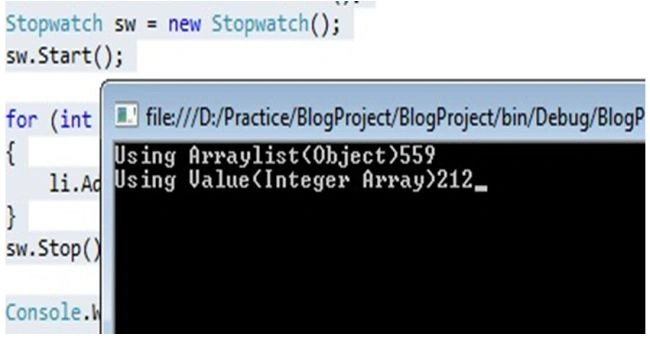
In the code above at first I used a generic List to store 1000 integer values and in the second time for the same operation I used an integer array. And my output screenshot shows which storage mechanism is best for the integer array. Now, you may think why does the List take more time? The reason is that the List stores the data in object format and when we try to store the value type at first it converts it to a reference type, then it's stored. So the first point is to always choose the proper storage mechanism to get the best performance.
Use For loop instead of foreach
I am will now explain a very interesting fact. I think all of you are familiar with both for and foreach loops. Now if I ask you which one is faster ? Hmm... Don't know. Right?
Guys, a for loop is much faster than a foreach loop. Let's see the following example.
List<Int32> Count = new List<int>();
List<Int32> lst1 = new List<Int32>();
List<Int32> lst2 = new List<Int32>();

for (int i = 0; i < 10000; i++)
{
    Count.Add(i);
}

Stopwatch sw =new Stopwatch();
sw.Start();
for (int i = 0; i < Count.Count; i++)
{
    lst1.Add(i);
}
sw.Stop();

Console.Write("For Loop :- "+ sw.ElapsedTicks+"\n");
sw.Restart();

foreach (int a in Count)
{
    lst2.Add(a);
}
sw.Stop();
Console.Write("Foreach Loop:- " +  sw.ElapsedTicks);
Console.ReadLine();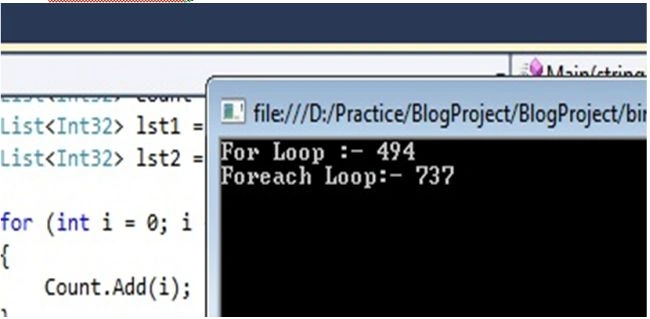
And don't worry, I have tested this example in release mode and this screenshot is taken after several test runs. And still if you want to use a for loop then I will request you to have a look at the output screenshot one more time.
Choose when to use a class and when to use a structure
By accepting that you pretty much understand structures and classes in C# or at least in your favorite programming language, if they are present there. Ok, if you are thinking that "long ago I had learned structures and in daily coding life never used then" then you are among those 95% of developers who have never measured the performance of classes and structures. Don't worry; neither have I before writing this article.
And what about classes? Yes now and then we implement a class in our daily routine project development.
Now my question is "Which one is faster, class or structure"? I expect that you are thinking that "Never tested it". Ok then let's test it here. Have a look at the following code.
namespace BlogProject
{
    struct MyStructure
    {
       public string Name;
       public string Surname;
    }
    class MyClass
    {
       public string Name;
       public string Surname;
    }
    class Program
    {
        static void Main(string[] args)
        {
            MyStructure [] objStruct =new MyStructure[1000];
            MyClass[] objClass = new MyClass[1000];
            Stopwatch sw = new Stopwatch();
            sw.Start();
            for (int i = 0; i < 1000; i++)
            {
                objStruct[i] = newMyStructure();
                objStruct[i].Name = "Sourav";
                objStruct[i].Surname = "Kayal";
            }
            sw.Stop();
            Console.WriteLine("For Structure:- "+ sw.ElapsedTicks);
            sw.Restart();
            for (int i = 0; i < 1000; i++)
            {
                objClass[i] = newMyClass();
                objClass[i].Name = "Sourav";
                objClass[i].Surname = "Kayal";
            }
            sw.Stop();
            Console.WriteLine("For Class:- " + sw.ElapsedTicks);
            Console.ReadLine();
        }
    }
}
And the output is here:
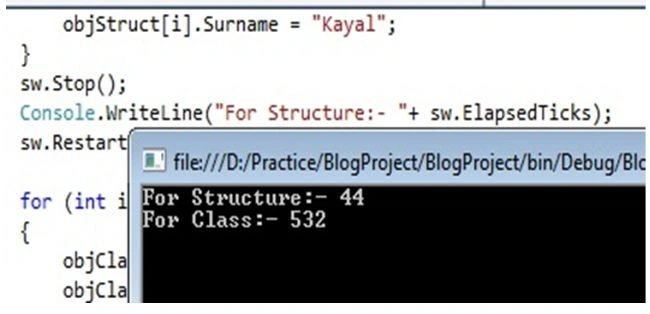
Now it's clear that the structure is much faster than the class. Again, I have tested this code in release mode and taken at least 20 outputs to get the program to a stable position.
Now the big question is "why is a structure faster than a class"?
As we know, structure variables are value types and in one location the value (or structure variable) is stored.
And a class object is a reference type. In case of an object type the reference is created and the value is stored in some other location of memory. Basically the value is stored in a manageable heap and the pointer is created in the stack. And to implement an object in memory in this fashion, generally it will take more time than a structure variable.
Always use Stringbuilder for String concatenation operations
This point is very crucial for developers. Please use StringBuilder in place of String when you are making heavy string concatenation operations. To demonstrate how it impacts on code performance I have prepared the following example code. I am doing a string concatenation operation 500 times within the for loop.
public classTest
{
   public static string Name { get; set; }
   public static String surname;
}
class Program
{
    static void Main(string[] args)
    {
       string First = "A";
        StringBuilder sb = new StringBuilder("A");

        Stopwatch st = new Stopwatch();
        st.Start();
        for (int i = 0; i < 500; i++)
        {
            First = First + "A";
        }
        st.Stop();
        Console.WriteLine("Using String :-" + st.ElapsedTicks);
        st.Restart();

        for (int i = 0; i < 500; i++)
        {
            sb.Append("A");
        }
        st.Stop();
        Console.WriteLine("Using Stringbuilder :-" + st.ElapsedTicks);
        Console.ReadLine();
    }
}
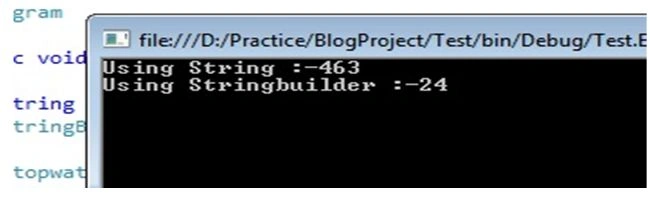
And this is the output.
Choose best way to assign class data member
Before assigning a value to your class variable, I suggest you look at the following code and output screen at this point.
namespace Test
{
    public class Test
    {
       public static string Name { get;set; }
       public static String surname;
    }
    class Program
    {
       static void Main(string[] args)
        {

            Stopwatch st = new Stopwatch();
            st.Start();
            for (int i = 0; i < 100; i++)
            {
               Test.Name = "Value";
            }
            st.Stop();
            Console.WriteLine("Using Property: " + st.ElapsedTicks);
            st.Restart();
            for (int i = 0; i < 100; i++)
            {
               Test.surname ="Value";
            }
            st.Stop();
            Console.WriteLine("Direct Assign: " + st.ElapsedTicks);
            Console.ReadLine();
        }
    }
}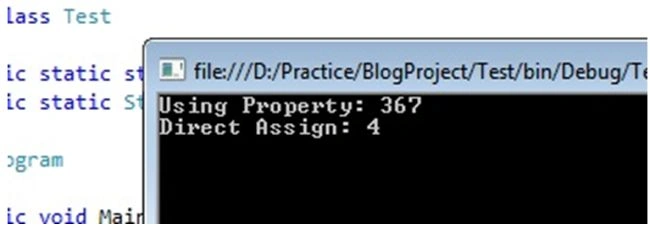
Yes, our output screen is saying that the data member is assigned using a property is much slower than direct assignment.


jubula samalPosted Nov 22, 2022, 1:57 AM EST
Nice article
Prashant ChoudharyPosted Feb 22, 2022, 12:36 AM EST
Your example is wrong in foreach, You are accessing the element from a list in second case however in the first one you are using a number directly.
Dinesh KumarPosted Dec 27, 2021, 11:27 PM EST
Nice article
Rainer KordmaaPosted Jul 17, 2020, 12:10 AM EDT
Taking any of these recommendations as gospel is a good way to screw yourself over. As a rule of thumb you are not smarter than the compiler. If you think you might have found an edge case where the compiler is not doing what it's supposed to do and you can do better, you need to benchmark that specific piece of code. And not be a bonehead by doing it in debug mode.
Subramanyam ReddyPosted Jun 9, 2020, 8:28 PM EDT
Nice article
Sateesh Kr MauryaPosted Jul 4, 2019, 1:29 AM EDT
Any one have idea where create class object we can create global or in method
Sateesh Kr MauryaPosted Jul 4, 2019, 1:25 AM EDT
That great
NathanPosted Feb 13, 2019, 6:17 PM EST
Not of it is correct either.
pawrv asdffPosted Feb 28, 2017, 5:25 AM EST
ALL, is wrong ALL is bullshit, you no idea what you doing. U second and 3rd are wrong from beginning you messure, is order of magnitude to big. Struck are NOT be general they are only better in few specific areas, in many cases they are slower than class. foreach is only few % slower than for, not 2 times. + operator is faster than stringBuldier if u add less than 4 elements. 1 is good because knowing structure make difference but u dont know array list is implemented and u did test wrong. If you init list size in costructor like you did in array it will be only few % slower. 5 will be optim ;), but in general case is faster.
Bob ComtestPosted Feb 19, 2017, 1:14 PM EST
Tip 5 is wrong, this is because you ran from the VS debugger. The compiler doesn't optimise when run from the debugger. If you run the exe outside Visual Studio and add a warmup loop at the start so that the JIT has time to work as well you get these results:warmup: 4Direct Assign: 1 Using Property: 1
Bikesh SrivastavaPosted Aug 22, 2016, 6:52 PM EDT
Very nice
Narahari NallagatlaPosted Dec 14, 2015, 2:39 AM EST
very very good article.
shakilPosted Nov 27, 2015, 12:31 AM EST
good one
Prakash TripathiTOP 100Posted Oct 6, 2015, 10:11 PM EDT
Good article.
AJAY KUMAR SANTRAPosted May 20, 2015, 2:03 AM EDT
Thanks for pretty good article. but for #Tip4, string is much faster then string Builder...
Pothappa KasenathPosted Apr 15, 2015, 1:54 AM EDT
Well,i will follow from today
Jeffrey ZhouPosted Apr 6, 2015, 3:04 PM EDT
For Tip#1 - The slow performance is NOT because List<int> stores it in object format but the Array.Copy, I think. Since you defines it as List<int>, it should store it in int format but object. That is to say, there is no additional boxing/unboxing operations.
Pankaj Kumar ChoudharyTOP 100Posted Feb 16, 2015, 7:58 PM EST
Sir,This article is very good for begginers just like me.You discussed about time taking by for loop and foreach loop.You write that for loop is faster then Foreach loop.But accrording me it not always true it depend upon data type which you using. like for "Array" Foreach is faster Then For loop and for "List" For loop is faster then faster then Foreach
Levin GPosted Jan 8, 2015, 9:53 AM EST
You're right eric... accessing the array each time would then push down performance very much... look at this for greater understanding what to use: http://www.dotnetperls.com/for-foreach
Eric ColdwaterPosted Feb 27, 2014, 10:53 AM EST
In Tip #2, inside the for loop should be lst1.Add(Count[i]); instead of lst1.Add(i);. This would get the values from the Count list similar to what the foreach loop does. The Article Extension has this same problem.
Shweta LodhaTOP 100Posted Feb 6, 2014, 10:35 AM EST
I usually prefer using For for high performance code :)
Ehsan MAPosted Feb 6, 2014, 9:56 AM EST
Hi Sourav, Thanks for pretty good article. Can you please explain why did you choosed a low number of itterations for measuring performance? for example i did raised the itterations on tip#5 to 1000000000 (1e9) from 100, and then the performance of assigning property and field was very near (~%25 difference). And can you explain the reason of this difference?
Santosh KumarPosted Oct 21, 2013, 2:49 AM EDT
Thanks for providing such a nice information.
Vithal WadjeTOP 100Posted Oct 7, 2013, 9:32 AM EDT
good one keep it up
liangde yePosted Jul 30, 2013, 10:57 PM EDT
very good, thank you. but i think we shuld test property after it be used tirst time. because ,first time to user property(no matter get or set ) will cost more time .
ShantanuPosted Jul 25, 2013, 9:54 PM EDT
thanks for sharing
Sonam SharmaPosted Jul 23, 2013, 10:26 PM EDT
kudos for the article.depicts good practices.one should really follow
Nimit JoshiTOP 100Posted Jul 10, 2013, 7:15 AM EDT
Very Impresive...
Dhanik SahniPosted Jul 9, 2013, 1:25 AM EDT
Good Post. Examples are good and easy to understand.
brajeshPosted Jul 2, 2013, 9:58 AM EDT
Reverse for loop(max count to 0) is fastest then foreach and for loop
Goutam YadavPosted Jun 28, 2013, 5:09 AM EDT
really nice!
Venkatesh KumarPosted Jun 27, 2013, 11:16 PM EDT
i am not sure Foreach is better that For loop , which version of C# you have tested, Can we try with some other collection types also
Gabriel Espirito SantoPosted Jun 26, 2013, 4:42 AM EDT
Very good sir, congratulations!
Harshal VadnerePosted Jun 26, 2013, 12:57 AM EDT
nice post and it is very informative
Arvind PradhanPosted Jun 25, 2013, 7:45 AM EDT
very good thought sir
Srinubabu RavillaPosted Jun 25, 2013, 3:59 AM EDT
Nice article
Santosh ThakurPosted Jun 25, 2013, 2:38 AM EDT
Great Tips..Very Helpful not only for Beginners but all developers........
Ravi ShekharPosted Jun 25, 2013, 2:27 AM EDT
Very very informative...
Gowthamaprabhu SPosted Jun 24, 2013, 9:47 PM EDT
Nice Article and Very useful Thanks
Sourav KayalTOP 100Posted Jun 24, 2013, 8:28 PM EDT
Dear Sandeep ,you are correct . Thanks to share this information with us.
Sourav KayalTOP 100Posted Jun 24, 2013, 8:26 PM EDT
Dear Sam, I am not saying that string is less efficient or bad . Just i have tried to show in which situation ,what need to use. And if we choose perfect option in perfect situation then only performance will increase.
Sandeep Singh ShekhawatPosted Jun 24, 2013, 6:05 PM EDT
Nice article, Thanks Sourav!! Struct is a better than class because it is value type and no need boxing. But the size of struct is the sum of the sizes of its members and we define more members in struct then it will be get large. Then It will be create a problem and involved overhead when we passing its instance. Microsoft recommends that the size of a struct should ideally be below 16 bytes, but it really is up. So struct should use for lightweight objects not instead of class.
Sam HobbsPosted Jun 24, 2013, 12:47 PM EDT
I agree that use of StringBuilder should be balanced with other criteria. I think one important point is that people that review other people's code should not automatically say that the string class is inefficient. The efficiency of the developer needs to be considered too. Note that the StringBuilder class does not have all the methods that the string class does. I do not understand why. I think that if the string class is not efficient then Microsoft needs to put all the methods that are in the string class in the StringBuilder class also.
Sourav KayalTOP 100Posted Jun 24, 2013, 6:38 AM EDT
Yes Sir, If there is huge string concatenation operation in development scenario then StringBuilder performs well.
Mahesh ChandTOP 10Posted Jun 24, 2013, 4:57 AM EDT
I've added an Article Extension. So if there are only a few operations on strings, StringBuilder may not be a good idea.
Sourav KayalTOP 100Posted Jun 24, 2013, 4:53 AM EDT
Thanks Mahesh Sir,
Sourav KayalTOP 100Posted Jun 24, 2013, 4:52 AM EDT
Dear Akella, 5 th test i again tested in Release mode and without attached debugger and there is no change in performance :)
Mahesh ChandTOP 10Posted Jun 24, 2013, 4:51 AM EDT
Welcome to C# Corner Saurav and great tips. Keep it up.
Jay ParekhPosted Jun 24, 2013, 4:08 AM EDT
Very useful tips Thanks
Dinesh BeniwalTOP 10Posted Jun 24, 2013, 3:00 AM EDT
Great Start, Welcome to the C# Corner.
AkellaPosted Jun 24, 2013, 1:11 AM EDT
in fifth test just change configuration to Release and run without attached debuger, you'l see the difference
AkellaPosted Jun 24, 2013, 1:09 AM EDT
structure allocates memmory much faster than reference type (because stack and heap), but you can face with performance problem when needs to copying value types
AkellaPosted Jun 24, 2013, 1:06 AM EDT
in first test change "new List<int>()" to "new List<int>(10000)" and run in Release w/o attached debugger
AkellaPosted Jun 24, 2013, 1:04 AM EDT
running tests in debug configuration is unaccpetable
Dariush MoshiriPosted Jun 24, 2013, 12:07 AM EDT
very useful
Akshatha SalianPosted Jun 24, 2013, 12:00 AM EDT
Nice Article :) Thanks It Helped A Lot !!