
Introduction
This post explains about two project types in Visual studio i.e. Website and Web Application that we use to build the ASP.NET Applications and the fundamental differences between the two project types.
Background
Website project type was introduced in the VS 2005 and Web Application model introduced in VS 2003. Website project type is based on folder structure and does not require a project file. Later in VS 2005 sp1 project file was introduced for the VS 2005 website project type. Now in VS 2008 we can create both project types.
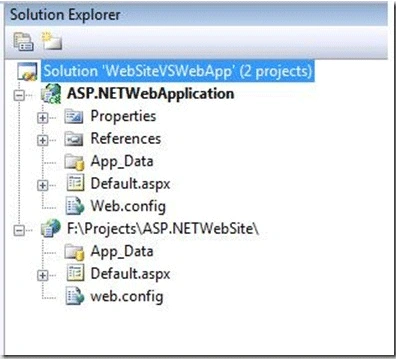
So First difference can be summarized like ASP.NET website project type is dynamic and WebApp is more like structured.
Notice In website project type namespace won't add to the class by default however you can define the namespaces explicitly where as in WebApp it creates the namespace for the class file when you added it to the project.
<codeSubDirectories>
<add directoryName="Testfolder"/>
</codeSubDirectories>
In compilation process you will have the finer degree of control in WebApp and it is not in Website because everything is dynamically compiled.
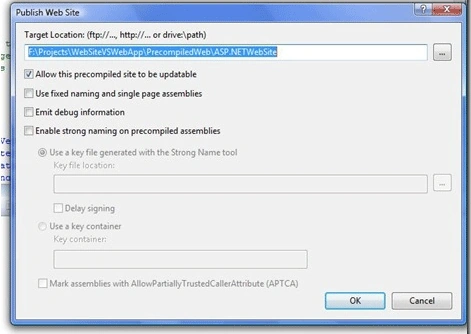
If you select the precompiled option then you will find the precompiled folder in the published location there you find the multiple assemblies for each folder in the website.
http://blogs.microsoft.co.il/blogs/maordavid/archive/2007/06/03/ASP.NET-2.0-_2D00_-Web-Site-vs-Web-Application-project.asp
ASP.NET Website vs Web Application project
Compares ASP.NET Website and Web Application projects in Visual Studio, including project structure, compilation, language support, controls, and deployment differences.
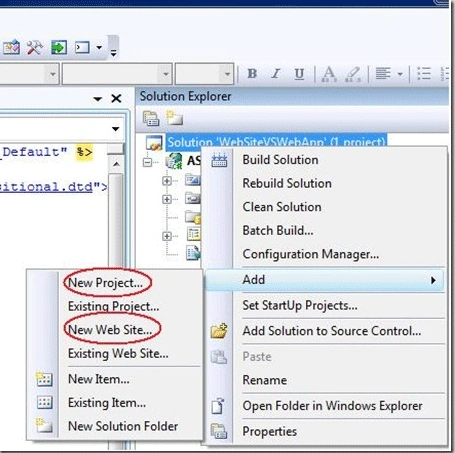
You can add Website or Web application project to your VS solution in VS 2008 as follows
I have added two project types to the solution and it looks like the following
Fundamentally the behavior of the application types is same but website project type is folder based and WebApp is project type like normal project types in VS studio. In WebApplication project type project file defines the structure of the project.
WebSite project type contains the folders and anything that you put in the folder are dynamically compiled and be part in the website. More about ASP.NET Website Dynamic compilation here.
WebApplication project type contains the designer for the ASPX page and you can find the bin folder which contains the compiled assembly.
When you add a class file to the website project it will prompt you that it will place the file in App_code folder under root.
WebApp project type is restricted to one language where as Website you can add different language files to the App_Code folder which compiles the files dynamically.
Referring a user control in WebApp is straight forward.You can define the properties and can be accessed in class files like any other objects where as in website it is not.
We can put multiple language files in the Website but those files needs to be in same folder. If you change the location of the file then you need to mention in the Web.Config file as follows..
When you deploy the WebApps you can just copy the Compiled Assembly and Visual elements to the IIS folder where as in Website you need to copy everything to the IIS to work.
You can see the following dialogue box when you publish the files in Website
If you use WebApplication project you can not access Profie at design time a workaround solution can be found here.
The following link helps you to choose which project type you have to user for the developing web applications.


Nicole KhooPosted Jul 26, 2018, 4:34 AM EDT
Thank you, Kalyan For Providing Meaningful data, if someone is working in a web application development company then he should be aware of this.
Dennis ThomasPosted Feb 4, 2018, 10:49 PM EST
An important advantage of web application project is that, you can avoid copying source code files to the IIS server.
Dennis ThomasPosted Feb 4, 2018, 10:48 PM EST
Good one. Thank you Kalyan.
Ravi KumarPosted May 1, 2013, 4:50 AM EDT
I have found another article to ans this question visit http://www.etechpulse.com/2013/05/aspnet-difference-between-web-site-and.html
Amresh KumarPosted Jun 19, 2012, 4:36 AM EDT
It was nice topic.
ravi kolavennuPosted Apr 5, 2011, 8:08 AM EDT
How to access user control properties from a class iile in a website. Can you throw some light on this?
tovvala chandrashekarPosted May 26, 2010, 2:42 AM EDT
good topic
SiriPosted Mar 8, 2009, 3:16 PM EDT
Hi Kalyan, Nice article. Looks like point 4 is not really true. 4. WebApp project type is restricted to one language where as Website you can add different language files to the App_Code folder which compiles the files dynamically. Visual studio does not allow different languages files need to be placed under the same App_Code folder. Refer the msdn article below. http://msdn.microsoft.com/en-us/library/t990ks23.aspx
MartijnPosted Feb 24, 2009, 10:11 PM EST
The link at point 10 is dead..