
A2UI lets agents return interactive screens rather than long text replies.
A2UI 1.0 is an open protocol that lets an AI agent return an interactive screen instead of only text. Your app defines the components it trusts, such as buttons, forms, cards, and charts. The agent selects and configures those components through structured A2UI messages, while your renderer draws them with native UI controls on the web, mobile, or desktop.
Google released A2UI 1.0 on November 11, 2026, as the first stable release of the Agent-to-User Interface protocol. It is a useful fit when a chat response would force users to read, compare, edit, or confirm too much information in plain text. Read the official A2UI 1.0 announcement for the release details.
Key takeaways
- A2UI 1.0 lets an agent describe a UI as structured data instead of generating frontend code that the client executes.
- A catalog is the contract that limits the components, properties, functions, and layout rules an agent can use.
- The same A2UI response can be rendered by supported React, Angular, Lit, Flutter, and SwiftUI renderers, while Jetpack Compose support is still catching up to version 1.0.
- Version 1.0 adds bidirectional function calls, accessibility metadata, extensions, richer validation, and the ability to include a complete small screen in one createSurface message.
- The fastest beginner path is to run the official travel sample before creating a small catalog for one focused workflow.
What is A2UI 1.0?
A2UI means Agent-to-User Interface. Think of it as a common language between an agent and a user interface. The agent says what should appear. Your application decides exactly how that component looks and behaves on each platform.
That split matters. Asking a model to create arbitrary HTML, JavaScript, or native application code at runtime is hard to validate and can conflict with your design system. With A2UI, the model sends declarative messages. Your app accepts only the catalog entries it knows how to validate and render.
For example, a travel agent might need to show three flight choices, a date picker, a price summary, and a button to confirm the selected flight. A text-only agent can describe all of that, but the user still has to parse the answer and reply with details. An A2UI agent can construct a selection screen from approved components, then receive the user action when the person selects an option.
Google describes the protocol as a way for agents to produce interactive views such as forms and charts while applications render those views using their own native components. The release includes renderer SDKs for web, Android, and iOS targets, along with agent SDKs for Python, TypeScript, and Dart.
Why an interactive agent screen is better than a wall of text
Text works well for an explanation, a short answer, or a summary. It works poorly when users must compare several choices, enter structured data, approve a change, or review a plan with many fields.
Consider a scheduling agent. A user asks to move a dinner reservation. The agent may need to compare calendar availability, restaurant times, and transportation prices. A written response can list choices, but a user still needs several chat turns to decide what to do.
With A2UI, the app can show a single view that groups the choices and waits for confirmation. The important product rule is simple: show the user what will happen before an action with side effects takes place. A confirmation button is much safer than having an agent silently make a reservation.
This is also why A2UI should not replace your whole app. Your navigation, login flow, persistent settings, chat box, and core pages remain normal application code. The agent-controlled area should be the part that changes because of the user’s current request.
How A2UI works: catalog, surface, messages, and renderer
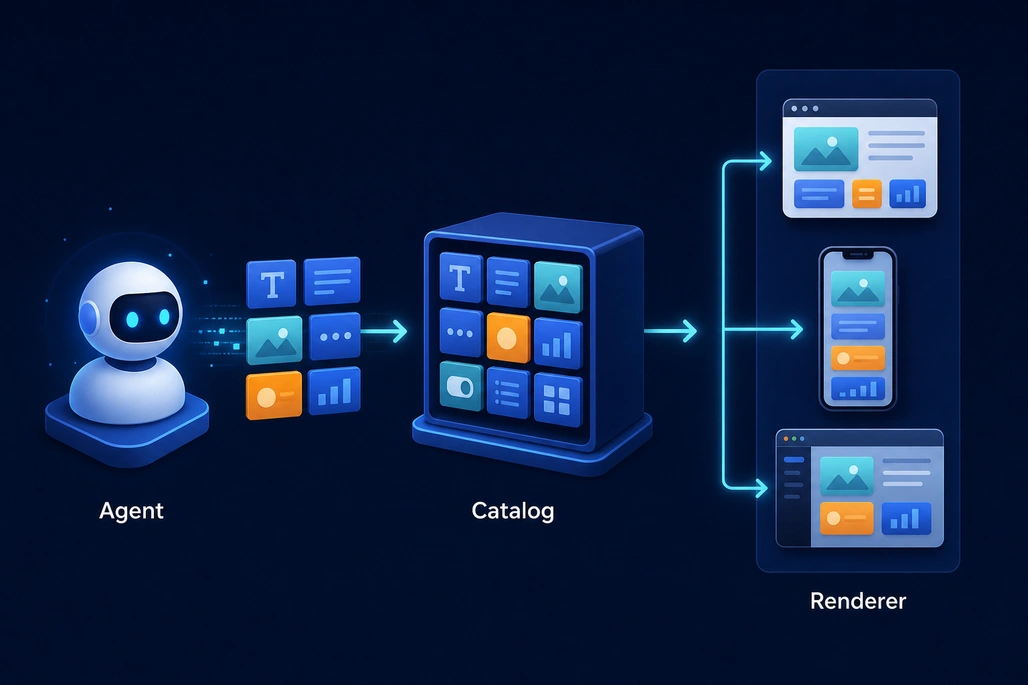
The catalog limits what the agent can ask each renderer to display.
You only need four ideas to understand an A2UI application.
| Part | What it does | Who owns it |
|---|---|---|
| Catalog | Lists allowed components, properties, functions, and rules. | You and your UI team |
| Surface | A defined part of the screen the agent can control. | Your app creates the host area |
| A2UI messages | Describe components, data, updates, and actions in a structured format. | Agent and server-side SDK |
| Renderer | Turns approved messages into platform UI controls. | Your client application |
The catalog is the safety boundary
A catalog is more than a list of controls. It is your contract with the agent. It can define a basic Text, Button, Row, or Column, plus domain components such as FlightOption, OrderSummary, or ApprovalCard.
The agent can choose from the catalog. It cannot invent a new component and expect the renderer to execute it. In the official walkthrough, the basic catalog includes controls such as Text, Row, Column, List, Button, and TextField. The travel sample then adds its own components for flights, hotels, date ranges, and prices.
Catalogs can also define client-side functions. A date formatter or currency formatter can run locally, which avoids another model call for simple display work. In A2UI 1.0, catalogs can also include composition rules, so you can state that a menu item belongs inside a menu or that a page layout can only be at the root of a surface.
A surface is the UI area the agent controls
A surface is a bounded region of UI. One surface could be a travel-selection card in a chat conversation. Another could be a planning panel beside the conversation.
Keeping surfaces small makes the system easier to reason about. The agent controls the request-specific content inside the surface. Your application still owns the surrounding page structure, branding, authentication state, navigation, analytics, and permissions.
Messages describe the screen and its data
The protocol uses JSON messages. In the official sample, messages include createSurface, updateComponents, updateDataModel, and deleteSurface. Component records reference each other by ID, which allows a screen to stream in as the agent produces output.
A2UI Express is a shorter authoring format that an agent can generate. The Agent SDK translates that output into validated A2UI JSON messages. The transport format remains JSON, so a renderer does not need to understand the model’s preferred authoring syntax.
A2UI 1.0 features that beginners should know
Create a complete small screen with one message
Earlier A2UI versions could require separate messages to create a surface, send components, and send data. In 1.0, createSurface can contain the initial component tree and data model. This is easier to log, replay, test, and understand.
The following is a small, real A2UI 1.0-style message based on the documented createSurface format. It creates a simple profile card and binds the visible name to data held in the surface model.
{
  "version": "1.0",
  "createSurface": {
    "surfaceId": "user_profile_card",
    "catalogId": "https://a2ui.org/specification/v1_0/catalogs/basic/catalog.json",
    "components": [
      {
        "id": "root",
        "component": "Column",
        "children": ["user_name"]
      },
      {
        "id": "user_name",
        "component": "Text",
        "text": { "@path": "/name" }
      }
    ],
    "dataModel": {
      "name": "John Doe"
    }
  }
}
The @path expression means that the renderer reads a value from the surface data model. This is useful because your application can update approved data without asking the model to repeat every visible value. Keep sensitive values out of model prompts when your server can bind them directly to the UI data model.
Function calls in both directions
A2UI 1.0 adds bidirectional function calls. The UI can ask the agent to perform an allowed task, such as checking current inventory or verifying an identifier. The agent can also call an allowed renderer-side function for information the device has, such as supported capabilities.
Do not treat a function call as permission to do anything. Define a narrow function contract, validate parameters, enforce authorization on the server, and return clear errors. Functions that have side effects, such as opening a URL or submitting an order, can be marked to require user activation. That means the renderer should run them only after a genuine user action like a click or tap.
Accessibility and validation are protocol concerns
A2UI 1.0 includes accessibility support. Renderers map labels and descriptions to the platform accessibility system, such as ARIA on the web and Semantics in Flutter. You should still write meaningful component labels, field descriptions, and clear validation messages in your catalog and agent instructions.
Validation results can now carry a code, message, and severity. That lets a form distinguish an error that blocks submission from a warning that asks the user to review something. It is a better model than treating every validation result as a generic failure.
A worked example: an approval card for a support agent
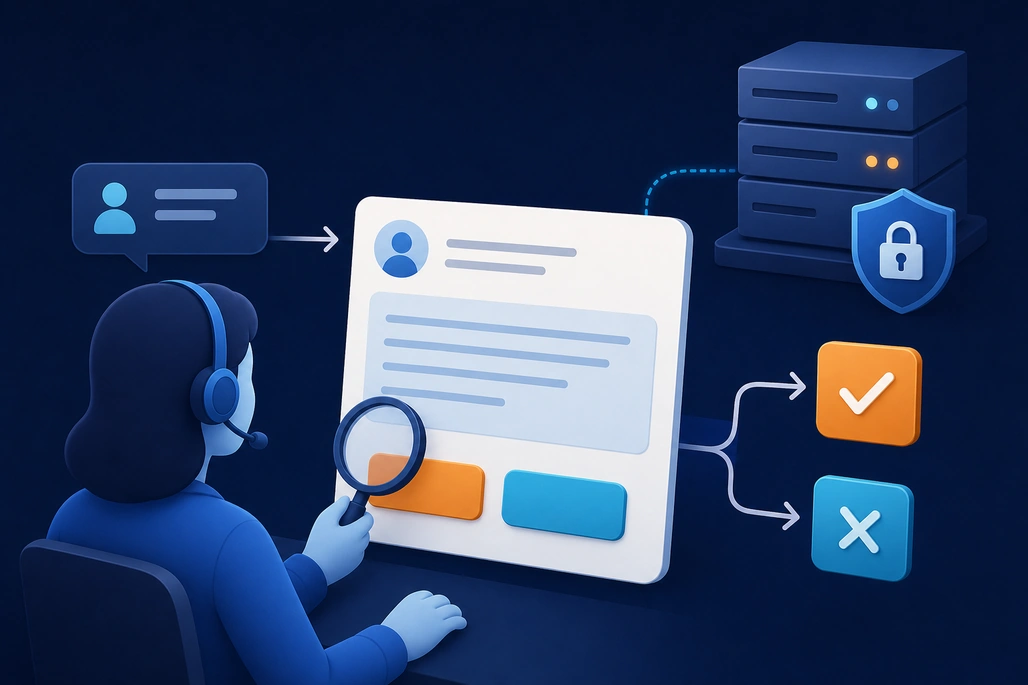
Keep people in control when an agent proposes a business action.
Start with a workflow that needs an explicit decision. A good beginner example is a support agent that drafts a customer reply and asks a human support representative to approve or edit it.
Your catalog might expose an ApprovalCard component with a customer name, draft response, priority, and two actions: approve and edit. The agent decides when this card is useful. Your server provides the customer data and checks that the signed-in representative is allowed to approve the response.
The model could produce concise A2UI Express similar to this documented style:
root = Column([title, draft, actions])
title = Text("Review reply for customer")
draft = Text($/reply/draft)
actions = Row([approve, edit])
approve = Button("Approve", Event("approve_reply", {id: $/reply/id}))
edit = Button("Edit", Event("edit_reply", {id: $/reply/id}))
The server-side Agent SDK converts the agent output to protocol messages and validates it against your catalog. The renderer creates real native controls. When the representative presses Approve, the client sends the approve_reply action back to your application. Your server must then validate the request, write the approval record, and send a status update.
Notice what the model does not do. It does not run SQL, call your internal API directly, decide whether the person has permission, or render an unknown JavaScript widget. Your normal service code remains responsible for those jobs.
What A2UI does well and where it does not fit
A2UI is a strong choice for agent responses whose layout varies by user intent but must remain inside known UI rules. It can help with comparison cards, review and approval steps, dynamic forms, task plans, record summaries, and dashboards assembled from trusted components.
It is less useful for a fully fixed workflow. If every user sees the same checkout screen or settings page, build it as ordinary UI. You get simpler code and more predictable testing. Use A2UI only where the agent needs to choose the shape or contents of a request-specific interface.
| Use A2UI when | Use ordinary application UI when |
|---|---|
| The user request changes the controls or layout needed. | The screen layout is fixed and known before runtime. |
| The user must compare choices, review data, or confirm an action. | A text response or a normal form is enough. |
| You can define a narrow catalog of trusted components. | The feature would need arbitrary runtime code to work. |
| You need the same agent response on several supported platforms. | You have a single platform and no shared agent UI need. |
There are trade-offs. You must design and maintain the catalog, build renderers for any custom components, test malformed agent output, and protect all actions with normal authentication and authorization. A2UI reduces the risk of arbitrary generated UI code, but it does not remove application security work.
How to start with A2UI as a beginner
Do not begin with a large multi-agent application. First, run the official travel sample. It includes one Python server, a React web client, and a Flutter client, so you can see the same messages rendered in two different clients.
The official quickstart requires Python 3.11 or later, Node 20 or later for the web client, and Flutter 3.38 or later for the mobile client. Clone the A2UI Labs repository, move into the travel sample, and start both clients with the project script.
git clone https://github.com/a2ui-project/labs
cd labs/samples/travel-a2ui
./scripts/quickstart.sh both
The sample starts the React application at http://127.0.0.1:8080 and the Flutter web build at http://127.0.0.1:8080/flutter/. It includes a recorded trip, so you can inspect the application without an API key. When you are ready to chat with the sample agent, the app asks for a Gemini key in the browser.
After that, choose one small business action with a clear approval step. Build only the components you need. Add useful error states. Log every rejected message and every user action. Then test the same surface with incomplete data, invalid input, and a user who does not have permission to complete the action.
CopilotKit also published an A2UI 1.0 integration and playground on November 11, 2026. Its explanation is useful for seeing how A2UI fits with AG-UI and how a prebuilt component catalog can shorten the first prototype. Lynx independently released an A2UI renderer in June 2026 and shows another important point: streamed A2UI messages can be progressively rendered rather than waiting for a whole screen to arrive.
Frequently asked questions
Is A2UI 1.0 a frontend framework?
No. A2UI is a protocol and set of supporting SDKs for agent-generated interfaces. You still use your own application framework and renderer, such as React, Angular, Lit, Flutter, or SwiftUI, to display components.
Does A2UI execute code generated by an AI model?
The protocol is designed for declarative UI messages, not arbitrary code execution. Your renderer accepts approved catalog components and validates messages before rendering them. You must still secure APIs, functions, and user actions in your application.
What is an A2UI catalog?
An A2UI catalog defines what an agent may use: components, properties, functions, data rules, and layout constraints. It is the boundary that keeps an agent aligned with your design system and supported renderer behavior.
Can one A2UI agent screen work on web and mobile?
Yes. A2UI messages are separate from platform rendering. A supported web or mobile renderer maps the same approved component descriptions to that platform’s native UI controls.
Should every AI chat response use A2UI?
No. Use plain text for answers that are easy to read and act on. Use A2UI when the user needs structured interaction, such as selecting an option, reviewing a plan, entering details, or approving an action.
Based on reporting by developers.googleblog.com, A2UI, CopilotKit and Lynx.

Join the conversation! Your thoughts help the community grow.