
About Schema
A database Schema is defined as a concept to logically group objects such as tables, views, stored procedures etc. Schema is a layout of the tables, data types, relations etc. act as a container of objects.
All objects within a schema must have a unique name and the name of the schema should also be unique in the database.
How to Create Schema:
Syntax:
- Create Schema Schema_Name <Schema element>Data types
- CREATE TABLE Product1
- (
- iProductID INT IDENTITY(1,1)
- ,vProductName VARCHAR(100) NOT NULL
- ,vManfacturer VARCHAR(100) NOT NULL
- ,LastUpdated DATETIME DEFAULT GETDATE() ,
- PRIMARY KEY (iProductID, vManfacturer, vProductName)
- )
Example of Schema Created : A schema is created as in the following,
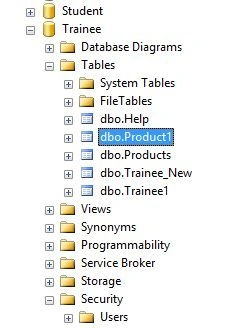
Once schema is created you can perform any SQL query like Update, Alter, Insert, Delete or Drop Schema.
Example: Here I used Insert Query.
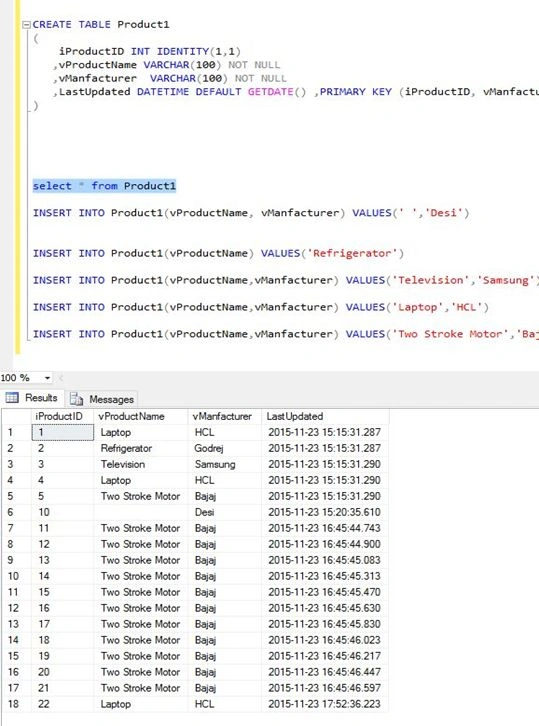
How To Drop Schema: To drop schema follow the given syntax:
Syntax:
Once schema is created you can perform any SQL query like Update, Alter, Insert, Delete or Drop Schema.
Example: Here I used Insert Query.
- INSERT INTO Product1(vProductName, vManfacturer) VALUES('Television','Samsung')
How To Drop Schema: To drop schema follow the given syntax:
Syntax:
- DROP Schema Schema_Name
To view the Schema Change History follow the below steps:
Firstly, go to your Server Object Explorer, then right click on selected server. Now select Reports, after that select Standard Reports, then click on Schema Change History option as in the following screenshot,
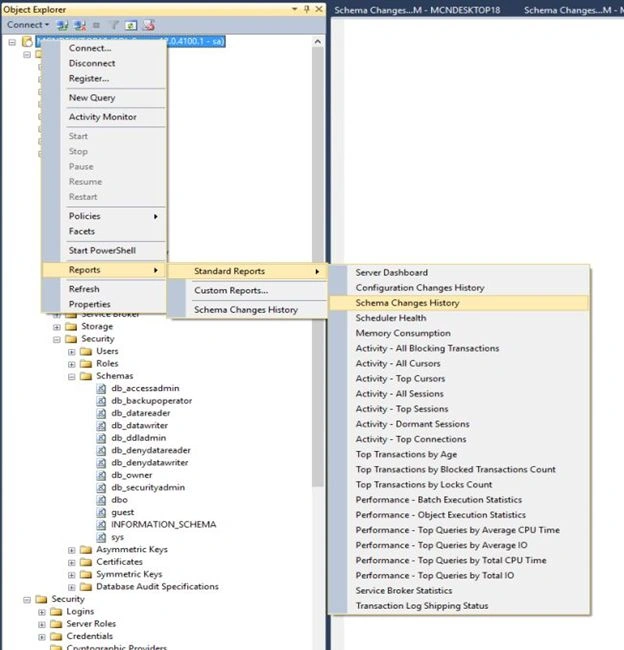
A new query tab will be opened with all DDL Statements executed status with Server Name, Database Name, History (Since date & time), Object Name, Type, DDL Operation detail with Time as given below:
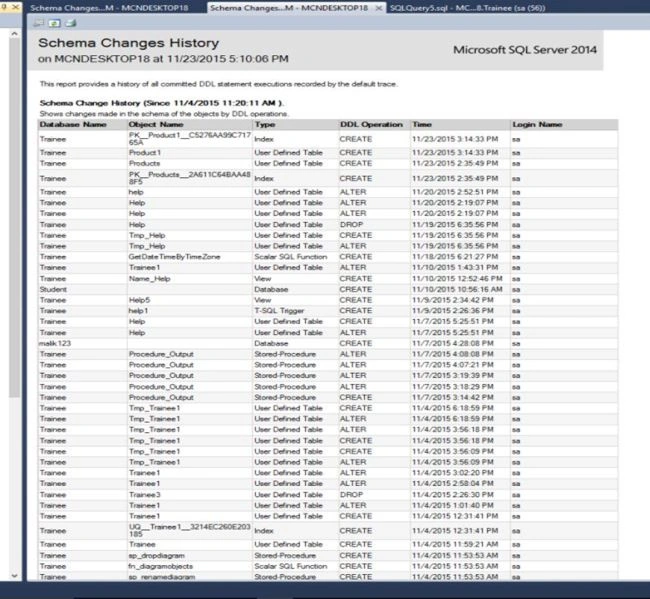
A new query tab will be opened with all DDL Statements executed status with Server Name, Database Name, History (Since date & time), Object Name, Type, DDL Operation detail with Time as given below:


SubashPosted Sep 7, 2016, 4:24 AM EDT
Great one
Santhakumar MunuswamyPosted Nov 27, 2015, 9:29 PM EST
Nice share
Yashwant VishwakarmaPosted Nov 24, 2015, 12:18 AM EST
Nice share dude !!
Mukesh KumarPosted Nov 23, 2015, 11:47 PM EST
Good One
Banketeshvar NarayanPosted Nov 23, 2015, 11:15 PM EST
Nice Share
Akash MalhotraPosted Nov 23, 2015, 10:57 PM EST
Good one
Debasis SahaTOP 100Posted Nov 23, 2015, 10:04 PM EST
Nice one..
Rajeesh MenothPosted Nov 23, 2015, 9:39 PM EST
Good Start!
Harshad PansuriyaPosted Nov 23, 2015, 9:26 PM EST
Nice one