
Accordion control provides us multiple collapsible panes or panels where only one can be expanded at a time. Each AccordionPane control has a template for its Header and its content. Before proceeding, I recommend you to read:
Let's Begin:
1. Go to File, New, then Website and Create an Empty Website. Add a webform(Default.aspx) in it.
2. Add ScriptManager from AJAX Extensions (from v15.1 of AJAX Control Toolkit, ToolScriptManager is removed. Use Standard Script Manager).
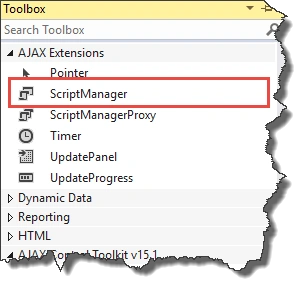
2. Add ScriptManager from AJAX Extensions (from v15.1 of AJAX Control Toolkit, ToolScriptManager is removed. Use Standard Script Manager).
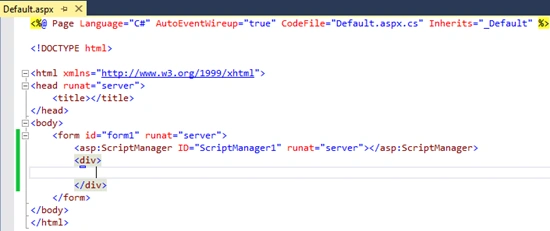
3. Go to AJAX Control Toolkit in Toolbox and drop Accordion Control on Default.aspx.
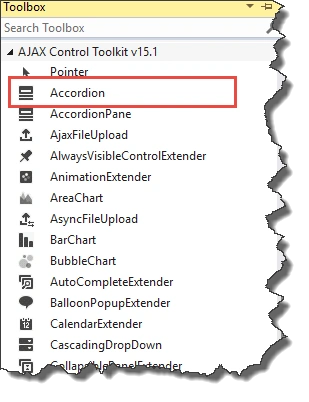
4. Add AccordionPane in Panes collection of the Accordion.
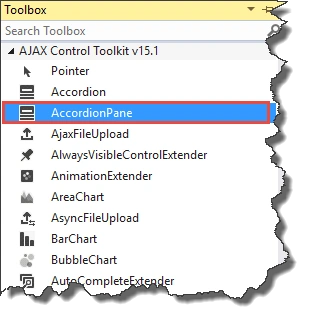
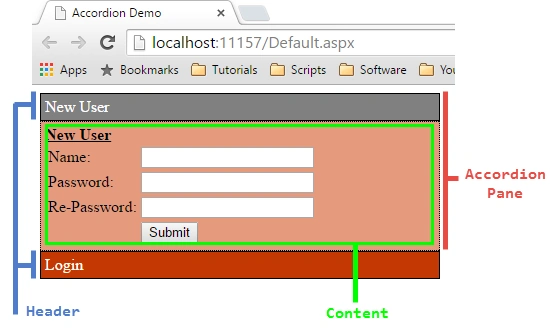
AccordionPane contains two parts i.e. Header and Content. When AccordionPane is collapsed, only Header part is visible to us.
Code (Default.aspx)
- <%@ Page Language="C#" AutoEventWireup="true" CodeFile="Default.aspx.cs" Inherits="_Default" %>
- <%@ Register Assembly="AjaxControlToolkit" Namespace="AjaxControlToolkit" TagPrefix="ajaxToolkit" %>
- <!DOCTYPE html>
- <html xmlns="http://www.w3.org/1999/xhtml">
- <head runat="server">
- <title>Accordion Demo</title>
- <style>
- .headerCssClass{
- background-color:#c33803;
- color:white;
- border:1px solid black;
- padding:4px;
- }
- .contentCssClass{
- background-color:#e59a7d;
- color:black;
- border:1px dotted black;
- padding:4px;
- }
- .headerSelectedCss{
- background-color:#808080;
- color:white;
- border:1px solid black;
- padding:4px;
- }
- </style>
- </head>
- <body>
- <form id="form1" runat="server">
- <asp:ScriptManager ID="ScriptManager1" runat="server"></asp:ScriptManager>
- <div style="width:400px;">
- <ajaxToolkit:Accordion ID="Accordion1" runat="server" HeaderCssClass="headerCssClass" ContentCssClass="contentCssClass" HeaderSelectedCssClass="headerSelectedCss" FadeTransitions="true" TransitionDuration="500" AutoSize="None" SelectedIndex="0">
- <Panes>
- <ajaxToolkit:AccordionPane ID="AccordionPane1" runat="server">
- <Header>New User
- </Header>
- <Content><b><u>New User</u></b>
- <table>
- <tr><td>Name:</td><td><input type="text" /></td></tr>
- <tr><td>Password:</td><td><input type="text" /></td></tr>
- <tr><td>Re-Password:</td><td><input type="text" /></td></tr>
- <tr><td></td><td><input type="button" value="Submit"/></td></tr>
- </table>
- </Content>
- </ajaxToolkit:AccordionPane>
- <ajaxToolkit:AccordionPane ID="AccordionPane2" runat="server">
- <Header>Login</Header>
- <Content>
- <b><u>Login User</u></b>
- <table>
- <tr><td>Name:</td><td><input type="text" /></td></tr>
- <tr><td>Password:</td><td><input type="text" /></td></tr>
- <tr><td></td><td><input type="button" value="Login"/></td></tr>
- </table>
- </Content>
- </ajaxToolkit:AccordionPane>
- </Panes>
- </ajaxToolkit:Accordion>
- </div>
- </form>
- </body>
- </html>
In the above code, I have used .headerCssClass (CSS class to use for the headers),.contentCssClass (CSS class to use for the content) and .headerSelectedCss (CSS class to use for the Selected headers) class for styling the Accordion Control.
Working Preview
Working Preview
Accordion control have several other properties like:
- FadeTransitions: FadeTransitions is used for adding the transition effect.
- SelectedIndex: The AccordionPane to be initially visible.
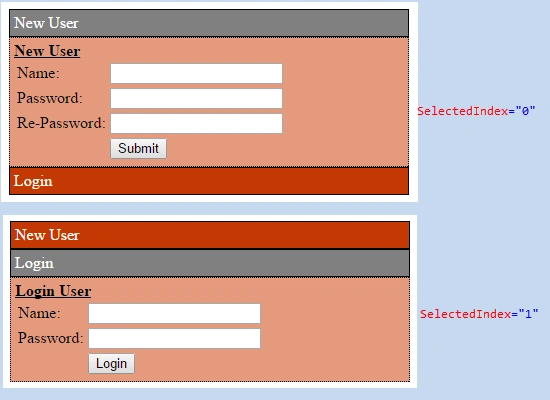
- TransitionDuration: Number of milliseconds to animate the transitions.
- Panes: Collection of AccordionPane controls.
Hope you liked it. Thanks!


Leela RameshPosted Dec 4, 2017, 6:04 AM EST
How does the transition works?
Delpin Susai RajTOP 100Posted Aug 28, 2016, 7:10 AM EDT
Nice
tejas gujarPosted Nov 29, 2015, 9:03 AM EST
Good one. i can easily understand ajax accordination tool
Anoop Kumar SharmaPosted Nov 21, 2015, 5:53 PM EST
Thanks Santhakumar Munuswamy..!!
Santhakumar MunuswamyPosted Nov 21, 2015, 6:48 AM EST
Good one
Anoop Kumar SharmaPosted Oct 19, 2015, 6:12 AM EDT
Thanks Sibeesh Venu..!! :-)
Anoop Kumar SharmaPosted Oct 19, 2015, 6:12 AM EDT
Thanks Mukesh Kumar..!!
Anoop Kumar SharmaPosted Oct 19, 2015, 6:12 AM EDT
Thanks Ankit Bansal..!!
Anoop Kumar SharmaPosted Oct 19, 2015, 6:11 AM EDT
Thanks Nilesh Jadav :-)
Anoop Kumar SharmaPosted Oct 19, 2015, 6:11 AM EDT
Thanks Harshad Pansuriya..!!
Sibeesh VenuTOP 100Posted Oct 19, 2015, 4:54 AM EDT
Nice Share
Mukesh KumarPosted Oct 18, 2015, 8:59 PM EDT
Good One !
Ankit BansalPosted Oct 18, 2015, 8:42 PM EDT
nice one..thanks for sharing with us..
Nilesh JadavPosted Oct 18, 2015, 8:15 PM EDT
Good work !!
Harshad PansuriyaPosted Oct 18, 2015, 8:04 PM EDT
Nice one