
Accessing SharePoint TermStore and playing with that is not a big deal in SPFx, we can do that with some tweaks. Since we don’t have direct REST API support for this service, we will be using the old JSOM method to add/edit TermStore in SharePoint Framework webpart.
Environment setup
We need to load some reference scripts to access SP.PageContext info. Please refer my article about reading SharePoint TermStore Managed Metadata In SharePoint Framework (SPFx) and follow the step by step guidelines in that to set up the environment to add/edit the TermSet.
What is Submission Policy in TermStore?
As we know, SPFx is functioning based on user context so the user can’t access anything out of his/her permission scope through SPFx app. TermStore is something related to SharePoint Admin Center, so then how do we add/edit TermStore through SPFx app?
We do have an option for that in TermStore settings as described below,
- Go to below URL to access TermStore settings in your tenant
https://tenantname-admin.sharepoint.com/_layouts/15/termstoremanager.aspx - Expand your TermGroup and select the TermSet, in my case I have selected People/Department
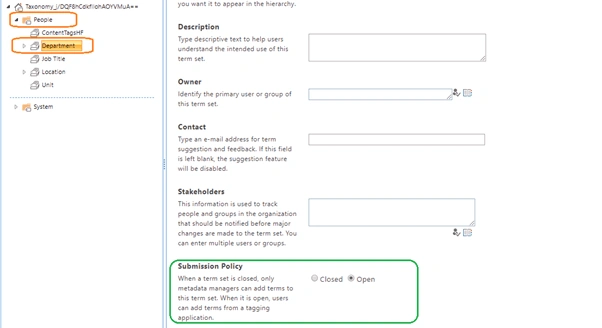
Create a Term in SPFx
Once you are finished with the environmental setup, the next step is to read the specific TermSets like department and location, so we can add the new term value in that.
Please follow the below code snippet to read the TermSet using spPageContext load and execute methods,
- let spContext: SP.ClientContext = new SP.ClientContext(siteColUrl);
- let taxSession = SP.Taxonomy.TaxonomySession.getTaxonomySession(spContext);
- let termStore = taxSession.getDefaultSiteCollectionTermStore();
- let termGroups = termStore.get_groups();
- let termGroup = termGroups.getByName("People");
- let termSets = termGroup.get_termSets();
- let termSet = termSets.getByName("Location");
- let lcID= 1033; // Mention the lcid as per your requirement
We got the TermSet in our SPFx instance now, the next step is to add a new Term value which is done by using the createTerm method in TermSet like below,
- let newTerm = termSet.createTerm(“New Term Value”, lcID, SP.Guid.newGuid());
- spContext.load(newTerm);
- spContext.executeQueryAsync(():void =>//Function to handle execution result);
Please refer to this official documentation about TermSet class members to know the other options available to manipulate TermSet.
First, we need to load the all Terms from the TermSet to edit any Term, again we are going to use spPageContext load and execute methods.
- let termSet = termSets.getByName("Location");
- let terms = termSet.getAllTerms();
- spContext.load(terms);
- spContext.executeQueryAsync(function() {
- var termsEnum = terms.getEnumerator();
- let termLocation: any[] = [];
- while (termsEnum.moveNext()) {
- var spTerm = termsEnum.get_current();
- termLocation.push({
- label: spTerm.get_name() ID: spTerm.get_id(),
- Term: spTerm
- });
- }
- let termToUpdate: termLocation.find(o => o.label == ’New Term Value’);
- if (termToUpdate != null) {
- termToUpdate.set_name(‘Edited Term Value’);
- spContext.load(termToUpdate);
- spContext.executeQueryAsync((): void => //Function to handle execution result);
- }
- });
In the above code snippet, we have loaded all the terms in an array called termLocation. I found some specific terms to update and updated the value by using set_name method of the term.
If you have any questions/issues about this article, please let me know in the comments.


Vishakha PatilPosted Nov 7, 2024, 5:44 AM EST
I am getting this error while fetching termset message: "Cannot access https://webshell.suite.office.com"
Rose AmeliePosted Mar 12, 2021, 4:59 AM EST
Hello Jayakumar Balasubramaniam, thank you for this article. Do you know how we can create a new Labels for a term like the pnp/Js method : term.createLabel("label text", 1031, true) using spfx ? ( the pnp/Js method does not work ). Thank you