
In this fast changing era we are developing applications that are most descriptive to the end-user. Our goals are changing every day, primarily we have a goal to deploy an application with functionality specified by the client but now the client is changing their requirements on a daily basis so we began from the Waterfall Model then the Agile and now we are using a continuous release Candence.
Application Insights is not just a small amunt of info about the application, it is complete end-to-end monitoring, we will get a true 360-degree monitoring of your application, not just small pieces of data.
And it is designed to work with services built into the Microsoft Azure, Microsoft .NET Framework, Java, Web sites, Windows Store and Windows Phone 8 applications.
Now how to do it
First go to Visual Studio and add an extension and download the Application Insights Tools for Visual Studio the extension.
Now, create a new project.

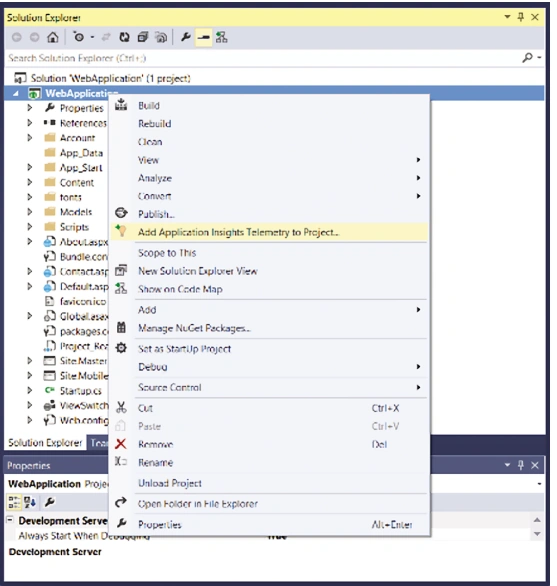
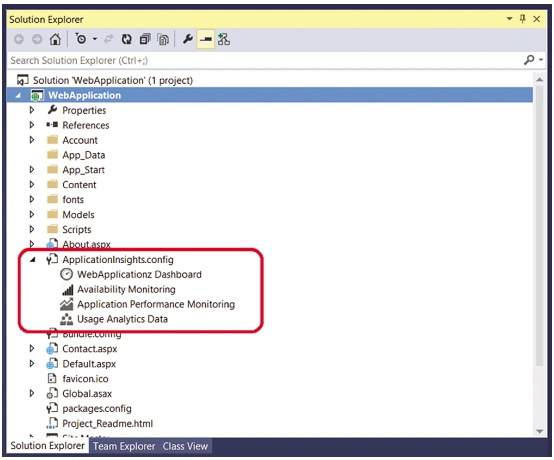
Once you have added Application Insights to a new or existing project, the usage monitoring on your Web, Windows Store and Windows Phone applications is automatically enabled.


Asfend YarPosted Feb 26, 2016, 10:53 PM EST
Nice Share
Sumit JoshiPosted Aug 19, 2015, 5:37 AM EDT
thanks sir.
Santhakumar MunuswamyPosted Aug 18, 2015, 10:40 AM EDT
Good one
Nilesh JadavPosted Aug 17, 2015, 12:22 AM EDT
Nice Article sir
Sibeesh VenuTOP 100Posted Aug 17, 2015, 12:11 AM EDT
Nice Share. Thank you.
Rajeesh MenothPosted Aug 16, 2015, 10:48 PM EDT
Nice Share..
Sumit JoshiPosted Aug 16, 2015, 9:27 PM EDT
Thanks Ankit Bansal
Ankit BansalPosted Aug 16, 2015, 9:25 PM EDT
thanks for share...
Sumit JoshiPosted Aug 16, 2015, 9:20 PM EDT
Thanks
Vaikesh K PPosted Aug 16, 2015, 8:35 PM EDT
Good one
Gopi ChandPosted Aug 16, 2015, 7:34 PM EDT
Its nice one
Karthikeyan KPosted Aug 16, 2015, 7:17 PM EDT
Good one..Thanks for sharing sir...