
Introduction
I would like to share three ways to add a checkbox to a DataGridView in a C# Windows Forms application.
We will learn the following three ways to add a checkbox to a DataGridView:
- Binding a List to a DataGridView having a bool property
- Binding a datatable to a DataGridView having a bool column
- Adding a checkbox column (DataGridViewCheckBoxColumn) to the DataGridView.
Procedure
1. Binding a List to a DataGridView having a bool property.
- Add the following class to the project:
We have added isMarried as a Boolean property.- public class Emp
- {
- public bool isMarried { get; set; }
- public string Name { get; set; }
- public string city { get; set; }
- }
- Creating a List of Emp classes:
- List<Emp> eObj = new List<Emp>();
- Emp emp = new Emp();
- emp.isMarried = false;
- emp.Name = "Devesh";
- emp.city = "Noida";
- eObj.Add(emp);
- emp = new Emp();
- emp.isMarried = false;
- emp.Name = "ROLI";
- emp.city = "MAINPURI";
- eObj.Add(emp);
- emp = new Emp();
- emp.isMarried = true;
- emp.Name = "Manish";
- emp.city = "GZB";
- eObj.Add(emp);
- emp = new Emp();
- emp.isMarried = false;
- emp.Name = "Nikhil";
- emp.city = "NOIda";
- eObj.Add(emp);
- Binding DataGGridView to a List:
- DataGGridView1.DataSource = eObj;
- DataGGridView1.DataSource = eObj;
- Running the code:

We can see here a checkbox is automatically added to the DataGridView that is only due to the bool property on the Emp class.
We did nothing to show the checkbox in the DataGridView.
2. Binding a datatable to the DataGridView having a bool column.
- Add a datatable to code:
Here we defined a bool column, IsMarried.- DataTable dtEmp = new DataTable();
- // add column to datatable
- dtEmp.Columns.Add("IsMarried", typeof(bool));
- dtEmp.Columns.Add("EmpID", typeof(int));
- dtEmp.Columns.Add("EmpName", typeof(string));
- dtEmp.Columns.Add("EmpCity", typeof(string));
- Adding data:
- dtEmp.Rows.Add(false, 111, "Devesh", "GZB");
- dtEmp.Rows.Add(false, 222, "ROLI", "KANPUR");
- dtEmp.Rows.Add(true, 333, "Rajesh", "NOIDa");
- dtEmp.Rows.Add(false,444, "NIKHIL", "KANPUR");
- Binding Grid:
- DataGGridView1.DataSource = dtEmp;
- Running Code.
We will get the following screen after running the code:
Checkbox automatically added to datagirdview because of Bool column defined in datatables: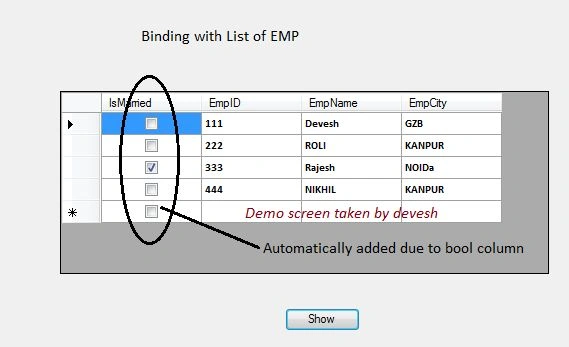
3. Adding the checkbox column (DataGridViewCheckBoxColumn) to the DataGridView.
- Add a datatable without having a bool column:
- DataTable dtEmp = new DataTable();
- // add column to datatable
- dtEmp.Columns.Add("EmpID", typeof(int));
- dtEmp.Columns.Add("EmpName", typeof(string));
- dtEmp.Columns.Add("EmpCity", typeof(string));
- Adding data:
- dtEmp.Rows.Add(111, "Devesh", "GZB");
- dtEmp.Rows.Add( 222, "ROLI", "KANPUR");
- dtEmp.Rows.Add(333, "Rajesh", "NOIDa");
- dtEmp.Rows.Add( 444, "NIKHIL", "KANPUR");
- Binding data:
- DataGGridView1.DataSource = dtEmp;
- Adding checkbox column
- DataGGridViewCheckBoxColumn dgvCmb = new DataGGridViewCheckBoxColumn();
- dgvCmb.ValueType = typeof(bool);
- dgvCmb.Name = "Chk";
- dgvCmb.HeaderText = "CheckBox";
- DataGGridView1.Columns.Add(dgvCmb);
- Running the code:
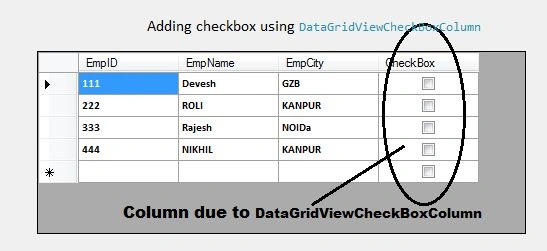
Conclusion
We have learned three ways to add a checkbox to a DataGridView.


Mohamed ElZahabyPosted Apr 24, 2022, 10:02 PM EDT
Thanks very much , Great!
Marcus BathenPosted Jul 21, 2021, 12:27 PM EDT
Try this, and it simple (values 0 or 1) <grid>.Columns[i].ValueType = typeof(Boolean);
Sebastián ReynagaPosted Jan 5, 2021, 2:53 PM EST
Is it possible to set those checkboxes in an indeterminate state?
Devesh OmarPosted Mar 10, 2017, 7:38 AM EST
Http://compilefactory.blogspot.in/2017/03/adding-checkbox-column-in-datagridview.html
Saber ShaikhPosted Jul 23, 2015, 2:40 AM EDT
nice
Sabheen GullPosted May 29, 2015, 9:40 AM EDT
What is a way to extract data from these checkbox?