
Introduction
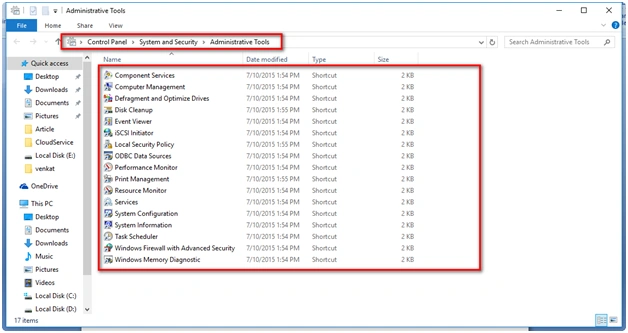
Here are the steps to identify Administrative Tools in Windows 10. Under Administrative Tools, options for Event Viewer, Disk Management, Services, Task Scheduler, etc are provided to the users.
Step 1
Go to Settings Option in Windows 10.

Step 2
Under the "Settings" tab go to "System" Icon.

Step 3
Go to Settings, System, About, then click "Additional administrative tools".

Step 4
On clicking the "Additional administrative tools" you can see the possible Administrative tools in Windows 10. Enjoy using it.
Read more articles on Windows 10:
Summary
In this article, we learned about Administrative Tools In Windows 10.


Gowtham KTOP 100Posted Feb 20, 2016, 7:10 AM EST
Thanks for sharing
Sibeesh VenuTOP 100Posted Feb 19, 2016, 8:39 PM EST
Nice Share
Ehsan SajjadPosted Feb 19, 2016, 10:38 AM EST
descriptive
Mohammed IbrahimPosted Feb 19, 2016, 9:46 AM EST
nice
Debasis SahaTOP 100Posted Feb 19, 2016, 8:03 AM EST
Thanks for nice article..
Shubham KumarPosted Feb 18, 2016, 9:55 PM EST
nice