
Introduction
If you are new to the term JQX Grid then please read here:Working with jQXGrid
If you need to bind the data source dynamically, please read here: Convert CellSet to HTML Table and From HTML to JSON and to Array
For the past days I have been working on JQX Grid. Now I will share that Grid with all the functionality.
In my previous article, one member asked for some functionality. So I thought of sharing that info. Please note that I have not implemented all the functionalities. I have selected some important features that we may use in our programming life.
Using the code
As we discussed in the previous articles, we need a web application with all the contents of JQX Widgets (http://www.c-sharpcorner.com/UploadFile/65794e/working-with-jqx-grid-with-filtering-and-sorting983/ ).
JQX Grid
jqxGrid is powerful datagrid widget built entirely with open web standards. It offers rich functionality, easy to use APIs and works across devices and browsers. jqxGrid delivers advanced data visualization features and built-in support for client and server-side paging, editing, sorting and filtering.
What we need
Simple HTML
- <!DOCTYPE html>
- <html lang="en">
- <head>
- <title></title>
- </head>
- <body>
- </body>
- </html>
- <body class='default'>
- <div id='jqxWidget' style="font-size: 13px; font-family: Verdana; float: left;">
- <div id="jqxgrid"></div>
- <div style='margin-top: 20px;'>
- <div style='float: left;'>
- <input type="button" value="Export to Excel" id='excelExport' />
- <br /><br />
- <input type="button" value="Export to XML" id='xmlExport' />
- </div>
- <div style='margin-left: 10px; float: left;'>
- <input type="button" value="Export to CSV" id='csvExport' />
- <br /><br />
- <input type="button" value="Export to TSV" id='tsvExport' />
- </div>
- <div style='margin-left: 10px; float: left;'>
- <input type="button" value="Export to HTML" id='htmlExport' />
- <br /><br />
- <input type="button" value="Export to JSON" id='jsonExport' />
- </div>
- <div style='margin-left: 10px; float: left;'>
- <input type="button" value="Print" id='print' />
- </div>
- </div>
- </div>
- </body>
- <link rel="stylesheet" href="jqwidgets/styles/jqx.base.css" type="text/css" />
- <script type="text/javascript" src="scripts/jquery-1.11.1.min.js"></script>
- <script type="text/javascript" src="jqwidgets/jqxcore.js"></script>
- <script type="text/javascript" src="jqwidgets/jqxdata.js"></script>
- <script type="text/javascript" src="jqwidgets/jqxbuttons.js"></script>
- <script type="text/javascript" src="jqwidgets/jqxscrollbar.js"></script>
- <script type="text/javascript" src="jqwidgets/jqxlistbox.js"></script>
- <script type="text/javascript" src="jqwidgets/jqxdropdownlist.js"></script>
- <script type="text/javascript" src="jqwidgets/jqxmenu.js"></script>
- <script type="text/javascript" src="jqwidgets/jqxgrid.js"></script>
- <script type="text/javascript" src="jqwidgets/jqxgrid.filter.js"></script>
- <script type="text/javascript" src="jqwidgets/jqxgrid.sort.js"></script>
- <script type="text/javascript" src="jqwidgets/jqxgrid.selection.js"></script>
- <script type="text/javascript" src="jqwidgets/jqxpanel.js"></script>
- <script type="text/javascript" src="jqwidgets/jqxcheckbox.js"></script>
- <script type="text/javascript" src="scripts/demos.js"></script>
- <script src="jqwidgets/jqxgrid.pager.js" type="text/javascript"></script>
- <script src="jqwidgets/jqxgrid.edit.js" type="text/javascript"></script>
- <script src="jqwidgets/jqxgrid.columnsresize.js" type="text/javascript"></script>
- <script src="jqwidgets/jqxgrid.columnsreorder.js" type="text/javascript"></script>
- <script src="jqwidgets/jqxgrid.export.js" type="text/javascript"></script>
- <script src="jqwidgets/jqxdata.export.js" type="text/javascript"></script>
- <script src="jqwidgets/jqxgrid.pager.js" type="text/javascript"></script>
And if you want different stylish paging then you can set that like this:
pagermode: 'simple',
- <script src="jqwidgets/jqxgrid.edit.js" type="text/javascript"></script>
- <script src="jqwidgets/jqxgrid.columnsresize.js" type="text/javascript"></script>
- <script src="jqwidgets/jqxgrid.columnsreorder.js" type="text/javascript"></script>
- <script src="jqwidgets/jqxgrid.export.js" type="text/javascript"></script>
- <script src="jqwidgets/jqxdata.export.js" type="text/javascript"></script>
- $("#excelExport").jqxButton({ theme: theme }); //Assign styles to the button
- $("#xmlExport").jqxButton({ theme: theme });
- $("#csvExport").jqxButton({ theme: theme });
- $("#tsvExport").jqxButton({ theme: theme });
- $("#htmlExport").jqxButton({ theme: theme });
- $("#jsonExport").jqxButton({ theme: theme });
- $("#excelExport").click(function () {
- $("#jqxgrid").jqxGrid('exportdata', 'xls', 'jqxGrid'); // To export to xlx
- });
- $("#xmlExport").click(function () {
- $("#jqxgrid").jqxGrid('exportdata', 'xml', 'jqxGrid'); //To export to XML
- });
- $("#csvExport").click(function () {
- $("#jqxgrid").jqxGrid('exportdata', 'csv', 'jqxGrid'); // To export to csv
- });
- $("#tsvExport").click(function () {
- $("#jqxgrid").jqxGrid('exportdata', 'tsv', 'jqxGrid'); // To export to tsv
- });
- $("#htmlExport").click(function () {
- $("#jqxgrid").jqxGrid('exportdata', 'html', 'jqxGrid'); // To export to html
- });
- $("#jsonExport").click(function () {
- $("#jqxgrid").jqxGrid('exportdata', 'json', 'jqxGrid'); // To export to JSON
- });
- $("#print").jqxButton();
- $("#print").click(function () {
- var gridContent = $("#jqxgrid").jqxGrid('exportdata', 'html');
- var newWindow = window.open('', '', 'width=800, height=500'),
- document = newWindow.document.open(),
- pageContent =
- '<!DOCTYPE html>\n' +
- '<html>\n' +
- '<head>\n' +
- '<meta charset="utf-8" />\n' +
- '<title>jQWidgets Grid</title>\n' +
- '</head>\n' +
- '<body>\n' + gridContent + '\n</body>\n</html>';
- document.write(pageContent);
- document.close();
- newWindow.print();
- });
- <DATA>
- <ROW>
- <ProductID>72</ProductID>
- <SupplierName>Formaggi Fortini s.r.l.</SupplierName>
- <Quantity>24 - 200 g pkgs.</Quantity>
- <Freight>32.3800</Freight>
- <OrderDate>1996-07-04 00:00:00</OrderDate>
- <OrderAddress>59 rue de l-Abbaye</OrderAddress>
- <Price>34.8000</Price>
- <City>Ravenna</City>
- <Address>Viale Dante, 75</Address>
- <ProductName>Mozzarella di Giovanni</ProductName>
- </ROW>
- <ROW>
- <ProductID>42</ProductID>
- <SupplierName>Leka Trading</SupplierName>
- <Quantity>32 - 1 kg pkgs.</Quantity>
- <Freight>32.3800</Freight>
- <OrderDate>1996-07-04 00:00:00</OrderDate>
- <OrderAddress>59 rue de l-Abbaye</OrderAddress>
- <Price>14.0000</Price>
- <City>Singapore</City>
- <Address>471 Serangoon Loop, Suite #402</Address>
- <ProductName>Singaporean Hokkien Fried Mee</ProductName>
- </ROW>
- <ROW>
- ........
- </ROW>
- <ROW>
- ........
- </ROW>
- </DATA>
Implementing a JQX GRid with advanced features.
- <script type="text/javascript">
- $(document).ready(function () {
- // prepare the data
- var source =
- {
- datatype: "xml",
- datafields: [
- { name: 'SupplierName', type: 'string' },
- { name: 'Quantity', type: 'number' },
- { name: 'OrderDate', type: 'date' },
- { name: 'OrderAddress', type: 'string' },
- { name: 'Freight', type: 'number' },
- { name: 'Price', type: 'number' },
- { name: 'City', type: 'string' },
- { name: 'ProductName', type: 'string' },
- { name: 'Address', type: 'string' }
- ],
- url: 'orderdetailsextended.xml',
- root: 'DATA',
- record: 'ROW'
- };
- var dataAdapter = new $.jqx.dataAdapter(source, {
- loadComplete: function () {
- }
- });
- // create jqxgrid.
- $("#jqxgrid").jqxGrid(
- {
- width: 900,
- source: dataAdapter,
- filterable: true,
- sortable: true,
- pageable: true,
- autorowheight: true,
- altrows: true,
- columnsresize: true,
- columns: [
- { text: 'Supplier Name', cellsalign: 'center', align: 'center', datafield: 'SupplierName', width: 110 },
- { text: 'Name', columngroup: 'ProductDetails', cellsalign: 'center', align: 'center', datafield: 'ProductName', width: 120 },
- { text: 'Quantity', columngroup: 'ProductDetails', datafield: 'Quantity', cellsformat: 'd', cellsalign: 'center', align: 'center', width: 80 },
- { text: 'Freight', columngroup: 'OrderDetails', datafield: 'Freight', cellsformat: 'd', cellsalign: 'center', align: 'center', width: 100 },
- { text: 'Order Date', columngroup: 'OrderDetails', cellsalign: 'center', align: 'center', cellsformat: 'd', datafield: 'OrderDate', width: 100 },
- { text: 'Order Address', columngroup: 'OrderDetails', cellsalign: 'center', align: 'center', datafield: 'OrderAddress', width: 100 },
- { text: 'Price', columngroup: 'ProductDetails', datafield: 'Price', cellsformat: 'c2', align: 'center', cellsalign: 'center', width: 70 },
- { text: 'Address', columngroup: 'Location', cellsalign: 'center', align: 'center', datafield: 'Address', width: 120 },
- { text: 'City', columngroup: 'Location', cellsalign: 'center', align: 'center', datafield: 'City', width: 80 }
- ],
- columngroups:
- [
- { text: 'Product Details', align: 'center', name: 'ProductDetails' },
- { text: 'Order Details', parentgroup: 'ProductDetails', align: 'center', name: 'OrderDetails' },
- { text: 'Location', align: 'center', name: 'Location' }
- ]
- });
- $("#excelExport").jqxButton({ theme: theme });
- $("#xmlExport").jqxButton({ theme: theme });
- $("#csvExport").jqxButton({ theme: theme });
- $("#tsvExport").jqxButton({ theme: theme });
- $("#htmlExport").jqxButton({ theme: theme });
- $("#jsonExport").jqxButton({ theme: theme });
- $("#excelExport").click(function () {
- $("#jqxgrid").jqxGrid('exportdata', 'xls', 'jqxGrid');
- });
- $("#xmlExport").click(function () {
- $("#jqxgrid").jqxGrid('exportdata', 'xml', 'jqxGrid');
- });
- $("#csvExport").click(function () {
- $("#jqxgrid").jqxGrid('exportdata', 'csv', 'jqxGrid');
- });
- $("#tsvExport").click(function () {
- $("#jqxgrid").jqxGrid('exportdata', 'tsv', 'jqxGrid');
- });
- $("#htmlExport").click(function () {
- $("#jqxgrid").jqxGrid('exportdata', 'html', 'jqxGrid');
- });
- $("#jsonExport").click(function () {
- $("#jqxgrid").jqxGrid('exportdata', 'json', 'jqxGrid');
- });
- $("#print").jqxButton();
- $("#print").click(function () {
- var gridContent = $("#jqxgrid").jqxGrid('exportdata', 'html');
- var newWindow = window.open('', '', 'width=800, height=500'),
- document = newWindow.document.open(),
- pageContent =
- '<!DOCTYPE html>\n' +
- '<html>\n' +
- '<head>\n' +
- '<meta charset="utf-8" />\n' +
- '<title>jQWidgets Grid</title>\n' +
- '</head>\n' +
- '<body>\n' + gridContent + '\n</body>\n</html>';
- document.write(pageContent);
- document.close();
- newWindow.print();
- });
- });
- </script>
- columngroups:
- [
- { text: 'Product Details', align: 'center', name: 'ProductDetails' },
- { text: 'Order Details', parentgroup: 'ProductDetails', align: 'center', name: 'OrderDetails' },
- { text: 'Location', align: 'center', name: 'Location' }
- ]
- { text: 'Name', columngroup: 'ProductDetails', cellsalign: 'center', align: 'center', datafield: 'ProductName', width: 120 }
Now this is how our page looks like.
- <!DOCTYPE html>
- <html lang="en">
- <head>
- <title></title>
- <link rel="stylesheet" href="jqwidgets/styles/jqx.base.css" type="text/css" />
- <script type="text/javascript" src="scripts/jquery-1.11.1.min.js"></script>
- <script type="text/javascript" src="jqwidgets/jqxcore.js"></script>
- <script type="text/javascript" src="jqwidgets/jqxdata.js"></script>
- <script type="text/javascript" src="jqwidgets/jqxbuttons.js"></script>
- <script type="text/javascript" src="jqwidgets/jqxscrollbar.js"></script>
- <script type="text/javascript" src="jqwidgets/jqxlistbox.js"></script>
- <script type="text/javascript" src="jqwidgets/jqxdropdownlist.js"></script>
- <script type="text/javascript" src="jqwidgets/jqxmenu.js"></script>
- <script type="text/javascript" src="jqwidgets/jqxgrid.js"></script>
- <script type="text/javascript" src="jqwidgets/jqxgrid.filter.js"></script>
- <script type="text/javascript" src="jqwidgets/jqxgrid.sort.js"></script>
- <script type="text/javascript" src="jqwidgets/jqxgrid.selection.js"></script>
- <script type="text/javascript" src="jqwidgets/jqxpanel.js"></script>
- <script type="text/javascript" src="jqwidgets/jqxcheckbox.js"></script>
- <script type="text/javascript" src="scripts/demos.js"></script>
- <script src="generatedata.js" type="text/javascript"></script>
- <script src="jqwidgets/jqxgrid.pager.js" type="text/javascript"></script>
- <script src="jqwidgets/jqxgrid.edit.js" type="text/javascript"></script>
- <script src="jqwidgets/jqxgrid.columnsresize.js" type="text/javascript"></script>
- <script src="jqwidgets/jqxgrid.columnsreorder.js" type="text/javascript"></script>
- <script src="jqwidgets/jqxgrid.export.js" type="text/javascript"></script>
- <script src="jqwidgets/jqxdata.export.js" type="text/javascript"></script>
- <script type="text/javascript">
- $(document).ready(function () {
- // prepare the data
- var source =
- {
- datatype: "xml",
- datafields: [
- { name: 'SupplierName', type: 'string' },
- { name: 'Quantity', type: 'number' },
- { name: 'OrderDate', type: 'date' },
- { name: 'OrderAddress', type: 'string' },
- { name: 'Freight', type: 'number' },
- { name: 'Price', type: 'number' },
- { name: 'City', type: 'string' },
- { name: 'ProductName', type: 'string' },
- { name: 'Address', type: 'string' }
- ],
- url: 'orderdetailsextended.xml',
- root: 'DATA',
- record: 'ROW'
- };
- var dataAdapter = new $.jqx.dataAdapter(source, {
- loadComplete: function () {
- }
- });
- // create jqxgrid.
- $("#jqxgrid").jqxGrid(
- {
- width: 900,
- source: dataAdapter,
- filterable: true,
- sortable: true,
- pageable: true,
- autorowheight: true,
- altrows: true,
- columnsresize: true,
- columns: [
- { text: 'Supplier Name', cellsalign: 'center', align: 'center', datafield: 'SupplierName', width: 110 },
- { text: 'Name', columngroup: 'ProductDetails', cellsalign: 'center', align: 'center', datafield: 'ProductName', width: 120 },
- { text: 'Quantity', columngroup: 'ProductDetails', datafield: 'Quantity', cellsformat: 'd', cellsalign: 'center', align: 'center', width: 80 },
- { text: 'Freight', columngroup: 'OrderDetails', datafield: 'Freight', cellsformat: 'd', cellsalign: 'center', align: 'center', width: 100 },
- { text: 'Order Date', columngroup: 'OrderDetails', cellsalign: 'center', align: 'center', cellsformat: 'd', datafield: 'OrderDate', width: 100 },
- { text: 'Order Address', columngroup: 'OrderDetails', cellsalign: 'center', align: 'center', datafield: 'OrderAddress', width: 100 },
- { text: 'Price', columngroup: 'ProductDetails', datafield: 'Price', cellsformat: 'c2', align: 'center', cellsalign: 'center', width: 70 },
- { text: 'Address', columngroup: 'Location', cellsalign: 'center', align: 'center', datafield: 'Address', width: 120 },
- { text: 'City', columngroup: 'Location', cellsalign: 'center', align: 'center', datafield: 'City', width: 80 }
- ],
- columngroups:
- [
- { text: 'Product Details', align: 'center', name: 'ProductDetails' },
- { text: 'Order Details', parentgroup: 'ProductDetails', align: 'center', name: 'OrderDetails' },
- { text: 'Location', align: 'center', name: 'Location' }
- ]
- });
- $("#excelExport").jqxButton({ theme: theme });
- $("#xmlExport").jqxButton({ theme: theme });
- $("#csvExport").jqxButton({ theme: theme });
- $("#tsvExport").jqxButton({ theme: theme });
- $("#htmlExport").jqxButton({ theme: theme });
- $("#jsonExport").jqxButton({ theme: theme });
- $("#excelExport").click(function () {
- $("#jqxgrid").jqxGrid('exportdata', 'xls', 'jqxGrid');
- });
- $("#xmlExport").click(function () {
- $("#jqxgrid").jqxGrid('exportdata', 'xml', 'jqxGrid');
- });
- $("#csvExport").click(function () {
- $("#jqxgrid").jqxGrid('exportdata', 'csv', 'jqxGrid');
- });
- $("#tsvExport").click(function () {
- $("#jqxgrid").jqxGrid('exportdata', 'tsv', 'jqxGrid');
- });
- $("#htmlExport").click(function () {
- $("#jqxgrid").jqxGrid('exportdata', 'html', 'jqxGrid');
- });
- $("#jsonExport").click(function () {
- $("#jqxgrid").jqxGrid('exportdata', 'json', 'jqxGrid');
- });
- $("#print").jqxButton();
- $("#print").click(function () {
- var gridContent = $("#jqxgrid").jqxGrid('exportdata', 'html');
- var newWindow = window.open('', '', 'width=800, height=500'),
- document = newWindow.document.open(),
- pageContent =
- '<!DOCTYPE html>\n' +
- '<html>\n' +
- '<head>\n' +
- '<meta charset="utf-8" />\n' +
- '<title>jQWidgets Grid</title>\n' +
- '</head>\n' +
- '<body>\n' + gridContent + '\n</body>\n</html>';
- document.write(pageContent);
- document.close();
- newWindow.print();
- });
- });
- </script>
- </head>
- <body class='default'>
- <div id='jqxWidget' style="font-size: 13px; font-family: Verdana; float: left;">
- <div id="jqxgrid"></div>
- <div style='margin-top: 20px;'>
- <div style='float: left;'>
- <input type="button" value="Export to Excel" id='excelExport' />
- <br /><br />
- <input type="button" value="Export to XML" id='xmlExport' />
- </div>
- <div style='margin-left: 10px; float: left;'>
- <input type="button" value="Export to CSV" id='csvExport' />
- <br /><br />
- <input type="button" value="Export to TSV" id='tsvExport' />
- </div>
- <div style='margin-left: 10px; float: left;'>
- <input type="button" value="Export to HTML" id='htmlExport' />
- <br /><br />
- <input type="button" value="Export to JSON" id='jsonExport' />
- </div>
- <div style='margin-left: 10px; float: left;'>
- <input type="button" value="Print" id='print' />
- </div>
- </div>
- </div>
- </body>
- </html>
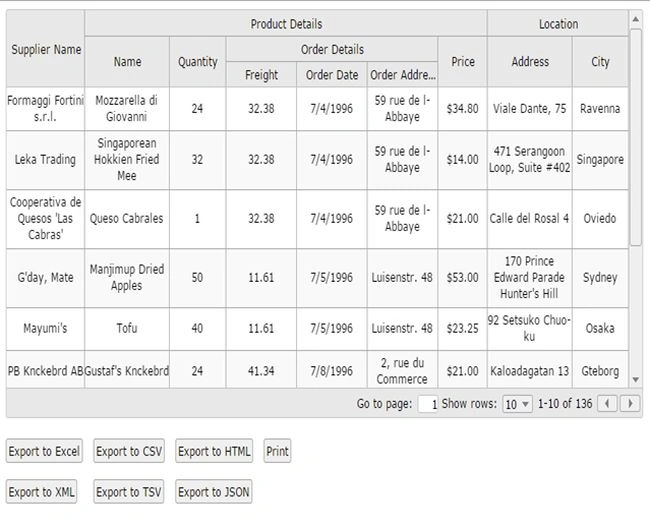
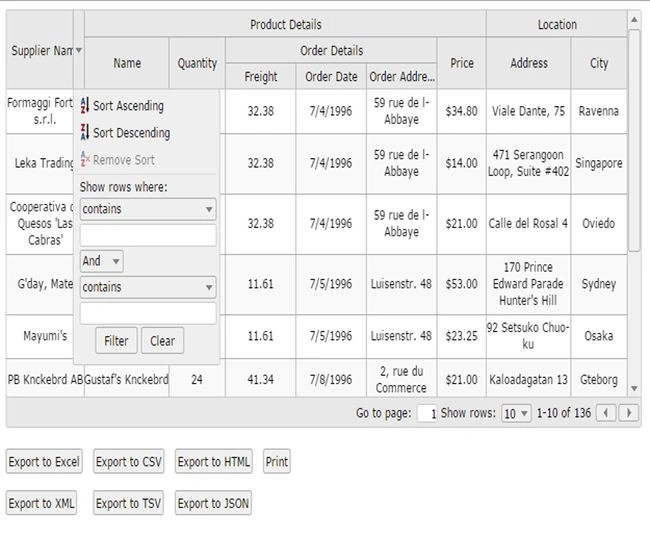

Now you may think, why are those export buttons outside? It looks different, right? Now we can work on it. In the JQX Grid there is an option called showtoolbar, by setting this to true we can have a toolbar along with the grid. There we can bind all of these buttons if you want. So shall we start?
showtoolbar: true,
Add that line to your JQX grid implementation. Next we need to append the UI elements to the tool bar, right?
- rendertoolbar:function (toolbar) {
- var me = this;
- var container = $("<div ></div>");
- var input = $('<div id="excelExport" style="background-color: #555555;float: left; font-
- weight: bold;line-height: 28px; min-
- width: 80px;padding: 3px 5px 3px 10px;color: #fff; ">Excel</div>
- div style="background-color: #555555;float: left; font-weight: bold;line-
- height: 28px; min-width: 80px;padding: 3px 5px 3px 10px;color: #fff; margin-
- left: 3px;" id="print" >Print</div></div>');
- toolbar.append(container);
- container.append(input);
- }
- $("#jqxgrid").jqxGrid(
- {
- width: 900,
- source: dataAdapter,
- filterable: true,
- sortable: true,
- pageable: true,
- autorowheight: true,
- altrows: true,
- columnsresize: true,
- showtoolbar: true,
- rendertoolbar: function (toolbar) {
- var me = this;
- var container = $("<div ></div>");
- var input = $('<div id="div1" style="background-color: #555555;float: left; font-weight: bold;line-
- height: 28px; min-width: 80px;padding: 3px 5px 3px 10px;color: #fff; ">Your First Div</div>
- <div style="background-color: #555555;float: left; font-weight: bold;line-height: 28px; min-
- width: 80px;padding: 3px 5px 3px 10px;color: #fff; margin-
- left: 3px;" id="Div2" >Your Second Div</div></div>');
- toolbar.append(container);
- container.append(input);
- },
- columns: [
- { text: 'Supplier Name', cellsalign: 'center', align: 'center', datafield: 'SupplierName', width: 110 },
- { text: 'Name', columngroup: 'ProductDetails', cellsalign: 'center', align: 'center', datafield: 'ProductName'
- , width: 120 },
- { text: 'Quantity', columngroup: 'ProductDetails', datafield: 'Quantity', cellsformat: 'd', cellsalign: 'cente
- r', align: 'center', width: 80 },
- { text: 'Freight', columngroup: 'OrderDetails', datafield: 'Freight', cellsformat: 'd', cellsalign: 'center',
- align: 'center', width: 100 },
- { text: 'Order Date', columngroup: 'OrderDetails', cellsalign: 'center', align: 'center', cellsformat: 'd', da
- tafield: 'OrderDate', width: 100 },
- { text: 'Order Address', columngroup: 'OrderDetails', cellsalign: 'center', align: 'center', datafield: 'Order
- Address', width: 100 },
- { text: 'Price', columngroup: 'ProductDetails', datafield: 'Price', cellsformat: 'c2', align: 'center', cellsa
- lign: 'center', width: 70 },
- { text: 'Address', columngroup: 'Location', cellsalign: 'center', align: 'center', datafield: 'Address', width
- : 120 },
- { text: 'City', columngroup: 'Location', cellsalign: 'center', align: 'center', datafield: 'City', width: 80 }
- ],
- columngroups: [
- { text: 'Product Details', align: 'center', name: 'ProductDetails' },
- { text: 'Order Details', parentgroup: 'ProductDetails', align: 'center', name: 'OrderDetails' },
- { text: 'Location', align: 'center', name: 'Location' }
- ]
- });

What if you want to share this Grid with your friends? For that we have a jQuery share pluggin. Minimal jQuery Plugin For Social Share Buttons - Sharer.
Include the following files from the downloded rar from the preceding link.
- jquery.sharer.css
- jquery.sharer.js
- sharer.png
- <link href="styles/jquery.sharer.css" rel="stylesheet" type="text/css" />
- <script src="scripts/jquery.sharer.js" type="text/javascript"></script>
- $(".social-buttons").sharer();
- <div class="social-buttons" style="position: relative;z-index: 1000;"></div>

To set the page size add the following line to your grid settings:
pagesize: 50,
To set the custom pagesize options add the following line to your grid settings:
pagesizeoptions: ['5','10','15','20','30','40','50'],
To allow resizing of the columns add the following line to your grid settings:
columnsresize: true,
To allow column re-ordering options add the following line to your grid settings:
columnsreorder: true,
Be sure that you added the jqxgrid.columnsreorder.js JavaScript file.
To allow an Excel-like filter add the following line to your grid settings:
filtermode: 'excel',
Then you will get a filtering option as follows:

To enable the tooltip add the following line to your grid settings
- enabletooltips: true,
To apply themes add the following line to your grid settings
- theme: 'metro',
Please be noted that you must include the style sheet accordingly, In this case you have to include the following
- <link href="~/jqwidgets/styles/jqx.metro.css" rel="stylesheet" />
You can find so many CSS in jqwidgets/styles folder.
To enable auto height add the following line to your grid settings
- autoheight: true,
To show the default filter icon always add the following line to your grid settings
- autoshowfiltericon: false,
History
First Version: 20-Oct-2014
Conclusion
Did I miss anything that you may think which is needed? Could you find this post as useful? I hope you liked this article. Please share me your valuable suggestions and feedback.
Your turn. What do you think?
A blog isn’t a blog without comments, but do try to stay on topic. If you have a question unrelated to this post, you’re better off posting it on C# Corner, Code Project, Stack Overflow, Asp.Net Forum instead of commenting here. Tweet or email me a link to your question there and I’ll definitely try to help if I can.
Kindest Regards
Sibeesh Venu


Rakesh KumarPosted Aug 25, 2021, 1:35 AM EDT
I am trying To download AdvancedJQXGrid.zip and content not getting download
Sibeesh VenuTOP 100Posted Jul 5, 2016, 3:51 AM EDT
Sr Karthiga Thanks
Sr KarthigaPosted Feb 23, 2016, 2:46 PM EST
good one
Sr KarthigaPosted Feb 23, 2016, 2:46 PM EST
Nice explanation
Sibeesh VenuTOP 100Posted Oct 22, 2015, 9:16 PM EDT
Rupali Shinde Thanks lot
Rupali ShindePosted Oct 22, 2015, 8:16 PM EDT
really nice article, i found 1 new way to have grid control as developer ..
Sibeesh VenuTOP 100Posted Jan 11, 2015, 8:01 PM EST
Sumit Jolly Thanks a lot :)
Guest UserPosted Jan 11, 2015, 5:55 AM EST
Congratulations as your article is chosen as article of the day!!! Keep it up!
Sibeesh VenuTOP 100Posted Jan 11, 2015, 3:43 AM EST
Anupam Singh Thanks a lot. I am glad you liked it.
Anupam SinghPosted Jan 11, 2015, 12:52 AM EST
nice article Sibeesh Venu
Sibeesh VenuTOP 100Posted Jan 10, 2015, 11:53 PM EST
khargesh rajput Thank you
Khargesh RajputPosted Jan 10, 2015, 8:38 PM EST
Thanks Bookmarked this
Sibeesh VenuTOP 100Posted Jan 10, 2015, 7:16 PM EST
Dinesh Beniwal Wow thanks buddy
Dinesh BeniwalTOP 10Posted Jan 10, 2015, 7:13 PM EST
Congratulations Sibeesh Venu Articles of the day on Asp.net
Sibeesh VenuTOP 100Posted Dec 30, 2014, 9:40 PM EST
santosh tilak Please tell me which one use as back end!. Is it SQL or OLEDB?
Sibeesh VenuTOP 100Posted Dec 30, 2014, 9:39 PM EST
santosh tilak If you are still looking for a solution to load from DB, I can help you with that.
Sibeesh VenuTOP 100Posted Nov 19, 2014, 11:49 PM EST
santosh tilak You can have a look at this : http://www.c-sharpcorner.com/UploadFile/65794e/convert-cellset-to-html-table-and-from-html-to-json-and-to-a/
Sibeesh VenuTOP 100Posted Nov 19, 2014, 11:46 PM EST
santosh tilak You mean you need to implement grid from DB data? If yes it is possible buddy. All you need is just an ajax function which returns data as json, or xml.
Sibeesh VenuTOP 100Posted Nov 19, 2014, 11:45 PM EST
santosh tilak Thank you :)
santosh tilakPosted Nov 19, 2014, 9:17 PM EST
great article ,need to implement the data from database
Sibeesh VenuTOP 100Posted Nov 19, 2014, 4:33 AM EST
Ramesh Thanks buddy.
Ramesh MaruthiPosted Nov 19, 2014, 4:02 AM EST
Awesome article bookmarked :)
Sibeesh VenuTOP 100Posted Nov 18, 2014, 10:27 PM EST
Keyur Patel Thanks buddy :)
Keyur PatelPosted Nov 18, 2014, 9:17 PM EST
Good detail explanation on JQX Grid. Rock!!