
Most of the time, a developer requires encryption and decryption for encoding a message or information in such a way that only authorized person can retrieve that information.
In this article, I will discuss the implementation of AES encryption and decryption with Angular 7 while developing an application.
So, the first question that comes in our mind is "What is AES?".
- AES stands for "Advanced Encryption Standard".
- It is a tool that is used to encrypt and decrypt the simple text using AES encryption algorithm.
- This algorithm was developed by two Belgian cryptographers, Joan Daemen and Vincent Rijmen.
- AES was designed to be efficient in both, hardware and software, and supports a block length of 128 bits and key lengths of 128, 192, and 256 bits.
When to use AES Encryption
- When you want to encrypt a confidential text into a decryptable format, for example - when you need to send some sensitive data in an e-mail.
- The decryption of the encrypted text is possible only if you know the right password.
Now, try to implement the AES encryption and decryption in Angular 7. It's very easy to implement in Angular 7 with the help of crypto-js.
First, we create a new project with the following command.
- ng new EncryptionDescryptionSample
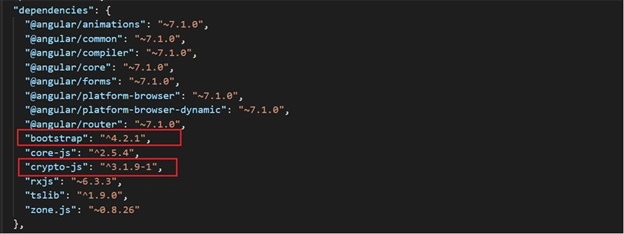
After that, install crypto.js file, by the following command.
- npm install crypto-js --save
- npm install bootstrap --save
After running the above command, check the package.json file if it is installed or not. Your file should look like this.
- <h1 class="text-center">Encrypt-Decrypt with AES</h1>
- <br>
- <div>
- <div class="row">
- <div class="col-sm-6">
- <button type="button" class="btn btn-primary btn-lg btn-block">
- Encryption
- </button>
- <br>
- <div class="form-group">
- <label for="txtTextToConvert">Plain Text</label>
- <input type="text" class="form-control" placeholder="Enter text you want to encrypt" [(ngModel)]="plainText">
- </div>
- <div class="form-group">
- <label for="txtPassword">Password</label>
- <input type="password" class="form-control" placeholder="Enter encryption password" [(ngModel)]="encPassword">
- </div>
- <textarea class="form-control" readonly rows="3">{{conversionEncryptOutput}}</textarea>
- <br>
- <button type="button" class="btn btn-success float-right" (click)="convertText('encrypt')">Encrypt</button>
- </div>
- <div class="col-sm-6">
- <button type="button" class="btn btn-dark btn-lg btn-block">
- Decryption
- </button>
- <br>
- <div class="form-group">
- <label for="txtTextToConvert">Encrypted Text</label>
- <input type="text" class="form-control" placeholder="Enter text you want to decrypt" [(ngModel)]="encryptText">
- </div>
- <div class="form-group">
- <label for="txtPassword">Password</label>
- <input type="password" class="form-control" placeholder="Enter decryption password" [(ngModel)]="decPassword">
- </div>
- <textarea class="form-control" readonly rows="3">{{conversionDecryptOutput}}</textarea>
- <br>
- <button type="button" class="btn btn-success float-right" (click)="convertText('decrypt')">Decrypt</button>
- </div>
- </div>
- </div>
Now, visit "app.component.ts" file and write the below code,
- import { Component } from '@angular/core';
- import * as CryptoJS from 'crypto-js';
- @Component({
- selector: 'app-root',
- templateUrl: './app.component.html',
- styleUrls: ['./app.component.css']
- })
- export class AppComponent {
- title = 'EncryptionDecryptionSample';
- plainText:string;
- encryptText: string;
- encPassword: string;
- decPassword:string;
- conversionEncryptOutput: string;
- conversionDecryptOutput:string;
- constructor() {
- }
- //method is used to encrypt and decrypt the text
- convertText(conversion:string) {
- if (conversion=="encrypt") {
- this.conversionEncryptOutput = CryptoJS.AES.encrypt(this.plainText.trim(), this.encPassword.trim()).toString();
- }
- else {
- this.conversionDecryptOutput = CryptoJS.AES.decrypt(this.encryptText.trim(), this.decPassword.trim()).toString(CryptoJS.enc.Utf8);
- }
- }
- }
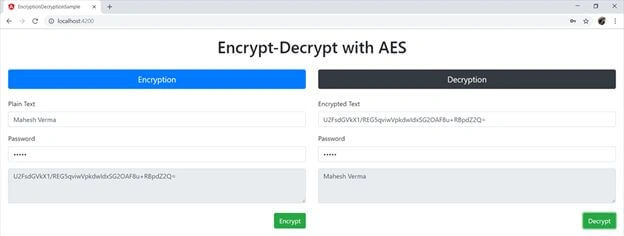
In the above code, we used the Encrypt method of AES and passed our plain text with a password to encrypt the string. Similarly, we used the Decrypt method of AES and passed our encrypted text with a password to decrypt the string. Be sure that both times, your password is the same. For using both of these methods, you need to import "CryptoJS" from crypto-js.
- import * as CryptoJS from 'crypto-js';
- ng serve --o
Conclusion
Now, we have learned what AES encryption and decryption are and how we can implement this feature with Angular. For practice purposes, the sample project called “EncryptionDecryptionSample” is attached which covers all the pieces of code mentioned in this article. We can download and modify this as per our different requirements.
All the queries related to this article and sample project are always welcome. Thanks for reading.


Tech DhanhindPosted Apr 2, 2021, 10:20 AM EDT
How to keep secure Secretkey,because if know the secret key can able to decrypt
Apanoub AmeenPosted Feb 25, 2020, 12:43 AM EST
You are the best i love you man thanks for sharing this
SREERAM MANEPALLIPosted Dec 16, 2019, 9:02 PM EST
How to include RNCryptor in angular 6 project (plz helpme)
Andriy ZapisotskyiPosted Nov 4, 2019, 6:46 AM EST
Great read, Mahesh Verma! Thanks for sharing
Reena LakraPosted Jul 3, 2019, 5:48 AM EDT
Nice article. Thanks for sharing.
Alex Jose Baltodano PaniaguaPosted Jun 26, 2019, 1:07 PM EDT
How can I decrypt an encrypted text using crypto js in .net core 2.2?
Mohd KashifPosted May 6, 2019, 8:34 PM EDT
Very informative. thanks for sharing.
Ajay GuptaPosted Jan 21, 2019, 10:24 PM EST
But is it secure?
Muthu KumarPosted Jan 18, 2019, 2:51 AM EST
Nice Article. Thanks for sharing.
Bhairab DuttPosted Jan 16, 2019, 7:22 PM EST
Nice Article......
Sharad GuptaPosted Jan 16, 2019, 7:14 PM EST
Nice one Mahesh Verma, I think we may pass encrypted data from APIs, the decrypted at typescript side and vice versa.
Hiten PandyaPosted Jan 16, 2019, 5:49 PM EST
Good article. Thanks for sharing.