
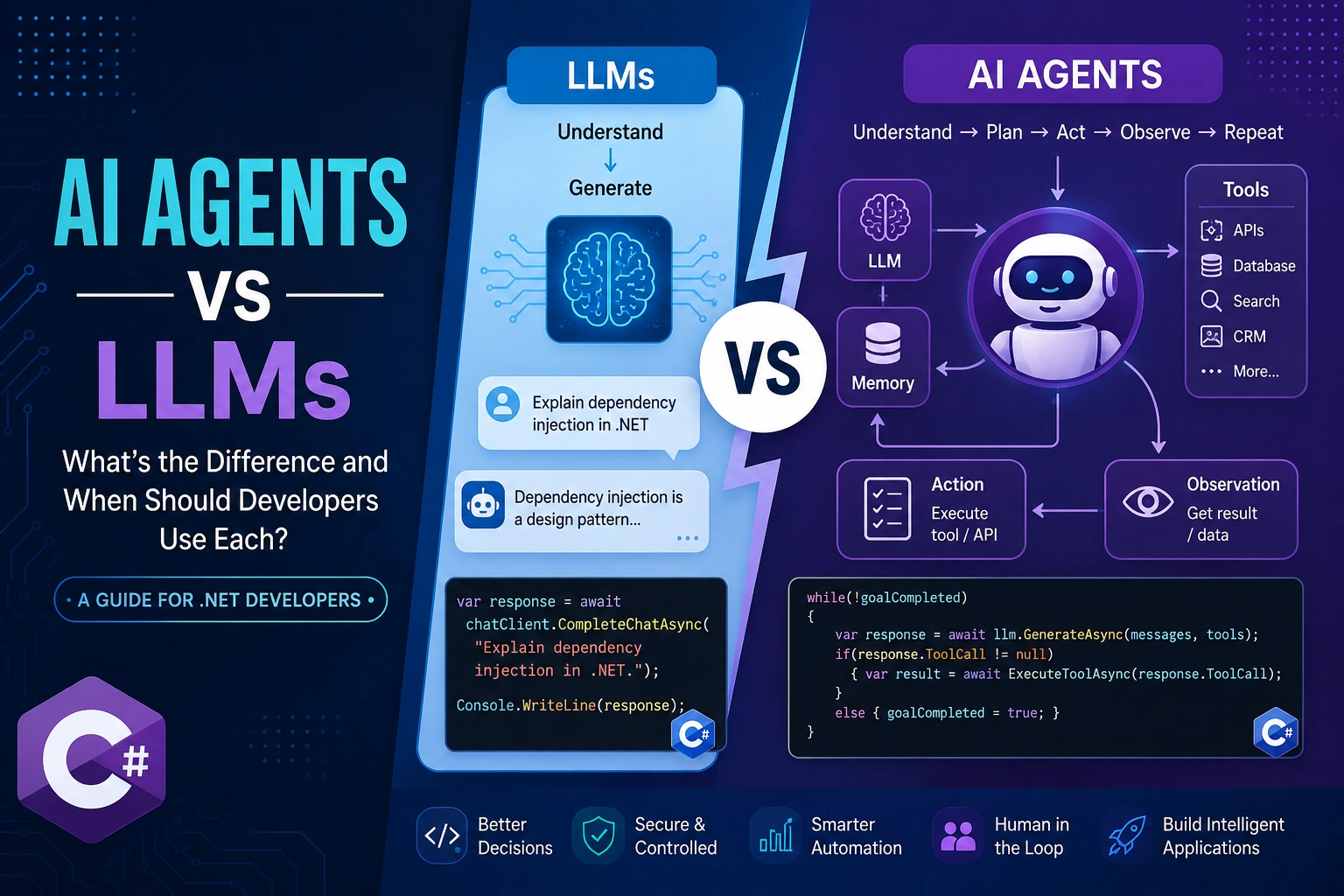
Large language models (LLMs) have changed how developers build modern AI applications. They can understand natural language, generate code, summarize documents, extract information, answer questions, and interact conversationally with users.
But an LLM is not the same thing as an AI agent.
An LLM primarily provides intelligence for understanding and generating language. An AI agent typically combines an LLM with tools, memory, instructions, state, external systems, and an execution loop to accomplish a goal.
For .NET developers, understanding this distinction is important when deciding whether an application needs a straightforward LLM integration or a more autonomous agent architecture.
This article explains the difference between LLMs and AI agents using practical C# and .NET examples, including tool calling, state management, and a simple agent loop.
What Is an LLM?
A Large Language Model (LLM) is a machine-learning model trained on large amounts of data to predict and generate sequences of tokens.
Examples include models from OpenAI, Anthropic, Google, Meta, and other providers.
At a simplified level, an application sends a prompt to an LLM:
User:
Explain dependency injection in .NET.

        ↓

      LLM

        ↓

Response:
Dependency injection is a design pattern...
The LLM generates a response based on the provided context and its learned parameters.
A typical application architecture looks like this:
.NET Application
      |
      v
Prompt + Context
      |
      v
     LLM
      |
      v
Generated Response
The important point is that the LLM generally doesn't execute your business process by itself.
It generates an output.
What Is an AI Agent?
An AI agent is a software system that uses an LLM as a reasoning or decision-making component while interacting with external tools and systems to accomplish a goal.
A simplified architecture looks like this:
                 +----------------+
                 |      User      |
                 +-------+--------+
                         |
                         v
                 +----------------+
                 |   AI Agent     |
                 +-------+--------+
                         |
              +----------+----------+
              |          |          |
              v          v          v
             LLM       Memory     Tools
                         |          |
                         |     +----+----+
                         |     | APIs     |
                         |     | Database |
                         |     | Search   |
                         |     | CRM      |
                         |     +----------+
                         |
                         v
                  Previous State
An agent can:
Understand the user's objective.
Determine what information it needs.
Select an appropriate tool.
Execute the tool.
Inspect the result.
Decide what to do next.
Continue until the objective is completed or requires human intervention.
Therefore:
LLM = intelligence component
Agent = system built around intelligence + tools + state + execution
AI Agent vs LLM: Key Differences
| Capability | LLM | AI Agent |
|---|---|---|
| Natural language understanding | Yes | Yes |
| Text generation | Yes | Yes |
| Code generation | Yes | Yes |
| Tool execution | Usually through application integration | Core capability |
| Multi-step workflows | Limited | Yes |
| External API interaction | Indirect | Yes |
| Persistent memory | Not inherent | Can be implemented |
| Planning | Can generate plans | Can execute plans |
| Autonomous actions | No by default | Yes, within defined permissions |
| Business workflow automation | Limited | Strong use case |
| State management | External | Typically included |
| Human approval | Application-level | Can be built into workflow |
The distinction becomes clearer with an example.
Example: LLM-Based Customer Support
Suppose a customer asks:
"What is the status of my order #12345?"
A simple LLM cannot reliably know the current order status unless the application provides that information.
For example:
var prompt = """The customer asked:
"What is the status of order #12345?"""";

var response = await chatClient.CompleteChatAsync(prompt);

Console.WriteLine(response);
The model might produce a plausible response, but it doesn't have direct access to the company's order database.
This is where tools become important.
Example: AI Agent With an Order Lookup Tool
We can provide the AI system with a function that retrieves order information.
public class OrderService
{
    public async Task<Order?> GetOrderAsync(string orderId)
    {
        // Database/API lookup
        return await database.Orders
            .FirstOrDefaultAsync(x => x.Id == orderId);
    }
}
The agent can decide that the order database is required.
Conceptually:
User Question
      |
      v
     LLM
      |
      | "I need order information"
      v
Order Lookup Tool
      |
      v
Database
      |
      v
Order Status
      |
      v
     LLM
      |
      v
Final Response
Now the system is no longer simply generating an answer.
It is taking an action to obtain information and using the result to complete the task.
What Is Tool Calling?
Tool calling allows an LLM to determine when an external function should be invoked.
For example, we can define a tool:
public record WeatherRequest(string City);

public async Task<string> GetWeatherAsync(WeatherRequest request)
{
    // Call weather API
    return $"Weather information for {request.City}";
}
The model can receive a tool definition such as:
{
  "name": "get_weather",
  "description": "Gets current weather information",
  "parameters": {
    "type": "object",
    "properties": {
      "city": {
        "type": "string"
      }
    },
    "required": ["city"]
  }
}
If the user asks:
What's the weather in Chicago?the model can request:
{
  "name": "get_weather",
  "arguments": {
    "city": "Chicago"
  }
}
The application executes the function and sends the result back to the model.
This pattern is fundamental to modern agent architectures.
A Simple Agent Loop in C#
An agent can be represented conceptually with an execution loop.
while (!goalCompleted)
{
    var response = await llm.GenerateAsync(
        messages,
        tools);

    if (response.ToolCall is not null)
    {
        var result = await ExecuteToolAsync(
            response.ToolCall);

        messages.Add(response);
        messages.Add(result);
    }
    else
    {
        Console.WriteLine(response.Text);
        goalCompleted = true;
    }
}
The loop is important.
A basic LLM interaction is generally:
Prompt → Model → ResponseAn agentic interaction can look like:
Goal
 ↓
LLM
 ↓
Tool
 ↓
Result
 ↓
LLM
 ↓
Another Tool
 ↓
Result
 ↓
LLM
 ↓
Final Answer
This is why agents can support multi-step workflows.
Do AI Agents Actually "Reason"?
The word reasoning can be misleading.
Developers should avoid assuming that an agent has human-like reasoning.
In practical software architecture, an agent can be understood as a system that uses an LLM to select actions, interpret results, and determine subsequent steps according to its instructions and available tools.
For example:
Goal:
Find customers who haven't renewed their subscription.

Step 1:
Query CRM.

Step 2:
Filter customers.

Step 3:
Check subscription status.

Step 4:
Generate follow-up list.

Step 5:
Create draft emails.
The LLM can help determine the sequence, while deterministic software performs the actual operations.
When Should Developers Use an LLM?
An LLM is usually the better choice when the application primarily needs language intelligence.
Typical use cases include:
Text Summarization
Long document
      ↓
     LLM
      ↓
Short summary
Content Generation
Product information
      ↓
     LLM
      ↓
Product description
Classification
Customer message
      ↓
     LLM
      ↓
Billing / Technical / Sales
Information Extraction
Invoice
   ↓
LLM
   ↓
{
  "invoiceNumber": "...",
  "amount": "...",
  "date": "..."
}
Code Assistance
LLMs can also assist developers with:
Code generation
Refactoring
Documentation
Test generation
Debugging
Code explanation
If the task is essentially:
Input → Understand → Generate
you may not need an agent.
When Should Developers Use an AI Agent?
Agents become more useful when the application needs multiple steps, tools, decisions, or external actions.
Examples include:
IT Automation
User reports problem
        ↓
Agent
        ↓
Check monitoring API
        ↓
Analyze logs
        ↓
Create incident
        ↓
Notify engineer
Sales Operations
Find new leads
      ↓
CRM
      ↓
Enrich company
      ↓
Research account
      ↓
Score lead
      ↓
Create CRM task
Customer Support
Customer question
       ↓
Knowledge Base
       ↓
Order API
       ↓
Customer Account
       ↓
Agent
       ↓
Response / Action
These workflows require more than text generation.
AI Agents Need Tools
One of the biggest architectural differences is access to external systems.
Tools may include:
REST APIs
Databases
Search engines
CRM systems
ERP systems
File systems
Internal services
Cloud services
Business applications
A tool should have a clearly defined contract.
For example:
public interface ICustomerTools
{
    Task<Customer?> GetCustomerAsync(
        string customerId);

    Task<IEnumerable<Order>> GetOrdersAsync(
        string customerId);
}
The agent doesn't need unrestricted access to your infrastructure.
Instead, expose specific capabilities through controlled tools.
This is an important security principle.
LLM + RAG vs AI Agent
RAG and agents are also frequently confused.
Retrieval-Augmented Generation (RAG) allows an LLM to retrieve relevant information before generating a response.
A typical RAG architecture is:
User Question
      ↓
Embedding/Search
      ↓
Relevant Documents
      ↓
LLM
      ↓
Answer
An agent can use RAG as one of its tools.
For example:
                 AI Agent
                    |
        +-----------+-----------+
        |           |           |
       RAG        CRM         API
        |           |           |
   Documents     Customer    External
                 Data        Service
Therefore:
RAG is a retrieval architecture. An AI agent is an execution architecture.
They can be used together.
Building a Simple Agent Architecture in .NET
A production agent can be divided into several components.
+------------------------------------------------+
|                 Agent Application              |
+------------------------------------------------+
|                                                |
|  Instructions / Policies                       |
|                                                |
|  +----------------+                            |
|  | Agent Runtime  |                            |
|  +--------+-------+                            |
|           |                                    |
|     +-----+------+                             |
|     |            |                             |
|     v            v                             |
|    LLM         Memory                          |
|     |                                             |
|     +----------------------+                    |
|                            |                    |
|                            v                    |
|                          Tools                  |
|                            |                    |
|              +-------------+-------------+      |
|              |             |             |      |
|             API          SQL           RAG      |
|                                                |
+------------------------------------------------+
The application should control:
Which tools are available
What parameters they accept
Which users can invoke them
What actions require approval
How failures are handled
How much context is retained
How long an agent can execute
Guardrails Are Essential
Giving an agent tools doesn't mean giving it unlimited autonomy.
For example, reading an order might be low risk:
GetOrder(orderId)But deleting an order is significantly higher risk:
DeleteOrder(orderId)A safer architecture can require approval:
Agent
  ↓
Delete Order?
  ↓
Risk Check
  ↓
Human Approval
  ↓
Execute
Developers should consider:
Authentication
Authorization
Least-privilege access
Input validation
Tool-level permissions
Rate limits
Audit logs
Human approval
Timeout controls
Cost limits
Avoid Giving Agents Too Many Tools
A common mistake is exposing every API available to the agent.
More tools can increase complexity and make tool selection less reliable.
Instead of:
50+ unrestricted toolsconsider:
Customer Agent
 ├── Get Customer
 ├── Get Orders
 └── Create Support Ticket
A separate finance agent might have:
Finance Agent
 ├── Get Invoice
 ├── Check Payment
 └── Create Payment Request
This follows the principle of least privilege and makes evaluation easier.
Single Agent vs Multi-Agent Architecture
Not every application requires multiple agents.
A single agent is usually preferable when:
The workflow is relatively simple.
One model can handle the required tools.
There is limited domain complexity.
Centralized orchestration is easier to maintain.
A multi-agent architecture may make sense when different responsibilities need separate contexts or permissions.
For example:
                  Supervisor
                      |
       +--------------+--------------+
       |              |              |
       v              v              v
   Sales Agent    Finance Agent   Support Agent
       |              |              |
      CRM           ERP/API       Ticketing
However, multi-agent systems introduce additional complexity.
Developers should not use multiple agents simply because the architecture looks more sophisticated.
LLM or AI Agent? A Practical Decision Framework
Ask these questions before choosing an architecture.
Question 1: Does the application only generate or transform information?
If yes, start with an LLM.
Question 2: Does it need external information?
Consider RAG or tool calling.
Question 3: Does it need to perform multiple actions?
Consider an agent.
Question 4: Does it need to modify business systems?
Use an agent with strictly controlled tools and permissions.
Question 5: Does the workflow have deterministic business rules?
Keep those rules in conventional application code.
This last point is particularly important.
Not everything should be delegated to an LLM.
Don't Replace Deterministic Code With an LLM
Suppose your business rule is:
if (order.Total > 10000)
{
    RequireManagerApproval();
}
There is little reason to ask an LLM to determine whether 10000 is greater than the order threshold.
Use traditional software for deterministic logic.
Use the LLM where language understanding, ambiguity, classification, planning, or interpretation provides value.
A strong architecture often looks like:
        LLM
         |
  Interpretation
         |
         v
Deterministic Application Logic
         |
         v
      Business APIs
Rather than:
Everything → LLMLLM + Agent Architecture in Enterprise Applications
A production enterprise system may look like this:
                    User
                     |
                     v
              Authentication
                     |
                     v
              Agent Runtime
                     |
          +----------+----------+
          |                     |
          v                     v
         LLM                  Policy
          |                     |
          +----------+----------+
                     |
              Tool Selection
                     |
      +--------------+--------------+
      |              |              |
      v              v              v
     CRM            ERP            RAG
      |              |              |
      +--------------+--------------+
                     |
                     v
               Final Response
This architecture separates intelligence, policy, tools, data, and business logic.
That separation becomes increasingly important as agents move from prototypes into production.
Performance and Cost Considerations
Agents can consume more tokens and make more model calls than simple LLM applications.
For example:
Simple LLM:

1 request
   ↓
1 model call
Agent workflow:
User
 ↓
LLM call
 ↓
Tool
 ↓
LLM call
 ↓
Tool
 ↓
LLM call
 ↓
Final response
Three or more model interactions can significantly increase:
Latency
Token consumption
API cost
Failure opportunities
Therefore, developers should monitor:
Average model calls / task
Tool calls / task
Tokens / task
Latency
Task success rate
Tool failure rate
Human escalation rate
Evaluating an AI Agent
Traditional application unit tests aren't enough for an agent.
Developers should evaluate:
Task Success
Did the agent accomplish the objective?
Tool Selection
Did it select the correct tool?
Parameter Accuracy
Did it pass correct arguments?
Safety
Did it avoid unauthorized actions?
Reliability
Does it behave consistently across similar tasks?
Cost
How many model calls and tokens were required?
An evaluation dataset might look like:
public record AgentTestCase(
    string Input,
    string ExpectedTool,
    bool RequiresApproval);
You can then run repeatable evaluations against the agent.
Common Mistakes When Building AI Agents
1. Treating the LLM as the Entire Application
An LLM should not replace your entire software architecture.
2. Giving Excessive Tool Access
Follow least-privilege principles.
3. No Human Approval
High-impact operations should have appropriate approval mechanisms.
4. No Observability
Log tool calls, latency, failures, model usage, and important decisions.
5. Using Agents for Simple Tasks
If a deterministic function can solve the problem reliably, use the function.
6. Ignoring Failure Handling
External APIs fail. Models produce incorrect tool calls. Networks fail.
Design explicit retry, timeout, fallback, and escalation mechanisms.
LLM vs AI Agent: The Bottom Line
LLMs and AI agents aren't competing technologies.
They operate at different architectural levels.
An LLM provides language intelligence:
Understand → GenerateAn AI agent builds a system around that intelligence:
Understand
    ↓
Plan / Select Action
    ↓
Use Tool
    ↓
Observe Result
    ↓
Continue
    ↓
Complete Goal
For developers, the practical decision is straightforward:
Use an LLM when you need language intelligence. Use an AI agent when you need language intelligence combined with tools, state, multi-step execution, and controlled actions.
The most robust enterprise implementations will likely combine LLMs with conventional software engineering rather than attempting to replace deterministic systems entirely.
The goal isn't to make an application as autonomous as possible.
The goal is to give AI exactly enough autonomy to create measurable value—while keeping the system observable, secure, predictable, and maintainable.

Join the conversation! Your thoughts help the community grow.