
Introduction
Dialog Boxes are mainly used for showing some information to the user. This information may be related to a specific task or to an error or it may be some kind of general information.
Now we move to the code part of this article.
First of all, we create an XML file for our project. We are using two Activities in this project. Our first activity is activity_main.xml.
- <RelativeLayout xmlns:android="http://schemas.android.com/apk/res/android"
- xmlns:tools="http://schemas.android.com/tools"
- android:layout_width="match_parent"
- android:layout_height="match_parent"
- android:paddingBottom="@dimen/activity_vertical_margin"
- android:paddingLeft="@dimen/activity_horizontal_margin"
- android:paddingRight="@dimen/activity_horizontal_margin"
- android:paddingTop="@dimen/activity_vertical_margin"
- tools:context=".MainActivity" >
- <TextView
- android:id="@+id/textView1"
- android:layout_width="wrap_content"
- android:layout_height="wrap_content"
- android:text="@string/hello_world" />
- <Button
- android:id="@+id/button1"
- android:layout_width="wrap_content"
- android:layout_height="wrap_content"
- android:layout_below="@+id/textView1"
- android:layout_centerHorizontal="true"
- android:layout_marginTop="64dp"
- android:text="@string/button1" />
- <Button
- android:id="@+id/button2"
- android:layout_width="wrap_content"
- android:layout_height="wrap_content"
- android:layout_alignLeft="@+id/button1"
- android:layout_below="@+id/button1"
- android:layout_marginTop="28dp"
- android:text="@string/button2" />
- <Button
- android:id="@+id/button3"
- android:layout_width="wrap_content"
- android:layout_height="wrap_content"
- android:layout_alignLeft="@+id/button2"
- android:layout_below="@+id/button2"
- android:layout_marginTop="30dp"
- android:text="@string/button3" />
- </RelativeLayout>
Graphical Layout of Activity
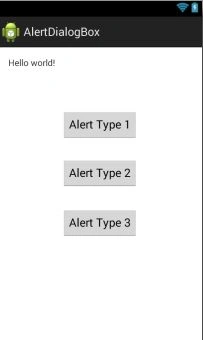
- <?xml version="1.0" encoding="utf-8"?>
- <LinearLayout xmlns:android="http://schemas.android.com/apk/res/android"
- android:orientation="vertical"
- android:layout_width="match_parent"
- android:gravity="center"
- android:background="#5ba4e5"
- android:layout_height="match_parent">
- <ListView
- android:id="@+id/listView1"
- android:layout_width="match_parent"
- android:layout_height="wrap_content"
- android:layout_marginTop="25dp" >
- </ListView>
- </LinearLayout>

- public class MainActivity extends Activity {
- Button B1, B2, B3;
- ArrayAdapter < String > adapter;@Override
- protected void onCreate(Bundle savedInstanceState) {
- super.onCreate(savedInstanceState);
- setContentView(R.layout.activity_main);
- B1 = (Button) findViewById(R.id.button1);
- B2 = (Button) findViewById(R.id.button2);
- B3 = (Button) findViewById(R.id.button3);
- B1.setOnClickListener(new View.OnClickListener() {
- @Override
- public void onClick(View arg0) {
- // TODO Auto-generated method stub
- final AlertDialog alertDialog = new AlertDialog.Builder(MainActivity.this).create();
- alertDialog.setTitle("Alert Dialog");
- alertDialog.setMessage("Welcome to My Device");
- alertDialog.setIcon(R.drawable.icon_smile);
- alertDialog.setButton("OK", new DialogInterface.OnClickListener() {
- public void onClick(DialogInterface dialog, int which) {
- Toast.makeText(getApplicationContext(), "You clicked on OK", Toast.LENGTH_SHORT).show();
- }
- });
- alertDialog.show();
- }
- });
- B2.setOnClickListener(new View.OnClickListener() {
- @Override
- public void onClick(View arg0) {
- // TODO Auto-generated method stub
- //alertDialog.setButton2(text, listener)
- AlertDialog.Builder alertDialog = new AlertDialog.Builder(MainActivity.this);
- alertDialog.setTitle("Alert Dialog");
- alertDialog.setMessage("Welcome to DZone");
- alertDialog.setIcon(R.drawable.icon_smile);
- alertDialog.setPositiveButton("YES", new DialogInterface.OnClickListener() {
- public void onClick(DialogInterface dialog, int which) {
- Toast.makeText(getApplicationContext(), "You clicked on YES", Toast.LENGTH_SHORT).show();
- }
- });
- alertDialog.setNegativeButton("NO", new DialogInterface.OnClickListener() {
- public void onClick(DialogInterface dialog, int which) {
- Toast.makeText(getApplicationContext(), "You clicked on NO", Toast.LENGTH_SHORT).show();
- }
- });
- alertDialog.show();
- }
- });
- B3.setOnClickListener(new View.OnClickListener() {
- @Override
- public void onClick(View arg0) {
- // TODO Auto-generated method stub
- AlertDialog.Builder alertDialog = new AlertDialog.Builder(MainActivity.this);
- alertDialog.setTitle("Alert Dialog");
- alertDialog.setMessage("Welcome to My Device");
- alertDialog.setIcon(R.drawable.icon_smile);
- final String names[] = {
- "Item1", "Item2", "Item3", "Item4"
- };
- // AlertDialog.Builder alertDialog2 = new AlertDialog.Builder(MainActivity.this);
- LayoutInflater inflater = getLayoutInflater();
- View convertView = (View) inflater.inflate(R.layout.menu_detail_fragment, null);
- alertDialog.setView(convertView);
- alertDialog.setTitle("List");
- ListView lv = (ListView) convertView.findViewById(R.id.listView1);
- adapter = new ArrayAdapter < String > (MainActivity.this, android.R.layout.simple_list_item_1, names);
- lv.setAdapter(adapter);
- alertDialog.show();
- lv.setOnItemClickListener(new AdapterView.OnItemClickListener() {
- @Override
- public void onItemClick(AdapterView <? > parent, View view,
- int position, long id) {
- Toast.makeText(MainActivity.this, "You Clicked at " + names[+position], Toast.LENGTH_SHORT).show();
- }
- });
- }
- });
- }
- }
- B1.setOnClickListener(new View.OnClickListener() {
- @Override
- public void onClick(View arg0) {
- // TODO Auto-generated method stub
- final AlertDialog alertDialog = new AlertDialog.Builder(MainActivity.this).create();
- alertDialog.setTitle("Alert Dialog");
- alertDialog.setMessage("Welcome to My Device");
- alertDialog.setIcon(R.drawable.icon_smile);
- alertDialog.setButton("OK", new DialogInterface.OnClickListener() {
- public void onClick(DialogInterface dialog, int which) {
- Toast.makeText(getApplicationContext(), "You clicked on OK", Toast.LENGTH_SHORT).show();
- }
- });
- alertDialog.show();
- }
- });


- B2.setOnClickListener(new View.OnClickListener() {
- @Override
- public void onClick(View arg0) {
- // TODO Auto-generated method stub
- //alertDialog.setButton2(text, listener)
- AlertDialog.Builder alertDialog = new AlertDialog.Builder(MainActivity.this);
- alertDialog.setTitle("Alert Dialog");
- alertDialog.setMessage("Welcome to DZone");
- alertDialog.setIcon(R.drawable.icon_smile);
- alertDialog.setPositiveButton("YES", new DialogInterface.OnClickListener() {
- public void onClick(DialogInterface dialog, int which) {
- Toast.makeText(getApplicationContext(), "You clicked on YES", Toast.LENGTH_SHORT).show();
- }
- });
- alertDialog.setNegativeButton("NO", new DialogInterface.OnClickListener() {
- public void onClick(DialogInterface dialog, int which) {
- Toast.makeText(getApplicationContext(), "You clicked on NO", Toast.LENGTH_SHORT).show();
- }
- });
- alertDialog.show();
- }
- });


- B3.setOnClickListener(new View.OnClickListener() {
- @Override
- public void onClick(View arg0) {
- // TODO Auto-generated method stub
- AlertDialog.Builder alertDialog = new AlertDialog.Builder(MainActivity.this);
- alertDialog.setTitle("Alert Dialog");
- alertDialog.setMessage("Welcome to My Device");
- alertDialog.setIcon(R.drawable.icon_smile);
- final String names[] = {
- "Item1", "Item2", "Item3", "Item4"
- };
- // AlertDialog.Builder alertDialog2 = new AlertDialog.Builder(MainActivity.this);
- LayoutInflater inflater = getLayoutInflater();
- View convertView = (View) inflater.inflate(R.layout.menu_detail_fragment, null);
- alertDialog.setView(convertView);
- alertDialog.setTitle("List");
- ListView lv = (ListView) convertView.findViewById(R.id.listView1);
- adapter = new ArrayAdapter < String > (MainActivity.this, android.R.layout.simple_list_item_1, names);
- lv.setAdapter(adapter);
- alertDialog.show();
- lv.setOnItemClickListener(new AdapterView.OnItemClickListener() {
- @Override
- public void onItemClick(AdapterView <? > parent, View view,
- int position, long id) {
- Toast.makeText(MainActivity.this, "You Clicked at " + names[+position], Toast.LENGTH_SHORT).show();
- }
- });
- }
- });




Yashwanth MuthineniPosted Aug 27, 2015, 1:55 AM EDT
Nice Share
Pankaj Kumar ChoudharyTOP 100Posted Jul 30, 2015, 2:42 AM EDT
Thanks Santhakumar Sir........
Santhakumar MunuswamyPosted Jul 30, 2015, 2:23 AM EDT
Thanks for nice article
Sibeesh VenuTOP 100Posted Jul 30, 2015, 1:04 AM EDT
Nice Share
Pankaj Kumar ChoudharyTOP 100Posted Jul 29, 2015, 3:19 PM EDT
Thanks Neeraj............
Neeraj KumarPosted Jul 29, 2015, 12:01 PM EDT
Nice work ...
Pankaj Kumar ChoudharyTOP 100Posted Jul 29, 2015, 8:05 AM EDT
Thanks Rakesh Sir........
RakeshPosted Jul 29, 2015, 5:44 AM EDT
Nice one
Gopi ChandPosted Jul 29, 2015, 4:58 AM EDT
Great work :)
Pankaj Kumar ChoudharyTOP 100Posted Jul 29, 2015, 4:28 AM EDT
Thanks Rajeesh Sir........
Rajeesh MenothPosted Jul 29, 2015, 3:27 AM EDT
Good One..