
Introduction
In this article, we will see what is an API, why should we create it and how to create a simple Web API project.
What is Web API?
Web API is fully supported and extensible framework for building HTTP based endpoints. This framework makes it very easy to build HTTP services. It is built on top of ASP.NET. It does not dictate an architectural style but it’s a good platform to build RESTful applications.
Why should we use Web API?
Most of the time when any application needs a service layer, for example, HTML 5 application or mobile application or client server desktop application. In a real world scenario any mobile recharge company wants to expose endpoints to do the recharge, it has to create an API i.e. service layer and expose it to the world so that other companies can use that Uri and do the recharge.
Creating Web API
Let’s create our first Web API project
- Open Visual Studio Editor.
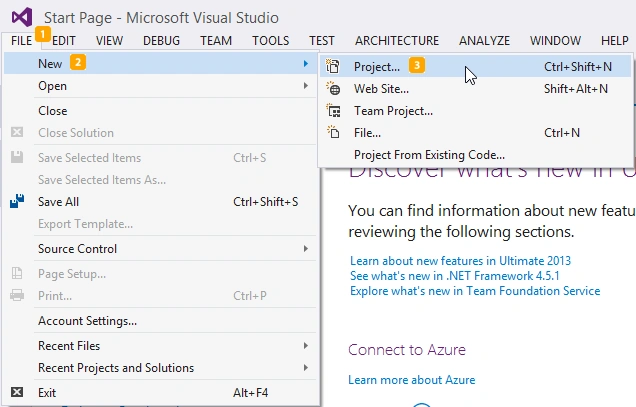
- Select ‘File’ menu, expand ‘New’ and click on ‘Project…’
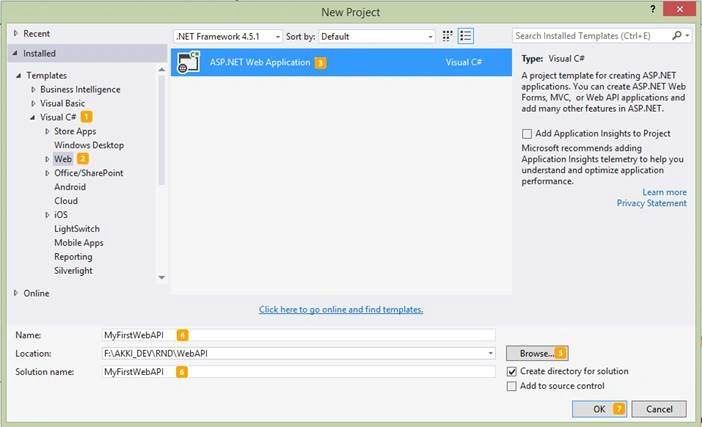
- Expand ‘Visual C#’ and select ‘Web’ from the left panel.
- Select ‘ASP.NET Web Application’.
- Provide appropriate name of the application and select the location.
- Click on ‘OK’ button.
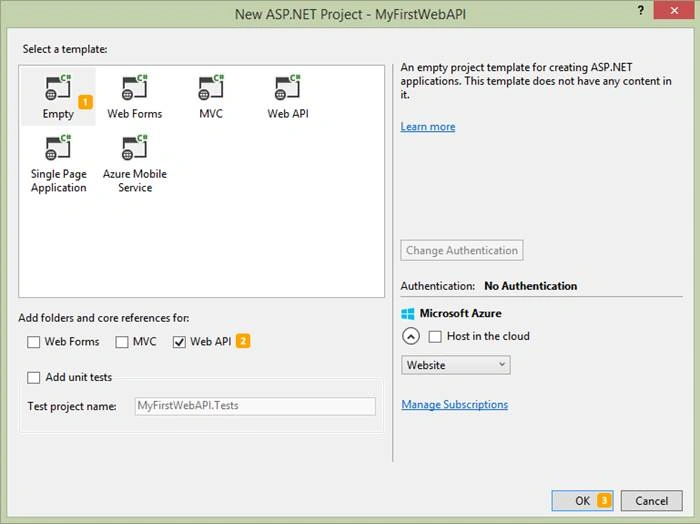
- Select ‘Empty’ as a template and check ‘Web API’ check box.
- Press ‘OK’ button and it will create an empty Web API project.
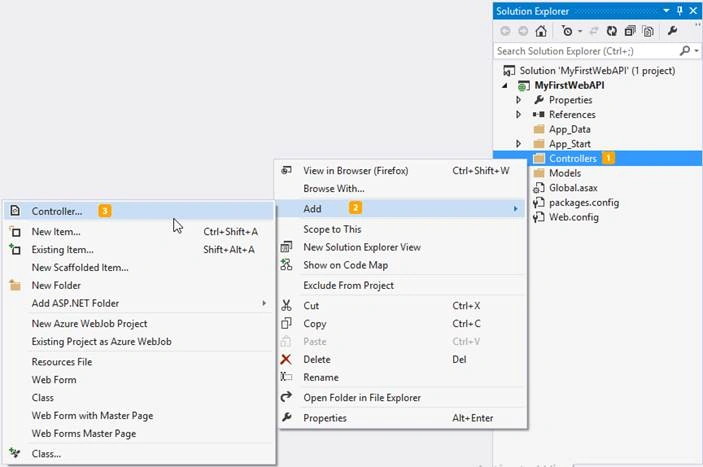
- Right click on ‘Controllers’, expand ‘Add’ and click on ‘Controller…’
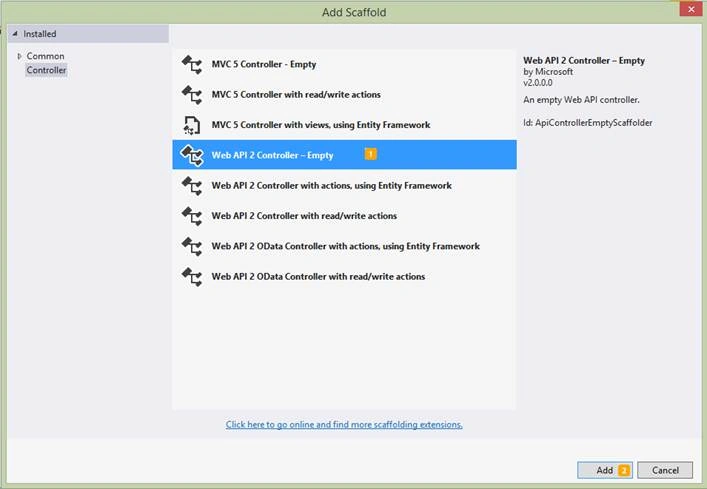
- Select ‘Web API 2 Controller – Empty’ and press ‘Add’ button,
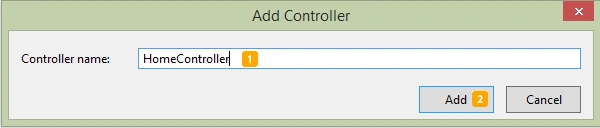
- Provide appropriate name and press ‘Add’ button,
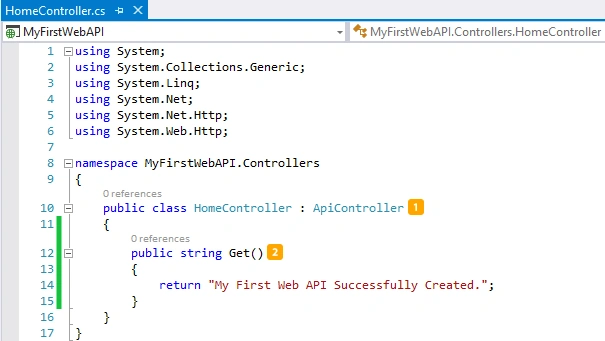
- This controller is inherited from API controller with the namespace System.Web.Http. ApiController defines properties and methods for controller.
- Create one Get method which will return static string.
- Now let’s go through the WebApiConfig file where routes are mapped. MapHttpRoute maps the specified route template and sets default route values.
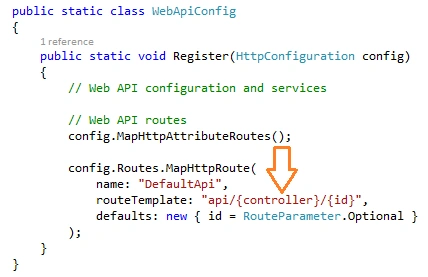
- Run the application and as per route template add first API, then controller i.e. Home and Api method i.e. Get.
- You will get the string in the browser, returned by the Get method.
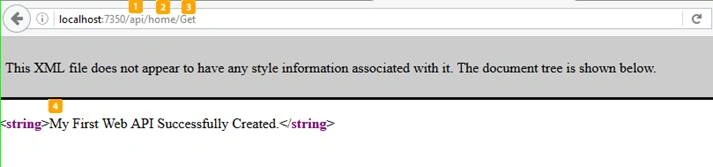
Here it seems that API in the route is mandatory but it is not like that. It is just a convention. You can remove ‘api’ from route template and still it works.
Conclusion
Here in this article we have seen only Get method, which means we have used only ‘GET’ http verb. In the next article we will see other HTTP methods like POST, PUT and DELETE.
Read more articles on ASP.NET:


Anil Kumar PradhanPosted Jul 7, 2016, 9:59 PM EDT
Very Useful Article...and nicely explained.
Vignesh ManiTOP 100Posted May 2, 2016, 8:06 AM EDT
nice
Debasis SahaTOP 100Posted May 2, 2016, 6:08 AM EDT
Nice One..
Bhuvanesh MohankumarPosted May 2, 2016, 2:53 AM EDT
Good one
Bhuvanesh MohankumarPosted May 2, 2016, 2:52 AM EDT
Good one
Sonu ChaudharyPosted May 2, 2016, 1:52 AM EDT
Thanks for sharing
Pankaj Kumar ChoudharyTOP 100Posted May 2, 2016, 1:46 AM EDT
Nice Article Sir...... I think this will be a great article series Best of luck ...........
Gowtham RajamanickamTOP 100Posted May 2, 2016, 1:05 AM EDT
good one..
Bhavik PatelPosted May 2, 2016, 12:41 AM EDT
good one
Thiruppathi RPosted May 2, 2016, 12:02 AM EDT
Nice Info