
Before reading this article, I highly recommended reading my previous articles on AngularJS.
- Brief Introduction of AngularJS
- Module and Controller in angularJS
- Bind data on view using ng-repeat in angularJs
- Repeating multiple elements in AngularJS
I am using my previous project so I am not going to do things like adding controller, view, js and bootstrap file in our project. You can find all the steps at Bind data on view using ng-repeat in AngularJS.
What filter is
Filter is a module provided by AngularJS. If you don’t know what module is, then please read my previous article on Module and Controller in AngularJS. There are nine components of filter which are provided by AngularJS. We can write custom as well.
- currency
- date
- filter
- json
- limitTo
- lowercase
- number
- uppercase
Currency:
It formats a number as currency. Default currency symbol is $(dollar).
- <td>{{data.Phone | currency}}
- </td>
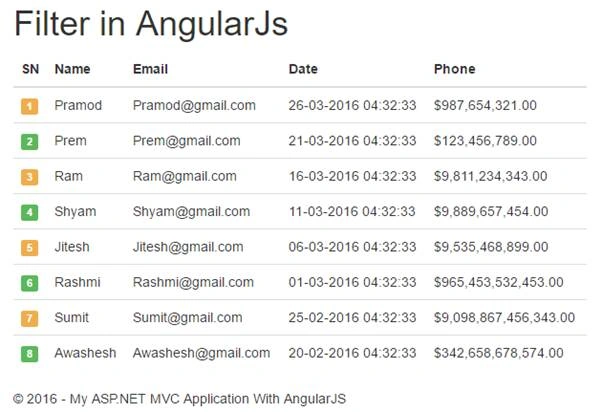
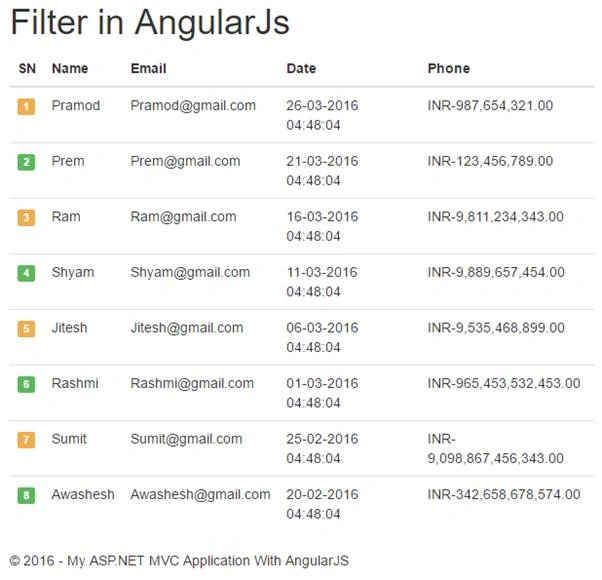
If I want that instead of $ as it appears in INR, then we have to write the following code. It take two parameters first and is about what we want to display before the number and second is how many numbers should display after the decimal. In this example I am passing two so it displays two numbers after the decimal.
- <td>{{data.Phone | currency :"INR-":2}}
- </td>
- using System;
- using System.Web.Mvc;
- namespace AngularWithMVC.Controllers
- {
- public class HomeController: Controller
- {
- public ActionResult Index()
- {
- ViewBag.Heading = "Filter in AngularJs";
- return View();
- }
- public JsonResult JsonValue()
- {
- var data = new []
- {
- new
- {
- Name = "Pramod", Email = "[email protected]", Phone = "987654321", Date = DateTime.Now.ToString()
- },
- new
- {
- Name = "Prem", Email = "[email protected]", Phone = "123456789", Date = DateTime.Now.AddDays(-5).ToString()
- },
- new
- {
- Name = "Ram", Email = "[email protected]", Phone = "9811234343", Date = DateTime.Now.AddDays(-10).ToString()
- },
- new
- {
- Name = "Shyam", Email = "[email protected]", Phone = "9889657454", Date = DateTime.Now.AddDays(-15).ToString()
- },
- new
- {
- Name = "Jitesh", Email = "[email protected]", Phone = "9535468899", Date = DateTime.Now.AddDays(-20).ToString()
- },
- new
- {
- Name = "Rashmi", Email = "[email protected]", Phone = "965453532453", Date = DateTime.Now.AddDays(-25).ToString()
- },
- new
- {
- Name = "Sumit", Email = "[email protected]", Phone = "9098867456343", Date = DateTime.Now.AddDays(-30).ToString()
- },
- new
- {
- Name = "Awashesh", Email = "[email protected]", Phone = "342658678574", Date = DateTime.Now.AddDays(-35).ToString()
- }
- };
- return Json(data, JsonRequestBehavior.AllowGet);
- }
- }
- }
Date:
It formats the date on the basis of the request of how we want to show the date. By default it shows the date format which comes from backend, but we change to it according to our need.
The best practise is that we manipulate the date on the server side and use the client side to display. But in this demo I am going to show how to do manipulation with date in AngularJS.
In above image we see the value of date column; it is in “dd-mm-yyyy hh-mm-ss”. It only comes when we choose date as string. But what if when we pass date as date not as string? Then output looks like the following.
- public JsonResult JsonValue()
- {
- var data = new []
- {
- new
- {
- Name = "Pramod", Email = "[email protected]", Phone = "987654321", Date = DateTime.Now
- },
- new
- {
- Name = "Prem", Email = "[email protected]", Phone = "123456789", Date = DateTime.Now.AddDays(-5)
- },
- new
- {
- Name = "Ram", Email = "[email protected]", Phone = "9811234343", Date = DateTime.Now.AddDays(-10)
- },
- new
- {
- Name = "Shyam", Email = "[email protected]", Phone = "9889657454", Date = DateTime.Now.AddDays(-15)
- },
- new
- {
- Name = "Jitesh", Email = "[email protected]", Phone = "9535468899", Date = DateTime.Now.AddDays(-20)
- },
- new
- {
- Name = "Rashmi", Email = "[email protected]", Phone = "965453532453", Date = DateTime.Now.AddDays(-25)
- },
- new
- {
- Name = "Sumit", Email = "[email protected]", Phone = "9098867456343", Date = DateTime.Now.AddDays(-30)
- },
- new
- {
- Name = "Awashesh", Email = "[email protected]", Phone = "342658678574", Date = DateTime.Now.AddDays(-35)
- }
- };
- return Json(data, JsonRequestBehavior.AllowGet);
- }
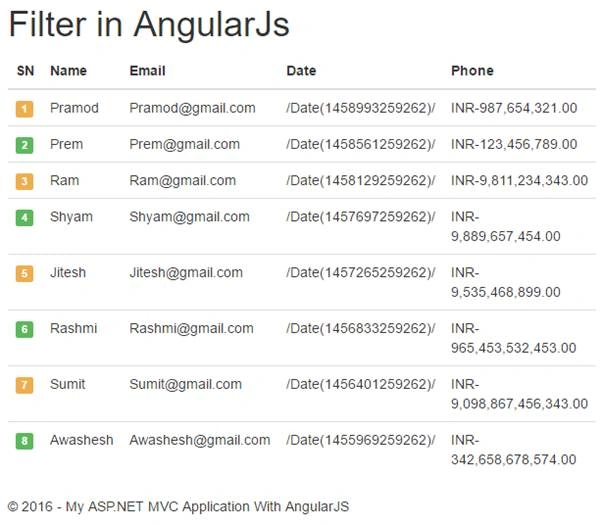
As of now I am going to write a method in the data.js file for displaying the correct format for date.
Data.js
- $scope.ConvertDate = function(inputDate)
- {
- var date = inputDate.replace(/\/Date\((.*?)\)\//gi, "$1");
- return date;
- }
- @ {
- ViewBag.Title = "Index";
- Layout = "~/Views/Shared/_layout.cshtml";
- } <
- script src = "~/Scripts/Data/Data.js" > < /script> <
- div class = "table-responsive"
- style = "overflow:hidden; width:900px;"
- ng - app = "myModule"
- ng - controller = "myController" >
- <
- div style = "padding-left:20px;" >
- <
- table class = "table"
- style = "width:900px" >
- <
- thead >
- <
- tr >
- <
- th > SN < /th> <
- th > Name < /th> <
- th > Email < /th> <
- th > Date < /th> <
- th > Full Date < /th> <
- th > Phone < /th> <
- /tr> <
- /thead> <
- tbody >
- <
- tr ng - repeat = "data in dataList" >
- <
- td > < span ng - class = "$odd?'label label-success' : 'label label-warning'" > {
- {
- $index + 1
- }
- } < /span></td >
- <
- td ng - bind = "data.Name" > < /td> <
- td ng - bind = "data.Email" > < /td> <
- td > {
- {
- ConvertDate(data.Date) | date
- }
- } < /td> <
- td > {
- {
- ConvertDate(data.Date) | date: 'fullDate'
- }
- } < /td> <
- td > {
- {
- data.Phone | currency: "INR-": 2
- }
- } < /td>
- <
- /tr> <
- /tbody> <
- /table> <
- /div> <
- /div>
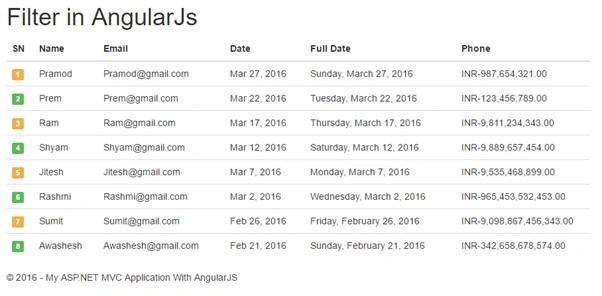
Note: This approach is not good. I am going to write a custom filter for it.
Filter:
Filters are used to modify the data. Filter is nothing but it a subset of that array in which we are trying to search and return a new array.
I am making some changes in index.cshtml file. Add the following code just after div which contains ng-app and ng-controller attribute.
- <div style="padding-left:20px;"><input style="width:850px" class="form-control" type="text" ng-model="searchText" placeholder="Search here" /></div>
- <tr ng-repeat="data in dataList | filter:searchText">
In the next article we will discuss other filters as well.
Hope this article was helpful.
Read more articles on AngularJS:


Pramod ThakurPosted Apr 2, 2016, 7:31 PM EDT
thank you Gowtham Rajamanickam..
Pramod ThakurPosted Apr 2, 2016, 7:31 PM EDT
thank you Rahul Saxena..
Gowtham RajamanickamTOP 100Posted Apr 2, 2016, 8:37 AM EDT
Good one..
Rahul Kumar SaxenaTOP 100Posted Apr 2, 2016, 8:34 AM EDT
Good One
Pramod ThakurPosted Apr 2, 2016, 1:16 AM EDT
thanks Gopi Chand..
Pramod ThakurPosted Apr 2, 2016, 1:16 AM EDT
thanks Shashangka Shekhar...
Gopi ChandPosted Apr 1, 2016, 8:53 AM EDT
Great effort
Shashangka ShekharPosted Apr 1, 2016, 8:13 AM EDT
helpful thanks :)
Pramod ThakurPosted Apr 1, 2016, 6:28 AM EDT
SystemTak Sistemas not getting you what are you trying to say..
Pramod ThakurPosted Apr 1, 2016, 6:26 AM EDT
tnx Rajeev Punhani...
SystemTak SistemasPosted Apr 1, 2016, 4:22 AM EDT
Nice Thanks from shared know how !
Rajeev PunhaniPosted Apr 1, 2016, 2:54 AM EDT
Nice Share.
Pramod ThakurPosted Mar 31, 2016, 9:34 AM EDT
thank you Vignesh Mani...
Pramod ThakurPosted Mar 31, 2016, 9:34 AM EDT
tnx Jaipal Reddy
Vignesh ManiTOP 100Posted Mar 31, 2016, 4:52 AM EDT
good one
Jaipal ReddyPosted Mar 31, 2016, 3:00 AM EDT
Nice one. .