
In this series, we will learn step by step how to implement CRUD (Create, Read, Update, Delete) operations using Angular 8 With Web API and SQL database.
Table of contents for this article
- Install or update
- Introduction of CLI and CLI commands
- Install and Create Sample application
- Implement Routing
- Create Services
- Implement CRUD operations functionality
- Run and test the application
Requirement
The following tools and frameworks are required.
- Node.JS, NPM
- Angular CLI
- Visual Studio Code
- Web API
Install or Update
Follow the given link to install node.js -- that includes npm as well. The given package have latest version of node.js (12.14.1) and npm (6.13.4).
https://nodejs.org/en/download/
To check if you have installed nodejs and npm, follow these commands using the command prompt.
- node -v
- npm -v
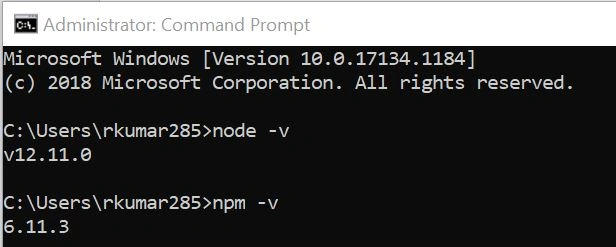
Provide the following command to install Angular CLI,
npm install -g @angular/cli
Or
npm install -g @angular/cli@latest
Use this command to check the installed CLI version using command line.
ng –version
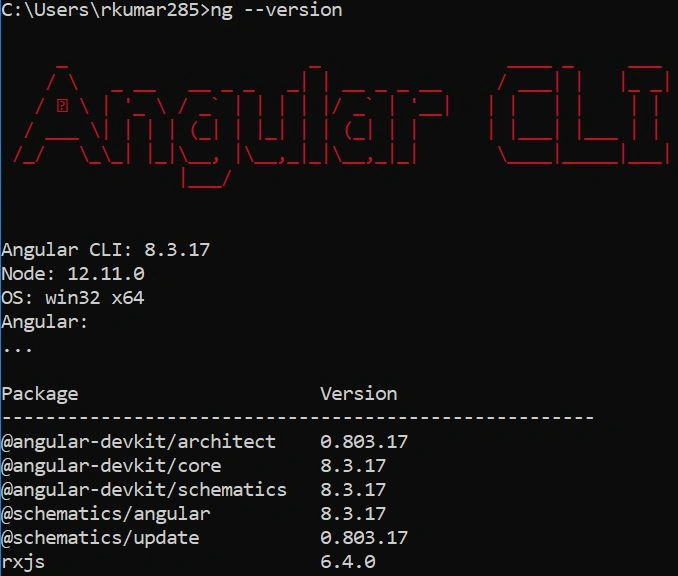
We can install Visual Studio code from given link.
Introduction of CLI and CLI Commands
The Angular CLI is a command-line interface tool that you use to initialize, develop, scaffold, and maintain Angular applications. You can use the tool directly in a command shell, or indirectly through an interactive UI such as Angular Console.
CLI Commands
|
Command
|
Description
|
|
add
|
Adds support for an external library to your project.
|
|
build
|
Compiles an Angular app into an output directory named dist/ at the given output path. Must be executed from within a workspace directory.
|
|
config
|
Retrieves or sets Angular configuration values in the angular.json file for the workspace.
|
|
deploy
|
Invokes the deploy builder for a specified project or for the default project in the workspace.
|
|
generate
|
Generates and/or modifies files based on a schematic.
|
|
help
|
Lists available commands and their short descriptions.
|
|
new
|
Creates a new workspace and an initial Angular app.
|
|
run
|
Runs an Architect target with an optional custom builder configuration defined in your project.
|
|
serve
|
Builds and serves your app, rebuilding on file changes.
|
|
test
|
Runs unit tests in a project.
|
|
update
|
Updates your application and its dependencies.
|
Create a Sample Application
Start Visual Studio Code and open terminal in Visual Studio Code and type the following command to create a new project.
ng new ng-crud-sample

After that, hit ENTER. It will take a while to create the project.
You will be asked to add Angular routings (y/N), I am adding y.
Then it would ask which stylesheet format you would like to use. I am adding Saas, it’s up to you which you want to use.

Wait until project structure is ready.

Once created, the project should look like this,
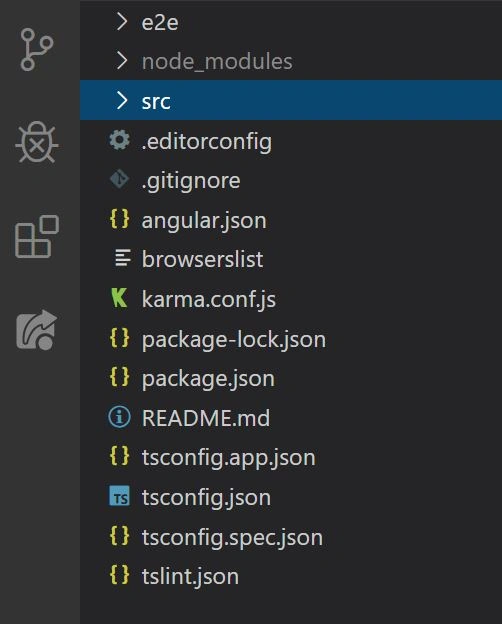
We are done with installation and project structure here. In the next part we will learn how to implement routing and how to use Web API in Angular Services and Implement CRUD operations with database.
Conclusion
In this article, we have learned how to install Angular framework and how to set up a new Angular application using Visual Studio Code.


Sourav Kumar DasPosted Jan 25, 2020, 7:24 AM EST
Nice and useful article Sir on CRUD operation in Angular.