
Overview
In this article, we will learn about AngularJS UI Custom Data, with an example. Here, we will add some custom data to our Controller. Let’s see how.
For more articles on AngularJS, pleasee refer to these links.
- Overview Of AngularJS
- Modules And Controller In AngularJS
- Controllers in AngularJS
- AngularJS ng src Directive
- AngularJS ng-Repeat Directive
- Handling Events In AngularJS
- How To Use Two-Way Data Binding In AngularJS
- Filters In AngularJS
- Sorting Data In AngularJS
- Sorting Rows By Table Header In AngularJS
- Creating Custom Filters In AngularJS
- ng-Hide And ng-Show In AngularJS
- ng-init Directive In AngularJS
- Search And MultiSearch In AngularJS
- ngInclude Directive In AngularJS
- $http Service In AngularJS
- Consuming ASP.NET WebService In AngularJS
- AnchorScroll Service In AngularJS
- AngularJS Page Refresh Problems
- RouteParams In AngularJS
- Angular AnchorScroll With Database Part
- AngularJS Routing Using WebService
- AngularJS Controller As Syntax
- AngularJS Nested Scopes And Controllers As Syntax
- AngularJS CaseSensitive And Inline Templates
To add the customData to a state, we use data property. So, let’s go back to our Controller and add a data property. Also, we will add some customData to our various states, like /home and /courses in our script.js file.
- .state("home", {
- url: "/home",
- templateUrl: "Templates/home.html",
- controller: "homeController as homeCtrl",
- data:{
- customData1: "Home State Custom Data 1",
- customData2:"Home Statae custom Data 2"
- }
- })
- .state("courses", {
- url: "/courses",
- templateUrl: "Templates/courses.html",
- controller: "coursesController as coursesCtrl",
- data: {
- customData1: "Courses State Custom Data 1",
- customData2: "Courses Statae custom Data 2"
- }
- })
Now, let’s go to homeController function. To read the customData, we are going to use the state service.
- .controller("homeController", function ($state) {
- this.message = "Home Page";
- this.homeCustomData1 = $state.current.data.customData1;
- })
So, let’s do it for customData2 property,
- this.homeCustomData2 = $state.current.data.customData2;
- this.coursesCustomData1 = $state.get("courses").data.customData1;
Let’s do the same thing for CustomData2.
- this.coursesCustomData2 = $state.get("courses").data.customData2;
- /// <reference path="angular.min.js" />
- /// <reference path="angular-route.min.js" />
- var app = angular.module("Demo", ["ui.router"])
- .config(function ($stateProvider, $urlMatcherFactoryProvider, $urlRouterProvider) {
- // $routeProvider.caseInsensitiveMatch = true;
- $urlRouterProvider.otherwise("/home");
- $urlMatcherFactoryProvider.caseInsensitive(true);
- $stateProvider
- .state("home", {
- url: "/home",
- templateUrl: "Templates/home.html",
- controller: "homeController as homeCtrl",
- data:{
- customData1: "Home State Custom Data 1",
- customData2:"Home Statae custom Data 2"
- }
- })
- .state("courses", {
- url: "/courses",
- templateUrl: "Templates/courses.html",
- controller: "coursesController as coursesCtrl",
- data: {
- customData1: "Courses State Custom Data 1",
- customData2: "Courses Statae custom Data 2"
- }
- })
- .state("students", {
- url: "/students",
- templateUrl: "Templates/students.html",
- controller: "studentsController as studentsCtrl",
- resolve: {
- studentsList: function ($http) {
- return $http.get("StudentService.asmx/GetAllStudents")
- .then(function (response) {
- return response.data;
- })
- }
- }
- })
- .state("studentDetails", {
- url: "/students/:id",
- templateUrl: "Templates/studentDetail.html",
- controller: "studentdetailcontroller as StudentDetailCtrl"
- })
- // .when("/studentssearch/:name?", {
- // templateurl: "templates/studentssearch.html",
- // controller: "studentssearchcontroller as studentssearchctrl"
- // })
- // .otherwise({
- // redirectto: "/home"
- // })
- // $locationprovider.html5mode(true);
- })
- .controller("homeController", function ($state) {
- this.message = "Home Page";
- this.homeCustomData1 = $state.current.data.customData1;
- this.homeCustomData2 = $state.current.data.customData2;
- this.coursesCustomData1 = $state.get("courses").data.customData1;
- this.coursesCustomData2 = $state.get("courses").data.customData2;
- })
- .controller("coursesController", function () {
- this.courses = ["c#", "SQL", "Oracle"];
- })
- .controller("studentsController", function (studentsList, $state, $location) {
- var vm = this;
- vm.searchStudents = function () {
- if (vm.name) {
- $location.url("/studentsSearch/" + vm.name);
- }
- else {
- $location.url("/studentsSearch/");
- }
- }
- vm.reloadData = function () {
- $state.reload();
- }
- vm.students = studentsList;
- })
- .controller("studentdetailcontroller", function ($http, $stateParams) {
- var vm = this;
- $http({
- url: "StudentService.asmx/GetStudents",
- method: "get",
- params: {id:$stateParams.id}
- })
- .then(function (response) {
- vm.student = response.data;
- })
- })
- //.controller("studentsSearchController", function ($http, $routeParams) {
- // var vm = this;
- // if ($routeParams.name) {
- // $http({
- // url: "StudentService.asmx/GetStudentsByName",
- // params: { name: $routeParams.name },
- // })
- //.then(function (response) {
- // vm.students = response.data;
- //})
- // }
- // else {
- // $http.get("StudentService.asmx/GetAllStudents")
- // .then(function (response) {
- // vm.students = response.data;
- // })
- // }
- <fieldset>
- <legend>Home
- </legend>
- CustomData1 :{{homeCtrl.homeCustomData1}} <br/>
- CustomData2 :{{homeCtrl.homeCustomData2}}
- </fieldset>
Similarly, take another field set for courses.
- <fieldset>
- <legend>
- Courses
- </legend>
- CustomData1 :{{homeCtrl.coursesCustomData1}} <br />
- CustomData2 :{{homeCtrl.coursesCustomData2}}
- </fieldset>
- <h1>{{homeCtrl.message}}</h1>
- <div>
- In 1988, Microsoft joined Ashton-Tate and Sybase to create a variant of Sybase SQL Server for IBM OS/2 (then developed jointly with Microsoft), which was released the following year.[4] This was the first version of Microsoft SQL Server, and served as Microsoft's entry to the enterprise-level database market, competing against Oracle, IBM, and later, Sybase. SQL Server 4.2 was shipped in 1992, bundled with OS/2 version 1.3, followed by version 4.21 for Windows NT, released alongside Windows NT 3.1. SQL Server 6.0 was the first version designed for NT, and did not include any direction from Sybase.
- <ul>
- <li>The protocol layer implements the external interface to SQL Server. All operations that can be invoked on SQL Server are communicated to it via a Microsoft-defined format, called Tabular Data Stream (TDS). TDS is an application layer protocol, used to transfer data between a database server and a client. Initially designed and developed by Sybase Inc.</li>
- </ul>
- <fieldset>
- <legend>Home
- </legend>
- CustomData1 :{{homeCtrl.homeCustomData1}} <br/>
- CustomData2 :{{homeCtrl.homeCustomData2}}
- </fieldset>
- <fieldset>
- <legend>
- Courses
- </legend>
- CustomData1 :{{homeCtrl.coursesCustomData1}} <br />
- CustomData2 :{{homeCtrl.coursesCustomData2}}
- </fieldset>
- </div>
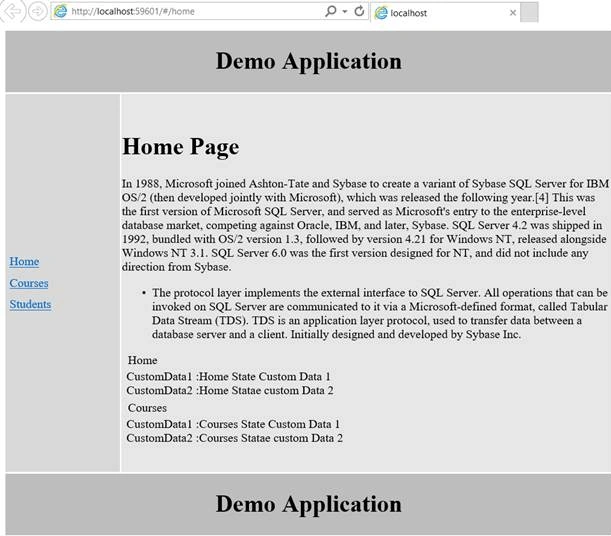
You can see the home and courses custom data at the bottom, respectively .
To access the state custom data from its own Controller, we use -
$state.current.data.customPropertyName
To access state custom data from a different Controller, we use -
$state.get(“statename”).data.customPropertyName
Conclusion - So, this was all about AngularJS UI CustomData. Hope this article was helpful!!


Vignesh ManiTOP 100Posted Sep 19, 2016, 4:26 AM EDT
Nice One