
AngularJS provides animation for common directives like ngRepeat , ngSwitch, ngInclude,ngClass and ngView. AngularJS also provides animation for custom directives using the $animate service. It provides animated transitions, with help from CSS. Animations in AngularJS are completely based on CSS classes. As long as we have CSS classes attached to an HTML element within our website, we can apply animations to it.
Example:
- <html>
- <head>
- <title>Angular JS Example</title>
- <style>
- div {
- transition: width2s, height4s;
- background-color: red;
- height: 150px;
- width: 150%;
- position: relative;
- top: 10px;
- left: 10px;
- }
- .ng-hide {
- height: 0;
- width: 0;
- background-color: blue;
- top: -100px;
- left: 150px;
- }
- </style>
- <scriptsrc="http://ajax.googleapis.com/ajax/libs/angularjs/1.4.8/angular.min.js">
- </script>
- <scriptsrc="http://ajax.googleapis.com/ajax/libs/angularjs/1.4.8/angular-animate.js">
- </script>
- </head>
- <bodyng-app="ngAnimate">
- <h2>AngularJS Animation</h2>
- <h1>Hide this DIV: <inputtype="checkbox"ng-model="myCheck"></h1>
- <divng-hide="myCheck">
- <pre><h2>During the Animation color of Div
- Change from red to blue
- </h2></pre>
- </div>
- </body>
- </html>
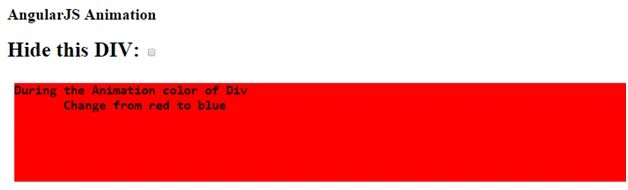
After animation starts the following effect will occur.
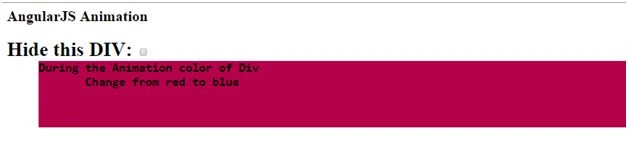
Above is a quick example of ng-hide directive that enables the animation.
How implement Animation in Application
Firstly, you need to include the AngularJS Animation in your application. You can refer to the following link:
- <scriptsrc="http://ajax.googleapis.com/ajax/libs/angularjs/1.4.8/angular-animate.js"></script>
- <body ng-app="ngAnimate">
- <body ng-app="myApp">
- <script>
- var app = angular.module('myApp', ['ngAnimate']);
- </script>
We know that animation in AngularJS is completely based on CSS classes. If we have a CSS class attached to an HTML element within our website, we can apply animations to it. The ngAnimate module is used for adds and removes classes for HTML elements. The ngAnimate module does not animate our HTML elements, but when ngAnimate notice certain events, like hide or show of an HTML element, it add or remove the CSS classes.
The following directives are used for adding or removing the classes: ng-show, ng-hide, ng-view, ng-class, ng-if, ng-include, ng-switch, ng-repeat. There are some other directives that are used for animation like ng-leave, ng-enter, ng-move.
Example:
- <html>
- <head>
- <title>Angular JS Example</title>
- <style>
- .add-class-add,
- .css-class-remove {
- -webkit-transition: allcubic-bezier(0.150, 0.260, 0.410, 0.760)0.2s;
- -moz-transition: allcubic-bezier(0.250, 0.460, 0.450, 0.940)0.3s;
- -o-transition: allcubic-bezier(0.150, 0.360, 0.450, 0.940)0.2s;
- transition: allcubic-bezier(0.250, 0.460, 0.550, 0.940)0.5s;
- }
- .add-class,
- .add-class-add.css-class-add-active {
- color: red;
- font-size: 3em;
- }
- .add-class:hover {
- -webkit-transform: rotate(360deg);
- background: #9351A6;
- border-radius: 50%;
- -webkit-transition: all0.5sease-in;
- -moz-transition: all0.5sease-in-out;
- -o-transition: all0.5sease-out;
- transition: all0.5sease-in-out;
- }
- .css-class-remove.css-class-remove-active {
- font-size: 1.0em;
- color: black;
- }
- .rotate {}
- </style>
- <scriptsrc="http://ajax.googleapis.com/ajax/libs/angularjs/1.4.8/angular.min.js">
- </script>
- <scriptsrc="http://ajax.googleapis.com/ajax/libs/angularjs/1.4.8/angular-animate.js">
- </script>
- </head>
- <bodyng-app="ngAnimate">
- <h2>AngularJS Animation</h2>
- <inputtype="button" style="height:60px;width:160px;font-size:30px" value="Apply" ng-click="myclass='add-class'">
- <inputtype="button" style="height:60px;width:160px;font-size:30px" value="Reset" ng-click="myclass=''">
- <br>
- <divng-class="myclass" style="background-color:blue; height:200px; width:400px">Div Will Rotate</div>
- </body>
- </html>
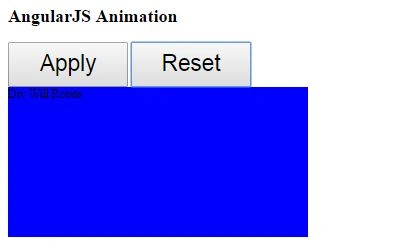
After that click on “Apply” button.
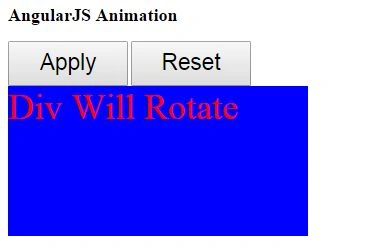
On mouse over event:
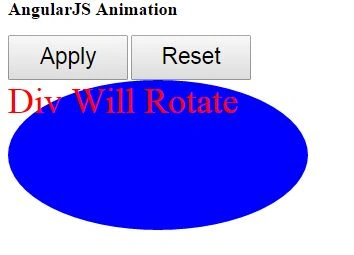
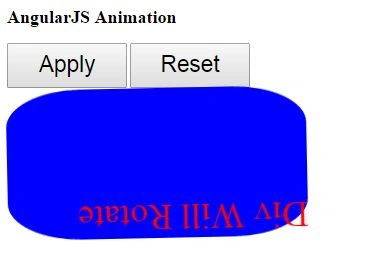
In above example we are using “ng-class” directive and on the activation of this directive we are adding “add-class.” This class contains events like hover and remove.
Types of Animation
AngularJS supports two types of animation: CSS based animation and JavaScript based animation. For both CSS and JS based animations it must be required that both have a matching CSS class that exists both in the registered animation and within the HTML element that the animation will be triggered on.
CSS based Animation
CSS based animation doesn’t require any javaScriptcode, using the CSS class we can create animation that will be picked up by Angular when the underlying directive performs an operation. Class based animations are triggered via ngClass, ngShow, ngHide and other directives.
Example:
- <html>
- <head>
- <title>Angular JS Example</title>
- <style>
- .animate.ng-enter {
- transition: 0.5slinearall;
- opacity: 0;
- }
- /*The finishing CSS styles for the enter animation*/
- .animate.ng-enter.ng-enter-active {
- opacity: 1;
- }
- .animate:hover {
- width: 300px;
- height: 300px;
- -webkit-transform: rotate(180deg);
- /*Safari*/
- transform: rotate(90deg);
- transition-property: width;
- transition-duration: 5s;
- transition-delay: 2s;
- }
- </style>
- <scriptsrc="http://ajax.googleapis.com/ajax/libs/angularjs/1.4.8/angular.min.js">
- </script>
- <scriptsrc="http://ajax.googleapis.com/ajax/libs/angularjs/1.4.8/angular-animate.js">
- </script>
- </head>
- <bodyng-app="ngAnimate">
- <divstyle="height:200px ;width:400px;font-size:24px; background-color:darkorange" ng-if="bool" class="animate">
- This is a example of css based animation
- </div>
- <buttonng-click="bool=true">Fade Me In !</button>
- <buttonng-click="bool=false">Fade me Out !</button>
- </body>
- </html>
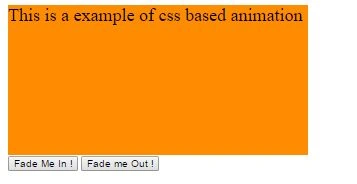
On page load style of page:

After clicking on “Fade Me In!” button style of page.
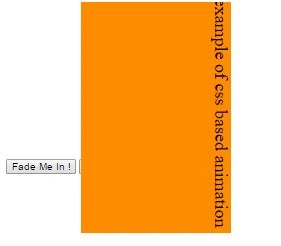
On mouse over:
JavaScript Based Animation
Animation in AngularJS can also be applied using JavaScript. This approach is similar to CSS based animation, we are required to register the animation on the module using the module.animate function.
Example:
- <html>
- <head>
- <title>Angular JS Example</title>
- <script src="http://ajax.googleapis.com/ajax/libs/angularjs/1.4.8/angular.min.js">
- </script>
- <script src="http://ajax.googleapis.com/ajax/libs/angularjs/1.4.8/angular-animate.js">
- </script>
- <script>
- var myApp = angular.module('mainModule', ['ngAnimate']);
- myApp.animation('.repeat-item', function() {
- return {
- enter: function(element, done) {
- runTheAnimation(element, done);
- return function(cancelled) {
- if (cancelled) {
- stopTheAnimation();
- } else {
- completeTheAnimation();
- }
- }
- },
- addClass: function(element, className, done) {
- if (className == 'hide') {
- runTheHideAnimation(element, done);
- } else {
- runTheAnimation(element, done);
- }
- return functiononEnd(element, done) {};
- },
- removeClass: function(element, className, done) {
- if (className == 'hide') {
- runTheShowAnimation(element, done);
- } else {
- runTheAnimation(element, done);
- }
- return functiononEnd(element, done) {};
- },
- };
- });
- </script>
- <style>
- .repeat-item.ng-enter,
- .repeat-item.ng-leave {
- -webkit-transition: 0.5slinearall;
- transition: 0.5slinearall;
- background-color: red
- }
- .repeat-item.ng-enter,
- .repeat-item.ng-leave.ng-leave-active {
- opacity: 0.3;
- background-color: blue;
- }
- .repeat-item.ng-leave,
- .repeat-item.ng-enter.ng-enter-active {
- opacity: 1;
- }
- .ng-hide {
- display: none!important;
- }
- .my-elm {
- -webkit-transition: 0.6slinearall;
- transition: 0.4slinearall;
- opacity: 1;
- }
- .ng-hide {
- background-color: orange;
- }
- .my-elm.ng-hide {
- opacity: 0.2;
- }
- </style>
- </head>
- <body ng-app="mainModule">
- <div style="margin-left:100px;margin-top:20px; font-size:24px">
- <h1>Animation Using Javascript</h1>
- <div ng-init="items=['pankaj','sandeep','rahul','neeraj','sanjeev','divyanshu']">
- <input placeholder="serach name" ng-model="f" />
- <div ng-repeat="obj in items | filter:f" class="repeat-item">
- {{obj}}
- </div>
- </div>
- </div>
- </body>
- </html>
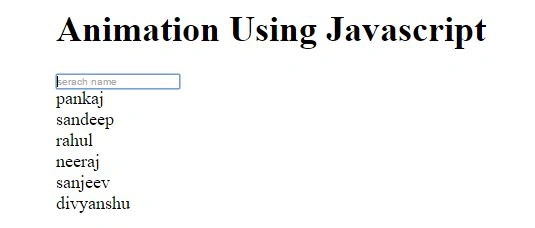
At starting of page load.
On key press the following effect will occur,
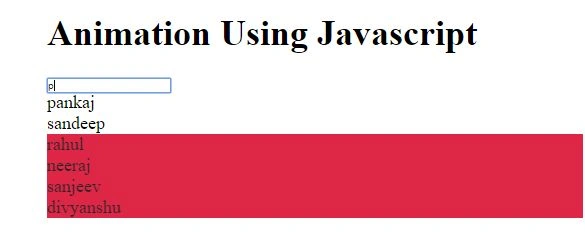
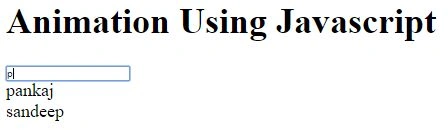
In the above example we are applying animation for “ng-repeat” directive. Animations in AngularJS can also be applied by the combination of CSS and JavaScript or using the $animate for custom directive.
Read more articles on AngularJS:


Vivek KumarPosted Apr 28, 2016, 10:56 AM EDT
Good one
Gowtham RajamanickamTOP 100Posted Apr 2, 2016, 8:41 AM EDT
Good one..
Ehsan SajjadPosted Feb 28, 2016, 6:29 AM EST
Good one
Pankaj Kumar ChoudharyTOP 100Posted Feb 25, 2016, 4:01 PM EST
Thanks Sonu Chaudhary I will try to post another article on this topic........
Pankaj Kumar ChoudharyTOP 100Posted Feb 25, 2016, 4:01 PM EST
Thanks Pramod Thakur.........
Pankaj Kumar ChoudharyTOP 100Posted Feb 25, 2016, 4:00 PM EST
Thanks Sibeesh Sir.......
Pankaj Kumar ChoudharyTOP 100Posted Feb 25, 2016, 4:00 PM EST
Thanks Vignesh Mani Sir.........
Pankaj Kumar ChoudharyTOP 100Posted Feb 25, 2016, 3:59 PM EST
Thanks Mohammed Ibrahim Sir........
Pankaj Kumar ChoudharyTOP 100Posted Feb 25, 2016, 3:59 PM EST
Thanks Shubham Kumar Sir......
Pankaj Kumar ChoudharyTOP 100Posted Feb 25, 2016, 3:58 PM EST
Thanks Raja T.......
Pankaj Kumar ChoudharyTOP 100Posted Feb 25, 2016, 3:58 PM EST
Thanks Humayun Kabir Mamun............
Sonu ChaudharyPosted Feb 25, 2016, 1:16 AM EST
plz upload some more artical on this topice
Pramod ThakurPosted Feb 24, 2016, 9:25 PM EST
Nice..
Sibeesh VenuTOP 100Posted Feb 24, 2016, 7:46 PM EST
Nice Share
Vignesh ManiTOP 100Posted Feb 24, 2016, 1:09 PM EST
Good one
Mohammed IbrahimPosted Feb 24, 2016, 10:59 AM EST
nice
Shubham KumarPosted Feb 24, 2016, 2:32 AM EST
nice
Raja TPosted Feb 24, 2016, 1:12 AM EST
Good, Thanks for sharing
Humayun Kabir MamunPosted Feb 23, 2016, 11:49 PM EST
Nice...