Overview
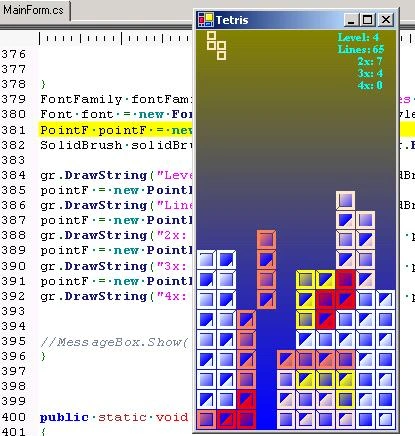
Just another implementation of tetris
j -move left
l - move right
i - rotate
k - drop
r - restart
There is no score, just lines, levels and some statistics (2x - number of times, two lines where removed ). That's just a brief implementation, that introduce some usage of GDU+ and Windows.Forms. Exposes custom drawing control. Uses opaque background instead of real doublebuffering.
Another Tetris Game in C#
Here is another version of Tetris. This program uses opaque background instead of real double buffering.


Junaid InamPosted Dec 12, 2012, 8:35 PM EST
Amazing!!!! Good Work. By the way i had to change the keys to "wasd". Anyways goos work.
Chito CervantesPosted May 12, 2012, 10:32 PM EDT
OK....FORGET ABOUT THAT, I JUST FIND THAT THING BUT I HAVE ANOTHER PROBLEM...THE COMMANDS DOESN'T RESPOND (J, L, K, I AND R)
Chito CervantesPosted May 12, 2012, 10:26 PM EDT
HEY DUDE....BUT WHERE I CAN FIND THE START UP OBJECT THING??? PLEASE TELL ME
Paul AdamseditedPosted Dec 21, 2010, 4:17 PM ESTEdited Dec 21, 2010, 4:18 PM EST
1. Start a new C# project in Visual Studio 2. Drag the MainForm.cs file into the project, or right-click on the project and select Add --> Existing Item and browse to MainForm.cs file. 3. Change the Startup Object to TetPanel in the Project's properties. 4. Run
sourabh aggarwalPosted Sep 29, 2010, 5:54 PM EDT
i don't get the debug file so idon't abe to run it.
Nenad hdjshPosted Apr 19, 2010, 11:17 AM EDT
Can you send me the project in Visual studio 2005 tetris som simple tetris? pls
ushalPosted Jul 14, 2009, 6:26 AM EDT
I downloaded it and opened it with Visual Studios, but when i right click on it i cant seem to run the application-please help
SergioPosted Apr 5, 2009, 7:57 AM EDT
No explanation whatsoever of what the Pen tool is and why it is used in this example. Just some code plastered on the form. No use to beginners.