
Introduction
The project makes use of a class written by T. Clark to execute the actual
conversion, I found the project containing this very useful class located here
on the Code Project website: http://www.codeproject.com/Articles/29670/Converting-HL7-to-XML.
The application included here takes this class and wraps it up in a Windows Form
application. This application allows the user to open up the HL7 message in raw
format, uses T. Clark's class to convert it to XML, and then displays the XML in
a tree view control. The application also provides the means to save the XML
file as a true XML document and, based upon a query of the derived XML, sets the
default file name to the message control ID associated with the raw HL7
document.
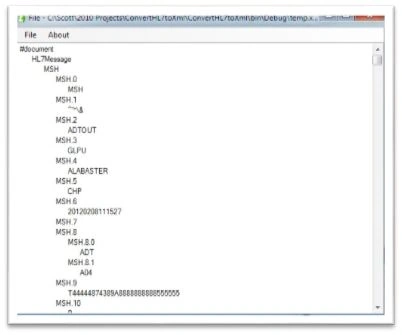
Figure 1: Application Displaying a Fake HL7 Message in a Tree View
Getting Started
Download and unzip the attached project to get started. Open the project up into
Visual Studio 2012 and review its contents. In general you will find a Windows
Forms application with a main application form cleverly entitled, "Form1.cs".
There is also an about box listed as, "AboutApp.cs". Aside from the two forms,
there is a single class, "HL7ToXmlConverter.cs" that wraps up the class written
by T. Clark and mentioned earlier in the article.
The main form contains the code necessary to open the raw files, convert the
files to XML using Clark's class, and to then save the raw HL7 messages having
been converted into true XML format. The conversion has worked flawlessly with
the HL7 messages I have encountered but you may need to alter the conversion
class if you have any problems working with different sources for the raw HL7
messages.
The Code: ConvertHL7ToXml Class
As was mentioned, this class was written by a T. Clark and is sited from the URL
provided previously. Clark has annotated his code and you may open the class and
read that annotation to study the approach used to handle the conversion.
The Code: Form1 Class
This class puts Clark's conversion class into the context of a Windows Form
based application. This form allows the user to open up the raw (non-XML format)
HL7 messages (which oddly enough carry the .xml extension). Once opened and
converted to XML, the class temporarily stores the true XML file, and then
displays the XML document in a tree view control as is shown in Figure 1 of this
document. The class also allows the user to save the file in proper XML format
to the file system; in so doing, the code queries the XML document to obtain the
message control ID and uses that message control ID as the default file name.
The system I am using now initially saves the HL7 messages using a GUID as the
file name, this GUID does not identify the records in any meaningful way and it
makes evaluating message errors more difficult as finding the file needed cannot
be accomplished using the GUID file name. The GUID provided as a file name never
appears in any part of the message itself and therefore it is never captured nor
stored into the database built from the messages; at that, if you wish to look
at the raw message.
The code for the entire class is presented below; it is annotated to describe
the purpose of each part of the code:
using System;
using System.Linq;
using System.Windows.Forms;
using System.Xml;
using System.IO;
using System.Xml.XPath;
namespace ConvertHL7ToXml
{ public partial class Form1 : Form { // the file to be converted; this is the HL7 message in its raw format; even // though it uses an xml file extension, is it not xml but rather is a // pipe and character delimited file with a specific definition String sourceFilePath; // a temporary place to save the file after it is converted to true xml format String tempFilePath; // the actual xml document to be XmlDocument doc = new XmlDocument(); /// <summary> /// Constructor /// </summary> public Form1() { InitializeComponent(); // define the temporary xml file storage path tempFilePath = Application.StartupPath + "\\temp.xml"; } /// <summary> /// Exit the application /// </summary> /// <param name="sender"></param> /// <param name="e"></param> private void ExitToolStripMenuItemClick(object sender, EventArgs e) { Application.Exit(); } /// <summary> /// Open an existing HL7 message file and convert it to actual XML, /// Then display the document in a tree view /// </summary> /// <param name="sender"></param> /// <param name="e"></param> private void OpenToolStripMenuItemClick(object sender, EventArgs e) { try { // define the open file dialog, since HLy messages are saved with // an xml extension (even though they are not xml) we will set up // the dialog to allow the user to open a file with that extension openFileDialog1.Title = "Open HL7 Message File"; openFileDialog1.Filter = "XML Files|*.xml"; openFileDialog1.DefaultExt = "XML"; openFileDialog1.FileName = string.Empty; // or you can use the dialog result openFileDialog1.ShowDialog(); // make sure we get a file name if (String.IsNullOrEmpty(openFileDialog1.FileName)) return; // set the file path member variable sourceFilePath = openFileDialog1.FileName; // read the contents of the file into a stream reader StreamReader sr = new StreamReader(sourceFilePath); string hl7Message = sr.ReadToEnd(); sr.Close(); // define a string to hold the xml returned from the convert to xml call, // refer to the HL7ToXmlConverter class by T. Clark for details on how // the conversion works string xmlFileContents = HL7ToXmlConverter.ConvertToXml(hl7Message); // save the returned XML into a temporary xml file for now, then we can // work with the xml to get it displayed in the treeview using (StreamWriter outfile = new StreamWriter(tempFilePath)) { outfile.Write(xmlFileContents); } // Clear out the treeview in case it has another xml file displayed in it treeXml.Nodes.Clear(); // set the wait cursor this.Cursor = Cursors.WaitCursor; // create a new xml doc XmlDocument doc = new XmlDocument(); try { // load the xml doc from the temporary xml file doc.Load(tempFilePath); // set the form text to display the file name this.Text = "File - " + tempFilePath; // return the cursor to normal this.Cursor = Cursors.Default; } catch (Exception ex1) { // return the cursor to normal this.Cursor = Cursors.Default; // and describe the error to the user MessageBox.Show(ex1.Message, "Error Opening File"); // since we had an error, don't try to display the file // in the treeview return; } // open the xml doc into the treeview for inspection PushToTreeView(doc, treeXml.Nodes); // open all the nodes after the treeview is populated treeXml.ExpandAll(); // restore the cursor to normal this.Cursor = Cursors.Default; } catch (Exception ex2) { // describe what went wrong in the event of an error MessageBox.Show(ex2.Message, "Unable to Open the Document"); } } /// <summary> /// Save the current open file as an xml document /// </summary> /// <param name="sender"></param> /// <param name="e"></param> private void SaveToolStripMenuItemClick(object sender, EventArgs e) { // configure the save file dialog to allow the user to save an xml file saveFileDialog1.Title = "Save XML File"; saveFileDialog1.Filter = "XML Files|*.xml"; saveFileDialog1.DefaultExt = "XML"; // leave the initial file name as an empty string, we // will replace that with the message control ID in // a minute but we will give the user the option of saving it // with a name of their choice saveFileDialog1.FileName = string.Empty; // load the temporary xml document into an instance of // the XML document we defined with class scope doc.Load(tempFilePath); // create a navigator so we can find the message control ID and use that // as the initial file name XPathNavigator navigator = doc.CreateNavigator(); // the message control ID is stored in the message header in the // 9th position string searchTerm = "//MSH/MSH.9"; // look for the node indicated in the search term XPathNodeIterator nodes = navigator.Select(searchTerm); // iterate through the nodes to find the value in the // selected node - should be one only while (nodes.MoveNext()) { // create an instance of a node from the // selected node XPathNavigator node = nodes.Current; // set the default file name to the value stored in the // selected node saveFileDialog1.FileName = node.InnerXml; } // open the dialog and get the user's OK DialogResult result = saveFileDialog1.ShowDialog(); if (result == System.Windows.Forms.DialogResult.OK) { // copy the temporary file to the new location and rename it // using the message control ID scraped from the xml document System.IO.File.Move(tempFilePath, saveFileDialog1.FileName); } } /// <summary> /// Show about box /// </summary> /// <param name="sender"></param> /// <param name="e"></param> private void AboutConvertToTrueXmlToolStripMenuItemClick(object sender, EventArgs e) { AboutApp f = new AboutApp(); f.ShowDialog(); } /// <summary> /// Populate the tree view using the xml obtained using T. Clark's xml converter class /// </summary> /// <param name="currentNode"></param> /// <param name="nodCollection"></param> private void PushToTreeView(XmlNode currentNode, TreeNodeCollection nodCollection) { TreeNode insertNode = nodCollection.Add(currentNode.Name); switch (currentNode.NodeType) { case XmlNodeType.Element: insertNode.Text = currentNode.Name; insertNode.Tag = "Element"; insertNode.ImageIndex = 1; break; case XmlNodeType.Attribute: insertNode.Text = "@" + currentNode.Name; insertNode.Tag = "Attribute"; insertNode.ImageIndex = 2; break; case XmlNodeType.Text: insertNode.Text = currentNode.Value; insertNode.Tag = "Text"; insertNode.ImageIndex = 3; break; case XmlNodeType.CDATA: insertNode.Text = currentNode.Value; insertNode.Tag = "CDATA"; insertNode.ImageIndex = 4; break; case XmlNodeType.Comment: insertNode.Text = currentNode.Value; insertNode.Tag = "Comment"; insertNode.ImageIndex = 5; break; case XmlNodeType.Entity: insertNode.Text = currentNode.Value; insertNode.Tag = "Entity"; insertNode.ImageIndex = 6; break; case XmlNodeType.Notation: insertNode.Text = currentNode.Value; insertNode.Tag = "Notation"; insertNode.ImageIndex = 7; break; default: break; } // recursive processing // check the current node for attributes if (currentNode.Attributes != null && currentNode.Attributes.Count > 0) { // write out the attributes to the treeview foreach (XmlAttribute attribute in currentNode.Attributes) { PushToTreeView(attribute, insertNode.Nodes); } } // check the current node for child nodes if (currentNode.HasChildNodes) { // write out the child nodes to the treeview foreach (XmlNode childNode in currentNode.ChildNodes) { PushToTreeView(childNode, insertNode.Nodes); } } } }}

amr kamalPosted Jul 16, 2017, 4:01 AM EDT
How can i load hl7 file to convert it to xml ?
vijay pPosted May 26, 2017, 2:54 AM EDT
It askes to chose xml file instead of hl7 file