
Introduction
Let’s first establish what the purpose of this code is, in the first place.
For this article, the purpose of the code is to understand what async / await and asynchronous programming is, how to use asynchronous programming, benefits of using asynchronous programming. In this article, I will create a simple MVC application to elaborate the answers to all the above questions.
Async
Async keyword is used to call the function/method as asynchronously.
Await
Await keyword is used when we need to get result of any function/method without blocking that function/method.
Asynchronous Programming
Asynchronous Programming means parallel programming. By using Asynchronous Programming, the compiler can execute multiple functions/methods at same time without blocking any function/method.
We will create 3 methods here, and ensure that all these methods take specific time for execution.
STEP 01 Create new MVC Application project, named as "Async".
In the File menu, click New Project.
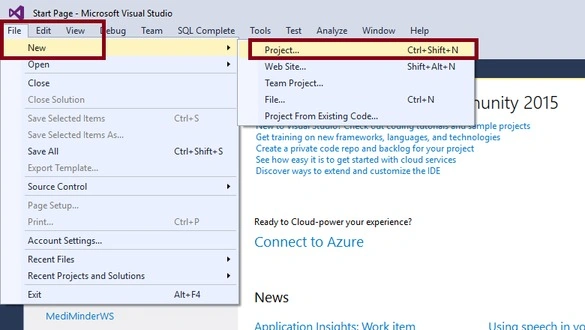
In the "New Project" dialog box, under Project types, expand Visual C#, and then click "Web". In the Name box, type "Async", then click on Ok.
Now, in the dialog box, click on "MVC" under the ASP.NET 4.5.2 Templates. Then, click on "Change Authentication" at the center of the right side.
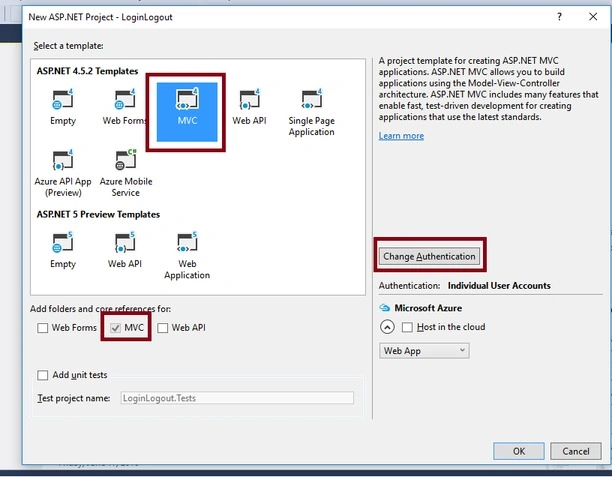
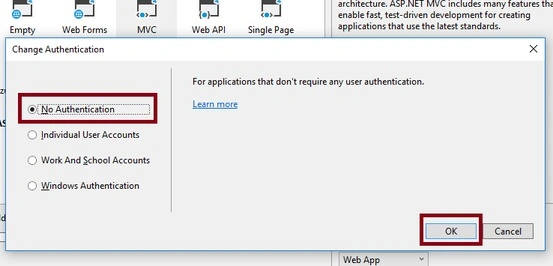
STEP 02 Add synchronize and asynchronize methods.
Add GetList() ActionResult in Home Controller.
- public ActionResult GetList() {
- //Create a stopwatch for getting excution time
- var watch = new Stopwatch();
- watch.Start();
- var country = GetCountry();
- var state = GetState();
- var city = GetCity();
- watch.Stop();
- ViewBag.WatchMilliseconds = watch.ElapsedMilliseconds;
- return View();
- }
Add GetListAsync() ActionResult in Home Controller.
- public async Task < ActionResult > GetListAsync() {
- //Create a stopwatch for getting excution time
- var watch = new Stopwatch();
- watch.Start();
- var country = GetCountryAsync();
- var state = GetStateAsync();
- var city = GetCityAsync();
- var content = await country;
- var count = await state;
- var name = await city;
- watch.Stop();
- ViewBag.WatchMilliseconds = watch.ElapsedMilliseconds;
- return View();
- }
The above method code is in "asynchronize programming". Stopwatch is used for getting exact execution time. As we discussed earlier,
- async is for calling the GetListAsync() method asynchronously.
- await is used to execute GetCountryAsync(), GetStateAsync() and GetCityAsync() parallelly without blocking any of them.
- #region-- > GetCountry Methods
- for GetList && GetListAsync
- public string GetCountry() {
- Thread.Sleep(3000); //Use - when you want to block the current thread.
- return "India";
- }
- public async Task < string > GetCountryAsync() {
- await Task.Delay(3000); //Use - when you want a logical delay without blocking the current thread.
- return "India";
- }#endregion
- # region-- > GetState Methods
- for GetList && GetListAsync
- public string GetState() {
- Thread.Sleep(5000); //Use - when you want to block the current thread.
- return "Gujarat";
- }
- public async Task < string > GetStateAsync() {
- await Task.Delay(5000); //Use - when you want a logical delay without blocking the current thread.
- return "Gujarat";
- }#endregion
- # region-- > GetCity Methods
- for GetList && GetListAsync
- public string GetCity() {
- Thread.Sleep(6000); //Use - when you want to block the current thread.
- return "Junagadh";
- }
- public async Task < string > GetCityAsync() {
- await Task.Delay(6000); //Use - when you want a logical delay without blocking the current thread.
- return "Junagadh";
- }#endregion
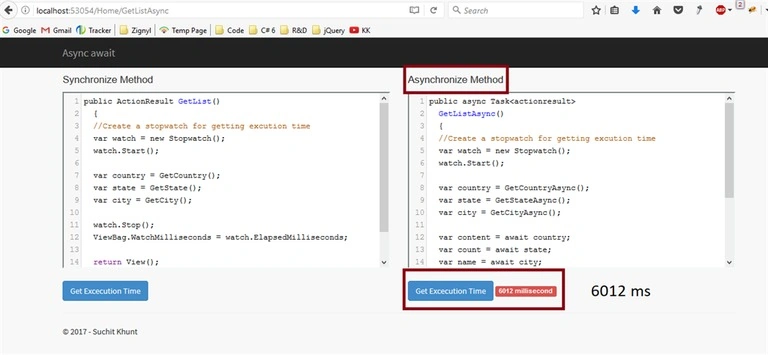
After executing synchronize method, we see that it takes 14002 milliseconds.
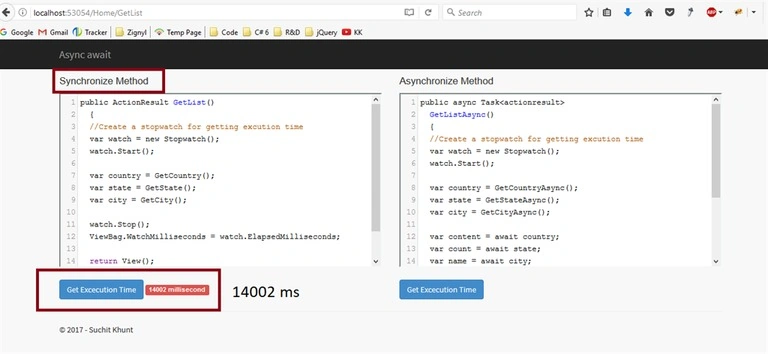
After executing asynchronize method, we saw that it took 6012 ms.


대용 이Posted Jun 15, 2020, 4:56 AM EDT
If the await keyword is met, is a thread allocated from the thread pool??
Ankit KanojiaPosted Mar 11, 2020, 11:19 PM EDT
Thank you so much Rushabh Patel
Ankit KanojiaPosted Mar 11, 2020, 11:18 PM EDT
Thank you so much Saravanan V
Ankit KanojiaPosted Mar 11, 2020, 11:18 PM EDT
Thank you so much Vishal Prajapati
Ankit KanojiaPosted Mar 11, 2020, 10:07 PM EDT
Thank you so much pawan sharma
Ankit KanojiaPosted Mar 11, 2020, 10:07 PM EDT
Thank you so much pat capozzi
Ankit KanojiaPosted Mar 11, 2020, 10:06 PM EDT
Thank you so much Dharmendra Prajapati
Ankit KanojiaPosted Mar 11, 2020, 10:06 PM EDT
Thank you so much Gadhiraju Phaneendrakumar
Ankit KanojiaPosted Mar 11, 2020, 10:06 PM EDT
Thank you so much M j
Ankit KanojiaPosted Mar 11, 2020, 10:05 PM EDT
Thank you so much Anchal Srivastava
Ankit KanojiaPosted Mar 11, 2020, 10:05 PM EDT
Thank you so much Saied Khatibi
Saied KhatibiPosted Aug 3, 2019, 12:48 AM EDT
Great. Thank you very much Mr Suchit
Anchal SrivastavaPosted Jul 30, 2019, 8:47 PM EDT
Same thing we can achive by using Task, so what's the benefit of using aync-await over using Task?
M jPosted Jul 21, 2019, 10:21 PM EDT
When its best condition to use? please explain
Gadhiraju PhaneendrakumarPosted Sep 24, 2018, 9:26 PM EDT
Where I Have to write GetList() and GetListAsync().
Dharmendra PrajapatiPosted Jul 8, 2018, 7:30 AM EDT
It really helped me to understand....Thanks Suchit..
pat capozziPosted Mar 13, 2018, 8:38 AM EDT
Nice to see all your friends chime in but this is not a 'real world' example. I does not explain the why of using async in a typical controller method that needs some data and then operates on it and returns the result.
pawan sharmaPosted Nov 23, 2017, 9:15 PM EST
Great Work Mr Suchit.
Manas MohapatraPosted Jun 6, 2017, 11:20 PM EDT
Nice article with well description. Carry on..
Abhay ShankerPosted Jun 6, 2017, 7:29 AM EDT
Well explained............
Rushabh PatelPosted Jun 6, 2017, 6:18 AM EDT
Great work Mr. Suchit As usual
Saravanan VPosted Jun 6, 2017, 6:07 AM EDT
Nicely Explained...
Vishal PrajapatiPosted Jun 5, 2017, 9:20 PM EDT
Awesome.............
Manav PandyaPosted Jun 5, 2017, 8:28 PM EDT
Nice one sir .............
Thiruppathi RPosted Jun 5, 2017, 10:33 AM EDT
Nice Article.......