
Introduction
Demo
Let me demonstrate synchronous binding first.
Here is the cs file.
- public partial class AsyncBinding : UserControl, INotifyPropertyChanged
- {
- public AsyncBinding()
- {
- InitializeComponent();
- }
- #region INotifyPropertyChanged Members
- public event PropertyChangedEventHandler PropertyChanged;
- public void OnPropertyChanged(string txt)
- {
- PropertyChangedEventHandler handle = PropertyChanged;
- if (handle != null)
- {
- handle(this, new PropertyChangedEventArgs(txt));
- }
- }
- #endregion
- private string firstname;
- public string FirstName
- {
- get { return firstname; }
- set
- {
- firstname = value;
- OnPropertyChanged("FirstName");
- }
- }
- private string address;
- public string Address
- {
- get
- {
- Thread.Sleep(5000);
- return address;
- }
- set
- {
- Thread.Sleep(5000);
- address = value;
- OnPropertyChanged("Address");
- }
- }
- private string phone;
- public string Phone
- {
- get { return phone; }
- set
- {
- phone = value;
- OnPropertyChanged("Phone");
- }
- }
- private void ThisWindow_Loaded(object sender, RoutedEventArgs e)
- {
- FirstName = "Ryan";
- Address = "USA";
- Phone = "4563525234523";
- }
- }
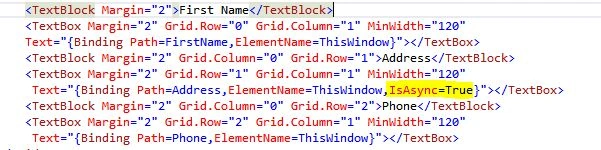
Demo:IsAsync
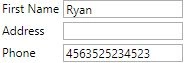
Intial state
Initially we got data in all fields except address without any delay. After a few seconds the address field has been populated in the different thread.
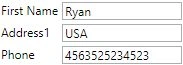
After 5000 milliseconds.
Delay
It is used to avoid calling downstream logic too soon for rapidly changing values. In some cases you might have several logic inside a set block of a property that is bound to a TextBox.Text property . That logic will be called when the user enters each character if UpdateSourceTrigger=PropertyChanged.
For a delay demonstration, I have commented the Thread.Sleep() in the get/set block of the address property and in the XAML we can see our address property bound with two Text Boxes. I have added one delay inside the address property that is highlighted in the image below.
- private string address;
- public string Address
- {
- get
- {
- // Thread.Sleep(5000);
- return address;
- }
- set
- {
- // Thread.Sleep(5000);
- address = value;
- OnPropertyChanged("Address");
- }
- }

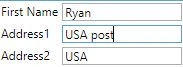
Initial state
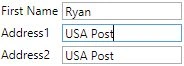
After 500 milliseconds.


Bharath YadavPosted Oct 12, 2015, 7:01 AM EDT
Thanks for the article :) Nicely explained.
Akhil GargPosted Apr 9, 2015, 6:31 PM EDT
nice article
Tom MohanPosted Mar 11, 2015, 12:52 AM EDT
Thanks Rahul Saxena
Rahul Kumar SaxenaTOP 100Posted Mar 10, 2015, 11:08 PM EDT
Good Show Tom Mohan
Tom MohanPosted Mar 10, 2015, 10:20 PM EDT
Thanks Vikram Chaudhary
Vikram ChaudharyPosted Mar 10, 2015, 9:22 PM EDT
good one