
Here is a quick example of how to use an AutoComplete ComboBox in DataGridView in a Windows Application.
- Create one Windows Application and add DataGridView from toolbox to design.
- Now create two DataGridViewComboBoxColumns and add them to the DataGridView:
C#
public void ComboList1() { DataGridViewComboBoxColumn combo1 = new DataGridViewComboBoxColumn(); combo1.HeaderText = "Country"; combo1.Items.Add("Antarctica"); combo1.Items.Add("Belgium"); combo1.Items.Add("Canada"); combo1.Items.Add("Finland"); combo1.Items.Add("Albania"); combo1.Items.Add("India"); combo1.Items.Add("Barbados"); dataGridView1.Columns.Add(combo1); } public void ComboList2() { DataGridViewComboBoxColumn combo2 = new DataGridViewComboBoxColumn(); combo2.HeaderText = "Types of Jobs"; combo2.Items.Add("Accounting"); combo2.Items.Add("HR"); combo2.Items.Add("Finance"); combo2.Items.Add("Transportation"); combo2.Items.Add("Testing"); dataGridView1.Columns.Add(combo2); } - Call both these methods from the Form Constructor.
- Now Click on DataGridView and generate EditingControlShowing event and write the folllowing code in it:
This will work for all comboBoxes which are present in the DataGridView.C#
if (e.Control is DataGridViewComboBoxEditingControl)
{
    ((ComboBox)e.Control).DropDownStyle = ComboBoxStyle.DropDown;
    ((ComboBox)e.Control).AutoCompleteSource = AutoCompleteSource.ListItems;
    ((ComboBox)e.Control).AutoCompleteMode = System.Windows.Forms.AutoCompleteMode.Suggest;
}
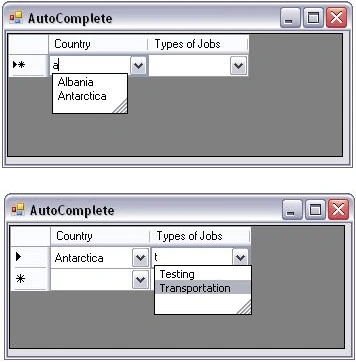
The AutoCompleteMode and AutoCompleteSource properties create a ComboBox that automatically completes input strings by comparing the prefix being entered to the prefixes of all strings in a maintained source. This is useful for ComboBox controls in which URLs, addresses, file names, or commands will be frequently entered. If there are duplicate entries in the maintained source, automatic completion behaves unpredictably.


KaungHtet SanPosted Jun 20, 2022, 12:09 AM EDT
Thanks good article
Gowtham RajamanickamTOP 100Posted Apr 9, 2015, 12:35 AM EDT
useful
Gowtham RajamanickamTOP 100Posted Apr 9, 2015, 12:35 AM EDT
good
paresh bijamPosted Nov 18, 2014, 9:16 PM EST
nice dude
Hussain AfridiPosted Nov 11, 2014, 2:13 AM EST
nice 100 Stars
mazhar hayatPosted Feb 27, 2013, 10:29 PM EST
nice artical
Rajshri ShitolePosted Nov 19, 2012, 9:23 PM EST
this we can apply for normal dropdown combobox only difference is we want this from set properities windows as same above.
Rajshri ShitolePosted Nov 19, 2012, 9:20 PM EST
thanks good article its basic thing and this always help us.
subrahmanyam gurramPosted Jun 19, 2012, 2:33 AM EDT
Srikanth its very nice following the article, its very help full to me. I need one more feature that How can i get the complete list of autosuggestion items in a list
jayakrishnan MorayurPosted May 1, 2012, 8:29 PM EDT
thanks
faizan ahmadPosted Apr 16, 2012, 4:35 AM EDT
but i wan to get value from one table and display in datagridview combobox column plz help me
Dattaram GarudPosted Jan 13, 2012, 8:31 PM EST
thanks boss
lakhan aanjanaeditedPosted Dec 1, 2011, 9:08 PM ESTEdited Dec 1, 2011, 9:09 PM EST
actually i have datagridview which already bind data and want to combo box in particular cell as user enter on cell in (C#.net) please help me [email protected] Regards Lakhan Anjana
bhrugesh thakkarPosted Oct 11, 2011, 2:36 AM EDT
Its really vry gud code..it saves my time also reduce my coding length its in vb If TypeOf e.Control Is DataGridViewComboBoxEditingControl Then DirectCast(e.Control, ComboBox).DropDownStyle = ComboBoxStyle.DropDown DirectCast(e.Control, ComboBox).AutoCompleteSource = AutoCompleteSource.ListItems DirectCast(e.Control, ComboBox).AutoCompleteMode = System.Windows.Forms.AutoCompleteMode.SuggestAppend End If
tara deoPosted Jun 27, 2011, 9:04 PM EDT
Thanks Bose
surender bhyanPosted Apr 4, 2011, 12:13 PM EDT
thanks