
In today's world we often see autocomplete dropdown lists. Whenever you type the first one or two characters of the word they show the words that begin with those characters. jQuery is used basically for providing the look and feel in your application. It provides a good looking and easy way to use an application. In this article, I am showing how to use an autocompleted dropdown list in ASP.NET application with C#.
First of all you need to add two jQuery files and one CSS file. This is given in my zip code folder.
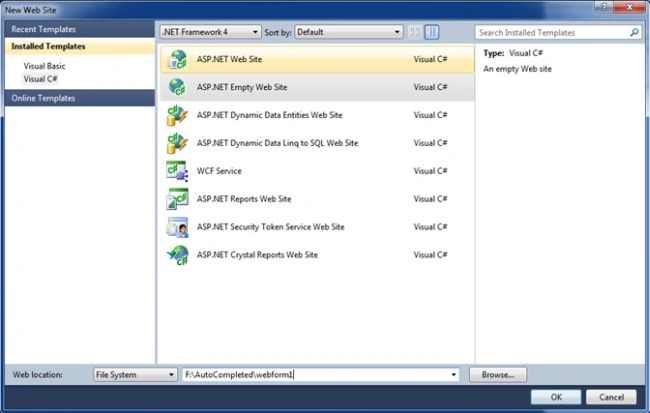
Listing 1: Go to Visual Studio 2010 then select "New" -> "Web site" and choose "Empty Website".
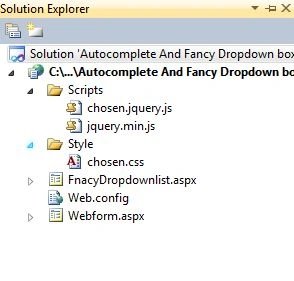
Listing 2: Add a JavaScript and CSS file to your application that is provide in the Zip file.
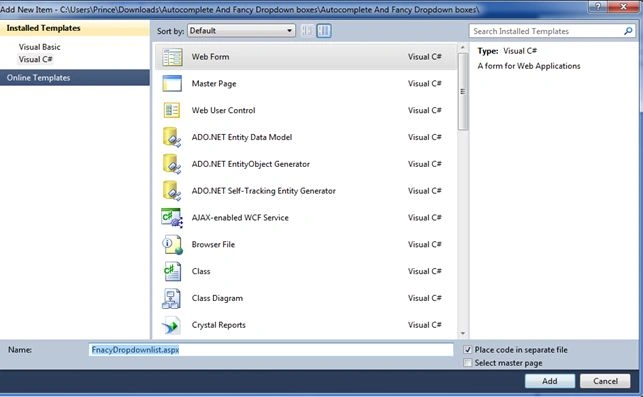
Listing 3: Add a new web page to your application. Go to Solution Explorer and right-click then select "Add new item"then choose "New web form" and name it "FancyDropdownlist.aspx".
Listing 4: Source Code for FnacyDropdownlist.aspx
- <%@ Page Language="C#" AutoEventWireup="true" CodeFile="FnacyDropdownlist.aspx.cs" Inherits="FnacyDropdownlist" %>
- <!DOCTYPE html>
- <html xmlns="http://www.w3.org/1999/xhtml">
- <head>
- <style>
- a img{border: none;}
- ol li{list-style: decimal outside;}
- div#container{width: 780px;margin: 0 auto;padding: 1em 0;}
- div.side-by-side{width: 100%;margin-bottom: 1em;}
- div.side-by-side > div{float: left;width: 50%;}
- div.side-by-side > div > em{margin-bottom: 10px;display: block;}
- .clearfix:after{content: "\0020";display: block;height: 0;clear: both;overflow: hidden;visibility: hidden;}
- </style>
- <link rel="stylesheet" href="Style/chosen.css" />
- </head>
- <body>
- <form runat="server" id="form1">
- <div id="container">
- <h2>Selected Value :
- <asp:Label runat="server" ID="lblSelectedValue" Style="color: red"></asp:Label></h2>
- <div class="side-by-side clearfix">
- <div>
- <asp:DropDownList data-placeholder="Choose a Country..." runat="server" ID="cboCountry" class="chzn-select" Style="width: 350px;">
- <asp:ListItem Text="" Value=""></asp:ListItem>
- <asp:ListItem Text="Ahemdabad" Value="Ahendabad"></asp:ListItem>
- <asp:ListItem Text="Bangalore" Value="Bangalore"></asp:ListItem>
- <asp:ListItem Text="Chennai" Value="Chennai"></asp:ListItem>
- <asp:ListItem Text="Aagra" Value="Aagra"></asp:ListItem>
- <asp:ListItem Text="Mumbai" Value="Mumbai"></asp:ListItem>
- <asp:ListItem Text="Hydrabad" Value="Hydrabad"></asp:ListItem>
- <asp:ListItem Text="Calcutta" Value="Calcutta"></asp:ListItem>
- <asp:ListItem Text="Patna" Value="Patna"></asp:ListItem>
- <asp:ListItem Text="Delhi" Value="Delhi"></asp:ListItem>
- <asp:ListItem Text="Noida" Value="Noida"></asp:ListItem>
- <asp:ListItem Text="Mangalore" Value="Mangalore"></asp:ListItem>
- <asp:ListItem Text="Goa" Value="Goa"></asp:ListItem>
- </asp:DropDownList><asp:Button runat="server" ID="btnSelect" Text="Get Selected" OnClick="btnSelect_Click" />
- </div>
- </div>
- </div>
- <script src="Scripts/jquery.min.js" type="text/javascript"></script>
- <script src="Scripts/chosen.jquery.js" type="text/javascript"></script>
- <script type="text/javascript"> $(".chzn-select").chosen(); $(".chzn-select-deselect").chosen({ allow_single_deselect: true }); </script>
- </form>
- </body>
- </html>
- using System;
- using System.Collections.Generic;
- using System.Linq;
- using System.Web;
- using System.Web.UI;
- using System.Web.UI.WebControls;
- using System.Data;
- using System.Data.SqlClient;
- public partial class FnacyDropdownlist : System.Web.UI.Page
- {
- protected void Page_Load(object sender, EventArgs e)
- {
- }
- protected void btnSelect_Click(object sender, EventArgs e)
- {
- lblSelectedValue.Text = cboCountry.SelectedValue;
- }
- }
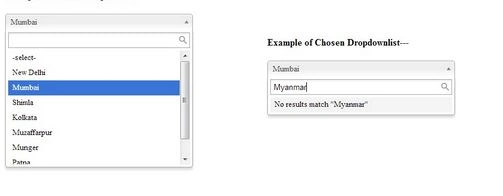
Output
I hope this article will help you to add auto dropdown list functionality to you application.


juan citoPosted Jun 20, 2022, 8:22 AM EDT
It works perfectly! The only bad thing is that you don't see the typical "down arrow" dropdownlist button...Does anyone have an idea?
Jacobo CanoPosted Dec 21, 2021, 12:11 PM EST
Thank you!
SARDAR MUKHTARPosted May 11, 2019, 2:30 AM EDT
After Post back JavaScript and CSS removed. Please check this code in Update Panel. And fix the bug. Thanks..
SARDAR MUKHTARPosted May 11, 2019, 2:30 AM EDT
After Post back Java Script and CSS removed.
SARDAR MUKHTARPosted May 11, 2019, 2:29 AM EDT
Not working in UpdatePanel.
Eldhose AbrahamPosted Jan 27, 2019, 8:05 PM EST
Not working
Bhavin PatelPosted Apr 18, 2018, 9:11 PM EDT
This code is not working for me
sagar raoPosted Mar 27, 2018, 7:21 PM EDT
Hi,the code is working fine, but problem is when the drop down post back is true the css are not append to drop down control. please suggest the solution.
k12 BilişimPosted Dec 19, 2017, 12:23 PM EST
Cenneti hak ediyorsun...
Carlos HPosted Oct 17, 2017, 6:14 AM EDT
Hello, the code works perfect on my local server, when I publish on my server does not work, you know something? TypeError: $(...).chosen is not a function
QMobile SpecsPosted Jul 24, 2017, 12:50 PM EDT
Great code it will help me in my web www.qmobilespecs.com
Jigar VadiwalaPosted May 18, 2017, 12:42 AM EDT
Allow value OutSide list. how to allow in chosen.jquery FIle..
Minnu Merin AlexPosted Apr 27, 2017, 10:46 PM EDT
This code is not working in ascx page ..why?
Riddhi ValechaPosted Feb 19, 2017, 10:59 PM EST
Hi...excellent example for user-friendly dropdownlist.... Just one query - Will this work with ajax update panel ?
Gursewak SinghPosted Dec 12, 2016, 12:08 AM EST
How can i do this by using database
Pratik PurohitPosted Mar 19, 2016, 2:34 AM EDT
Put the below script after the </ContentTemplate> tag and before </asp:UpdatePanel> to use the autocomplete dropdownlist in update panel after post back.. <Triggers> <asp:PostBackTrigger ControlID="btnUploadSOW" /> </Triggers>
Riddhi ValechaPosted Feb 7, 2016, 1:42 AM EST
I am stuck up because - I have to make a auto-suggest dropdownlist - where the datasource of dropdownlist is the datatable. Please guide !
Riddhi ValechaPosted Feb 7, 2016, 1:41 AM EST
Hi... I downloaded this code ... But , I am not able to find = "chzn-select" class/method. This did not work...
Amit Kumar SinghPosted Feb 5, 2016, 6:59 PM EST
Check the above Code ......its working
Amit Kumar SinghPosted Feb 5, 2016, 6:58 PM EST
<head> <link href="http://ajax.googleapis.com/ajax/libs/jqueryui/1.8.1/themes/base/jquery-ui.css" rel="stylesheet" type="text/css" /> <script src="http://ajax.googleapis.com/ajax/libs/jquery/1.4.2/jquery.min.js"></script> <script src="http://ajax.googleapis.com/ajax/libs/jqueryui/1.8.11/jquery-ui.min.js"></script> <script type="text/javascript"> $(document).ready(function () { BindControls(); }); function BindControls() { var Countries = ['ARGENTINA', 'AUSTRALIA', 'BRAZIL', 'BELARUS', 'BHUTAN', 'CHILE', 'CAMBODIA', 'CANADA', 'CHILE', 'DENMARK', 'DOMINICA']; $('#tbCountries').autocomplete({ source: Countries, minLength: 0, scroll: true }).focus(function () { $(this).autocomplete("search", ""); }); } </script> <style> .ui-autocomplete { cursor: pointer; height: 120px; overflow-y: scroll; } </style> </head> <body style="font-size: 62.5%;"> <div style="font: 14px arial"> <input type="text" id="tbCountries" /> </div> </body> </html>
Anup KumarPosted Aug 24, 2015, 4:11 AM EDT
I am getting the same problem Mr Chava Pipo. Is anybody is there who can help me to resolve this?
moh ghorPosted Jul 26, 2015, 6:41 AM EDT
just worked in Firefox, in IE or chrome not worked
Tom TrobePosted Jun 30, 2015, 9:09 PM EDT
This is an awesome article and works well. My only issue is that I am trying to put the <asp:DropDownList> within an <asp:UpdatePanel> and upon update panel refresh, the drop down returns to being a standard drop down. Do you know how to fix?
chava pipoPosted Jun 24, 2015, 2:02 PM EDT
Es Genial, Me ayudo mucho, Muchas gracias [It's great, I helped a lot, thank you very much]
Mudzakkir TohaPosted Jun 11, 2015, 8:14 PM EDT
not working at ie 8
hhh hhhPosted Jun 10, 2015, 5:03 AM EDT
hi it's great but have problem that is it's donot accept null value ? why? i need to show me null or ' ' value too . how i fix it ?
smilu varghesePosted May 27, 2015, 10:41 PM EDT
good.
juan cerdaPosted Mar 20, 2015, 10:58 AM EDT
Excelente!!!
Pablo LaplacePosted Mar 5, 2015, 4:14 AM EST
In example file chosen-sprite.png is missing
raj vardhanPosted Feb 3, 2015, 3:56 AM EST
u explained well but its not working
Siva anandPosted Sep 25, 2014, 10:14 AM EDT
@Prince ...... explained well..but it is not working when dropdown list is dynamically bound the data
Prince RajPosted Apr 14, 2014, 6:12 AM EDT
Thank you all of my friends to view this article.