
AutoComplete textbox is used for completing a text automatically when you type some alphabet in the textbox. It is used for searching and filtering the text in a fastest way.
Here I am explaining how to implement the autocomplete textbox in windows form.
Please design the following windows form:

Here, I have a textbox where I should type the text to search.
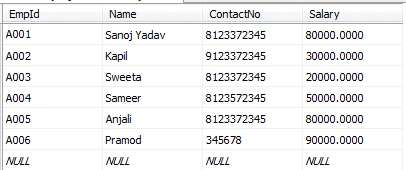
Here, I have the database table from where I searched the name that is typed in the textbox.
Code
- using System;
- using System.Collections.Generic;
- using System.ComponentModel;
- using System.Data;
- using System.Drawing;
- using System.Linq;
- using System.Text;
- using System.Threading.Tasks;
- using System.Windows.Forms;
- using System.Data;
- using System.Data.SqlClient;
- namespace AutoComplete
- {
- public partial class Form1: Form
- {
- AutoCompleteStringCollection coll = new AutoCompleteStringCollection();
- SqlConnection con = new SqlConnection("Data Source=TUNA-PC;Initial Catalog=Employee;User ID=sa;Password=123");
- SqlDataAdapter da;
- public Form1()
- {
- InitializeComponent();
- }
- private void Form1_Load(object sender, EventArgs e)
- {
- Auto(); //calling the auto method.
- }
- //Main logic for autocomplete
- public void Auto()
- {
- da = new SqlDataAdapter("select Name from tbl_empdetails order by name asc", con);
- DataTable dt = new DataTable();
- da.Fill(dt);
- if (dt.Rows.Count > 0)
- {
- for (int i = 0; i < dt.Rows.Count; i++)
- {
- coll.Add(dt.Rows[i]["Name"].ToString());
- }
- } else
- {
- MessageBox.Show("Name not found");
- }
- textBox1.AutoCompleteMode = AutoCompleteMode.Suggest;
- textBox1.AutoCompleteSource = AutoCompleteSource.CustomSource;
- textBox1.AutoCompleteCustomSource = coll;
- }
- public void fillgrid()
- {
- da = new SqlDataAdapter("select * from tbl_empdetails where name='" + textBox1.Text + "'", con);
- DataTable dt = new DataTable();
- da.Fill(dt);
- if (dt.Rows.Count > 0)
- {
- dataGridView1.DataSource = dt;
- }
- }
- private void textBox1_TextChanged(object sender, EventArgs e)
- {
- fillgrid(); //when selecting the searched name then filling its data in datagrid.
- }
- }
- }
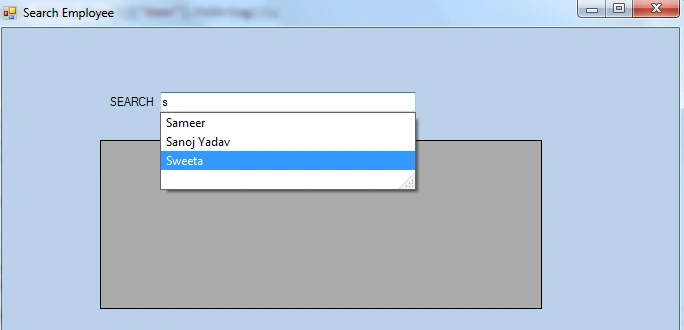
Now while running the form it will look like this.
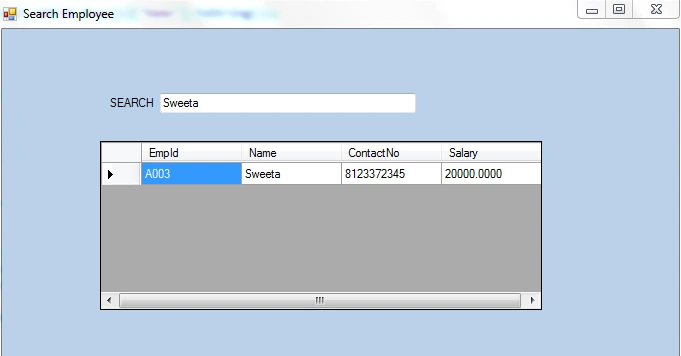
When selecting any name, the data will be filled in the datagrid.
AutoCompleteMode property defines how text is suggested in the TextBox. It can be set to a AutoCompleteMode enumeration, Append, Suggest, SuggestAppend, and None. Suggest displays all the suggestions as dropdown. Append displays first value of the suggestion appended or selected in the TextBox, other values can be navigated using arrow keys. SuggestAppend displays suggested values as dropdown and first value appended in the TextBox.
AutoCompleteSource property sets the source for auto complete data. It can be set to a AutoCompleteSource enumeration, FileSystem, HistoryList, RecentlyUsedList, AllUrl, AlSystemSources, FileSystemDirectories, CustomSource or None. As we are getting our own data we set it to CustomSource.
Thus in this way we can create autocomplete textbox like this.


Kruti DesaiPosted Feb 11, 2019, 11:54 PM EST
I am working on windows form application and want autocomplete textbox with two different tables... please help me
vivek nigamPosted Jan 15, 2018, 8:23 PM EST
I am getting error "vshost.exe stopped working" when i am getting the record approx 900 in the autocomplete. when i am trying to type in the textbox i am getting the above error. Please help
Guest UserPosted Jan 2, 2018, 12:36 AM EST
Can you please share the zip of this code and db on google drive.
Sovan MondalPosted Nov 10, 2017, 2:09 AM EST
Very well done ,, superb bro
Santhakumar MunuswamyPosted Oct 17, 2015, 11:46 PM EDT
Good one
Rajeesh MenothPosted Oct 12, 2015, 10:39 AM EDT
Good One
Mohammed IbrahimPosted Oct 12, 2015, 8:10 AM EDT
nice
RakeshPosted Oct 12, 2015, 7:41 AM EDT
Good share
karuppasamy mPosted Oct 12, 2015, 5:56 AM EDT
superb, how to avoid letter case problem in this. in text box , you typed the small case "s", but it shows the names starting with upper case "S". can you help for me to avoid this problem.
Mukesh KumarPosted Oct 12, 2015, 4:13 AM EDT
Great, thanks for sharing
Sibeesh VenuTOP 100Posted Oct 11, 2015, 11:12 PM EDT
Nice Share
Mukesh KumarPosted Oct 11, 2015, 11:03 PM EDT
Good One..
Nilesh JadavPosted Oct 11, 2015, 10:58 PM EDT
Great work sir
Rupali ShindePosted Oct 11, 2015, 10:52 PM EDT
good , i know how to achieve using JQuery but in windows application it is first time i tried