
In our previous articles (listed below), we have learned how to create a DevTest Lab and also configured policies in the DevTest Lab to reduce the waste and cost.
- Azure DevTest Labs: A Self-Service Sandbox Environment – Basics
- Azure DevTest Labs: Policies To Control Costs - Part One
- Azure DevTest Labs: Policies To Control Costs - Part Two
In this article, we will see how to add a developer or a tester. Please note that you can invite only the users who have a valid Microsoft account.
Let’s try adding a new user to the DevTest Lab “DotnetDevTestLab” that we have created in one of our previous articles Azure DevTest Labs: A Self-Service Sandbox Environment – Basics.
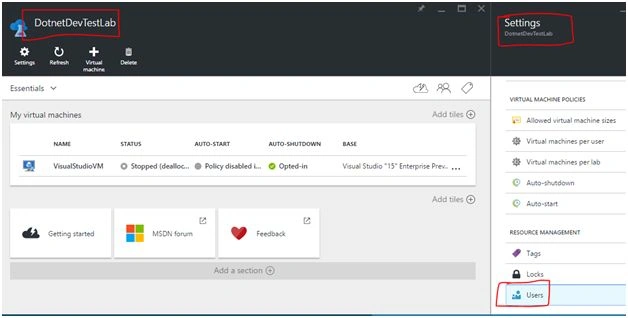
Navigate to the Azure Management and go to our DevTest Lab’s settings blade as shown below.
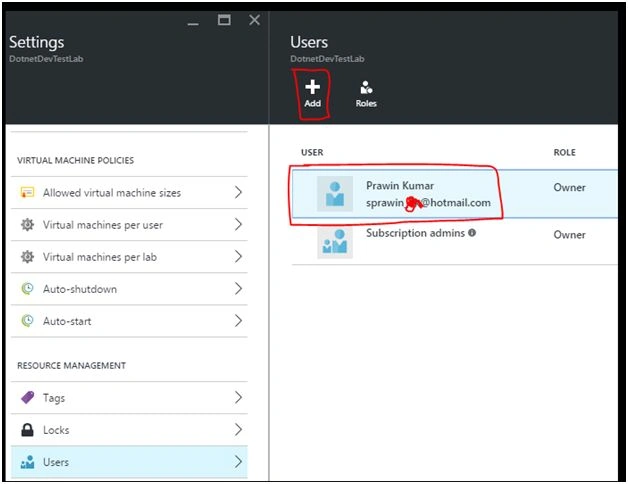
Now, select “Users” link and go to Users blade where you see the Subscription Administrator as the Owner, as he is the one who created the Lab.
Let’s click on “Add” at the top to add the new user. Adding a user to a DevTest Lab is a two-step process.
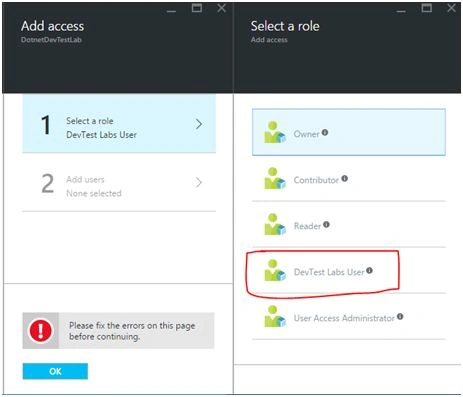
- Select the role of the user which you are trying to add.
- Create the user by providing a valid Microsoft account.
Step 1
Step 2
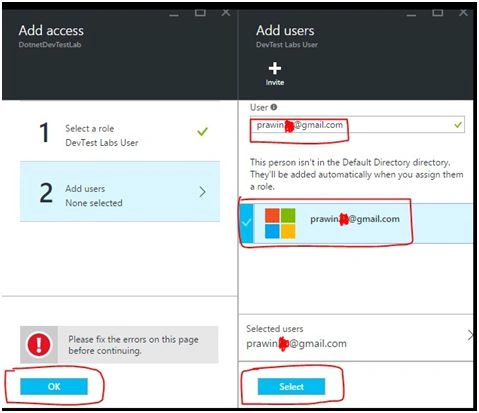
Once you provide the valid account details, click on “Select” in the “Add Users” blade and then click “OK” in the “Add Access” blade.
Now, we have added the new developer to the DevTest Lab named “DotnetDevTestLab” as shown below.
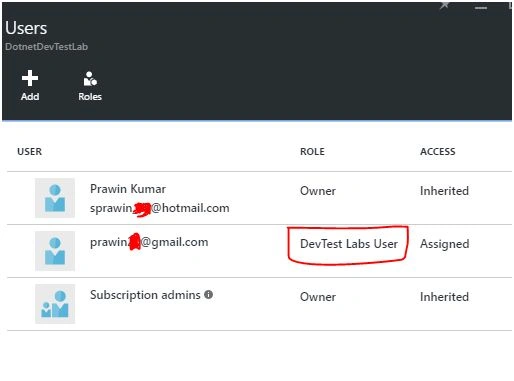
Let’s login with the new DevTest Lab User.
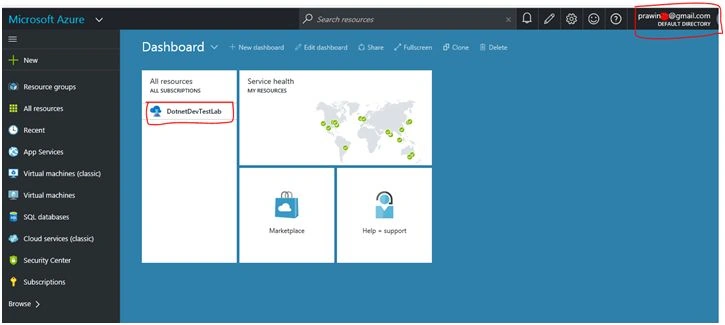
As per the above screen capture, I was able to login successfully to the Azure Management Portal and can view the “DotnetDevTestLab” lab as a DevTest Lab User.
Kindly note that the my DevTest Lab user doesn’t even have an Azure Subscription. But still I am able to able to log into the Azure Portal. That’s the power of DevTest Lab!
Let’s have a look at few other features of the DevTest Labs in the upcoming articles.
Stay tuned and your feedback is highly appreciated!


Praveen SreeramPosted Jun 8, 2016, 8:53 PM EDT
Thanks Santhakumar Munuswamy
Santhakumar MunuswamyPosted Jun 8, 2016, 8:35 PM EDT
Thank you for nice share
Praveen SreeramPosted Jun 6, 2016, 8:05 AM EDT
Thanks Nagaraj
Kuppurasu NagarajTOP 100Posted Jun 6, 2016, 7:59 AM EDT
Nice Sharing..
Praveen SreeramPosted Jun 6, 2016, 5:59 AM EDT
Thank you Sonu Chaudhary
Sonu ChaudharyPosted Jun 6, 2016, 5:43 AM EDT
good one...
Praveen SreeramPosted Jun 6, 2016, 1:36 AM EDT
Thanks @vignesh
Vignesh ManiTOP 100Posted Jun 6, 2016, 1:24 AM EDT
Nice
Praveen SreeramPosted Jun 5, 2016, 8:24 PM EDT
Thank you Raja Ganapathy
RajaPosted Jun 5, 2016, 8:23 PM EDT
Good Work...
Praveen SreeramPosted Jun 5, 2016, 8:21 PM EDT
Thanks Debasis Saha
Debasis SahaTOP 100Posted Jun 5, 2016, 8:17 PM EDT
Good One..
Praveen SreeramPosted Jun 5, 2016, 8:49 AM EDT
Thank you @Bhavik
Bhavik PatelPosted Jun 5, 2016, 8:45 AM EDT
Helpful... nice article