
The following SQL queries are not related to any specific topic of SQL. But knowledge of these queries can solve some complex tasks and may be used in many scenarios.
Let us start to read these queries.
Use Multiple CTE in Single Select Statement
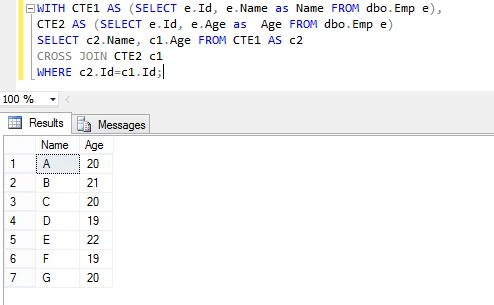
CTE is known as Common Table Expression and works as a temporary result set that is defined within the execution scope of a single SELECT, INSERT, UPDATE, DELETE, or CREATE VIEW statement. CTE is not stored as an object and lasts only for the duration of the query. Now we learn how to use multiple CTE in one query or multiple CTE in SELECT statement.
Example:
- WITH CTE1 AS (SELECT e.Id, e.Name as Name FROM dbo.Emp e),
- CTE2 AS (SELECT e.Id, e.Age as Age FROM dbo.Emp e)
- SELECT c2.Name, c1.Age FROM CTE1 AS c2
- CROSS JOIN CTE2 c1
- WHERE c2.Id=c1.Id;
Enable and Disable Check Constraint
Sometimes we are required to disable the check constraint for queries and after completion of the query we are required to set the check constraint in its previous state. Such a type of operation is needed when we insert data in bulk or check constraint is not required for some data. We can use the following code script for this.
Syntax:
//Disable Constraint
Alter Table Table_Name NOCHECK Constraint Constraint_Name
//Enable Constraint
Alter Table Table_Name
WITH CHECK CHECK Constraint Constraint_Name
Example:
- ALTER TABLE dbo.Emp
- NOCHECK CONSTRAINT CK_Employee_Age
- GO
- -- Enable the constraint
- ALTER TABLE dbo.Emp
- WITH CHECK CHECK CONSTRAINT CK_Employee_Age
Sometimes we need to find out all the values from a column that do not exist in the column. Let us consider the following table.
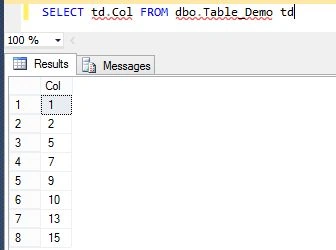
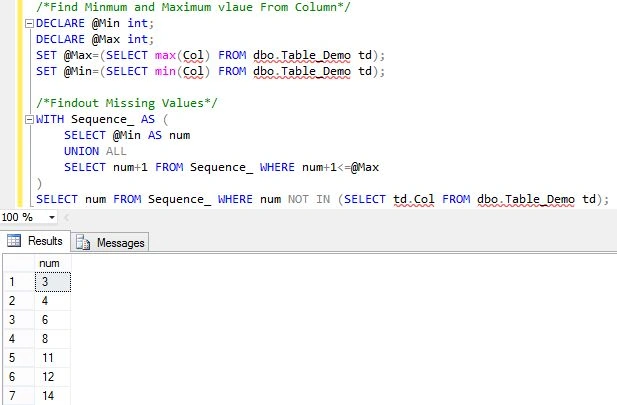
We can see that value in Col are starting from 1 and last value in Col is 15, but there are some values between 1 and 15 that do not exist . So now we learn how to find out the missing values that do not exist in Col.
Example:
- /*Find Minmum and Maximum vlaue From Column*/
- DECLARE @Min int;
- DECLARE @Max int;
- SET @Max=(SELECT max(Col) FROM dbo.Table_Demo td);
- SET @Min=(SELECT min(Col) FROM dbo.Table_Demo td);
- /*Findout Missing Values*/
- WITH Sequence_ AS (
- SELECT @Min AS num
- UNION ALL
- SELECT num+1 FROM Sequence_ WHERE num+1<=@Max
- )
- SELECT num FROM Sequence_ WHERE num NOT IN (SELECT td.Col FROM dbo.Table_Demo td);
Query to insert value in Identity column:
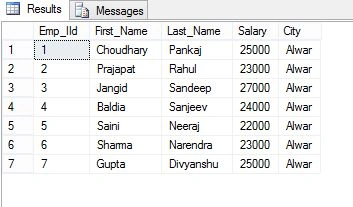
In above table: Emp_IId” column is Identity. Let us try to insert some value into Employee table.
- Insert Into Employee(Emp_IId,First_Name,Last_Name,Salary,City) values(8,'Sonu', 'Singh',32basic-useful-sql-queriesbasic-useful-sql-queriesbasic-useful-sql-queries,'Delhi')
- Insert Into Employee(Emp_IId,First_Name,Last_Name,Salary,City) values(9,'Ravi', 'Singh',35basic-useful-sql-queriesbasic-useful-sql-queriesbasic-useful-sql-queries,'Delhi')
Msg 81basic-useful-sql-queries1, Level 16, State 1, Line 1
An explicit value for the identity column in table 'Employee' can only be specified when a column list is used and IDENTITY_INSERT is ON.
When we execute the above insert query then the system throws an error that we can’t insert value into Identity Column.
Now I tell you how to insert value in Identity column.
- SET IDENTITY_INSERT Employee ON
- Insert Into Employee(Emp_IId,First_Name,Last_Name,Salary,City) values(8,'Sonu', 'Singh',32basic-useful-sql-queriesbasic-useful-sql-queriesbasic-useful-sql-queries,'Delhi')
- Insert Into Employee(Emp_IId,First_Name,Last_Name,Salary,City) values(9,'Ravi', 'Singh',35basic-useful-sql-queriesbasic-useful-sql-queriesbasic-useful-sql-queries,'Delhi')
- SET IDENTITY_INSERT Employee OFF
- Select * From Employee
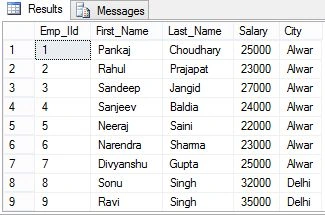
In above query IDENTITY_INSERT ON allow insert to the identity column and DENTITY_INSERT OFF doesnot allow insertion to the identity column.
Find Out Number of occurrences of a word in String
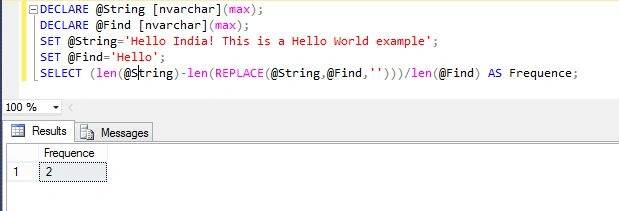
In this script we will learn how to find out the number of occurrences of a word in a string. Let us take an example: we have a string ̶basic-useful-sql-query; Hello India! This is a Hello World example” and we want to find out the number of occurrences of the "Hello” word. Let us take an example.
Example:
- DECLARE @String [nvarchar](max);
- DECLARE @Find [nvarchar](max);
- SET @String='Hello India! This is a Hello World example';
- SET @Find='Hello';
- SELECT (len(@String)-len(REPLACE(@String,@Find,'')))/len(@Find) AS Frequence;
Transfer data from row level to column level
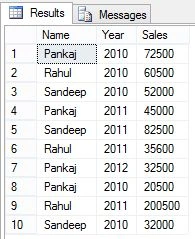
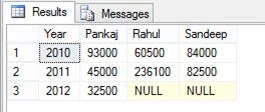
PIVOT is used when we want to transfer data from row level to column level. PIVOT is used to generate an interactive table that quickly combines and compares large amounts of data. PIVOT relational operator converts data from row level to column level. PIVOT rotates a table-valued expression by turning the unique values from one column in the expression into multiple columns in the output. Using PIVOT operator we can perform aggregate operations where we are required.
Example:
Syntax:
SELECT <non-pivoted column>,
<list of pivoted column>
FROM
(<SELECT query to produces the data>)
AS <alias name>
PIVOT
(
<aggregation function>(<column name>)
FOR
[<column name that become column headers>]
IN ( [list of pivoted columns])
) AS <alias name for pivot table>
Example:
- SELECT [Year], Pankaj,Rahul,Sandeep FROM
- (SELECT Name, [Year] , Sales FROM Employee )Tab1
- PIVOT
- (
- SUM(Sales) FOR Name IN (Pankaj,Rahul,Sandeep)) AS Tab2
- ORDER BY [Tab2].[Year]
Retrieve Duplicate Data from Table
In this query we will learn how to retrieve the duplicate data from a column. Let us consider the following table:
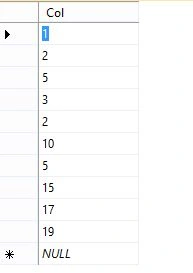
For the above table we find out the values that are present more than once in column.
Example:
- WITH CTE
- AS
- (
- SELECT td.Col,ROW_NUMBER() OVER( Partition By td.Col ORDER BY td.Col) AS Rank_
- FROM dbo.Table_Demo td)
- SELECT c.Col FROM CTE c WHERE c.Rank_>=2;
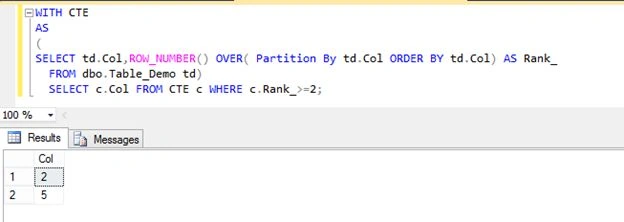
Retrieve Duplicate Data along with number of occurrence from column:
In the previous query we learned how to retrieve the duplicate data from a table. In this query we will learn how to retrieve duplicate data and also their number of occurrences. Consider the following table:
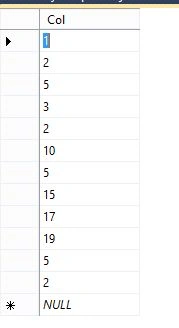
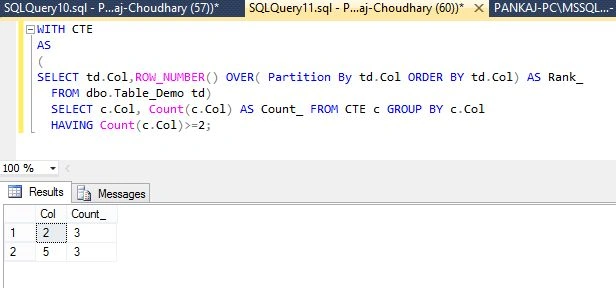
We find the duplicate data for the above table using the following script.
Example:
- WITH CTE
- AS
- (
- SELECT td.Col,ROW_NUMBER() OVER( Partition By td.Col ORDER BY td.Col) AS Rank_
- FROM dbo.Table_Demo td)
- SELECT c.Col, Count(c.Col) AS Count_ FROM CTE c GROUP BY c.Col
- HAVING Count(c.Col)>=2;
I hope you liked this article. If you have any better solution or method for any query among the above queries then please share.
Thanks for reading the article.
Read more articles on SQL Server:


Bhuvanesh MohankumarPosted May 13, 2016, 1:22 AM EDT
Great effort Pankaj and useful one.
Yogendra YadavPosted Mar 21, 2016, 3:34 AM EDT
Nice Article..
Shaili DashoraPosted Mar 11, 2016, 10:56 PM EST
Nice one..
Amit AggarwalPosted Mar 7, 2016, 4:09 AM EST
helpful and Simple
Pankaj Kumar ChoudharyTOP 100Posted Feb 29, 2016, 4:30 AM EST
Thanks Ankur Sir........
Ankur MistryTOP 100Posted Feb 28, 2016, 3:51 AM EST
Helpful
Pankaj Kumar ChoudharyTOP 100Posted Feb 25, 2016, 3:53 PM EST
Thanks Anu Vivin Sir..........
Anu VPosted Feb 25, 2016, 2:25 AM EST
Nice share..
Pankaj Kumar ChoudharyTOP 100Posted Feb 24, 2016, 3:25 PM EST
Thanks Asfend Yar , Thanks you like my article , But you write 4 comments. it is not good, you could write all these comment in a single comment, you know that these 4 comments give you 4 points that is not good efforts to achieve the extra point using some useless comments......
Pankaj Kumar ChoudharyTOP 100Posted Feb 24, 2016, 3:17 PM EST
Thanks Mohammed Ibrahim Sir............
Pankaj Kumar ChoudharyTOP 100Posted Feb 24, 2016, 3:17 PM EST
Thanks Santhakumar Munuswamy Sir........
Mohammed IbrahimPosted Feb 24, 2016, 10:56 AM EST
nice
Asfend YarPosted Feb 23, 2016, 7:29 PM EST
keep it up
Santhakumar MunuswamyPosted Feb 23, 2016, 9:23 AM EST
Thanks for nice article
Pankaj Kumar ChoudharyTOP 100Posted Feb 23, 2016, 6:20 AM EST
Thanks Merajuddin Ansari Sir..........
Pankaj Kumar ChoudharyTOP 100Posted Feb 23, 2016, 6:19 AM EST
Thanks Priti Kumari Mam........
Merajuddin AnsariPosted Feb 23, 2016, 1:04 AM EST
good1 i was looking for it.thanks
Priti KumariPosted Feb 22, 2016, 9:21 PM EST
Nice article!!
Pankaj Kumar ChoudharyTOP 100Posted Feb 22, 2016, 5:30 PM EST
Thanks sreenivasa k.........
Pankaj Kumar ChoudharyTOP 100Posted Feb 22, 2016, 5:30 PM EST
Thanks Manoj Kulkarni..........
Pankaj Kumar ChoudharyTOP 100Posted Feb 22, 2016, 5:29 PM EST
Thanks john theisen.........
Pankaj Kumar ChoudharyTOP 100Posted Feb 22, 2016, 5:29 PM EST
Thanks Vignesh Mani Sir.......
Pankaj Kumar ChoudharyTOP 100Posted Feb 22, 2016, 5:29 PM EST
Thanks Ehsan Sajjad .......
Pankaj Kumar ChoudharyTOP 100Posted Feb 22, 2016, 5:28 PM EST
Thanks Gowtham K Sir.........
sreenivasa kPosted Feb 22, 2016, 5:02 PM EST
good
Manoj KulkarniPosted Feb 22, 2016, 4:17 PM EST
Nice article. Thank you for sharing
Guest UserPosted Feb 22, 2016, 2:18 PM EST
thanks very nice writeup
Vignesh ManiTOP 100Posted Feb 22, 2016, 12:49 PM EST
Nice one
Ehsan SajjadPosted Feb 22, 2016, 8:58 AM EST
good wrote
Gowtham KTOP 100Posted Feb 22, 2016, 7:07 AM EST
Good One
Pankaj Kumar ChoudharyTOP 100Posted Feb 22, 2016, 5:49 AM EST
Thanks Abhishek Yadav Sir..........
Pankaj Kumar ChoudharyTOP 100Posted Feb 22, 2016, 5:49 AM EST
Thanks Sibeesh Venu Sir........
Pankaj Kumar ChoudharyTOP 100Posted Feb 22, 2016, 5:49 AM EST
Thanks Shubham Kumar Sir.......
Pankaj Kumar ChoudharyTOP 100Posted Feb 22, 2016, 5:48 AM EST
Thanks Raja T........
Pankaj Kumar ChoudharyTOP 100Posted Feb 22, 2016, 5:48 AM EST
Thanks Saineshwar Bageri Sir.......
Pankaj Kumar ChoudharyTOP 100Posted Feb 22, 2016, 5:47 AM EST
Thanks Amit Singh Sir.........
Abhishek YadavPosted Feb 22, 2016, 1:46 AM EST
Very Nice!!!!
Sibeesh VenuTOP 100Posted Feb 21, 2016, 10:50 PM EST
Nice Share
Shubham KumarPosted Feb 21, 2016, 7:34 PM EST
Quick info nice
Raja TPosted Feb 21, 2016, 6:13 PM EST
Thanks for sharing
Saineshwar BageriPosted Feb 21, 2016, 6:05 PM EST
Nice one
Amit Kumar SinghPosted Feb 21, 2016, 8:22 AM EST
Nice Share