
I had planned to start writing about AngularJS. I began to learn AngularJS a few months back, it's a great feature for website UI developers. It is also easy to learn with the interesting features available in this tutorial.
I prepared a tutorial designed for the beginners wanting to learn the basics of AngularJS and its programming concepts in a simple and easy procedure. I will describe the components of AngularJS with suitable examples.
The reference for Angular js is Tutorial:W3Schools,Tutorialspoint and C# Corner Member DJ for Angular Js.
In my previous article I explained angujar js, its prerequisites, features and basic syntax.
- Model
It is the lowest level of the pattern responsible for maintaining data. The model is responsible for managing application data. It responds to the request from the view and to the instructions from the controller to update itself.
- View
The View is responsible for displaying all, or a portion of, the data to the user. A presentation of data in a specific format, triggered by the controller's decision to present the data. They are script-based template systems such as JSP, ASP, PHP and very easy to integrate with AJAX technology.
-
Controller
A Controller is software code that controls the interactions between the Model and View. The controller responds to user input and performs interactions on the data model objects. The controller receives input, validates it and then performs business operations that modify the state of the data model.
AngularJS is a MVC based framework. In the future chapters, we will see how AngularJS uses MVC methodology.
AngularJS Controllers
An AngularJS application mainly relies on controllers to control the flow of data in the application. A controller is defined using the ng-controller directive. A controller is a JavaScript object containing attributes/properties and functions.
Each controller accepts $scope as a parameter that refers to the application/module that the controller is to control.
- <div ng-app="" ng-controller="inputController">
- ...
- </div>
The ng-controller directive defines the application controller.
A controller is a JavaScript Object, created by a standard JavaScript object constructor.
- < div ng - app = "myApp"
- ng - controller = "inputctrl" > First Name: < input type = "text"
- ng - model = "firstName" > < br > Last Name: < input type = "text"
- ng - model = "lastName" > < br > < br > Full Name:
- {
- {
- firstName + " " + lastName
- }
- }
- < /div>
- <script>
- var app = angular.module('myApp', []);
- app.controller('inputctrl', function($scope)
- {
- $scope.firstName = "";
- $scope.lastName = "";
- });
- </script >
In this example ng-app runs inside a <div>.
This ng-controller directive defines a controller.
The inputtrl function is a JavaScript function. AngularJS will invoke the controller with a $scope object.
In AngularJS, $scope is the application object (the owner of the application variables and functions).
The controller creates two properties (variables) in the scope (firstName and lastName).
The ng-model directives bind the input fields to the controller properties (firstName and lastName).
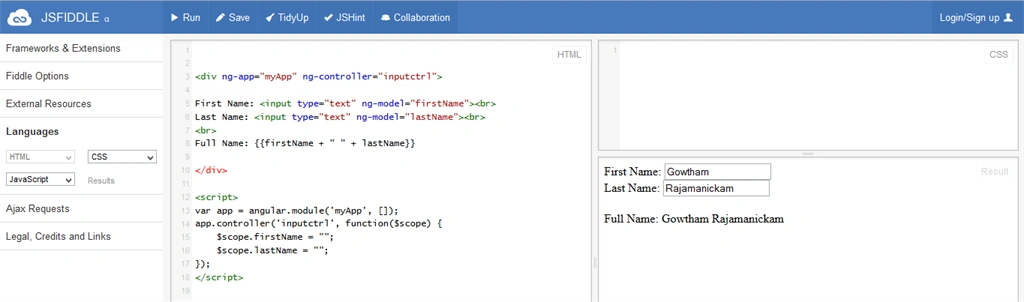
In the preceding example we have used two properties, first name and last name.
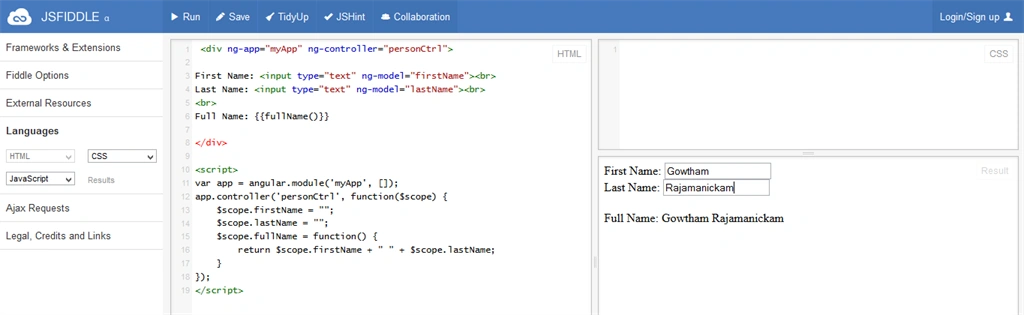
The same as in the preceding example, here we are returning the first name and last name to the HTML value.
Explanation
- Full Name: {{fullName()}}
- $scope.fullName = function()
{ - return $scope.firstName + " " + $scope.lastName;
- }
- <div ng-app="myApp" ng-controller="inputCtrl">
- First Name: <input type="text" ng-model="firstName"><br>
- Last Name: <input type="text" ng-model="lastName"><br>
- <br>
- Full Name: {{fullName()}}
- </div>
- <script>
- var app = angular.module('myApp', []);
- app.controller(' inputCtrl', function($scope) {
- $scope.firstName = "";
- $scope.lastName = "";
- $scope.fullName = function() {
- return $scope.firstName + " " + $scope.lastName;
- }
- });
- </script>
Controllers In External Files
We can use an external file also for this method. In larger applications, it is common to store controllers in external files.
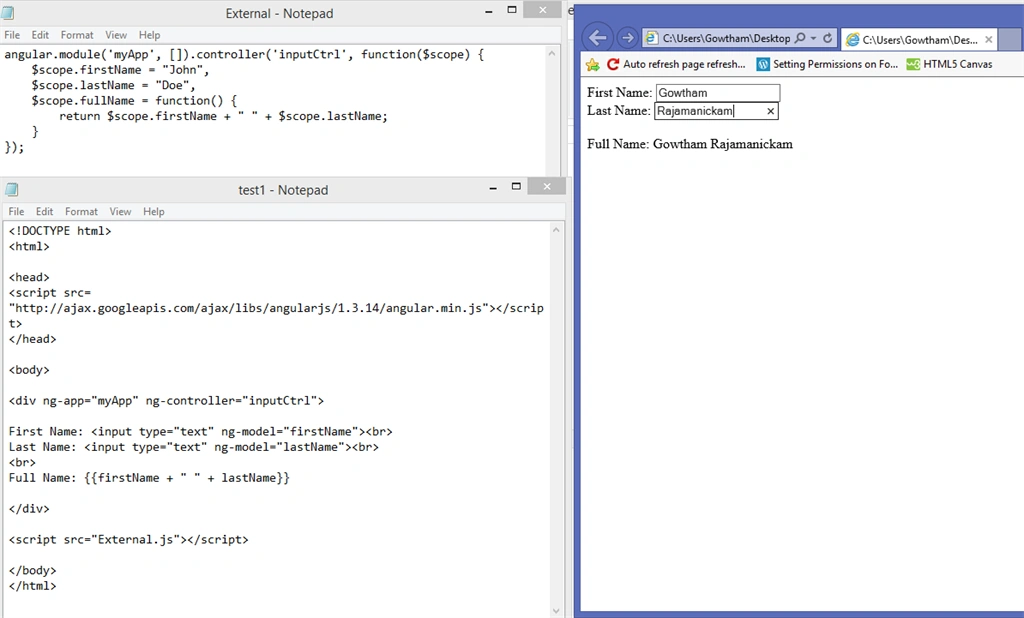
The following is another example to bind the employee details from an external file:
- angular.module('myApp', []).controller('namesCtrl', function($scope) {
- $scope.Employees = [{
- name: 'Gowtham',
- country: 'karur'
- }, {
- name: 'kiruthiga',
- country: 'Tirupur'
- }, {
- name: 'GK',
- country: 'Chennai'
- }];
- });



Sonu ChaudharyPosted May 27, 2016, 12:18 PM EDT
good one sir
Sr KarthigaPosted Mar 2, 2016, 5:48 PM EST
good one
Sr KarthigaPosted Mar 2, 2016, 5:47 PM EST
nice explanation
Santhakumar MunuswamyPosted Nov 27, 2015, 7:56 PM EST
Thanks Arul R
Arul RPosted Oct 28, 2015, 1:49 AM EDT
Nice share!!!
Santhakumar MunuswamyPosted Sep 20, 2015, 2:03 AM EDT
Thanks Ajeet Mishra
Ajeet MishraPosted Sep 14, 2015, 4:12 AM EDT
nice
Santhakumar MunuswamyPosted Jul 7, 2015, 9:57 AM EDT
Thanks you Jean Paul Sir
Santhakumar MunuswamyPosted Jul 7, 2015, 9:57 AM EDT
Thank you Gowtham K
Santhakumar MunuswamyPosted Jul 7, 2015, 9:57 AM EDT
Thank you Jacob Robinson
Jean PaulTOP 100Posted Jul 7, 2015, 3:25 AM EDT
Nice Presentation!
Gowtham KTOP 100Posted Jul 7, 2015, 3:18 AM EDT
Good one..
Jacob RobinsonPosted Jul 6, 2015, 9:16 PM EDT
Nice One..
Santhakumar MunuswamyPosted Jul 6, 2015, 11:06 AM EDT
Thank you Debasis Saha
Debasis SahaTOP 100Posted Jul 6, 2015, 10:48 AM EDT
Nice One..
Santhakumar MunuswamyPosted Jul 6, 2015, 10:09 AM EDT
Thank you Sharad
Santhakumar MunuswamyPosted Jul 6, 2015, 10:09 AM EDT
Thank you Vipul Malhotra
Santhakumar MunuswamyPosted Jul 6, 2015, 10:08 AM EDT
Thank you Sibeesh Venu
Santhakumar MunuswamyPosted Jul 6, 2015, 10:08 AM EDT
Thank you Kiranteja Jallepalli
Santhakumar MunuswamyPosted Jul 6, 2015, 10:07 AM EDT
Thank you Debendra Dash
Santhakumar MunuswamyPosted Jul 6, 2015, 10:07 AM EDT
Thank you Akash Nagina
Akash NaginaPosted Jul 6, 2015, 4:56 AM EDT
Nice Article...
Debendra DashPosted Jul 6, 2015, 1:24 AM EDT
good one sir.....
Kiranteja JallepalliPosted Jul 5, 2015, 11:27 PM EDT
good
Sibeesh VenuTOP 100Posted Jul 5, 2015, 11:17 PM EDT
Good One.Thanks for sharing :)
Vipul MalhotraPosted Jul 5, 2015, 11:14 PM EDT
Nice
SharadPosted Jul 5, 2015, 11:04 PM EDT
Nice Article...