
Introduction
HTML stands for hypertext markup language useful for developing web pages.
Using HTML we can add paragraphs, headings, images into web pages.
Basic Structure
<!DOCTYPE html>
<html> ----------------------------------- <html> Start tag
<head>-------------------------------<head > tag contains scripts and stylesheets
<title></tilte>--------------------- <title> tag display the tilte of the page
</head>
<body>
_________________________ <body> Contains main content appears on the webpage
</body>
</html>-------------------------------------<html> End tag
Heading Tag
- <html>
- <head>
- <title></title>
- </head>
- <body>
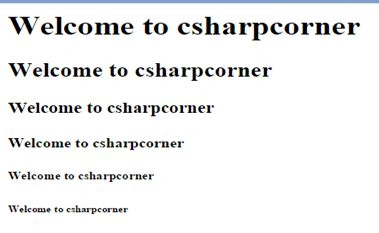
- <h1>Welcome to csharpcorner</h1>
- <h2>Welcome to csharpcorner</h2>
- <h3>Welcome to csharpcorner</h3>
- <h4>Welcome to csharpcorner</h4>
- <h5>Welcome to csharpcorner</h5>
- <h6>Welcome to csharpcorner</h6>
- </html>
Paragraph Tag
Example
- <Html>
- <Head>
- <Title>
- </title>
- </head>
- <Body>
- <p>Welcome to csharpcorner</p>
- <p>Welcome author</p>
- <p>N.Vinodh</p>
- </body>
- </html>
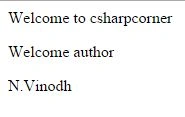
Image Tag
- <Html>
- <Head>
- <Title>
- </title>
- </head>
- <Body> <img src="images\ccorner.png" alt="logo" /> </body>
- </html>
- <img src="images\ccorner.png" alt="logo" height="200" width="200" />
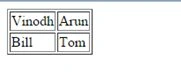
Table Tag
- <tr></tr> tags contains table rows
- <td></td> tags contains table data
Example
- <html>
- <head>
- <title></title>
- </head>
- <body>
- <table border="1">
- <tr>
- <td> Vinodh</td>
- <td> Arun</td>
- </tr>
- <tr>
- <td>Bill</td>
- <td>Tom</td>
- </tr>
- </table>
- </body>
- </html>
List tag
- Ordered list
- Unordered list
Unordered list
Unordered lists are defined with <ul></ul> tag.
Example
- <html>
- <head>
- <title></title>
- </head>
- <body>
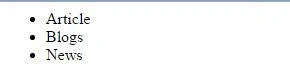
- <ul>
- <li>Article</li>
- <li>Blogs</li>
- <li>News</li>
- </ul>
- </body>
- </html>
Example
- <html>
- <head>
- <title></title>
- </head>
- <body>
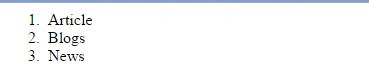
- <ol>
- <li>Article</li>
- <li>Blogs</li>
- <li>News</li>
- </ol>
- </body>
- </html>
- <dt></dt> Stands for description term
- <dd></dd> Stands for description data
Example
- <html>
- <head>
- <title></title>
- </head>
- <body>
- <dl> <dt>
- Article
- </dt>
- <dd> Basics of HTML and CSS </dd>
- </ol>
- </body>
- </html>

Summary
In this article, we learned about the Basics Of HTML And CSS - Part 1.


Prasanna MuraliPosted May 20, 2016, 7:24 AM EDT
Nice one....
Asfend YarPosted Feb 29, 2016, 9:01 AM EST
good
Vinodh NarayananPosted Oct 25, 2015, 8:09 AM EDT
Santhakumar Munuswamy Thanks a lot sir
Santhakumar MunuswamyPosted Oct 25, 2015, 7:46 AM EDT
Good one