
This article shows you how to bind a CheckedListbox of a Windows Forms form using C#, where we will use one CheckedListBox control and on a button click the data is bound to the control.
Initial chamber
Step 1
Open Visual Studio 2010, Go to File, then New, Projects and under Visual C# select Windows.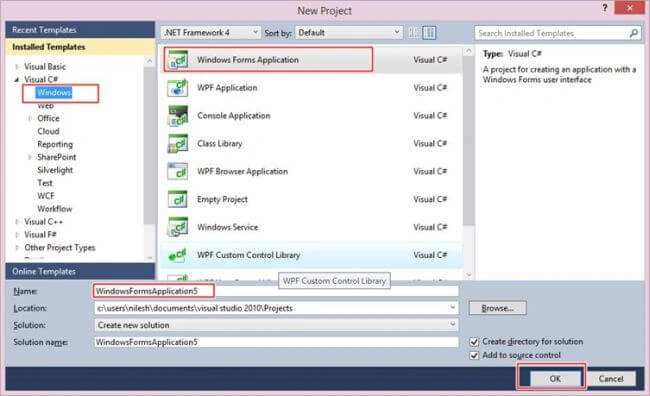
You can change the name of the project and can place your project in a different location too. Then press OK.
Step 2
In Solution Explorer you will get your project, add a Service Based Database. This is added by right-clicking, then selecting Add New Item and selecting Service Based Database.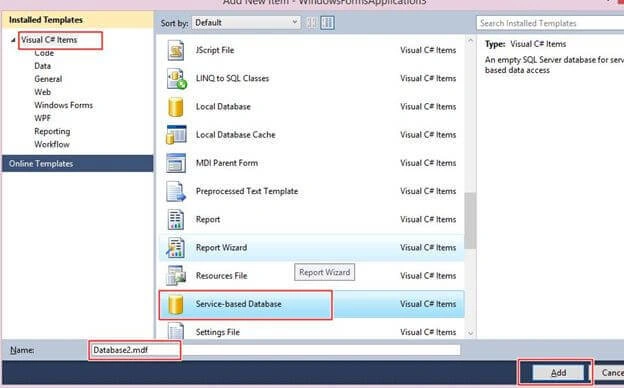
Database chamber
Step 3
Go to your database (database.mdf) and create a table tbl_Data. Go to database.mdf, select Table and Add New table. Design your table as in the following: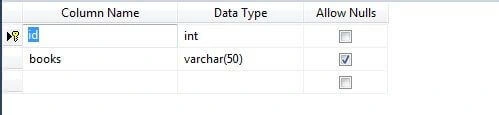
Show tbl_data: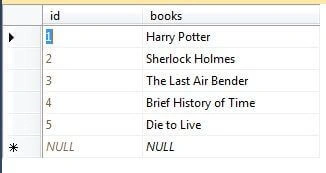
Design chamber
Step 4
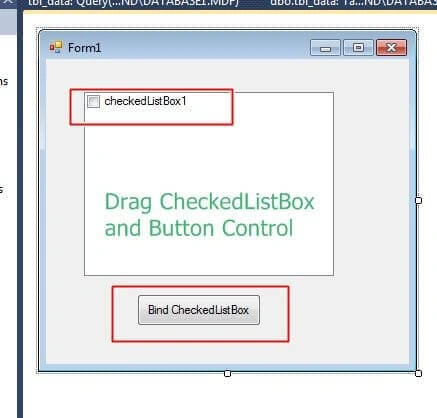
Now open your Form1.cs file, where we will create our design for CheckedListBox Binding.
We will drag CheckedListBox from the toolbox to Form1.cs.
Code chamber
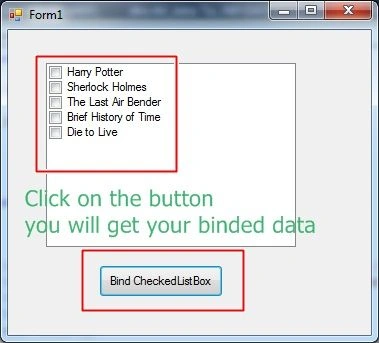
Right-click on the blank part of Form1.cs and View Code. Write the following code and then press F5 to run the project.
- using System;
- using System.Collections.Generic;
- using System.ComponentModel;
- using System.Data;
- using System.Drawing;
- using System.Linq;
- using System.Text;
- using System.Windows.Forms;
- using System.Data.SqlClient;
- namespace CheckBoxBind
- {
- public partial class Form1 : Form
- {
- public Form1()
- {
- InitializeComponent();
- }
- private void button1_Click(object sender, EventArgs e)
- {
- SqlConnection con = new SqlConnection(@"Data Source=.\SQLEXPRESS;AttachDbFilename=|DataDirectory|\Database1.mdf;Integrated Security=True;User Instance=True");
- SqlCommand cmd = new SqlCommand("select * from tbl_data", con);
- SqlDataAdapter sda = new SqlDataAdapter(cmd);
- DataTable dt = new DataTable();
- sda.Fill(dt);
- for (int i = 0; i < dt.Rows.Count; i++)
- {
- checkedListBox1.Items.Add(dt.Rows[i]["books"].ToString());
- }
- }
- }
- }
I hope you liked this. Thank you for reading. Have a good day.


Arul RPosted Oct 28, 2015, 1:34 AM EDT
Good one !!!
Yashwanth MuthineniPosted Aug 19, 2015, 2:25 AM EDT
Nice Share
Santhakumar MunuswamyPosted Aug 12, 2015, 11:04 AM EDT
Good Article. Thanks for sharing
Sibeesh VenuTOP 100Posted Aug 10, 2015, 10:22 PM EDT
Nice Share
Ankit BansalPosted Aug 10, 2015, 8:36 PM EDT
good nilesh...
Pankaj Kumar ChoudharyTOP 100Posted Aug 10, 2015, 4:49 PM EDT
Nice Explain Nilesh Sir...........
Nipesh JanghelPosted Aug 10, 2015, 7:59 AM EDT
Good!!
Gopi ChandPosted Aug 10, 2015, 5:32 AM EDT
Nice one
Upendra Pratap ShahiPosted Aug 10, 2015, 1:03 AM EDT
nice Nilesh Jadav sir
Vipul MalhotraPosted Aug 10, 2015, 1:01 AM EDT
Nice article
Debasis SahaTOP 100Posted Aug 9, 2015, 11:34 PM EDT
Good one....
Rajeesh MenothPosted Aug 9, 2015, 11:21 PM EDT
Simple and informative..