
In this tutorial, I’ll show you how to bind GridView using MVC5 C# using Razor. In the previous tutorial I haven’t used any database, but here we will use and then we manually feed some data into our table and bind that data to GridView. So it’s a kind of Binding GridView with database.
Step 1
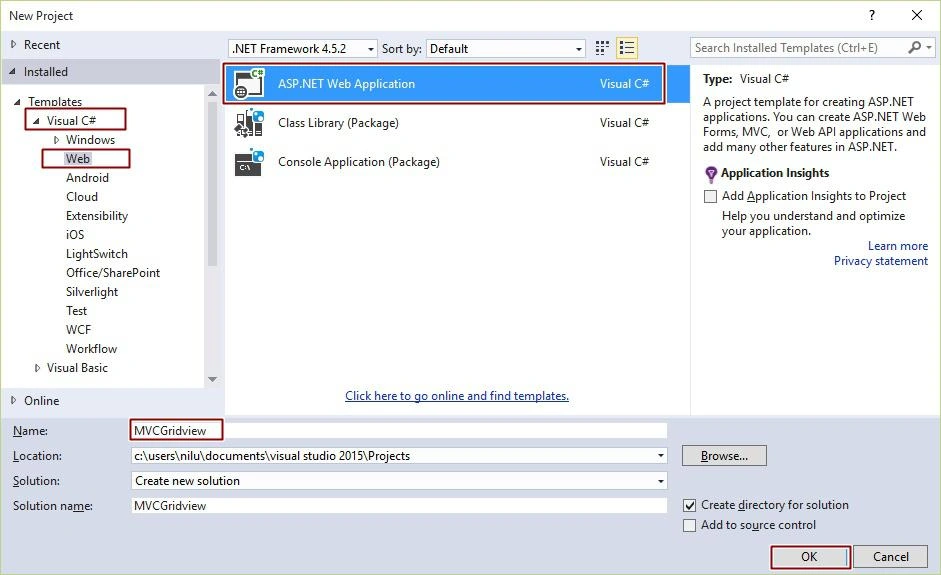
Open Visual Studio 2010, Go to the New Project - Visual C#, Web, then ASP.NET MVC Web Application and click OK.
Step 2
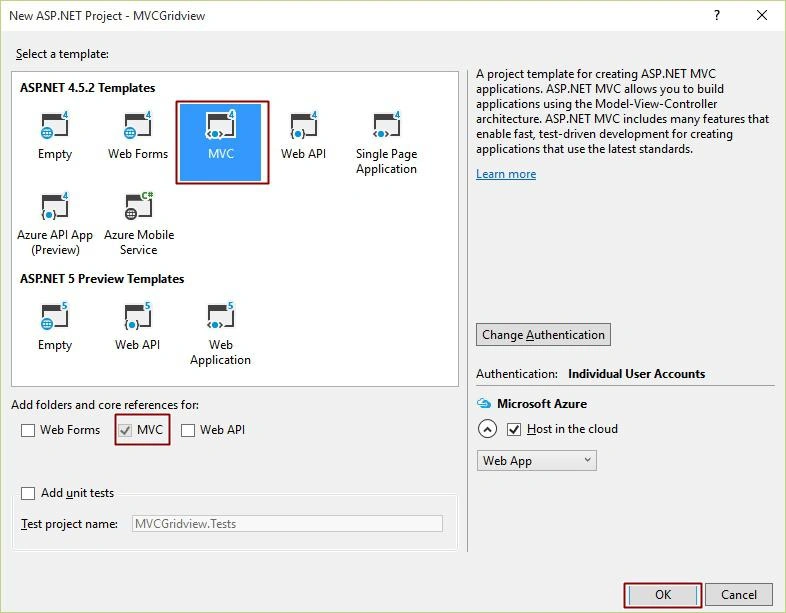
After Clicking OK, New ASP.NET MVC5 Project window will open and there you have to choose MVC and press OK.
Step 3
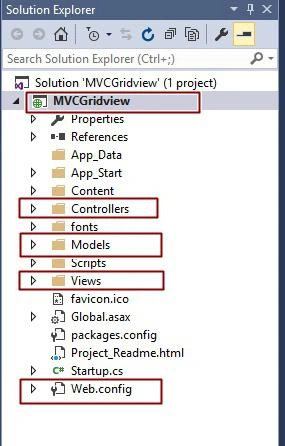
After Clicking OK, you will see something like the following image in your Solution Explorer. You need to look out for Model, Controller and View folders that are the main files in MVC, others are too but these are main files.
DATABASE CHAMBER:
Step 4
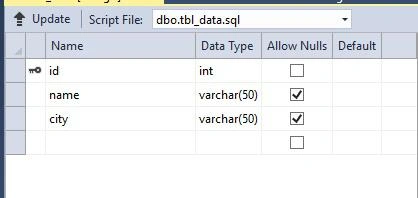
Right Click on your Project - Add New Item, then SQL Server Database and Add it. Go to your Database that resides in Server Explorer - [Database.mdf], We will create a table - tbl_data, Go to the database.mdf, Table and Add New table. Design your table like the following:
Web.Config File:
- <connectionStrings>
- <add name="DefaultConnection" connectionString="Data Source=(LocalDb)\MSSQLLocalDB;AttachDbFilename=|DataDirectory|\aspnet-MVCBindGridView-20150920090324.mdf;Initial Catalog=aspnet-MVCBindGridView-20150920090324;Integrated Security=True"
- providerName="System.Data.SqlClient" />
- <add name="StudentContext" connectionString="Data Source=NiluNilesh;Initial Catalog=mynewdata;Integrated Security=True" providerName="System.Data.SqlClient"></add>
- </connectionStrings>
Step 4
Right Click on Models - Add New Item, then Add a Class File [Class.cs] and ame it as Student.cs. Write the following code in Student.cs file.
Student.cs
- using System;
- using System.Collections.Generic;
- using System.Linq;
- using System.Web;
- using System.ComponentModel.DataAnnotations;
- using System.ComponentModel.DataAnnotations.Schema;
- namespace MVCBindGridView.Models
- {
- [Table("tbl_data")]
- public class Student
- {
- [Key]
- public int id { get; set; }
- public string name { get; set; }
- public string city { get; set; }
- }
- }
StudentContext.cs
- using System;
- using System.Collections.Generic;
- using System.Linq;
- using System.Web;
- using System.Data.Entity;
- namespace MVCBindGridView.Models
- {
- public class StudentContext : DbContext
- {
- public DbSet<Student> student { get; set; }
- }
- }
Step 5
Right Click on Controller, Add Empty Controller, Name it – StudentController.cs. Write the following code and don’t forget to add namespace of model.
- using System;
- using System.Collections.Generic;
- using System.Linq;
- using System.Web;
- using System.Web.Mvc;
- using MVCBindGridView.Models;
- namespace MVCBindGridView.Controllers
- {
- public class StudentController : Controller
- {
- // GET: Student
- public ActionResult Index()
- {
- StudentContext stdntcntxt = new StudentContext();
- var data = stdntcntxt.student;
- return View(data.ToList());
- }
- }
- }
Step 6
Right click on Index() method and Add View like the following image.
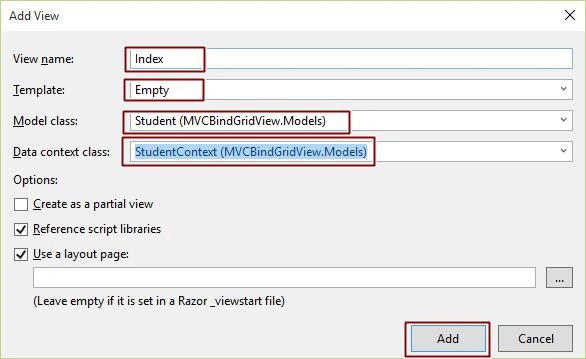
You will see under view that there is a folder named student created and inside that folder get your index.cshtml. Write the following code:
Index.cshtml
- @model IEnumerable<MVCBindGridView.Models.Student>
- @{
- ViewBag.Title = "Bind Gridview with Database";
- WebGrid grid = new WebGrid(Model);
- }
- <h2>Bind GridView in MVC5 with Database</h2>
- @grid.GetHtml(columns: new[]
- {
- grid.Column("id"),
- grid.Column("name"),
- grid.Column("city")
- }
- )
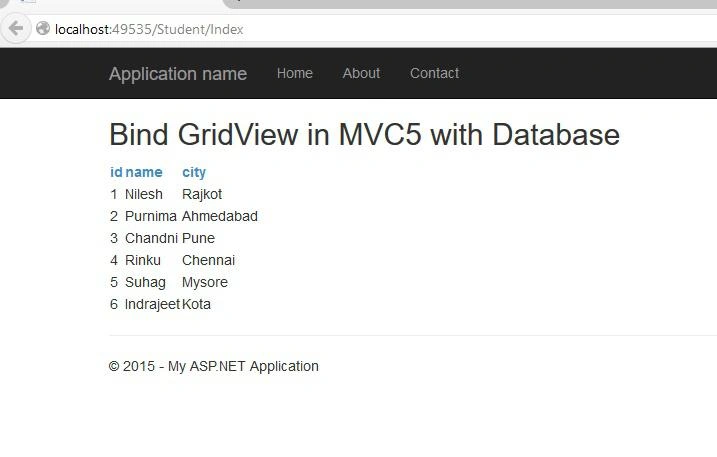
Hope you like it. Thank you for reading. Have a good day.


Bhavesh JadavPosted Oct 3, 2018, 10:29 PM EDT
Good...........
rabi pandaPosted Oct 18, 2017, 8:26 PM EDT
Sir ,no data is coming ,only column name is showing.
rajasekhar kollapuPosted May 18, 2017, 4:21 AM EDT
Please help me to display image in mvc grid
mahesh nPosted Mar 16, 2017, 1:14 AM EDT
Sir.. I am fresher.. what is this "DbContext"??? (StudentContext?:?DbContext??)
Amit Kumar SinghPosted Feb 3, 2016, 1:42 AM EST
Good One
Vignesh ManiTOP 100Posted Jan 27, 2016, 12:06 AM EST
Good one
Arul RPosted Oct 28, 2015, 1:32 AM EDT
Good one !!!
Mohammed IbrahimPosted Sep 29, 2015, 11:28 AM EDT
nice
Ankit BansalPosted Sep 29, 2015, 3:26 AM EDT
nice..
Ajeet MishraPosted Sep 28, 2015, 9:56 PM EDT
GOOD ONE
Harshad PansuriyaPosted Sep 28, 2015, 9:37 PM EDT
Nice One
Sujeet SumanPosted Sep 28, 2015, 9:14 PM EDT
Nice Article...............
Lalit RaghavPosted Sep 28, 2015, 8:59 PM EDT
Nice
Anil KumarPosted Sep 28, 2015, 8:47 PM EDT
nyc
Vinodh NarayananPosted Sep 28, 2015, 8:46 PM EDT
nice share]
Rajeesh MenothPosted Sep 28, 2015, 10:20 AM EDT
Nice One..
Santhakumar MunuswamyPosted Sep 28, 2015, 10:08 AM EDT
Good one