
Here I haven’t used any database, we manually feed that data into our Controller, so it’s a kind of binding gridview without any database.
Step 1: Open Visual Studio 2010, go to the New Project, then Visual C#. After that click Web, select ASP.NET MVC3 Web Application and click OK.

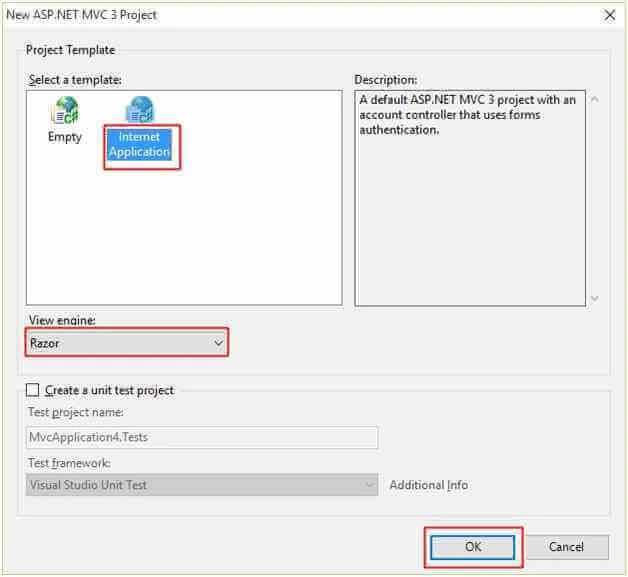
Step 2: After clicking OK, new ASP.NET MVC3 Project window will open, there you have you choose Internet Application and in View engine dropdown chose Razor.
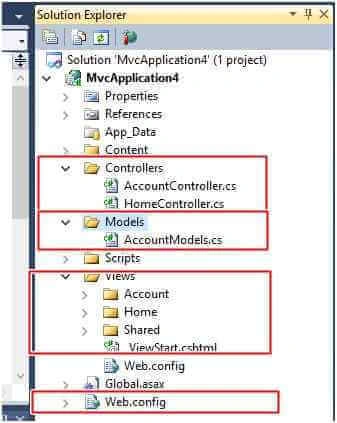
Step 3: After clicking OK, you will see something like the following image in Solution Explorer, you need to look out for Model, Controller and View Folders, that are the main files in MVC, others are too but these are main files.
In Model
Step 4: Right Click on Models, then Add New Item and Add a Class File [Class.cs] Name it Student.cs. Write the following code in Student.cs file.
Student.cs
- using System;
- using System.Collections.Generic;
- using System.Linq;
- using System.Web;
- namespace MvcApplication1.Models
- {
- public class Students
- {
- public int Std_ID { get; set; }
- public string Std_Name { get; set; }
- public string Std_City { get; set; }
- }
- }
Step 5: Open Controller, find HomeController.cs file there and open it, then write the following code. Don’t forget to add namespace of model.
HomeController.cs
- using System;
- using System.Collections.Generic;
- using System.Linq;
- using System.Web;
- using System.Web.Mvc;
- using MvcApplication4.Models;
- namespace MvcApplication4.Controllers
- {
- public class HomeController : Controller
- {
- public ActionResult Index()
- {
- Students stdnt = new Students();
- List<Students> stdnt1 = new List<Students>();
- stdnt.Std_ID = 1;
- stdnt.Std_Name = "Nilesh";
- stdnt.Std_City = "Rajkot";
- stdnt1.Add(stdnt);
- stdnt = new Students();
- stdnt.Std_ID = 2;
- stdnt.Std_Name = "Purnima";
- stdnt.Std_City = "Ahmedabad";
- stdnt1.Add(stdnt);
- stdnt = new Students();
- stdnt.Std_ID = 3;
- stdnt.Std_Name = "Rinku";
- stdnt.Std_City = "Pune";
- stdnt1.Add(stdnt);
- stdnt = new Students();
- stdnt.Std_ID = 4;
- stdnt.Std_Name = "Chandni";
- stdnt.Std_City = "Chennai";
- stdnt1.Add(stdnt);
- stdnt = new Students();
- stdnt.Std_ID = 5;
- stdnt.Std_Name = "Indrajeet";
- stdnt.Std_City = "Mumbai";
- stdnt1.Add(stdnt);
- stdnt = new Students();
- stdnt.Std_ID = 6;
- stdnt.Std_Name = "Suhag";
- stdnt.Std_City = "Mysore";
- stdnt1.Add(stdnt);
- var data = stdnt1;
- return View(data);
- }
- public ActionResult About()
- {
- return View();
- }
- }
- }
Step 6: Open View Folder, under that Home folder is there, Open the Index.cshtml file and write the following code:
Index.cshtml
- @model IEnumerable<MvcApplication1.Models.Students>
- @{
- ViewBag.Title = "Home Page";
- WebGrid grid = new WebGrid(Model);
- }
- <h2>Binding Gridview in MVC3</h2>
- <p>
- This is my First Binding Tutorial of Gridview in MVC3
- </p>
- @grid.GetHtml(columns: new[]
- {
- grid.Column("Std_ID"),
- grid.Column("Std_Name"),
- grid.Column("Std_City")
- })

Hope you liked it. Have a good day, Thank your for reading.


Arul RPosted Oct 28, 2015, 1:34 AM EDT
Good one !!!
Santhakumar MunuswamyPosted Sep 17, 2015, 6:38 AM EDT
Thanks for nice article:)
Vijay BhaskarPosted Sep 15, 2015, 12:05 PM EDT
Super article for the beginners..
Gowtham RajamanickamTOP 100Posted Sep 15, 2015, 3:56 AM EDT
Good one..
Sibeesh VenuTOP 100Posted Sep 15, 2015, 12:45 AM EDT
Nice Share
Harshad PansuriyaPosted Sep 14, 2015, 8:15 PM EDT
Nice One
Karthikeyan KPosted Sep 14, 2015, 7:24 PM EDT
Good one sir...Thanks for sharing
Pankaj Kumar ChoudharyTOP 100Posted Sep 14, 2015, 5:39 PM EDT
Nice Explain Sir........
Shridhar SharmaPosted Sep 14, 2015, 10:15 AM EDT
good one
Mohammed IbrahimPosted Sep 14, 2015, 9:06 AM EDT
nice
Nagaraj SPosted Sep 14, 2015, 8:31 AM EDT
Superb
Rajeesh MenothPosted Sep 14, 2015, 7:50 AM EDT
Good One Nilesh Jadav :)
Upendra Pratap ShahiPosted Sep 14, 2015, 7:50 AM EDT
nice and helpful...
Vipul MalhotraPosted Sep 14, 2015, 7:01 AM EDT
nice article