
Introduction
In this article we will learn how to bind Html CheckBoxListFor and get checked values in ASP.NET Html CheckBoxListFor and get checked values in ASP.NET MVC Controller. So lets start with step by step approach.
Create an MVC Application
Now let us start with a step by step approach from the creation of simple MVC application as in the following:
- "Start", then "All Programs" and select "Microsoft Visual Studio 2015".
- "File", then "New" and click "Project..." then select "ASP.NET Web Application Template" and provide the Project a name as you wish and click on OK .
Add Model class
Right click on model folder of created MVC application project and add class named CityModel.cs or as you wish.
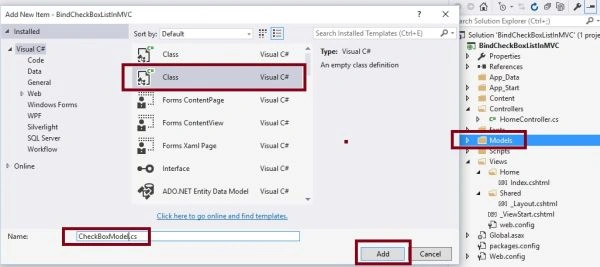
Now write the following code into the CityModel.cs class:
CityModel.cs:
- public class CityModel
- {
- //Value of checkbox
- public int Value
- {
- get;
- set;
- }
- //description of checkbox
- public string Text
- {
- get;
- set;
- }
- //whether the checkbox is selected or not
- public bool IsChecked
- {
- get;
- set;
- }
- }
- public class CityList
- {
- //use CheckBoxModel class as list
- public List < CityModel > Cities
- {
- get;
- set;
- }
- }
Right click on Controllers folder of created MVC application and click add empty Controller named HomeController.cs as.
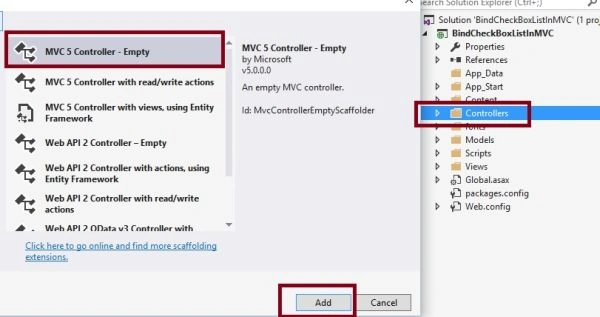
Now create the generic list and add the records instead of going to database, however you can bind html checkboxlistfor-and get checked values in ASP.NET generic list from database but for example we added hard coded records.
HomeController.cs
- public class HomeController: Controller
- {
- // GET: Home
- public ActionResult Index()
- {
- //Add Records into generic list
- List < CityModel > obj = new List < CityModel > ()
- {
- new CityModel
- {
- Text = "Latur", Value = 1, IsChecked = false
- },
- new CityModel
- {
- Text = "Mumbai", Value = 2, IsChecked = true
- },
- new CityModel
- {
- Text = "Pune", Value = 2, IsChecked = false
- },
- new CityModel
- {
- Text = "Noida", Value = 2, IsChecked = false
- },
- };
- CityList objBind = new CityList();
- objobjBind.Cities = obj;
- return View(objBind);
- }
- //Post and get checkbox checked records
- [HttpPost]
- public ActionResult Index(CityList Obj)
- {
- StringBuilder sb = new StringBuilder();
- foreach(var item in Obj.Cities)
- {
- if(item.IsChecked)
- {
- //append each checked records into StringBuilder
- sb.Append(item.Text + ",");
- }
- }
- //store location into viewbag
- ViewBag.Loc = "Your preferred work locations are " + sb.ToString();
- //return location view to display checked records using viewbag
- return View("Locations");
- }
- public ActionResult Locations()
- {
- return View();
- }
- }
Right click on Views folder of created MVC application project and add empty view named Index.cshtml as
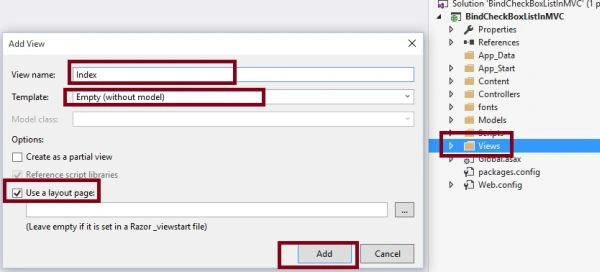
Now open the Index.cshtml view and write the following code into the view:
- @
- model BindStronglyTypedCheckBox.Models.CityList@
- {
- ViewBag.Title = "www.compilemode.com";
- }
- < div class = "form-horizontal" >< h4 > Select Preferred work location < /h4> @
- using(Html.BeginForm())
- {
- for(int i = 0; i < Model.Cities.Count; i++)
- {@
- Html.CheckBoxFor(m => Model.Cities[i].IsChecked)@ Model.Cities[i].Text@ Html.HiddenFor(m => Model.Cities[i].Value)@ Html.HiddenFor(m => Model.Cities[i].Text) < br / >
- }
- < div class = "col-md-offset-2 col-md-10" >< input type = "submit"
- value = "Save"
- class = "btn btn-default" / >< /div> @
- ViewBag.Loc
- }
- < /div>
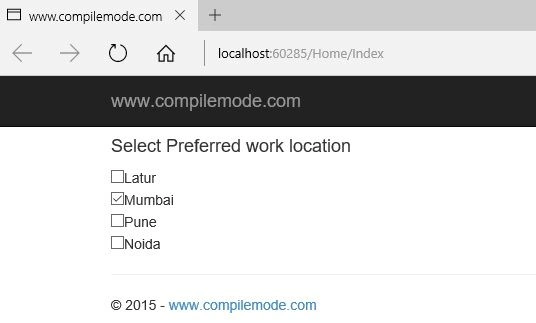
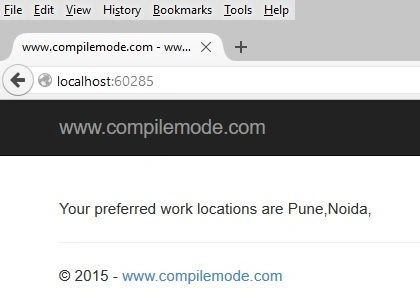
Now select Pune and Noida then the output will be as follows:
Now select Latur and Mumbai:
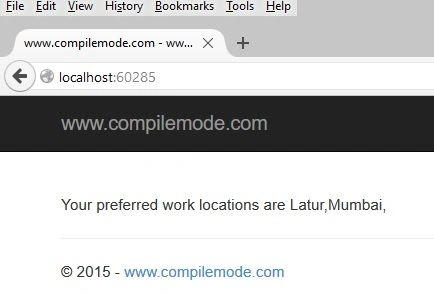
From all the above examples we have learned how to get check box values in ASP.NET MVC Controller.
Note:
- Do proper validation such as date input values when implementing.
- Download the Zip file of the sample application for a better understanding.
- In this example CheckBoxList bound using generic list however you can also bind html Checkboxlistfor and get checked values in ASP.NET using database.
Summary:
I hope this article is useful for all readers, if you have a suggestion then please contact me.


Vithal WadjeTOP 100Posted Oct 31, 2015, 7:48 AM EDT
Thanks Nilesh Jadav sir
Vithal WadjeTOP 100Posted Oct 31, 2015, 7:47 AM EDT
Thanks Mukesh Kumar sir
Vithal WadjeTOP 100Posted Oct 31, 2015, 7:47 AM EDT
Thanks Gowtham K
Vithal WadjeTOP 100Posted Oct 31, 2015, 7:47 AM EDT
Thanks Vignesh Mani sir
Nilesh JadavPosted Oct 31, 2015, 7:26 AM EDT
Good work
Mukesh KumarPosted Oct 31, 2015, 7:18 AM EDT
Good Job
Gowtham KTOP 100Posted Oct 31, 2015, 6:35 AM EDT
Good One, Thanks for sharing
Vignesh ManiTOP 100Posted Oct 31, 2015, 5:38 AM EDT
Nice