
Introduction
This article introduces how to implement a Bootstrap WYSIWYG editor in an ASP.NET MVC application. There are many editors available over the internet but here we will implement the Summer note editor that is a simple WYSIWYG editor using Bootstrap. Summer note is a JavaScript library that helps us to create a WYSIWYG editor. You can download it from either GitHub or the official site.
Using the Code
Summer note uses the open-source libraries jQuery, Bootstrap and Font Awesome. To implement this in an ASP.NET MVC application we will create an MVC project in Visual Studio. First of all we will create bundles required for both JavaScript and CSS files. The following code snippet shows the BundleConfig class.
- using System.Web.Optimization;
- namespace BootstrapEditor.App_Start
- {
- public class BundleConfig
- {
- public static void RegisterBundles(BundleCollection bundles)
- {
- bundles.Add(new StyleBundle("~/Content/css").Include(
- "~/Content/css/bootstrap.css",
- "~/Content/css/font-awesome.css",
- "~/Content/css/site.css"
- ));
- bundles.Add(new StyleBundle("~/Content/summernote").Include(
- "~/Content/summernote/summernote.css"
- ));
- bundles.Add(new ScriptBundle("~/bundle/base").Include(
- "~/Scripts/jquery-1.10.2.js",
- "~/Scripts/bootstrap.js"
- ));
- bundles.Add(new ScriptBundle("~/bundle/summernote").Include(
- "~/Content/summernote/summernote.js"
- ));
- }
- }
- }
- namespace BootstrapEditor.Models
- {
- public class HomeViewModel
- {
- public string Title { get; set; }
- public string Content { get; set; }
- }
- }
- using BootstrapEditor.Models;
- using System.Web.Mvc;
- namespace BootstrapEditor.Controllers
- {
- public class HomeController : Controller
- {
- [HttpGet]
- public ActionResult Index()
- {
- HomeViewModel model = new HomeViewModel();
- return View();
- }
- [HttpPost]
- public ActionResult Index(HomeViewModel model)
- {
- return View(model);
- }
- }
- }
- @model BootstrapEditor.Models.HomeViewModel
- @section head{
- @Styles.Render("~/Content/summernote")
- }
- <div class="panel panel-primary">
- <div class="panel-heading panel-head">Add Content</div>
- <div class="panel-body">
- @using (Html.BeginForm())
- {
- <div class="form-horizontal">
- <div class="form-group">
- @Html.LabelFor(model => model.Title, new { @class = "col-lg-2 control-label" })
- <div class="col-lg-9">
- @Html.TextBoxFor(model => model.Title, new { @class = "form-control" })
- </div>
- </div>
- <div class="form-group">
- @Html.LabelFor(model => model.Content, new { @class = "col-lg-2 control-label" })
- <div class="col-lg-9">
- @Html.TextAreaFor(model => model.Content, new { @class = "form-control", @row = 5 })
- </div>
- </div>
- <div class="form-group">
- <div class="col-lg-9"></div>
- <div class="col-lg-3">
- <button class="btn btn-success" id="btnSubmit" type="submit">
- Submit
- </button>
- </div>
- </div>
- </div>
- }
- </div>
- </div>
- @section scripts{
- @Scripts.Render("~/bundle/summernote",
- "~/Scripts/home-index.js")
- }
- (function ($) {
- function HomeIndex() {
- var $this = this;
- function initialize() {
- $('#Content').summernote({
- focus: true,
- height: 150,
- codemirror: {
- theme: 'united'
- }
- });
- }
- $this.init = function () {
- initialize();
- }
- }
- $(function () {
- var self = new HomeIndex();
- self.init();
- })
- }(jQuery))
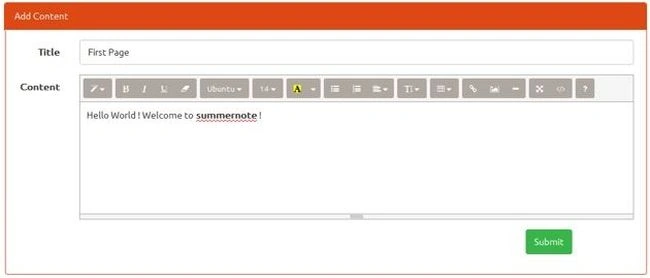
Figure 1: Text Editor on UI
Now we will click on the submit button to submit the form on the server. Here we will get an error such as:
A potentially dangerous Request.Form value was detected from the client (Content="Welcome to<span style="font-we")
This was because .NET detected something in the entered text that looked like an HTML statement. To disable request validation, we will add the [ValidateInput(false)] to the POST action in HomeController as in the following code snippet.
- [ValidateInput(false)]
- [HttpPost]
- public ActionResult Index(HomeViewModel model)
- {
- return View(model);
- }


Pritam SawwalakhePosted Aug 27, 2019, 8:53 AM EDT
Thanks for such beautiful HTML Editor , which covering almost features of CKEditor.
Hooman Babaii FardPosted Nov 28, 2017, 11:58 PM EST
Hi, Have you dealt with inserting image inside summernote? It seems to be a pain in the a$$, Any suggestion or example?
vinodh nehruPosted Sep 12, 2017, 11:39 PM EDT
Is it a free one or need to pay . Can i create my own design on top of this code without paying ?
Tamil GPosted Dec 14, 2016, 7:36 PM EST
How to set the value in that editor
Umer KhanPosted Sep 25, 2016, 12:56 AM EDT
His artical is really nice,.but I am having problem when retreiving data back contains html tags, how to get rid of that?
Saurabh SarkarPosted Jun 15, 2016, 3:42 AM EDT
Nice
Former memberPosted Apr 20, 2016, 1:33 PM EDT
Bump
David WrightPosted Aug 24, 2015, 5:54 AM EDT
Hello, thank you for this example it has helped me a lot. I just have a question. I have implemented summernote as you have above but I have problems with the way it looks and is layed out. The toolbar icons are missing and it is difficult to align the editor the way I would like to. Are you aware of any css or other files that may interfere with it?
Gowtham KTOP 100Posted Jul 6, 2015, 11:11 PM EDT
Good one..
Sandeep Singh ShekhawatPosted Jul 6, 2015, 9:03 PM EDT
Thanks all :)
SharadPosted Jul 6, 2015, 8:22 PM EDT
really cool..
Santhakumar MunuswamyPosted Jul 6, 2015, 11:48 AM EDT
Nice article. Thanks for sharing
Debendra DashPosted Jul 6, 2015, 5:06 AM EDT
Nice....
Sandeep Singh ShekhawatPosted Jul 6, 2015, 4:59 AM EDT
Thanks all :)
Nilesh JadavPosted Jul 6, 2015, 4:47 AM EDT
Nice one !
Debasis SahaTOP 100Posted Jul 6, 2015, 4:46 AM EDT
Thanks for sharing..
Sibeesh VenuTOP 100Posted Jul 6, 2015, 4:13 AM EDT
Good One.Thanks for sharing :)