
Just out of curiosity, I thought, why Build, Rebuild & Clean Solution in Visual Studio IDE? Earlier, I thought if you use any one of them, i.e. Build & Rebuild, they would do the same thing! But still I thought of going through a few resources and once I got the differences I was staggered to find that I was wrong. :D
This is a very simple and basic fact, which every developer using VS should be aware of. I wanted to be aware of this before someone questions me on the same. I will be discussing their work and describing each as an Agent.
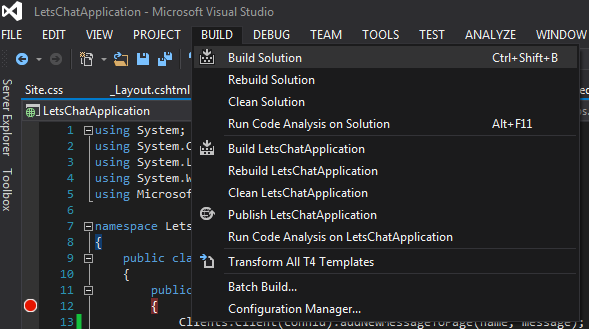
Let's first discuss about Build Solution.
:-
'Ctrl + Shift + B',
The short cut above is to build a solution. Now what does this Build agent do in the background!
The Build Agent,

This agent of the VS IDE does an incremental build. If you build your solution once, with some files changed, then it will build only those files which you have changed, without touching the files that are not even touched by you. :P
Moreover, if you are building the Solution once and then again doing a build, it will not again build the solution actually, as the agent finds no files that are changed!
We see the build result on the output window in the IDE.
Let's see a pictorial difference.

As you see in the above image, the dll of the project gets re-generated, as a file was modified under that project. Since my solution has a single project, it creates the dll of that only.

In the above image as we hit the Build, the Build is succeeded but shows '0 succeeded' i.e. there were no files modified, for which it did not create any dll.


This agent is the master of all. This is the combination of Clean & Build.
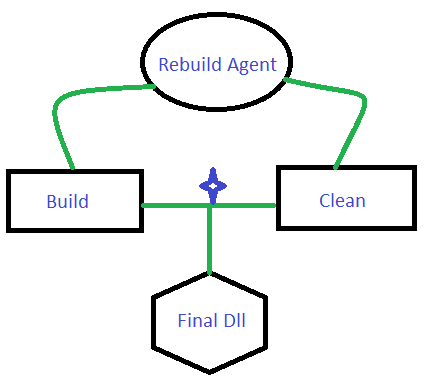 This does not check or bother if there are any changed/modified files, it will always do a clean and build the solution or the specific project. This will recompile and regenerate the dlls inside the bin folder.

The clean Madam cleans and removes all the dlls created inside the bin folder. The procedure she follows is simple, just remove the Dlls related to the project or related to the entire solution from the bin folder.
Before Cleaning the bin folder has all the dlls: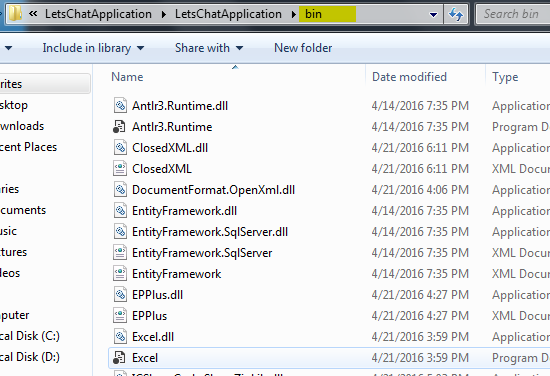
After the clean when the clean succeeds, all the dlls are removed by the clean agent.
To be honest, we can use any of them, I prefer a Clean first and then a Build. What do you prefer?
When we
- Rebuild a Solution with 2-3 projects, then the Re-build agent cleans the project 1 and then builds the project 1. Similarly, it cleans project 2 and builds project 2 and so on.
- When we clean and then build a solution, then the Clean agent first removes all the dlls for each project and then the build agent generates the project dlls at once.
Thus I have shared a simple tip and now know the facts which might be handy and mandate what we do, as we are Visual Studio developers!


Sathiya VijayarajanPosted Oct 8, 2018, 10:03 PM EDT
Fabulous ! It's to interesting article, really ! Thank you suraj.. i had removed my dll in bin folder.. Added some source in .cs file and after build my solution, DLL is not getting copied to the build output folder..Why is it not getting copied,Can you please suggest..your help and ideas will be greatly appreciated..
Bhuvanesh MohankumarPosted May 3, 2016, 8:53 AM EDT
Good one..
Gowtham RajamanickamTOP 100Posted Apr 24, 2016, 10:36 PM EDT
very good article
Mohammad KhalidPosted Apr 24, 2016, 10:34 PM EDT
Really a good post. I never paid attention to this. But this is useful. Thank you Suraj and C-sharpcorner.
Bhushan GawalePosted Apr 24, 2016, 9:03 PM EDT
Excellent post, highlighting basics for developers. Thanks for sharing!
Jaipal ReddyPosted Apr 24, 2016, 7:55 PM EDT
Rebuild = Clean + Build. . (i preferred rebuild instead clean then build).
Jaipal ReddyPosted Apr 24, 2016, 7:52 PM EDT
Good one. .
Dominique CejaPosted Apr 24, 2016, 6:32 PM EDT
Really great post
Rahul ChavanPosted Apr 24, 2016, 6:27 PM EDT
Good article
Kumaresh RajalingamPosted Apr 24, 2016, 5:34 PM EDT
Nice share
Ruchir SaxenaPosted Apr 24, 2016, 8:39 AM EDT
If the solution contains too many projects and some projects requires resources like connecting to excel and some other resource intensive work , then I prefer clean and than build...
Rahul Kumar SaxenaTOP 100Posted Apr 24, 2016, 8:19 AM EDT
Good One
Muhammad Aqib ShehzadPosted Apr 24, 2016, 8:00 AM EDT
Nice info share
Vignesh ManiTOP 100Posted Apr 24, 2016, 5:49 AM EDT
Nice
Manoj KulkarniPosted Apr 23, 2016, 8:07 PM EDT
Nice article. Thank you for sharing
Pankaj Kumar ChoudharyTOP 100Posted Apr 23, 2016, 4:40 PM EDT
Nice Information Sir........
Bhuvanesh MohankumarPosted Apr 23, 2016, 1:53 PM EDT
Good
Kuppurasu NagarajTOP 100Posted Apr 23, 2016, 9:31 AM EDT
Nice Sharing..
Upendra Pratap ShahiPosted Apr 23, 2016, 5:35 AM EDT
nice explain....