
In today’s digital world, users expect real-time information at their fingertips—whether they’re checking the weather before traveling or verifying live currency exchange rates for financial decisions. To meet this need, I developed an interactive Weather & Currency Rate Wizard using Microsoft Power Pages and Power Automate.
This solution demonstrates how low-code tools can be combined to deliver dynamic, API-driven, real-time experiences—without heavy backend coding.
🚀 Overview of the Solution
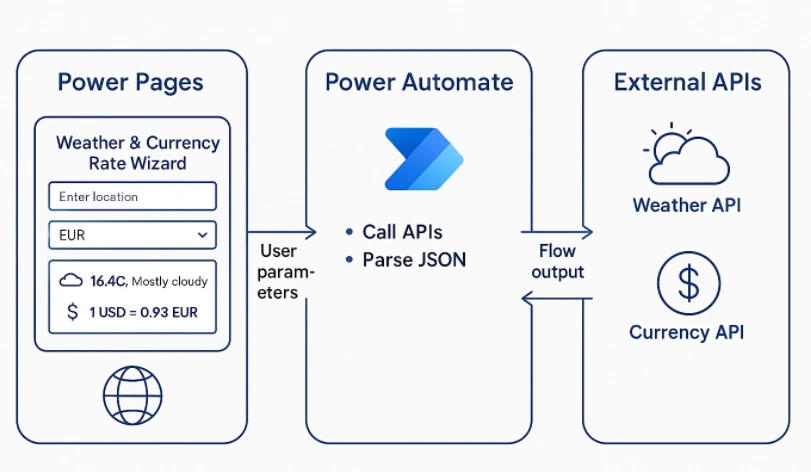
The Weather & Currency Rate Wizard is a lightweight tool built on Power Pages that pulls real-time data from external APIs and updates the UI dynamically. The system involves three key layers:
Power Pages Frontend
Power Automate for API integration
JavaScript for dynamic UI updates
Together, they deliver a seamless, interactive experience that feels like a modern web app.
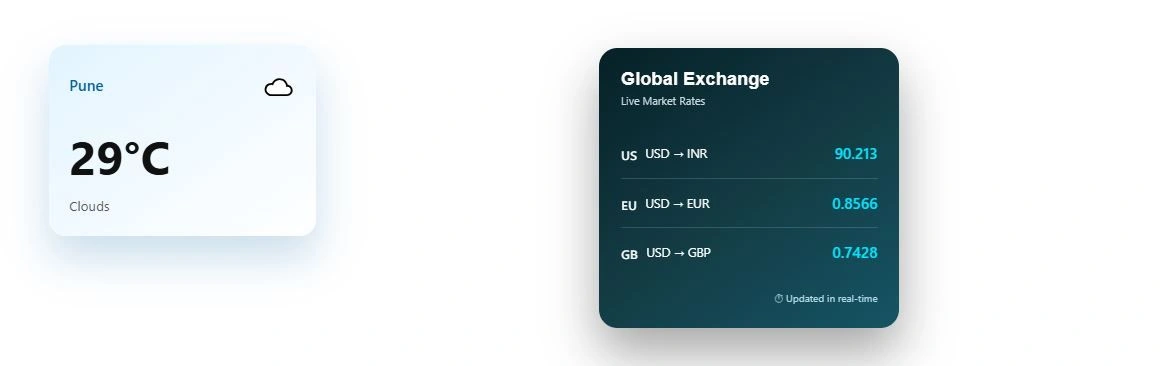
🧩 How the Solution Works
1️⃣ Power Pages: The User-Facing Interface
Power Pages acts as the presentation layer where users interact with the wizard.
The page includes:
A location input for weather lookup
A dropdown or preset list for currency conversion
A results panel that updates instantly
Modern and responsive UI aligned with Power Pages styling
<div class="row sectionBlockLayout sectionPrimaryColor text-start" style="display: flex; flex-wrap: wrap; height: 15px; padding: 8px; margin: 0px;"><div class="container" style="display: flex; flex-wrap: wrap;"></div></div>
<div class="row sectionBlockLayout text-start" style="display: flex; flex-wrap: wrap; margin: 0px; min-height: auto; padding: 8px;">
  <div class="container" style="padding: 0px; display: flex; flex-wrap: wrap;">
    <div class="col-lg-6 columnBlockLayout" style="flex-grow: 1; display: flex; flex-direction: column; min-width: 250px;">
     <div class="weather-card">
    <div class="weather-header">
        <span class="weather-city" id="wCity">Loading...</span>
        <span class="weather-icon" id="wIcon">☁️</span>
    </div>

    <div class="weather-temp">
        <span id="wTemp">--</span>°C
    </div>

    <div class="weather-condition" id="wCondition">
        Fetching weather...
    </div>
</div>
    </div>
    <div class="col-lg-6 columnBlockLayout" style="flex-grow: 1; display: flex; flex-direction: column; min-width: 250px;">
     <div class="currency-glass">
    <div class="currency-title">
        <h3>Global Exchange</h3>
        <span>Live Market Rates</span>
    </div>

    <div class="currency-list">
        <div class="currency-item">
            <div class="currency-left">
                <span class="flag">🇺🇸</span>
                <span>USD → INR</span>
            </div>
            <div class="currency-rate" id="rateINR">--</div>
        </div>

        <div class="currency-item">
            <div class="currency-left">
                <span class="flag">🇪🇺</span>
                <span>USD → EUR</span>
            </div>
            <div class="currency-rate" id="rateEUR">--</div>
        </div>

        <div class="currency-item">
            <div class="currency-left">
                <span class="flag">🇬🇧</span>
                <span>USD → GBP</span>
            </div>
            <div class="currency-rate" id="rateGBP">--</div>
        </div>
    </div>

    <div class="currency-footer">
        ⏱ Updated in real-time
    </div>
</div>

</div>
</div>
JavaScript
const weatherIcons = {
    Clear: "☀️",
    Clouds: "☁️",
    Rain: "🌧️",
    Drizzle: "🌦️",
    Thunderstorm: "⛈️",
    Snow: "❄️",
    Mist: "🌫️"
};

fetch("https://d66c7ffee47ced049bcb2e49695495.dc.environment.api.powerplatform.com:443/powerautomate/automations/direct/workflows/725b63c00dd240679c5f018dc374c5c9/triggers/manual/paths/invoke?api-version=1&sp=%2Ftriggers%2Fmanual%2Frun&sv=1.0&sig=gxiVl-rMBi90BuuTsljNifyKBRca9_4iu-hpkr8iQ0A", {
    method: "POST",
    headers: { "Content-Type": "application/json" },
    body: JSON.stringify({ city: "Pune" })
})
.then(res => res.json())
.then(data => {
    document.getElementById("wCity").innerText = data.city;
    document.getElementById("wTemp").innerText = Math.round(data.temperature);
    document.getElementById("wCondition").innerText = data.condition;
    document.getElementById("wIcon").innerText =
        weatherIcons[data.condition] || "🌤️";
})
.catch(() => {
    document.getElementById("wCondition").innerText = "Unable to load weather";
});

fetch("https://d66c7ffee47ced049bcb2e49695495.dc.environment.api.powerplatform.com:443/powerautomate/automations/direct/workflows/7329b09bf19d476faaa19c6be85a5c7f/triggers/manual/paths/invoke?api-version=1&sp=%2Ftriggers%2Fmanual%2Frun&sv=1.0&sig=ZkjOLr1mnJwJCeo4PORn3rXY8y4Ov8gs6OGv1B8PBzk", {
    method: "GET"
})
.then(res => {
    if (!res.ok) throw new Error("Network response was not ok");
    return res.json();
  })
  .then(data => {
    document.getElementById("rateINR").innerText = data.usdToInr;
    document.getElementById("rateEUR").innerText = data.usdToEur;
    document.getElementById("rateGBP").innerText = data.usdToGbp;
  })
  .catch(err => {
    console.error("Currency load failed", err);
  });
2️⃣ Power Automate: The Intelligent Backend
Power Automate handles all the heavy lifting:
✔ Calling External APIs
The flow connects to two APIs:
Weather API – retrieves temperature, climate conditions, humidity, etc.
Currency API – fetches live exchange rates (e.g., USD → INR/EUR/GBP)
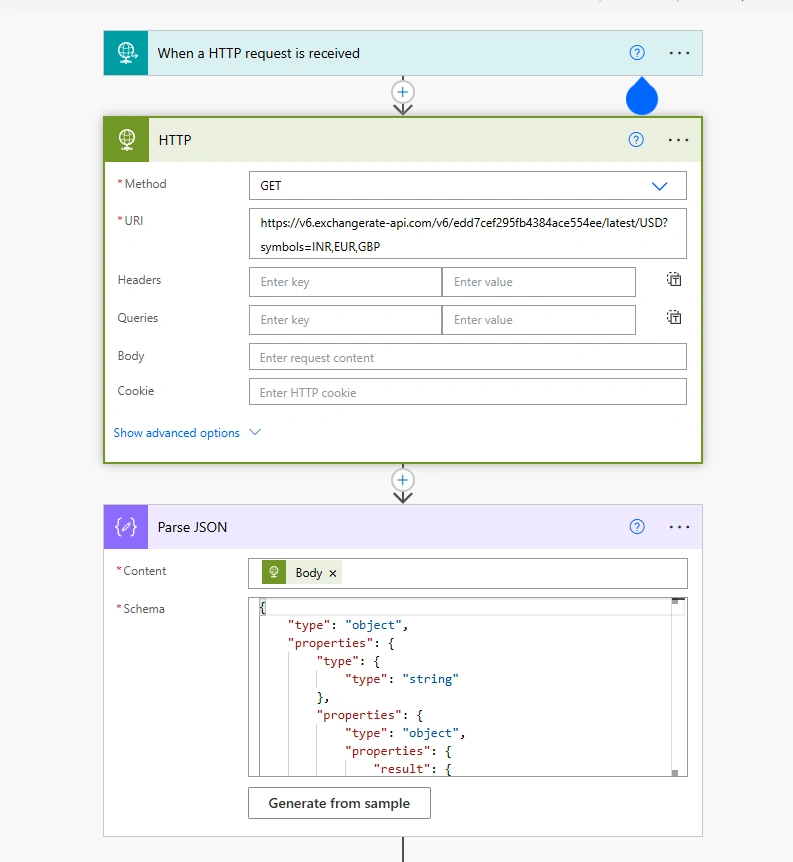
✔ JSON Parsing
After receiving the API response, the flow parses the JSON payload to extract:
Temperature
Weather Condition
Feels-like
Exchange rates
Only the necessary information is returned to the Power Pages frontend, keeping the response lightweight and clean.
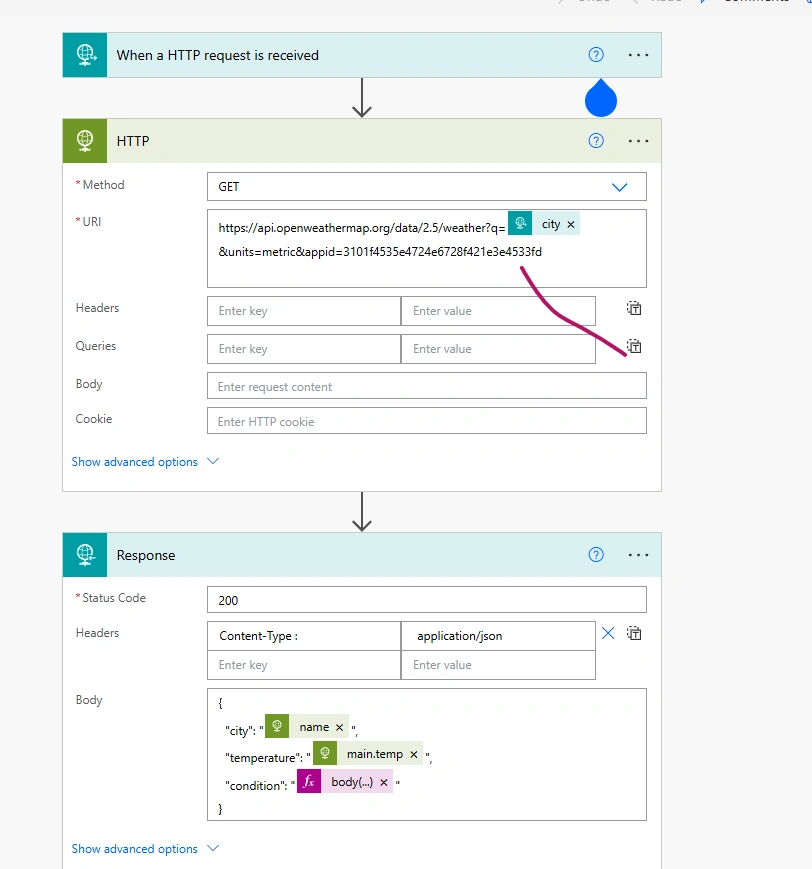
✔ Secure Output for JavaScript
The flow exposes a secure endpoint that Power Pages can call using JavaScript.
3️⃣ Dynamic UI Updates Using JavaScript
To avoid full page reloads, JavaScript fetches the Power Automate flow’s output asynchronously.
Key functions include:
Sending user parameters (city, currency) to the flow
Receiving parsed JSON response
Updating the DOM with temperature and currency results
Displaying loaders/spinners for a smooth user experience
This enables a real-time, app-like interface inside Power Pages.
🎯 Key Features of the Wizard
Real-time weather updates for any city
Live currency conversion using official exchange rates
API-driven architecture powered by Power Automate
Dynamic UI using client-side JavaScript
Fully low-code and easily extendable
🏁 Final Thoughts
The Weather & Currency Rate Wizard is a compact yet powerful demonstration of how Power Pages + Power Automate + JavaScript can deliver modern web-app capabilities in a low-code environment.

Join the conversation! Your thoughts help the community grow.