
This article provides the procedure for capturing an image from a webcam and store it in folder.
Here I used JSON, jQuery, SQL and C# to do it.
Preparation
- Download the webcam folder and extract it.
- Add that entire folder to your web application.
- Download the Scripts folder and run them in your SQL Server.
- Change the database name in your webconfig file.
Now we are ready to go.
Step 1: Starting with SQL.
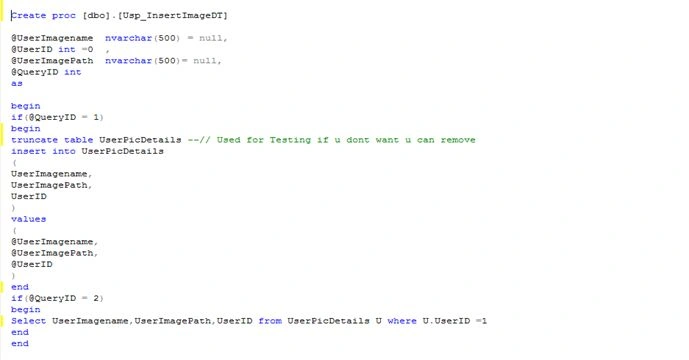
The following is the table and Stored Procedure that I have used.
Table

Stored Procedure
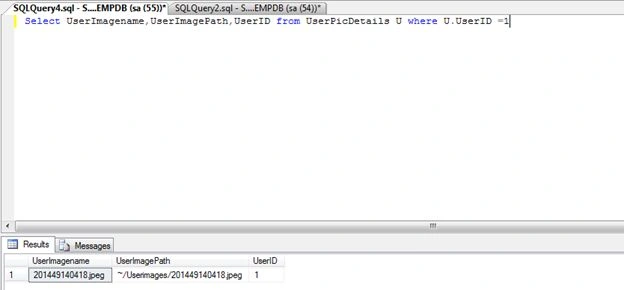
Show Records
Step 2: Now we are starting the coding.
- Create a new project
- Select Template Visual C# in side select Web.
- After Selecting Select ASP.NET Web Forms Application.
- Enter Name for application.
Step 3: Creating the WebCamCapture.aspx page.
Add a web form to your application and name it WebCamCapture.aspx.
Add the following Styles and Controls the page.
Controls
- Image Control
- Linkbutton.
- <html xmlns="http://www.w3.org/1999/xhtml">
- <head id="Head1" runat="server">
- <%--<meta http-equiv="refresh" content="30;url=WebCamCapture.aspx">--%>
- <style type="text/css">
- #profile_pic_wrapper
- {
- position: relative;
- border: #ccc solid 1px;
- width: 120px;
- height: 120px;
- border: none;
- }
- #profile_pic_wrapper a
- {
- position: absolute;
- display: none;
- top: 30;
- right: 0;
- margin-top: -30px;
- line-height: 20px;
- padding: 5px;
- color: #fff;
- background-color: #333;
- width: 110px;
- text-decoration: underline;
- text-align: center;
- z-index: 100;
- text-decoration: none;
- font-family: Arial;
- font-size: 10px;
- }
- #profile_pic_wrapper:hover a
- {
- position: absolute;
- margin: 90px 0px 0px 0px;
- display: block;
- text-decoration: none;
- font-family: Arial;
- font-size: 10px;
- }
- #profile_pic_wrapper:hover a:hover
- {
- text-decoration: none;
- font-family: Arial;
- font-size: 10px;
- }
- .profile_pic
- {
- width: 120px;
- height: 120px;
- }
- </style>
- <title>Web capture</title>
- </head>
- <body>
- <form id="form1" runat="server">
- <div style="float: left; padding-left: 35px;" id="profile_pic_wrapper">
- <asp:Image ID="img" Width="120" Height="120" runat="server" Style="float: left;" />
- <asp:LinkButton ID="Linkbutton1" runat="server" OnClick="Linkbutton1_Click">Change Photo</asp:LinkButton>
- </div>
- </form>
- </body>
- </html>

Step 4: After adding the Styles and Controls to your page.
On the load of this page we will set the image to an image control from the database.
The following is the on load code.
- protected void Page_Load(object sender, EventArgs e)
- {
- if (!IsPostBack)
- {
- SqlConnection con = new SqlConnection(ConfigurationManager.ConnectionStrings["Mycon"].ToString());
- // connection of sql
- // used this StoredProcedure for reteriving image
- // According to user id i am reteriving image from database
- SqlCommand cmd = new SqlCommand("Usp_InsertImageDT", con);
- cmd.CommandType = CommandType.StoredProcedure;
- cmd.Parameters.AddWithValue("@UserImagename", null);
- cmd.Parameters.AddWithValue("@UserImagePath", null);
- cmd.Parameters.AddWithValue("@UserID", 0);
- cmd.Parameters.AddWithValue("@QueryID", 2);
- DataSet ds = new DataSet();
- SqlDataAdapter da = new SqlDataAdapter();
- da.SelectCommand = cmd;
- da.Fill(ds);
- if (ds.Tables[0].Rows.Count > 0)
- {
- img.ImageUrl = ds.Tables[0].Rows[0]["UserImagePath"].ToString();
- // Assiging image to Image Control
- }
- }
- }
Step 5: Button Linkbutton1 click code.
- protected void Linkbutton1_Click(object sender, EventArgs e)
- {
- // to how Pop and calling another Page in Popup.
- string url = "/WebCam/Captureimage.aspx";
- string s = "window.open('" + url + "', 'popup_window', 'width=900,height=460,left=100,top=100,resizable=no');";
- ClientScript.RegisterStartupScript(this.GetType(), "script", s, true);
- }
Step 6:
Add a folder Name (WebCam) to your project that I am providing for you.
You can download it from the top folder.
Here is snapshot of the folder.
It contains all files the required for web cam image capturing.
Just add it.

In this folder are the following 2 .Aspx pages.
- Captureimage.aspx
The Captureimage.aspx Page contains code for waking up the WebCam and capturing the image.
- Baseimg.aspx
After capturing an image it will call the baseimg.aspx page and provide a base64 string to it.
On the load of this page it receive the base64 string.
Using a FileStream and Binary Writer it will draw an image.
After drawing it will save it to a folder and insert it into the database.
Step 7:
Captureimage.aspx Page
It contains 2 main JS Files.
- <script src="Scripts/jquery-1.4.2.min.js" type="text/javascript"></script>
- <script src="Scripts/jquery.webcam.js" type="text/javascript"></script>
Snapshot of Captureimage.aspx
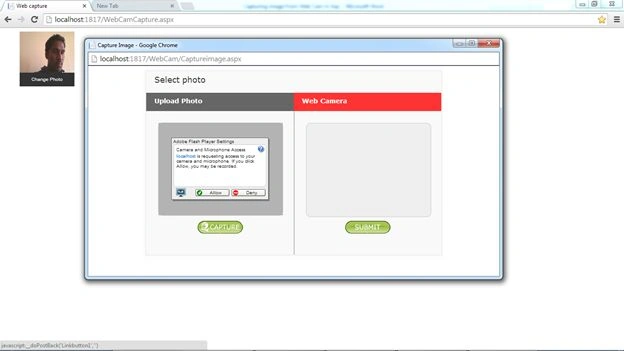
This will pop-up when you will click on the change Photo link button on the image.
It will ask for the Adobe Flash player setting.
Just click "Allow".
After clicking on Allow:
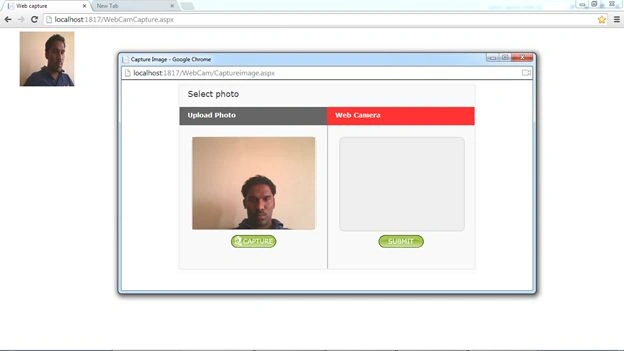
After clicking of Capture.

When you click on the "Submit" Button then it will call the page Baseimg.aspx for writing the Base 64 string .
The following is the JSON script for calling baseimg.aspx and reloading the image on the parent page.
- <div style="text-align: center; margin-bottom: 46px;">
- <a href="#" id="filter" onclick="javascript:UploadPic();">
- <input type="image" id="Submit" runat="server" src="images/submitBTN.png" />
- </a>
- </div>
- function UploadPic() {
- debugger;
- // generate the image data
- var canvas = document.getElementById("canvas");
- var dataURL = canvas.toDataURL("image/png");
- // Sending the image data to Server
- $.ajax({
- type: 'POST',
- url: "baseimg.aspx",
- data: { imgBase64: dataURL },
- success: function () {
- alert("Done, Picture Uploaded.");
- window.opener.location.reload(true); // reloading Parent page
- window.close();
- window.opener.setVal(1);
- return false;
- }
- });
- }
Step 8:
Baseimg.aspx
- protected void Page_Load(object sender, EventArgs e)
- {
- //called page form json for creating imgBase64 in image
- StreamReader reader = new StreamReader(Request.InputStream);
- String Data = Server.UrlDecode(reader.ReadToEnd());
- reader.Close();
- DateTime nm = DateTime.Now;
- string date = nm.ToString("yyyymmddMMss");
- //used date for creating Unique image name
- Session["capturedImageURL"] = Server.MapPath("~/Userimages/") + date + ".jpeg";
- Session["Imagename"] = date + ".jpeg";
- // We can use name of image where ever we required that why we are storing in Session
- drawimg(Data.Replace("imgBase64=data:image/png;base64,", String.Empty), Session["capturedImageURL"].ToString());
- // it is method
- // passing base64 string and string filename to Draw Image.
- insertImagePath(Session["Imagename"].ToString(), "~/Userimages/" + Session["Imagename"].ToString());
- // it is method
- //inserting image in to database
- }
Drawing Method
- public void drawimg(string base64, string filename) // Drawing image from Base64 string.
- {
- using (FileStream fs = new FileStream(filename, FileMode.OpenOrCreate, FileAccess.Write))
- {
- using (BinaryWriter bw = new BinaryWriter(fs))
- {
- byte[] data = Convert.FromBase64String(base64);
- bw.Write(data);
- bw.Close();
- }
- }
- }
Insert Image to Database Method
- public void insertImagePath(string imagename, string imagepath) // use for inserting image when it is created.
- {
- SqlConnection con = new SqlConnection(ConfigurationManager.ConnectionStrings["Mycon"].ToString());
- SqlCommand cmd = new SqlCommand("Usp_InsertImageDT", con);
- cmd.CommandType = CommandType.StoredProcedure;
- cmd.Parameters.AddWithValue("@UserImagename", imagename);
- cmd.Parameters.AddWithValue("@UserImagePath", imagepath);
- cmd.Parameters.AddWithValue("@UserID", 1);
- cmd.Parameters.AddWithValue("@QueryID", 1);
- con.Open();
- cmd.ExecuteNonQuery();
- con.Close();
- }
Step 9
Final output.

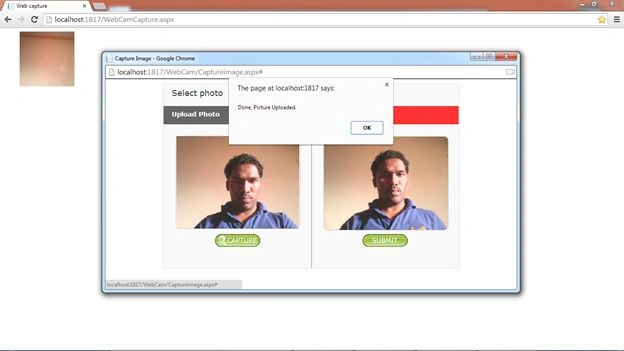

I am providing you the entire solution and table script. If you have any problem creating this then just run this solution and check it else you can comment on this article.


Dharminder sharmaPosted Feb 18, 2025, 7:35 AM EST
Great, but can you provide the complete solution folder for this, also will it work on http also or only on https
Ajay SinghPosted Mar 7, 2022, 11:17 AM EST
Getting error: capture is not a function.
Najaf HaiderPosted Nov 12, 2021, 10:47 AM EST
This project is showing error for Flash Plyer "Adobe Flash player is no longer supported".
Jorge E. SomersPosted Sep 11, 2021, 10:50 PM EDT
No way to use FLASH PLAYER it?s banned !
Sumit Kumar PatiPosted Jan 12, 2021, 12:41 AM EST
Is it based on flash player tool??? actually flash player is now stoped their services.
Ashish SharmaPosted Aug 11, 2020, 1:45 AM EDT
Hi...Great work...I modified your code to suite my requirements but when i put the pages on server it does not show any thing in capture image area ....can you help
ankul rathiPosted Aug 4, 2020, 7:05 AM EDT
In my case Request.InputStream.Length is 0 every time Please suggest what mistake i am doing
Fahid AliPosted Jun 29, 2020, 12:11 AM EDT
It work just localhost but when i publish site then it cannot work please tell me the solution .
Alan EscobedoPosted Jun 12, 2020, 5:46 PM EDT
Good article. It is working in my code, but I have a problem, I would like to take it from a TextBox, the name of the image, but when I call it, it appears to me that it has an empty string. I don't know why this is happening, can you help me with this situation? Thanks
Fahid AliPosted May 14, 2020, 11:55 PM EDT
Thanks sir its very helpful for me
Joseph EremitaPosted Oct 14, 2019, 5:56 AM EDT
Hi - when I press the Capture button, and in the Page_load event, the stream is null. I queried the request_type in Page_Load, and it is a 'GET', not 'POST' (as the js has)
Bartolomeu LemosPosted Feb 5, 2019, 9:22 AM EST
How do I run on theHow do I run on the client side?When it squeaks site, it works fine, but as I squeeze the server, it does not capture the webcam on the computer. Could you help me, please. client side?When it squeaks site, it works fine, but as I squeeze the server, it does not capture the webcam on the computer. Could you help me, please.
Obiora OkoyePosted Dec 30, 2018, 12:49 AM EST
This line an issue in asp.net <canvas id="canvas" width="320" height="240"></canvas>
Obiora OkoyePosted Dec 29, 2018, 5:28 AM EST
Good details. Thank you bro.
rajvir yadavPosted Nov 1, 2018, 11:16 PM EDT
Hello this code not working in masterpage in asp.net
ketan patelPosted Jul 26, 2018, 7:25 PM EDT
Is this code available in VB. i need this for an old website.
Ashwani BhargavPosted Jun 24, 2018, 10:09 PM EDT
This code is not run in chrome for live .net application so please suggest me
Ashwani BhargavPosted Jun 22, 2018, 4:23 AM EDT
It is not working in chrome .Please suggest.
Opeyemi OluwatobiPosted May 20, 2018, 10:49 PM EDT
Thanks a lot for the solution but it saved the first picture i took and didn't save the ones i took after into the sqlserver. Your swift response will be highly appreciated
Niranjan BPosted May 9, 2018, 1:00 AM EDT
I am Getting Error at drawing Method
omid aminiazarPosted Apr 22, 2018, 9:29 PM EDT
Thank you my brother
sandeep786 mishraPosted Apr 5, 2018, 3:27 AM EDT
When i open this in mobile it dosn't work..
Sribin KumarPosted Mar 14, 2018, 2:00 AM EDT
Getting data string as empty in baseimage.aspx.cs page.Any help?
Shrikant GavhanePosted Jan 26, 2018, 10:54 PM EST
Thanks a lot sir.. my problem got solved because of you....
Kamran MalikPosted Jun 16, 2017, 2:53 PM EDT
Sir i want to add webcam in Serenity webapplication. have any idea how to capture image in serene. ?
SubashPosted Mar 18, 2017, 8:49 PM EDT
Very Interesting bro..
kumar gargPosted Oct 18, 2016, 10:14 PM EDT
I want to show live webcam streaming of other clients more than 10 on my central pc.so that all clients webcam show at my pc in one screen how can i do this.Thanks
anurag singhPosted Jul 1, 2016, 1:58 AM EDT
Hello sir, an error is coming while running this code.-- a plugin is needed to display this content ... please help me to solve this problem
Mike NqokoPosted Jun 2, 2016, 12:55 AM EDT
you are awesome
Mahammmad ShakeefPosted Apr 22, 2016, 8:59 PM EDT
Hi Sianeshwar, I checked with browser console, I am getting following error when i connect to mysql-failed to load resources :the server uploaded with a status of 404(not found). It saying the images are missing like photoupload_header.png,photo_selected_BG123.png and logo.gif..
Mahammmad ShakeefPosted Apr 22, 2016, 8:50 PM EDT
Hi Saineshwar,
shakib shakibPosted Apr 19, 2016, 11:06 AM EDT
Hi, This is the very nice article. i already used it . But one problem that when upload done then again pop up show. how to i reduce this. Pls say to me. Thanks.............
Mahammmad ShakeefPosted Apr 15, 2016, 2:57 AM EDT
Hi,This is nice article.I tried with sql,its working fine.But i would like implement for mysql database.How can i do?
Venkat GovindPosted Feb 12, 2016, 7:27 PM EST
this not working when i hots application
Venkat GovindPosted Feb 12, 2016, 1:28 AM EST
Hi Sir i saved image in database binary format from web cam its working i run the code from visual studio the image update in database ,but i am host in server image does't upload ,
madhu smitaPosted Feb 11, 2016, 10:03 AM EST
its not working in uploaded host
Upendra Pratap ShahiPosted Jan 28, 2016, 7:57 AM EST
nice to share sir...
Shrikant MorePosted Jan 28, 2016, 6:06 AM EST
What steps do you follow to capture an image with dimesions 640x480
venkatt saikrishnaPosted Jan 27, 2016, 11:17 PM EST
plz sent me replay
venkatt saikrishnaPosted Jan 27, 2016, 11:17 PM EST
this code is working in desktop pc and not working in laptops while hosted
Junaid KhanPosted Jan 22, 2016, 11:17 AM EST
Does it work for IE ?
Venkat GovindPosted Oct 29, 2015, 9:36 PM EDT
image did't update in database, same time Error not showing ,the updated successfully only throwing
Venkat GovindPosted Oct 29, 2015, 9:34 PM EDT
Version 46.0.2490.80 m i am using only chrome version above , images saved in local folder but
Srivalli NalluriPosted Oct 28, 2015, 9:59 AM EDT
Capture button on IE9 is not working can you please let me know if there is anything wrong on the below code <a href="#" onclick="javascript:webcam.capture();"> <input type="image" id="capture" onclick="javascript: document.getElementById('Submit').disabled = false;" src="images/captureBTN.png" /></a>
Venkat GovindPosted Oct 27, 2015, 10:04 PM EDT
Pls help me i am stuck with the part of work
Venkat GovindPosted Oct 27, 2015, 10:03 PM EDT
Hi Above Coding only used I host app in local server, the images stored local folder but its not update in database
Venkat GovindPosted Oct 27, 2015, 10:02 PM EDT
HFUsername.Value = Request.Cookies["UserName"].Value.Trim(); StreamReader reader = new StreamReader(Request.InputStream); String Data = Server.UrlDecode(reader.ReadToEnd()); reader.Close(); DateTime nm = DateTime.Now; string date = nm.ToString("yyyymmddMMss"); //used date for creating Unique image name Session["capturedImageURL"] = date + ".jpeg"; Session["capturedImageURL"] = Server.MapPath("~/Userimages/") + date + ".jpeg"; Session["Imagename"] = date + ".jpeg"; // We can use name of image where ever we required that why we are storing in Session drawimg(Data.Replace("imgBase64=data:image/png;base64,", String.Empty), Session["capturedImageURL"].ToString()); // it is method // passing base64 string and string filename to Draw Image. if (Data != "") { // insertImagePath(Session["Imagename"].ToString(), Data.Replace("imgBase64=data:image/png;base64,", String.Empty)); //insertImagePath(Session["Imagename"].ToString(), "~/Userimages/" + Session["Imagename"].ToString()); using (FileStream fs = new FileStream(Session["Imagename"].ToString(), FileMode.OpenOrCreate, FileAccess.Write)) { using (BinaryWriter bw = new BinaryWriter(fs)) { //string WorkforceId = ViewState["WorkforceID"].ToString(); string uid = Session["WorkforceID"].ToString(); string HFQuerytype = "UpdatePhoto"; string Result = string.Empty; objBO.QueryType = HFQuerytype; byte[] data = Convert.FromBase64String(Data.Replace("imgBase64=data:image/png;base64,", String.Empty)); objBO.WorkforceId = uid; objBO.WorkforcePhoto = data; objBO.TranscationFlag = "N"; objBO.CreatedBy = HFUsername.Value.Trim(); Result = objBAL.WorkforcePhoto(objBO); if (Result.Trim() == "Success") { Session.Contents.RemoveAll(); } else { ScriptManager.RegisterClientScriptBlock(this, this.GetType(), "alertMessage", "alert('Workforce Master - Alert failure to submit!')", true); } } } }
Venkat GovindPosted Oct 27, 2015, 10:01 PM EDT
function UploadPic() { debugger; // generate the image data var canvas = document.getElementById("canvas"); var dataURL = canvas.toDataURL("image/png"); // Sending the image data to Server $.ajax({ type: 'POST', url: "Workforce.aspx", data: { imgBase64: dataURL }, success: function () { alert("Done, Picture Uploaded Successfully."); window.opener.location.reload(true); // reloading Parent page window.close(); window.opener.setVal(1); return false; } }); }
Venkat GovindPosted Oct 27, 2015, 3:09 AM EDT
Hi I am using your code in my project its working local i run the code from visual studio and image stored database but i host site in server its showing image uploaded done but not updated in database pls give any solution ,
anil maskePosted Sep 7, 2015, 8:54 PM EDT
very nice example
Venkat GovindPosted Aug 12, 2015, 12:48 AM EDT
Hi How can I pass particular employee id in ajax
manoj yadavPosted Aug 6, 2015, 4:19 AM EDT
thanks a lot sir ,its working superb............!
manoj yadavPosted Aug 5, 2015, 11:58 PM EDT
so i have set the url:"http://abc.jobandresult.com /WebCam/baseimg.aspx"
manoj yadavPosted Aug 5, 2015, 11:51 PM EDT
i have an subdomain abc.jobandresult.com and in this have a folder WebCam in which the Captureimage.aspx and baseimg.aspx
manoj yadavPosted Aug 5, 2015, 11:49 PM EDT
i have changed the url according you but not working ...i will tell you the details so plzzz help me to change the path
manoj yadavPosted Aug 5, 2015, 11:37 PM EDT
i have already changed the path but not working .....can u help me to change the path of this ..plzzz
Saineshwar BageriPosted Aug 5, 2015, 11:31 PM EDT
please change path of url: "baseimg.aspx" of your application example : - http://abc.com/baseimg.aspx
manoj yadavPosted Aug 5, 2015, 11:29 PM EDT
Uploadpic() function is working fine till generate the image data but not working during sending the image data to server.
manoj yadavPosted Aug 5, 2015, 11:25 PM EDT
on submit button click function are calling but not jump on baseimg.aspx
Saineshwar BageriPosted Aug 5, 2015, 11:19 PM EDT
have changed path of storing images and check browser console for any errors
manoj yadavPosted Aug 5, 2015, 11:14 PM EDT
its working on local but after host on godadday ,image is capture but not woring on submit button..plzzz help.?
Venkat GovindPosted Jul 21, 2015, 10:34 PM EDT
hi your code is working perfectly i Want upload particular user image photo how i can pass user id from Captureimage.aspx page to baseimg.aspx file
prem kumarPosted Apr 22, 2015, 5:29 AM EDT
it works fine on local. but it not working on iis 7. can you help me?
David CarlsonPosted Apr 4, 2015, 11:34 AM EDT
in Linkbutton1_Click put the full path string url = "/visualstudioprojectname/WebCam/Captureimage.aspx"; and add folder Userimages to the project
prabhu pPosted Dec 7, 2014, 5:33 AM EST
ok its working fine .but i want captured image in image box in my website after clicking submit button.plz help me
manish tiwariPosted Nov 11, 2014, 9:24 PM EST
how to create webcam attendance application
Saineshwar BageriPosted Oct 20, 2014, 12:26 AM EDT
need to do R & D on it baramee k sir
baramee kPosted Oct 20, 2014, 12:13 AM EDT
Is it possible to enhance your code to work on IE?
Saineshwar BageriPosted Sep 29, 2014, 8:06 PM EDT
some code wont work in IE but Works in Google Crome And FireFox
janwa zhongPosted Sep 29, 2014, 8:01 PM EDT
can't work at IE?
NANDAN CHOUDHARYPosted Sep 19, 2014, 1:19 AM EDT
Server Error
Soumen MondalPosted Sep 9, 2014, 5:40 AM EDT
thanks for this code ,its works great.....
Dammy SubayrPosted Sep 1, 2014, 7:08 AM EDT
thanks for this code, mine is working perfectly well on chrome but on ie when I click on allow webcam responding don't know why
akhilesh yadavPosted Aug 16, 2014, 4:57 AM EDT
thanks sir now it`s working properly but i want to create windows application using the same so pls help how to create and save in database also print that image
akhilesh yadavPosted Aug 16, 2014, 4:53 AM EDT
thanks sit=r
Saineshwar BageriPosted Aug 15, 2014, 8:11 PM EDT
sir which Visual Studio you are using
akhilesh yadavPosted Aug 15, 2014, 7:00 AM EDT
ERROR
akhilesh yadavPosted Aug 15, 2014, 7:00 AM EDT
C:\Users\akkiii\Documents\Visual Studio 2008\Projects\Webcamproject\Webcamproject\Userimages\201429150840.jpeg'.
akhilesh yadavPosted Aug 15, 2014, 12:39 AM EDT
ERROR
akhilesh yadavPosted Aug 15, 2014, 12:39 AM EDT
Server Error in '/' Application.Could not find a part of the path 'C:\Users\akkiii\Documents\Visual Studio 2008\Projects\Webcamproject\Webcamproject\Userimages\201409150844.jpeg'.
akhilesh yadavPosted Aug 15, 2014, 12:39 AM EDT
while run the project i get
Gajanan BhatPosted Aug 1, 2014, 4:29 AM EDT
OH! I got it.. Had made a mistake.. It is perfect.. Thanks a ton for such a nice code once again.. It is saving now :) I think my client wud be happy now :)
Gajanan BhatPosted Aug 1, 2014, 4:15 AM EDT
Hi Mr! I'm really happy about this coding.. I have downloaded the files you have given and it is capturing the image from webcam! But it is not saving the file.. It is saving a file of size 0 bytes.. Can you pls elaborate bit more on the saving part?? TONS of THANKS in ADVANCE..
Saineshwar BageriPosted Jul 31, 2014, 8:26 PM EDT
just check js webcam reference ravi sir
Ravi KiranPosted Jul 31, 2014, 8:44 AM EDT
hi Capture buttonis not working. Wen ever i click on Capture, its not capturing the image. I am not able to debug as well.
shital shindePosted Jul 20, 2014, 9:39 PM EDT
could you please tell me which packages needs to install in my web application .
shital shindePosted Jul 20, 2014, 8:56 PM EDT
Hello sir ,I just copy and pest the code into my demo project as per your instruction and publish that in to my server side only ,so that i can't send the link.
Saineshwar BageriPosted Jul 18, 2014, 8:28 PM EDT
have u hosted demo application pls send me link in message to test
shital shindePosted Jul 18, 2014, 1:19 AM EDT
could you please tell me flash players which version I want to install on my mobile?
shital shindePosted Jul 17, 2014, 12:39 AM EDT
hello sir i tried this on mobile but it's not working ,i added flash player also
shraddha pariharPosted Jul 16, 2014, 9:07 PM EDT
It's not working in IE
Saineshwar BageriPosted Jul 11, 2014, 9:43 PM EDT
thanks RCS sir your question make me learn more
RCS RCSPosted Jul 11, 2014, 9:02 AM EDT
As far as I understood, to change the resolution like I need I have to re-compile the jscam.swf and it's not easy for me. Thank you anyway for your help and for your share.
Saineshwar BageriPosted Jul 9, 2014, 8:33 PM EDT
RCS sir you can debug by firebug and increase the size of it . if you have any issue then please comment on it.
RCS RCSPosted Jul 9, 2014, 10:30 AM EDT
Hi! I had the same problem as Ali (previous comment). I need to change the resolution from 320x240 to 240x320. I already change all js files and the jscam.xml but the "video" still with 320x240. Can you help me? Thanks in advance.
Saineshwar BageriPosted Jun 28, 2014, 4:35 AM EDT
Sir Igwubor Oseroke and Junior Francy Mengual i have sent you answer in message please check it
Junior Francy MengualPosted Jun 27, 2014, 7:06 PM EDT
I am agree with Igwubor Oseroke it is not working with <asp:content> could you please tell us what kind of change should we made to have it works?
Saineshwar BageriPosted Jun 24, 2014, 5:47 AM EDT
you need little changes in this for your requirement
Igwubor OserokePosted Jun 23, 2014, 8:36 AM EDT
Hi. i edited your captureimage.aspx and put it in <asp:Content> and it doesn't capture the images anymore. I think it has something to do with the Canvas control. Can you help me please?
Ali CoskunPosted Jun 20, 2014, 10:42 AM EDT
Thanks for your share! It works really great. I have just a question. I wanted to change the resolution from 320x240 to 640x480 but I wasn't able to. Do you have an idea about that? Thanks
Arya RonggoPosted May 30, 2014, 8:10 AM EDT
thank you for your share ^^
m zPosted May 18, 2014, 10:59 PM EDT
very thanks
m zPosted May 18, 2014, 10:57 PM EDT
tanks
Vaibhav BhanushaliPosted May 16, 2014, 7:14 AM EDT
<add name="ApplicationServices" connectionString="Data Source=KINDRAJ\\SQLEXPRESS;Initial Catalog=EMPDB;Integrated Security=True" providerName="System.Data.SqlClient"/> </connectionStrings>. this is my connection string
Saineshwar BageriPosted May 16, 2014, 6:06 AM EDT
please set connection string properly and run the sql script i have provide
Vaibhav BhanushaliPosted May 16, 2014, 2:04 AM EDT
still getting same problem
Vaibhav BhanushaliPosted May 14, 2014, 9:32 PM EDT
NO. what should i write in web config file
Saineshwar BageriPosted May 14, 2014, 2:34 AM EDT
in web config have you configured connection string
Vaibhav BhanushaliPosted May 14, 2014, 1:21 AM EDT
SqlConnection con = new SqlConnection(ConfigurationManager.ConnectionStrings["Mycon"].ToString()); error is Object reference not set to an instance of an object.Please Help.
Vaibhav BhanushaliPosted May 14, 2014, 1:17 AM EDT
Object reference not set to an instance of an object.
Saineshwar BageriPosted May 5, 2014, 5:06 AM EDT
on Captureimage.aspx just Replace <a href="javascript:webcam.capture();void(0);"/> with <a href="javascript:webcam.capture();"/> and check sir
RCS RCSPosted May 5, 2014, 3:08 AM EDT
I had the same problem as David Edwards (previous comment). When I click the capture button nothing happens. Can you help me?
Saineshwar BageriPosted May 4, 2014, 2:42 AM EDT
where you kept popup window event
pattu sahuPosted May 3, 2014, 8:35 AM EDT
nice project.. everything is working well...bt when i call this aspx pages in MasterPage its not working,everytime it get refresh. plz help me soon.
Saineshwar BageriPosted Apr 24, 2014, 8:50 PM EDT
it still issue send me your code to [email protected]
nwaodu bedePosted Apr 24, 2014, 8:15 AM EDT
Yes I added the entire folder in the solution and installed Adobe Flash player but I did not see any Image to Capture using my Laptop Wecam. Please help me out.
David EdwardsPosted Apr 23, 2014, 2:29 PM EDT
I have downloaded the whole project and everything runs. However, I can't get the "Capture" to work. When I click the capture button, nothing happens. Any suggestions?
Saineshwar BageriPosted Apr 18, 2014, 8:21 PM EDT
Have u add entire folder in solution and u have flash player installed on pc
nwaodu bedePosted Apr 18, 2014, 2:18 AM EDT
Please Tell me what next to do for my image to appear on Captureimage.aspx page for capturing. Thanks.
nwaodu bedePosted Apr 18, 2014, 2:12 AM EDT
Thanks for Your post. The challenge I am facing is that after clicking on the change Photo link button Adobe Flash Player settings was not ask for and I did not see any Image to Capture