
ChatGPT Wallet adds user approval and tokenized card credentials to agent purchases.
ChatGPT Wallet is OpenAI’s new payment feature for letting a ChatGPT agent complete an online purchase after you approve it. You add an eligible card through a secure form, review the merchant, items, total, and card before checkout, then confirm the purchase with device security such as Face ID or Touch ID. The merchant and agent receive a payment token rather than your actual card number, security code, and expiration date.
OpenAI began rolling out ChatGPT Wallet on November 13, 2026, starting with dots for eligible ChatGPT Pro subscribers in the United States. It is an early agentic-commerce feature, so it will not work at every merchant and users should still review every order carefully before approving it.
Key takeaways
- ChatGPT Wallet lets a dot make a purchase only after the user approves the specific transaction.
- At launch, Wallet is for U.S. ChatGPT Pro users age 18 or older with an eligible U.S.-issued American Express, Chase, Mastercard, or Visa card.
- The agent does not receive the physical card details because checkout uses a tokenized payment credential.
- The merchant remains the seller and handles fulfillment, returns, cancellations, and most order problems.
- Wallet is separate from your ChatGPT subscription payment method, ChatGPT balance, gift cards, and API credits.
What ChatGPT Wallet is and who can use it
ChatGPT Wallet is a card wallet for agent-led purchases. It does not create a bank account, hold a stored cash balance, extend credit, or make OpenAI the seller. It stores the information needed to use an eligible payment card and lets ChatGPT request a payment credential for a merchant purchase.
The first release is deliberately narrow. OpenAI’s current support documentation says Wallet works in conversations with your dot, requires a supported device for biometric approval, and is not available in regular Chat, ChatGPT Work, or standalone Codex threads at launch. Availability can also vary by card, merchant, checkout flow, account, and device.
| Requirement | What it means at launch |
|---|---|
| ChatGPT plan | ChatGPT Pro is required. |
| Location and age | You must be 18 or older, reside in the United States, use Wallet in the United States, and have a U.S. billing address. |
| Eligible cards | OpenAI lists eligible U.S.-issued American Express, Chase, Mastercard, and Visa cards. Some cards can still be declined or found ineligible. |
| Where it works | Wallet begins in dot conversations. It may not complete checkout at every online store. |
| Approval | Each purchase requires review and biometric verification on a supported device. |
This scope matters because the word “wallet” can mean different things. ChatGPT Wallet is not the same as the ChatGPT account balance used for eligible OpenAI purchases. It is also separate from the card you may use to pay for a ChatGPT subscription. Do not assume that adding a card for one of those products adds it to the other.
How a ChatGPT Wallet purchase works
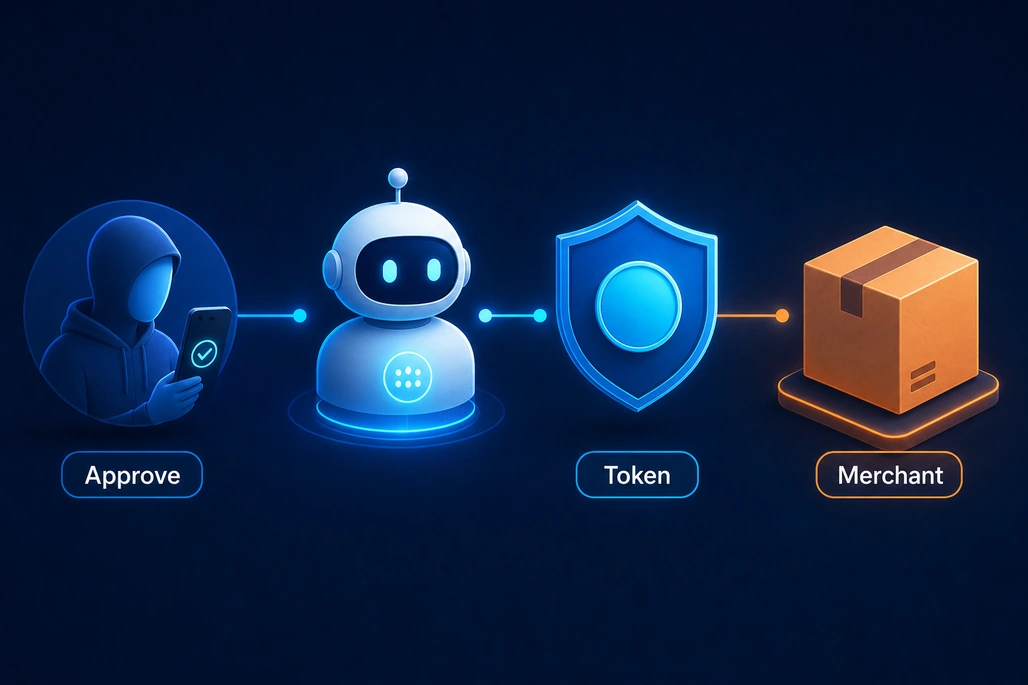
The agent prepares checkout, while the user approves payment and the merchant receives a token.
The basic model is simple: the agent can research, compare, and prepare checkout, but you approve the actual order. OpenAI describes the approval as a record of the purchase you authorized. The Wallet terms also say that your approval is limited to the merchant, items or services, amount, selected card, recipient, delivery details, and other displayed terms.
- Add an eligible card securely. Start from Wallet in ChatGPT settings or ask your dot to add a card. Enter the card number, expiration date, and security code in the secure card form, never in a chat message.
- Complete issuer verification if requested. Your bank may require a code, an approval in its mobile app, or another verification step before it makes the card available. Chase cardholders must be the primary cardholder for the eligible card described in OpenAI’s support guidance.
- Tell the dot what to buy. For example, you might ask it to find a product in a category, at a price you accept, and with delivery to your address. The agent may research options and prepare an order on a merchant’s site.
- Review the purchase request. Before submission, Wallet shows available details such as the merchant, item or service, quantity, total or maximum total, known taxes, fees, shipping, selected card, and whether the transaction includes a recurring charge, deposit, or authorization hold.
- Approve with device security. You use biometric verification such as Face ID or Touch ID on a supported device. If a material detail changes before checkout, the Wallet terms say that ChatGPT Wallet will ask for updated approval.
- Tokenized payment reaches the merchant. After approval, a payment provider, network, or issuer can create a tokenized, virtual, or other payment credential linked to the selected card. The merchant charges the underlying card account, but does not receive the physical card number.
A checkout attempt still is not a guaranteed order. The card issuer decides whether to authorize the transaction. The merchant decides whether to accept and fulfill it. If a chat appears to fail but there is a pending charge, OpenAI says to check for the merchant’s confirmation and contact the merchant before trying again.
Why payment tokenization matters for agent purchases
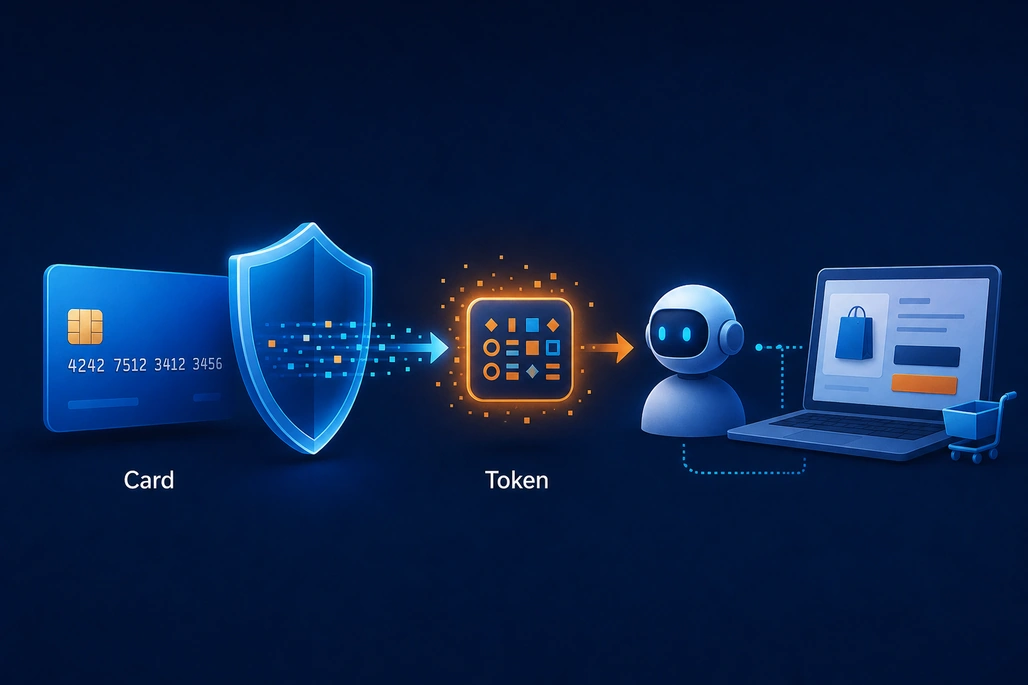
Tokenization keeps physical card details out of the agent and merchant payment flow.
A payment token is a substitute value for a card’s primary account number, often called a PAN. EMVCo’s payment-tokenization guidance explains that the technology protects digital payments by replacing the PAN with a unique alternative value. This keeps the most valuable card data out of more systems involved in a transaction.
For ChatGPT Wallet, this is the main security boundary: you add the card in a secure form, then the agent uses a payment credential for an approved checkout. OpenAI’s privacy notice says OpenAI receives a tokenized credential and limited card details, including items such as network, issuer, card type, last four digits, expiration date, billing country or postal code, and eligibility or status signals. It says OpenAI does not receive the full card number or security code.
Tokenization alone does not decide whether a purchase is safe. The other half is authorization. You review a concrete order and confirm it with a device check. The payment network and card issuer can then make their own authorization and fraud decisions. This is why ChatGPT Wallet can fit into existing card rails instead of asking merchants to accept a new currency or a new OpenAI-issued card.
Visa’s agentic-commerce documentation shows the same broader pattern: human-in-the-loop agent payments use a cardholder authorization for a specific transaction, tokenization, identity and verification, and purchase instructions that can support dispute handling. That does not mean every Wallet purchase uses the same Visa implementation. It does show why agent payments need more than a browser automation script and a stored card number.
A beginner example: buying a product with a dot
Imagine you want a dot to help you buy a winter jacket. You could begin with a request that sets clear limits instead of asking the agent to “find something good.” Specific instructions give you a better review screen and reduce ambiguity before the approval step.
Find a waterproof winter jacket in black, men’s medium, under $180.
Show me options that can arrive by Friday.
Do not buy anything until I review the final item, shipping cost, tax, and total.
The dot can search, compare choices, and take you toward checkout. At the moment payment is needed, Wallet should present the order details. Check the merchant name, exact product variant, quantity, shipping address, shipping speed, refund policy, recurring-charge disclosure, and final amount. Then confirm only if the displayed order matches what you meant to buy.
This is also a useful mental model for any AI agent: treat the conversation as a request, treat the review screen as the proposed transaction, and treat biometric approval as the authorization. A natural-language instruction can be unclear. The final approval screen is the point where you should catch a wrong size, duplicated quantity, unexpected shipping fee, or subscription option.
What Wallet does not change about cards, merchants, and disputes
ChatGPT Wallet adds a payment step to an agent workflow. It does not replace your relationship with the card issuer or merchant. The merchant is still the merchant of record, controls its prices and inventory, fulfills the order, and applies its return and customer-service policies.
If you receive a defective item, want to cancel an order, need a return, or are waiting for a refund, contact the merchant first. If you see an unrecognized charge, a billing error, or a stolen-card problem, contact the card issuer promptly. OpenAI says it may provide Wallet records or reasonable assistance, but it does not decide or fund merchant refunds or card chargebacks unless required by law or separately promised.
Existing cardholder terms continue to apply, including issuer and network rules around rewards, fees, disputes, and unauthorized transactions. OpenAI’s announcement says users keep existing card rewards and protections for eligible disputes. But “eligible” matters. Wallet does not promise that every return, chargeback, or dispute will succeed.
Security and privacy checks before you start
Adding a card to an agent is a higher-trust decision than asking it to summarize a page. Start with a card you actively monitor, use a strong password and passkey or multi-factor security for your OpenAI account, and keep your phone locked. Do not let another person use your Wallet approval flow unless that person is authorized to act for you.
- Enter a card number, CVV, password, and bank verification code only in the official secure form, never in a chat prompt, support message, or screenshot.
- Read every final approval screen. Check the merchant, item, price, quantity, delivery address, recurring-charge notice, and selected card.
- Do not assume a conversational error means checkout failed. Look for the merchant’s order confirmation, then ask the merchant about the order or your card issuer about a pending hold.
- Remove cards you no longer want in Wallet settings. Removing a card does not cancel a purchase already submitted.
- Report suspected account compromise to OpenAI and contact the card issuer if the card is lost, stolen, or shows an unauthorized charge.
OpenAI says a locally performed biometric check does not send the underlying fingerprint or face scan to OpenAI. Still, Wallet collects purchase and transaction information needed to make and manage the transaction, including merchant, time, amount, items, shipping, taxes, authentication result, order status, and approval records. Read the Wallet privacy notice before enrollment if you need to understand retention and sharing in detail.
What developers and online businesses should do
The first release is consumer-facing, but it also affects merchants and developers building commerce flows. An agent needs accurate product data, accessible pages, and checkout systems that can recognize an authorized agent purchase rather than automatically treating it as hostile automation.
OpenAI’s Commerce Partner Playbook recommends several starting points: claim and verify the business in ChatGPT, keep product feeds current, configure a CDN or firewall to recognize signed requests through Web Bot Auth, and work with payment and risk providers to reduce incorrect declines. OpenAI also says browser access does not require a plugin or product feed.
For more direct integrations, OpenAI says businesses can build a plugin that lets agents check availability, manage carts, or take actions through existing systems. Websites can also add WebMCP tools. That is different from a general-purpose payment API. A merchant should first make its existing catalog, website access, pricing, inventory, risk rules, and checkout behavior reliable for user-approved purchases.
OpenAI is working with fraud-prevention providers Forter, Riskified, Sardine, and Signifyd, plus payment service providers Adyen, Checkout.com, and Stripe, to help systems recognize legitimate agent purchases. Businesses should not weaken fraud controls to accept bots. The aim is to distinguish a user-approved agent transaction from unauthorized automation.
Getting started with ChatGPT Wallet
- Confirm that you have ChatGPT Pro, are at least 18, are located in the United States, and have an eligible U.S.-issued card.
- Set up a dot, because the current Wallet rollout is available in dot conversations.
- On a mobile device, open ChatGPT settings, select Wallet, and choose Add Card. You can also ask the dot to help add a card.
- Use the secure form and complete any verification requested by your bank.
- Start with a low-risk, one-time purchase from a merchant you know.
- Review the complete order before biometric approval, and save the merchant confirmation after checkout.
I would start small. Agentic purchasing is useful when it removes routine checkout steps, but the user should remain in control of product choice and final approval. OpenAI has said it expects to support more delegated purchases over time through parameters such as spending limits, categories, and time periods, with additional safeguards. That future capability is not the same as the current approval-per-purchase launch.
Frequently asked questions
Who can use ChatGPT Wallet?
At launch, ChatGPT Wallet is available to eligible ChatGPT Pro users who are 18 or older, live in the United States, use Wallet in the United States, have a U.S. billing address, and have an eligible U.S.-issued card. OpenAI currently lists eligible American Express, Chase, Mastercard, and Visa cards.
Does ChatGPT Wallet share my card number with an AI agent or merchant?
No. OpenAI says Wallet uses a payment token, which substitutes for the actual card details. The merchant or agent receives the payment credential needed for checkout rather than your physical card number and security code.
Do I need to approve every ChatGPT Wallet purchase?
Yes for the current launch flow. You review the order and approve it with a security check such as Face ID or Touch ID. OpenAI has discussed future pre-approved purchases with boundaries and stronger safeguards, but that is not the same as today’s purchase-by-purchase approval process.
What happens if an order is wrong or a charge is unauthorized?
For a recognized order problem, contact the merchant for cancellation, returns, or refunds. For an unrecognized charge, billing error, lost card, or stolen card, contact your card issuer promptly. OpenAI may provide records or support, but the merchant and card issuer handle the relevant order and card processes.
Can every online store accept ChatGPT Wallet?
No. OpenAI says Wallet may not complete checkout at every store. Merchant websites, fraud systems, payment providers, and checkout flows may need changes to recognize legitimate user-approved purchases made through an agent.
Based on reporting by OpenAI, OpenAI Help Center, EMVCo and Visa Developer Center.

Join the conversation! Your thoughts help the community grow.