
In this post we will discuss how we can check for any unsaved changes in the page by using JQuery. Normally this may need to be implemented in an application where we need to give any alert if any user try to reload the page when there any unsaved changes in the page. I hope you will like this.
Background
I was creating a page where I have some text boxes, so I wanted to give an alert if user try to get away from the page without saving the data entered.
Using the code
First of all we will create a page and an html table.
- <!DOCTYPE html>
- <html>
- <head>
- <title>Check for any unsaved changes in page</title>
- <script src="jquery-2.0.2.min.js"></script>
- </head>
- <body>
- <table class="table" border="1" style="width: 40%">
- <tr>
- <td>Sibi</td>
- <td>Ajay</td>
- <td>
- <input class="text" type="text" />
- </td>
- </tr>
- <tr>
- <td>Ansu</td>
- <td>Akhil</td>
- <td>
- <input class="text" type="text" />
- </td>
- </tr>
- <tr>
- <td>Shanto</td>
- <td>Libin</td>
- <td>
- <input class="text" type="text" />
- </td>
- </tr>
- </table>
- </body>
- </html>
Now if you run your page, you can see the table.

Check for any unsaved changes in page
No we will create a bool variable which will be true when there is an unsaved data.
- var unsaved = false;
What next? We will add call to an existing function when user reloads the page. Sounds good?
- window.onbeforeunload = unloadPage;
As you can see we are calling a function unloadPage, preceding is the function definition.
- function unloadPage() {
- if (unsaved) {
- return "You have unsaved changes on this page.";
- }
- }
Now please run your page and type anything in the text box given, then reload your page.
You will get an alert of "You have unsaved changes on this page." Shall we check that?
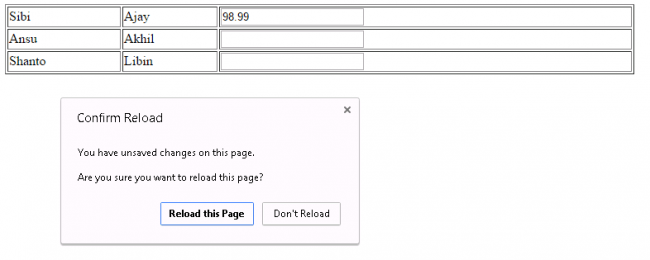
Check for any unsaved changes in page
We have done it finally.
Complete Code
- <!DOCTYPE html>
- <html>
- <head>
- <title>Check for any unsaved changes in page</title>
- <script src="jquery-2.0.2.min.js"></script>
- <script>
- var unsaved = false;
- $(document).on('change', '.table .text', function () {
- unsaved = true;
- });
- $(document).on('mouseover', '.table td', function () {
- $(this).attr('title', $(this).text());
- });
- function unloadPage() {
- if (unsaved) {
- return "You have unsaved changes on this page.";
- }
- }
- window.onbeforeunload = unloadPage;
- </script>
- </head>
- <body>
- <table class="table" border="1" style="width: 40%">
- <tr>
- <td>Sibi</td>
- <td>Ajay</td>
- <td>
- <input class="text" type="text" />
- </td>
- </tr>
- <tr>
- <td>Ansu</td>
- <td>Akhil</td>
- <td>
- <input class="text" type="text" />
- </td>
- </tr>
- <tr>
- <td>Shanto</td>
- <td>Libin</td>
- <td>
- <input class="text" type="text" />
- </td>
- </tr>
- </table>
- </body>
- </html>
Conclusion
Did I miss anything that you may think which is needed? Have you ever faced this requirement in your programming life? Does this article helps you in anyway? I hope you liked this article. Please share me your valuable suggestions and feedback.
Your turn. What do you think?
A blog is not a blog without comments, but do try to stay on topic. If you have a question, then please mention it in the comments section.


Sibeesh VenuTOP 100Posted Sep 29, 2015, 8:59 PM EDT
Mohammed Ibrahim Thank you
Sibeesh VenuTOP 100Posted Sep 29, 2015, 8:59 PM EDT
Ankit Bansal Thank you
Mohammed IbrahimPosted Sep 29, 2015, 11:29 AM EDT
nice
Ankit BansalPosted Sep 29, 2015, 3:26 AM EDT
nice..
Sibeesh VenuTOP 100Posted Sep 29, 2015, 12:38 AM EDT
Harshad Pansuriya Thanks a lot
Harshad PansuriyaPosted Sep 28, 2015, 11:53 PM EDT
Nice One
Sibeesh VenuTOP 100Posted Sep 28, 2015, 11:22 PM EDT
Vipul Malhotra Thanks a lot
Sibeesh VenuTOP 100Posted Sep 28, 2015, 11:22 PM EDT
N Vinodh Thanks a lot
Vipul MalhotraPosted Sep 28, 2015, 11:21 PM EDT
nice article
Vinodh NarayananPosted Sep 28, 2015, 11:17 PM EDT
nice share
Sibeesh VenuTOP 100Posted Sep 28, 2015, 10:34 PM EDT
Humayun Kabir Mamun Thanks a lot
Sibeesh VenuTOP 100Posted Sep 28, 2015, 10:34 PM EDT
Nilesh Jadav Thanks a lot
Sibeesh VenuTOP 100Posted Sep 28, 2015, 10:33 PM EDT
Nihal Ahmed Thanks a lot
Sibeesh VenuTOP 100Posted Sep 28, 2015, 10:33 PM EDT
Rakesh Chavda Thanks a lot
Sibeesh VenuTOP 100Posted Sep 28, 2015, 10:33 PM EDT
Rajeesh Menoth Thanks a lot
Sibeesh VenuTOP 100Posted Sep 28, 2015, 10:33 PM EDT
Santhakumar Munuswamy Thanks a lot
Sibeesh VenuTOP 100Posted Sep 28, 2015, 10:33 PM EDT
Manas Mohapatra Thanks a lot
Sibeesh VenuTOP 100Posted Sep 28, 2015, 10:33 PM EDT
Pankaj Kumar Choudhary Thanks a lot
Humayun Kabir MamunPosted Sep 28, 2015, 8:49 PM EDT
Nice...
Nilesh JadavPosted Sep 28, 2015, 8:22 PM EDT
Great post
Nihal AhmedPosted Sep 28, 2015, 8:17 PM EDT
nice one sir.
RakeshPosted Sep 28, 2015, 10:22 AM EDT
Good share
Rajeesh MenothPosted Sep 28, 2015, 10:20 AM EDT
Thanks for sharing..Nice One
Santhakumar MunuswamyPosted Sep 28, 2015, 10:09 AM EDT
Good one
Manas MohapatraPosted Sep 28, 2015, 9:43 AM EDT
Informative one..
Pankaj Kumar ChoudharyTOP 100Posted Sep 28, 2015, 8:59 AM EDT
Simple and useful information..........