
(The source code is attached.)
In this article, we will look at how to simplify checking for NULL and empty strings using C#. Most of you might have come across a requirement of checking whether a given string is null or empty. Let's have a look at the code:
One usual way to code is to do as follows:
static void Main(string[] args)
{
    string testString = "";
    bool hasValue;
    if (testString == null || testString == "")
        hasValue = false;
    else
        hasValue = true;
}
Let's simplify this code by using the static method of the String class. The method name is IsNullOrEmpty. The following is the code:
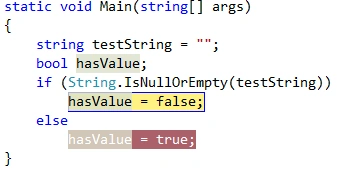
Now if you run this application, you will get hasValue = false, that is correct and as expected. Let's modify the string variable by assigning it a space as shown in the following code:
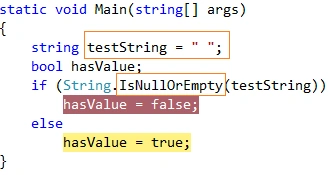
Now if you run the code above, you will get hasValue = true. Although your testString has nothing except one space, the IsNullOrEmpty method is still giving us true.
REASON: Because the IsNullOrEmpty method doesn't treat white spaces as empty.
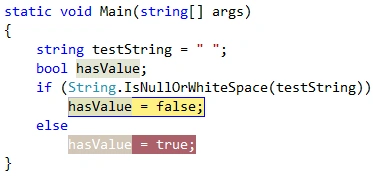
RESOLUTION: To resolve the preceding sort of issues another static method is available on the String class and named IsNullOrWhiteSpace. Let's have a look at the code.
Now, if you will run the code, it will provide you the correct result as expected with hasValue=false.


sanchita medhekarPosted Mar 9, 2018, 1:41 AM EST
In which Studio version you wrote this code. I am getting false for one space character in 2.0 and 4.0
SubashPosted Mar 18, 2017, 7:34 AM EDT
Thanks for sharing
ramya tPosted Mar 16, 2016, 11:41 PM EDT
product quantity textbox1 dropdownlist 1.kilogram 2.gramcost per product textbox2 Total cost textbox3 is this my form.and please help me to how to write code for converting kg to gm and vice versa. if i select kg,then get value of textbox1 and adding to textbox2 and the result will be textbox3. how to write the code.
Abhijit KakadePosted Dec 6, 2014, 9:08 AM EST
good one..
Shweta LodhaTOP 100Posted Mar 11, 2014, 10:11 AM EDT
Thanks for reading
Lakshmanan Sethu SankaranarayanPosted Mar 10, 2014, 9:17 PM EDT
Nice article