
In a normal case, the data of your chart is being sent to an external server which is http://export.highcharts.com/. But if your product is already in a production environment, none of your clients will agree with the idea of sending their data to any third-party server. Am I right? To overcome this, HighChart has given an option called offline-exporting. Here we will discuss that. I hope you will like this.
Background
For the past few months, I have been working on a project where I use HighChart to manipulate the data and show it as Charts. Now the problem is while exporting the data, the entire data was going to the HighChart server which is http://export.highcharts.com/. I wanted to get rid of this. So I used the option of client-side exporting by adding one extra JavaScript file https://code.highcharts.com/modules/offline-exporting.js.
Using the code
First, we will populate the chart. For that, you must add the needed references as follows.
<script src="https://code.jquery.com/jquery-2.2.4.min.js"></script>
<script src="https://code.highcharts.com/highcharts.js"></script>
<script src="https://code.highcharts.com/modules/exporting.js"></script>
Now add the chart configuration as follows.
$(function() {
    $('#myChart').highcharts({
        credits: {
            enabled: false
        },
        exporting: {
            chartOptions: {
                plotOptions: {
                    series: {
                        dataLabels: {
                            enabled: true
                        }
                    }
                }
            },
            scale: 3
        },
        title: {
            text: 'My blog vistor count for a week'
        },
        subtitle: {
            text: 'Monday to Sunday'
        },
        chart: {
            type: 'area'
        },
        xAxis: {
            categories: ['Mon', 'Tue', 'Wed', 'Thu', 'Fri', 'Sat', 'Sun']
        },
        series: [{
            name: 'Visitor Count',
            data: [1005, 558, 1467, 707, 1289, 867, 543]
        }]
    });
});
Now if you run your application, you can see a chart as follows.
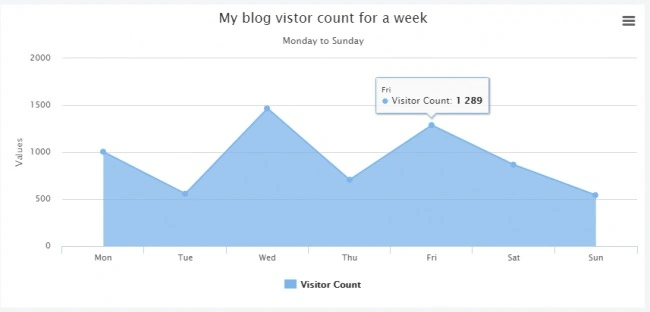
High Chart
Now it is time to check the exporting. If you click on the export icon in the right top corner, you will be given options to choose like which format you need to export the data. Just click on anything you wish. You can see that the data is being sent to the server http://export.highcharts.com/ in the top left side. To overcome this, you need to add a reference to the file called offline-exporting.js.
<script src="https://code.highcharts.com/modules/offline-exporting.js"></script>That’s all. You are done.
Please note that this feature is not supported in browser IE 8, So if you load this chart in any unsupported browser, the module will fall back to the export server. This can be handled with the optionfallbackToExportServer: false. You need to set this option in your exporting settings as follows.
exporting: {
  chartOptions: {
    plotOptions: {
      series: {
        dataLabels: {
          enabled: true
        }
      }
    }
  },
  scale: 3,
  fallbackToExportServer: false
}
Internet Explorer requires canvg library to export the chart to PNG format. But you don’t need to worry about this file. This will be automatically downloaded on demand by the system.
Reference
Conclusion
Did I miss anything that you may think is needed? Did you find this post useful? I hope you liked this article. Please share with me your valuable suggestions and feedback.
What do you think?
A blog isn’t a blog without comments, but do try to stay on topic. If you have a question unrelated to this post, you’re better off posting it on C# Corner, Code Project, Stack Overflow, or Asp.Net Forum instead of commenting here. Tweet or email me a link to your question there and I’ll definitely try to help if I can.
Please see this article in my blog here.
Demo
Please see the demo here.


Delpin Susai RajTOP 100Posted Aug 27, 2016, 11:57 PM EDT
Nice one
Sibeesh VenuTOP 100Posted Jul 7, 2016, 8:28 AM EDT
Sr Karthiga Thanks
Sr KarthigaPosted Jul 7, 2016, 4:16 AM EDT
Good one
Sibeesh VenuTOP 100Posted May 30, 2016, 12:49 AM EDT
Raja Ganapathy Thanks
RajaPosted May 29, 2016, 11:16 PM EDT
Nice Sharing...
Sibeesh VenuTOP 100Posted May 29, 2016, 11:12 PM EDT
Debasis Saha Thanks
Debasis SahaTOP 100Posted May 29, 2016, 11:01 PM EDT
Nice share..
Sibeesh VenuTOP 100Posted May 29, 2016, 9:02 PM EDT
Bhuvanesh Mohankumar Thanks
Bhuvanesh MohankumarPosted May 29, 2016, 8:47 AM EDT
Good one
Sibeesh VenuTOP 100Posted May 28, 2016, 10:39 PM EDT
Gowtham K Thanks
Sibeesh VenuTOP 100Posted May 28, 2016, 10:39 PM EDT
Munesh Sharma Thanks
Gowtham KTOP 100Posted May 28, 2016, 5:58 PM EDT
Good One, Thanks for sharing
Munesh SharmaPosted May 28, 2016, 11:12 AM EDT
nice