
Kitesurf is an open-source browser engine built for AI agents.
Cloudflare Kitesurf is an experimental, open-source browser engine made for AI agents. Released under the Apache 2.0 license on November 13, 2026, it can load web pages, apply CSS, run page JavaScript, and create screenshots without starting Chrome or another browser container. For a beginner, the practical point is simple: if your agent or automation code already speaks the Chrome DevTools Protocol, you can run Kitesurf locally and control it with tools such as Puppeteer.
Kitesurf is still under heavy development, so treat it as a project to test on your own pages and workflows, not as a drop-in replacement for Chromium in every browser automation job. Its source is available in Cloudflare’s November 13, 2026 announcement and in the public GitHub repository.
Key takeaways
- Kitesurf is an Apache 2.0 licensed, experimental browser engine for AI agents that runs on Cloudflare Workers.
- It supports the Chrome DevTools Protocol, so Puppeteer and other CDP clients can connect to it.
- You can run it locally with Node.js, pnpm, Bazelisk, and Cloudflare Wrangler.
- Deploying it to Cloudflare requires the Workers Paid plan because it uses Dynamic Workers for isolated page execution.
- A deployed Kitesurf instance needs authentication in front of it because the engine does not provide built-in authentication.
What is Cloudflare Kitesurf?
Kitesurf is a browser engine designed for software agents rather than for people sitting in front of a browser window. An AI agent may need to open a site, fill in a form, press a button, wait for JavaScript to finish, extract information, or capture a screenshot. Those are browser tasks, even when no human needs tabs, extensions, themes, or smooth scrolling.
Cloudflare first introduced Kitesurf on August 6, 2026. The company described it as a stateless browser that runs on Workers and targets the parts of web browsing that agents need: HTML parsing, CSS processing, JavaScript execution, interaction, rendering, and machine control. Cloudflare later added WebMCP-related work, APIs, and compatibility improvements before publishing the source code on November 13, 2026.
The open-source release matters because you can now inspect how the engine is put together, run it on your machine, file reproducible bugs, and deploy an instance in your own Cloudflare account. Independent coverage from Phoronix and New Runtime also describes the release as an open-source, experimental browser project rather than a finished general-purpose browser.
Why AI agents need a browser engine
Many useful web tasks cannot be completed with a simple HTTP request. A modern site may construct its page in JavaScript, require a click before content appears, use client-side navigation, or expose information only after a user flow completes. An agent needs a browser-like runtime to work with those pages.
A normal browser such as Chromium does much more than an agent often needs. It supports a full interactive product for people, including a broad platform surface and user-facing features. Kitesurf takes a narrower approach. Cloudflare says its goal is to provide a lightweight browser for agents that can scale across its Workers network while using less CPU and memory than a full browser such as Chromium.
That is an engineering goal, not a promise that Kitesurf will render every site exactly like Chrome. Cloudflare explicitly says that Kitesurf is under heavy development and is working on reliability, efficiency, and web standards compatibility. Start with a small, real workflow, such as opening a known page and taking a screenshot. Do not move a critical production crawler until you have tested the sites and actions it must support.
How Kitesurf works on Cloudflare Workers
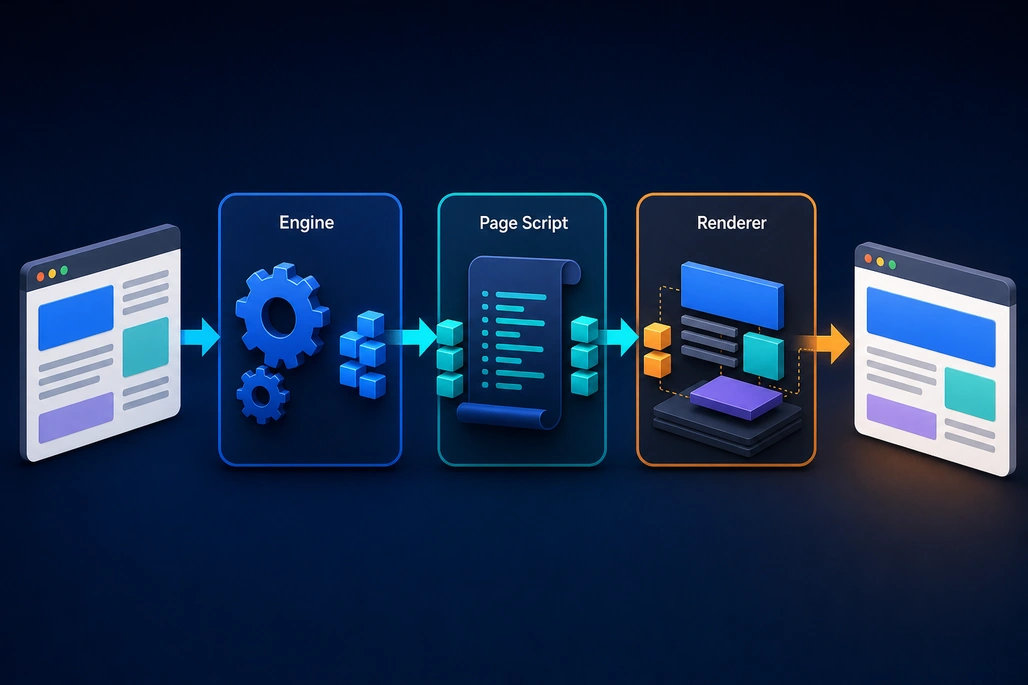
Kitesurf separates session management, page execution, and rendering.
Kitesurf runs without a traditional browser container. It parses HTML, applies CSS, executes page JavaScript, and renders output within Cloudflare’s Workers-based architecture. The engine exposes the Chrome DevTools Protocol, usually shortened to CDP, which gives automation clients a familiar way to create pages, navigate, run actions, and retrieve results.
Cloudflare describes three main parts of the project. The Engine manages browser sessions and client connections. PageScript runs the page and its JavaScript. PageRenderer draws the page result. Keeping those responsibilities separate makes the project easier to reason about when you first explore the repository.
| Part | What it does | Why it matters to you |
|---|---|---|
| Engine | Handles sessions and client connections. | Your Puppeteer or CDP client connects through this layer. |
| PageScript | Runs the page environment and page JavaScript. | Dynamic sites need this before their content and interactions are available. |
| PageRenderer | Draws the page result. | This enables visual output such as screenshots. |
The Rust and WebAssembly pieces are also important. Kitesurf uses the Blitz project for HTML parsing, the DOM, layout, and painting. Stylo handles CSS parsing, cascading, and computed styles. Boa can run JavaScript in WebAssembly when Dynamic Workers are not used. Linebender libraries provide text layout and two-dimensional graphics, and Krilla generates PDF output.
You do not need to learn Rust or WebAssembly to try Kitesurf. But knowing that these components exist explains why the first local build can take time. The build compiles the Rust core and related dependencies. Later builds can reuse the build cache.
What changed when Kitesurf became open source?
Before November 13, 2026, developers could use Kitesurf through Cloudflare’s Browser Run offering while it was in beta. The open-source release adds a different option: you can examine and change the engine itself. The repository is licensed under Apache 2.0, while bundled dependencies and third-party components keep their own licenses, documented in the repository’s NOTICE file.
The source code does not remove Cloudflare platform requirements for Cloudflare deployment. Kitesurf uses Dynamic Workers to create isolated workers for pages, and Cloudflare says Dynamic Workers are part of the Workers Paid plan. You can still run locally with wrangler dev, which is the right place for your first test.
This distinction is useful. Open source means the code is available for review, use, and modification under its license. It does not mean every hosting option is free, or that the project has reached full web-platform compatibility.
Run Kitesurf locally for the first time
The Kitesurf repository lists the required tools. You need Bazelisk installed as bazel, Node.js 22 or later, and pnpm 9.15.4. macOS users also need GNU tar. Rust through rustup is only needed if you plan to edit the vendored crate patches.
Install the pinned pnpm version if it is not already available:
npm install --global [email protected]Then clone the repository, install dependencies, and start the local engine:
git clone https://github.com/cloudflare/kitesurf.git
cd kitesurf
pnpm install --frozen-lockfile
pnpm run dev
The development server listens on http://127.0.0.1:8787. Open http://127.0.0.1:8787/health to check that it is running. The root page provides a landing page, example pages, and CDP endpoints. If port 8787 is already in use, set a different port before you start the engine:
KITESURF_PORT=8799 pnpm run devDo not be surprised if the first build is slow. Kitesurf uses Bazel to build WebAssembly modules, the page bundle, and the renderer bundle before Wrangler starts the local Worker. The repository says later builds reuse Bazel’s cache.
Connect Puppeteer to Kitesurf with CDP
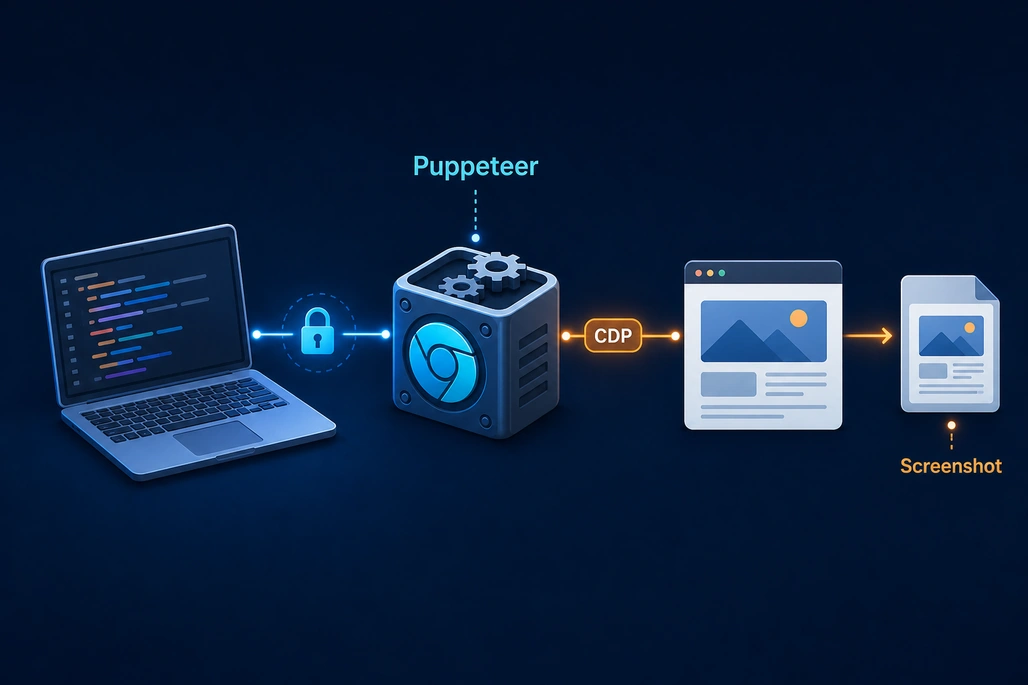
Puppeteer can connect to Kitesurf through the Chrome DevTools Protocol.
CDP compatibility is the easiest starting point for developers who already know Puppeteer. Kitesurf provides a browser WebSocket endpoint at ws://127.0.0.1:8787/devtools/browser when using the default local port.
Install puppeteer-core in a separate Node.js project, or in a folder where you want to keep your test script:
npm install puppeteer-coreCreate a file named capture.mjs with this code:
import puppeteer from "puppeteer-core";

const browser = await puppeteer.connect({
  browserWSEndpoint: "ws://127.0.0.1:8787/devtools/browser",
});

try {
  const page = await browser.newPage();
  await page.goto("https://example.com/");
  await page.screenshot({ path: "page.png" });
} finally {
  await browser.disconnect();
}
Run it with Node.js:
node capture.mjsIf the page opens and the script writes page.png, you have confirmed the basic path: Puppeteer connected through CDP, created a page, navigated to a URL, and asked Kitesurf to render a screenshot. That is a much better first milestone than trying to build a complete agent loop on day one.
Kitesurf offers a CDP endpoint, not a complete Chrome implementation. The repository warns that some Chrome DevTools features do not work yet. Keep your first automation small, then add selectors, clicks, waits, extraction, and login flows one at a time.
How Kitesurf compares with Browser Run
Cloudflare Browser Run is a managed browser automation product. Its documentation says it runs headless Chrome on Cloudflare’s network and supports Quick Actions for simple work, plus browser sessions through Puppeteer, Playwright, CDP, and Stagehand. It is intended for jobs such as screenshots, PDFs, crawling, data extraction, testing, and browser automation.
Kitesurf is the open-source browser engine that Cloudflare built for agent-oriented workloads. Browser Run can be a simpler path when you want managed headless Chrome and do not need to operate an engine. Kitesurf is worth trying when you want to inspect the browser implementation, run it locally, or experiment with an agent-first engine that speaks CDP.
| Option | Best first use | What you manage |
|---|---|---|
| Kitesurf | Testing an open-source, agent-focused browser engine. | Local build, compatibility testing, deployment, and access controls. |
| Browser Run | Using managed headless Chrome for automation tasks. | Your automation code and Browser Run configuration. |
For a beginner, choose one path based on your immediate need. If you need screenshots or scraping quickly, Browser Run may reduce setup work. If you want to understand an AI agent browser from the inside and have a small test case, start Kitesurf locally.
Secure a deployed Kitesurf instance before using it
This is the part you should not skip. Kitesurf has no authentication of its own. Cloudflare warns that a person who knows an unprotected deployment URL can open DevTools, connect a CDP client, browse through your engine, send outbound requests from your Cloudflare account, and consume CPU time and Dynamic Workers that your account pays for.
The repository instructs developers to put Cloudflare Access or another authentication layer in front of a deployment immediately. A workers.dev URL is public by default, so do not deploy first and plan to protect it later. Cloudflare recommends enabling Access for Workers in the account before deployment if you want to prevent an exposed period.
For CDP clients that connect through Cloudflare Access, the repository documents using an Access service token and passing its client ID and secret as WebSocket headers. Store those values in environment variables or a secret manager. Never place them in source control.
What to test before you adopt Kitesurf
Use a small test plan. Begin with public, non-sensitive pages that represent what your agent needs to do. A screenshot test checks the rendering path. A page-title or text-extraction test checks navigation and JavaScript. A form test checks interaction.
- Test static pages and JavaScript-heavy pages separately.
- Test the exact selectors and actions your automation uses.
- Compare key outputs with your current Chromium workflow when accuracy matters.
- Record a minimal reproduction when a page fails, then check existing GitHub issues before filing a new one.
- Keep credentials and production data out of early compatibility tests.
Cloudflare asks contributors to begin with its contribution guidelines, open an issue with a minimal reproduction or a proposed approach, and get a maintainer’s approval before opening a pull request. A small failing page, workflow, test, or documentation correction can be a useful contribution.
Frequently asked questions
Is Cloudflare Kitesurf free to use?
The Kitesurf source code is available under the Apache 2.0 license. Running it locally is supported with Wrangler, but deploying Kitesurf on Cloudflare requires the Workers Paid plan because it depends on Dynamic Workers.
Can I use Puppeteer with Kitesurf?
Yes. Kitesurf supports the Chrome DevTools Protocol, and Cloudflare documents connecting puppeteer-core to its local browser WebSocket endpoint.
Does Kitesurf replace Chrome or Chromium?
No. Kitesurf is an experimental engine built for AI agents, and Cloudflare says compatibility, reliability, and efficiency work is continuing. It exposes a CDP endpoint but does not yet implement every Chrome DevTools feature.
Do I need Rust to run Kitesurf?
No. The repository requires Bazelisk, Node.js 22 or later, and pnpm 9.15.4 for normal local setup. Rust through rustup is listed for developers who need to edit vendored crate patches.
How should I secure Kitesurf after deployment?
Put Cloudflare Access or another authentication layer in front of the deployment immediately. Kitesurf has no built-in authentication, and an exposed URL can let others control the engine through DevTools or CDP.
Based on reporting by Cloudflare Blog, GitHub, Cloudflare Developers and Phoronix.

Join the conversation! Your thoughts help the community grow.