
Introduction
This article will describe the DataGrid in Edit mode while the edit cell requires a list of data. We are going to achieve that using the ComboBox.
Crating WPF Application Project
Fire up Visual Studio 2008 and Create a WPF Application and name the project as DatePickerDGWPF.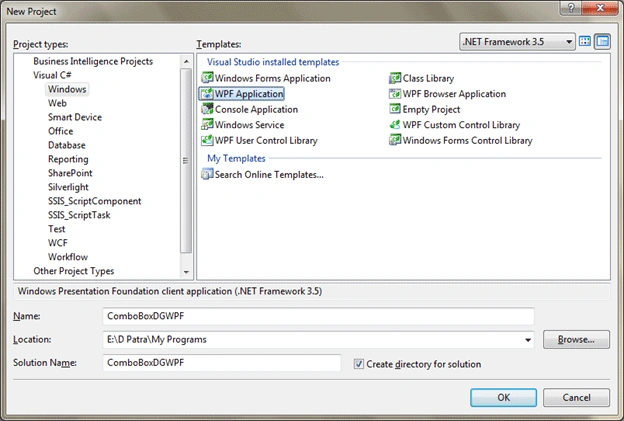
Here is the basic idea of our sample application; we would have sample data with one property that can be selected from a list of values displayed in ComboBox.
When the particular cell will be edit mode, we would be able to select from the list displayed in the ComboBox.
So let's have a class and have sample data.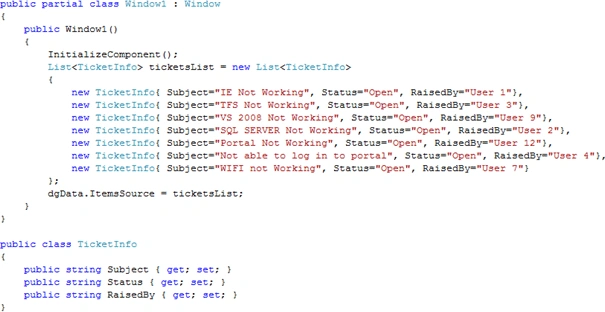
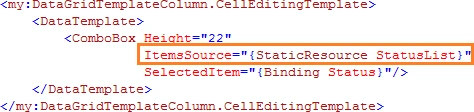
Now we will add a DataGrid to the Window and design the Columns inside of it.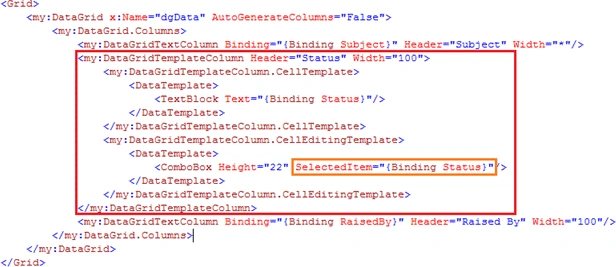
We need to set the ItemSource Property; for that I have created a Class that would generate the list and in XAML I have accessed it and assigned it. The following figures will clarify what I have done: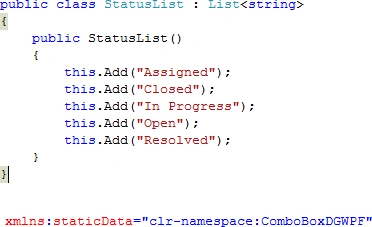
...
...
It seems we are done with the design of our DataGrid columns.
Run the application and try to edit the column "Status", you would get ComboBox control to handle the Status List.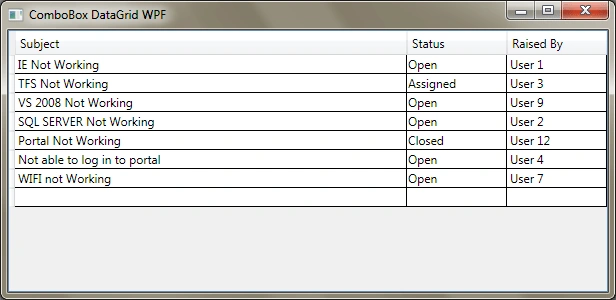
And when in Edit mode: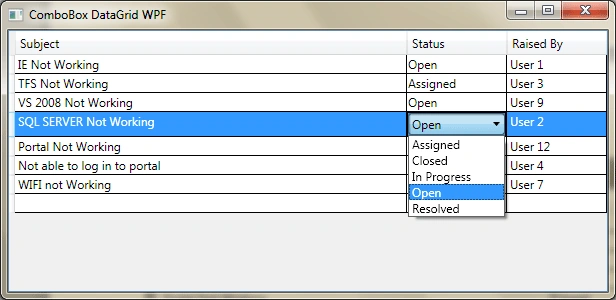
After Updating: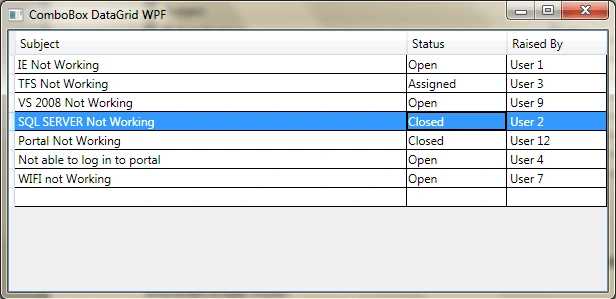
Hope this article helps.
27 comments
Join the conversation! Your thoughts help the community grow.

Join to leave a comment
Members earn 10 SHARP for a comment, 10 SHARP for a reaction, and 1,000 SHARP for every article they publish.

Rishikesh PandaPosted Dec 15, 2018, 1:14 AM EST
Ow to retrieve the data from combo box. Would be better if that was could be explained as well. Nice article
Ali HamzaPosted Mar 15, 2018, 8:10 PM EDT
It is helpful. Nice. But i want to add combobox selected value path and display member path.
arif ansariPosted Mar 2, 2017, 12:43 AM EST
It is helpful. Nice
shameer kPosted Jan 13, 2016, 6:39 PM EST
thanks a lot
Mrunal LelePosted Aug 6, 2015, 7:23 AM EDT
hey, I have combobox in datagrid whose list list has to be updated based on the value of another combobox, outside the grid. Do you know how I can implement this?
_siddh MPosted May 29, 2015, 10:12 PM EDT
but how can i save the containt of combox in Database..? The value of selected combo box is need to save , How can we do this ..??
Ezequias RochaPosted Nov 13, 2013, 8:16 AM EST
Have you tried to make a tutorial for dynamic binding?
Ezequias RochaPosted Nov 13, 2013, 2:05 AM EST
Many thanks :)
shehin kkPosted Sep 10, 2013, 6:24 AM EDT
It really helped me a lot.. Great Work!! Thanks a lot for sharing..
SridharPosted Sep 5, 2013, 2:52 AM EDT
not working
Sandun DhanushkaeditedPosted May 9, 2013, 3:41 AM EDTEdited May 9, 2013, 3:42 AM EDT
Great work. can you tell me how to store "value" and "item" in ComboBox. (To get Different arguments as "SelectedValue" and "SelectedItem")
Ratnesh KhandelwaleditedPosted Apr 25, 2013, 3:14 AM EDTEdited Apr 25, 2013, 3:18 AM EDT
really helpfull, but I want to open the combo when we write into that "Status" cell. For example when I add a new row and after adding subject, as I enter a letter in "Status" cell this combo should open. Plz tell me If we can achieve this one also.
Jay HamlinPosted Jan 22, 2013, 11:31 AM EST
Great. Simple example and very clear. Thanks.
fang SterlingPosted Nov 19, 2012, 4:56 AM EST
Thanks for sharing! it is helpful for me !Thanks again!
emmett maguirePosted Oct 31, 2012, 2:06 AM EDT
This is the first article i've read about this control that actually gives propper explaination of how it should work. Thank you sir.
gaurav vermaeditedPosted May 17, 2012, 3:07 AM EDTEdited May 17, 2012, 3:07 AM EDT
Thanx a lot buddy for this solution... :)
gioPosted Mar 17, 2011, 9:47 AM EDT
I'm trying to do it the same but binding with ListBox or ComboBox, but I can't. I need some Template? maybe i lost in the XAML.
Shiv Kumar SharmaPosted Feb 20, 2011, 9:49 PM EST
thanks a lot for your solutions.
Jacky LeePosted Jan 7, 2011, 3:48 AM EST
favorite it!
John LundyPosted Dec 13, 2010, 9:56 PM EST
I have tried a mode=twoway on this solution but am still having problems making this work from a db. If I remove SelectedItem="{Binding Path=Code}" from the code below then everything works fine except the edited cell returns to the original value when I move off it. If I leave it in then that still happens but when I move to a new row the grid locks. Any help would be greatly appreciated. <ComboBox IsEditable="False" SelectedItem="{Binding Path=Code, mode=TwoWay}" DisplayMemberPath="Name" ItemsSource="{Binding Source={StaticResource brokersViewSource}}" />
John LundyeditedPosted Dec 13, 2010, 3:41 PM ESTEdited Dec 13, 2010, 3:43 PM EST
I cannot seem to get this code to work when I replace the data created in code with tableadapters from a dataset to my sql server 2008 database. The data item I select in the combobox drops correctly into the edit cell but when i leave the edit cell on the same row it reverts to the original data item. When I change rows the grid completely locks up. Any ideas what I'm doing wrong?
Sergey LurkPosted Aug 18, 2010, 9:46 AM EDT
Thanks, good work
PhilippePosted May 11, 2010, 6:59 AM EDT
I've made the auto-edit work by 1) setting the focus on the cell I want to edit (using http://wpf.codeplex.com/Thread/View.aspx?ThreadId=34065) 2) performing a BeginEdit() on the DataGrid hope this helps
PhilippeeditedPosted May 11, 2010, 5:47 AM EDTEdited May 11, 2010, 5:50 AM EDT
Thanks, this solved my problem! btw, I'm going to try and figure out what the user above me requested. I've got an image column, when this is clicked, the cell should be made editable and become readOnly again when it looses focus
Sarbland MalikeditedPosted May 3, 2010, 10:16 PM EDTEdited May 3, 2010, 10:17 PM EDT
Good work. I have an edit able dropdown and how can I avoid F2+Tab to do editing? I need to start editing when the cell got focus..