
In this article we will be seeing how to configure a crawl schedule for
enterprise search content source in SharePoint 2010 using C#.
In the Search service application, you can schedule a full or incremental crawl
of a content source. There are four types of Schedules:
- DailySchedule - Used to specify the number of days between crawls.
- WeeklySchedule - Used to specify the number of weeks between crawls.
- MonthlyDateSchedule - Used to specify the days of the month and months of the year when the crawl should occur.
- MonthlyDayOfWeekSchedule - Used to specify the days of the month, the weeks of the month, and the months of the year when the crawl should occur.
Through UI:
- Go to Central Administration => Application Management => Manage service applications => Search Service Application.
- In the Navigation go to Crawling => Content Sources.
- You could be able to see the content sources.
- I am going to edit the content source "Local SharePoint sites" and schedule the crawl.
- Go to ECB menu of Local SharePoint
Sites =>Edit.
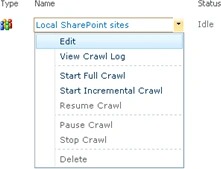
- You could see "Crawl schedule section"
where you could schedule the Full Crawl and Incremental Crawl.

C# code:
- Open Visual Studio 2010.
- Go to File => New => Project.
- Select Console Application from the installed templates.
- Enter the Name and click Ok.
- Add the following references.
o Microsoft.SharePoint.dll
o Microsoft.Office.Server.dll
o Microsoft.Office.Server.Search.dll
- Add the following namespaces.
o using Microsoft.Office.Server.Search.Administration;
o using Microsoft.Office.Server;
o using Microsoft.SharePoint;
- Replace the code with the following.
// search service application name
string ssaName = "Search Service Application";
SearchContext context= SearchContext.GetContext(ssaName);// Represents a crawl schedule used to specify the number of days between crawls
DailySchedule daily = new DailySchedule(context);
daily.BeginDay = 25;
daily.BeginMonth = 1;
daily.BeginYear = 2010;
daily.StartHour = 2;
daily.StartMinute = 30;
daily.DaysInterval = 1;// Represents a crawl schedule used to specify the number of weeks between crawls.
WeeklySchedule weekly = new WeeklySchedule(context);
weekly.BeginDay = 25;
weekly.BeginMonth = 1;
weekly.BeginYear = 2010;
weekly.StartHour = 23;
weekly.StartMinute = 15;
weekly.WeeksInterval = 1;Content ssaContent = new Content(context);
ContentSourceCollection ssaContentSources = ssaContent.ContentSources;
// Getting the content source
ContentSource cs = ssaContentSources["Local SharePoint Sites"];
// Incremental Crawl Schedule
cs.IncrementalCrawlSchedule = daily;
// Full Crawl Schedule
cs.FullCrawlSchedule = weekly;
cs.Update();
- Build the solution.
- Hit F5.
- You could see the Full Crawl and
Incremental Crawl has been scheduled successfully which is also reflected in
the UI.


Join the conversation! Your thoughts help the community grow.