
In C#, we work in two different ways with database connectivity. As you know when we create software or website or any other application which is connected to the database we need to make connection to the database to get data. Here you can get data in two different ways.
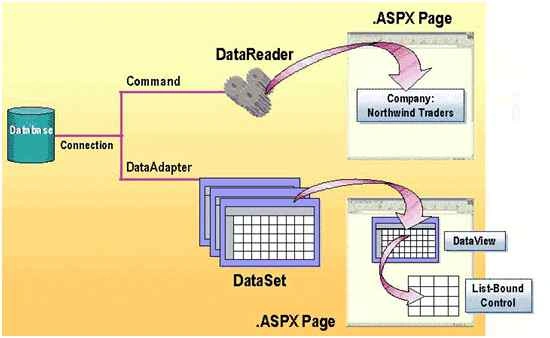
Either it can be connected architecture where you go and connect to the database and get data or disconnected architecture where you connect to the database first time and get all data in an object and use it if required. You can perform any action like insert, update, and search on this.
You can use two C# objects to achieve this, first one is DataSet and other one is DataReader.
DataSet
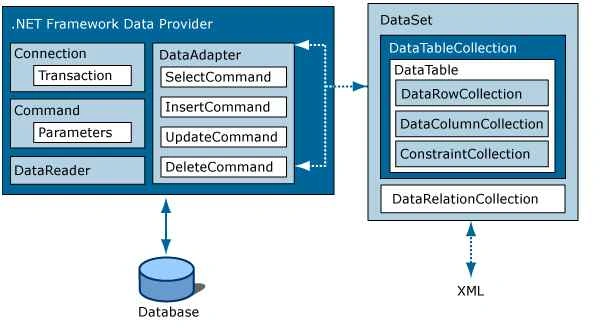
It is a type of disconnected architecture. Disconnected architecture means, you don’t need to connect always when you want to get data from the database. You can get data from dataset; basically DataSet is a collection of datatables. We can store the database table, view data in the DataSet and can also store the xml value in dataset and get it if required.
To achieve this you need to use DataAdapter which work as a mediator between Database and DataSet.
Example
- public DataSet GetEmployeeData()
- {
- SqlConnection conString = new SqlConnection("myconnection");
- conString.Open();
- SqlCommand cmdQuery = new SqlCommand("Select * from Employee", conString);
- SqlDataAdapter sda = new SqlDataAdapter(cmdQuery);
- DataSet dsData = new DataSet();
- sda.Fill(dsData);
- return dsData;
- }
It is a connected architecture, which means when you require data from the database you need to connect with database and fetch the data from there. You can use if you need updated data from the database in a faster manner. DataReader is Read/Forward only that means we can only get the data using this but we cannot update or insert the data into the database. It fetches the record one by one.
Example
- static void HasRows(SqlConnection connection)
- {
- using (connection)
- {
- SqlCommand command = new SqlCommand("SELECT CategoryID, CategoryName FROM Categories;",connection);
- connection.Open();
- SqlDataReader reader = command.ExecuteReader();
- if (reader.HasRows)
- {
- while (reader.Read())
- {
- Console.WriteLine("{0}\t{1}", reader.GetInt32(0),reader.GetString(1));
- }
- }
- else
- {
- Console.WriteLine("No rows found.");
- }
- reader.Close();
- }
- }
Thanks for reading this article. Hope you enjoyed it.


satish MisalPosted Mar 5, 2020, 6:46 PM EST
Nice... Good Explain
Ramzanali MominPosted Oct 30, 2018, 8:53 PM EDT
Nice one thanks for sharing
rajendra singhPosted Oct 7, 2018, 10:54 PM EDT
Nice one thanks for sharing
mangesh santharamPosted Jul 26, 2017, 3:28 AM EDT
Nice Article Good to Study
Aishwarya DPosted Feb 10, 2016, 10:15 PM EST
Nice Article. Easy to understand
Santhakumar MunuswamyPosted Oct 17, 2015, 11:25 PM EDT
Good one
Mukesh KumarPosted Oct 13, 2015, 9:29 PM EDT
Thanks to all
Humayun Kabir MamunPosted Oct 13, 2015, 8:16 PM EDT
Nice...
Nilesh JadavPosted Oct 13, 2015, 8:08 PM EDT
Good Explain :)
Harshad PansuriyaPosted Oct 13, 2015, 7:54 PM EDT
Nice one
Gowtham KTOP 100Posted Oct 13, 2015, 6:42 PM EDT
Good One
Sujeet SumanPosted Oct 13, 2015, 6:12 PM EDT
Nice Article...............