As any ASP.NET application silverlight can connect to any of the web or data services like
In this section we'll find how to create a WebClient in silverlight. Step 2: XML Service XmlSerializer ser = new XmlSerializer(typeof(List<Employee>)); You may notice that the ArrayOfEmployee node has been generated for you by the XmlWriter. It has also been given a default namespace and XSD. <ItemsControl x:Name="_employees"> Now the URI for the handler that returns XML for you can be determined to be at: {
InitializeComponent();
WebClient wc = new WebClient();
wc.DownloadStringAsync(new Uri("http://localhost:8001/WebClientAccessApp/EmployeeDataHandler.ashx
"));
wc.DownloadStringCompleted += new
DownloadStringCompletedEventHandler(wc_DownloadStringCompleted);
}
Binding the Data on the Callback The string data will be stored in DownloadStringCompletedEventArgs Result property, so you can load it into an XDocument using One of the new language features in .NET, and in Silverlight is LINQ, which brings some functional programming to Silverlight. To bind to ItemsControl set the ItemSource For more complex HttpRequest, we'll find how in my following articles
In this article explain the step by step creation of a Web client application in Silverlight 2.0.
Create simple POX (Plain Old XML) Service
Step 1: Silverlight Application
In this task you'll add a generic handler and have it return XML data back to the caller.
using (XmlWriter writer = XmlWriter.Create(context.Response.OutputStream))
{
context.Response.ContentType = "text/xml";
ser.Serialize(writer, empList);
}
Step3: XAML to bind
The XAML (Page.xaml)
<ItemsControl.ItemTemplate>
<DataTemplate>
<TextBlock FontSize="14" Height="30" Text="{Binding EmployeeName}" />
<TextBlock FontSize="14" Height="30" Text="{Binding EmpID}" />
<TextBlock FontSize="14" Height="30" Text="{Binding Salary}" />
</DataTemplate>
</ItemsControl.ItemTemplate>
</ItemsControl>
Step 4: WebClient
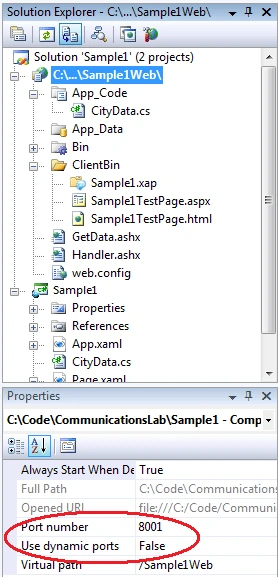
To set a static port for your Web project to run on,
http://localhost:8001/WebClientAccessApp/EmployeeDataHandler.ashx
Step 5: In the client
In Page.xaml.cs
Call a POX Service
Add new code in Page() (constructor) that creates a new instance of the WebClient class, and then instructs it to download a string from the above URI, as well as wiring up a completed event handler callback.
public Page()
When you specified the DownloadStringCompleted callback Visual Studio should have created a boiler plate event handler for you.
void wc_DownloadStringCompleted(object sender, DownloadStringCompletedEventArgs e)
{
}
XDocument xReturn = XDocument.Parse(e.Result);
So here's how you can use it to create an IEnumerable of Employee from the returned XML. As ItemsControl requires an IEnumerable to bind data
IEnumerable<Employee> employees = from employee in xReturn.Descendants("Employee")
select new Employee
{
EmployeeName = employee.Element("EmployeeName").Value,
EmpID = Convert.ToDouble(employee.Element("EmpID").Value),
Salary = Convert.ToDouble(employee.Element("Salary").Value)
};
_employees.ItemsSource = employees;
Here you are. After a long runyou have a result
You have seen some of these,
Happy Coding.
Connecting your Silverlight Applications to Web and Data services (WebClient)
Silverlight application can access simple HTTP request through WebClient Data Services
WebClient (simple HTTP request )
WebRequest/WebResponse classes (to more complex HTTP requests )
WCF Web Services (through proxy classes )
ADO.NET Data Services
Create a new silverlight application WebClientAccessApp
Add a new Class, called Employee.cs to the Web site part of your solution.
Add member variables for EmployeeName, EmpID and Salary.
Add a new Generic handler to your Web application and call it EmployeeDataHandler.ashx
Create an instance of employee list 'empList' to which Employee object get added
The Generic handler will process an incoming request using the code declared in the ProcessRequest function.
In this function, some new instances of Employee are added into the empList.
Next, you'll write code that serializes the List<T> into XML and writes it back as a response to the caller. Here's the code:
add a ListBox
ItemsControl allows you to define how to render bound data according to a DataTemplate
Add a single TextBlock that binds to the each property.
select the Web project in Solution Explorer, and press F4 to call up the properties window.
'Use Dynamic Ports' entry and set it to 'False'. Save everything
then find the 'Port Number' setting and make it '8001'.
WebClient which is used for simple asynchronous HTTP requests.
XDocument, XmlWriter and XmlSerializer for managing XML Data
The XML ItemsControl for data binding

Join the conversation! Your thoughts help the community grow.