
My article focuses on how to access and expose such static resources to the client. Now let’s proceed step-by-step to create awareness on how to use static files.
Step 1: Create an empty ASP.NET 5 project.
Open Visual Studio 2015, select an empty project template for creating new ASP.NET application as in the following:
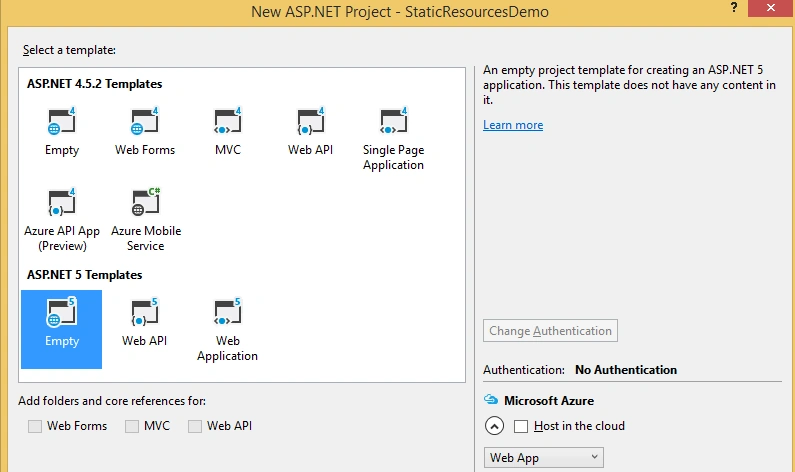
Step 2: Introduce Static File,
Open Visual Studio 2015, select an empty project template for creating new ASP.NET application as in the following:
Step 2: Introduce Static File,
Create a HTML file under wwwroot folder. Below is my sample HTML file named SampleHTML:
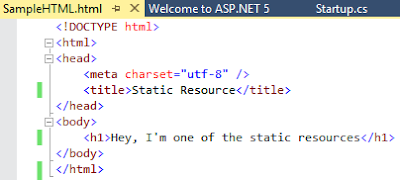
Step 3: Configure Middleware,
Middleware are small components that can be combined as part of an application in order to handle HTTP request response pipeline. So in order to serve static files, Midddleware has to be configured by adding static files to the pipeline. And this can be achieved by using extension method named UseStaticFiles in Startup class. But before that, add the required dependency in project.json file highlighted below:

Next is to update Configure method in Startup class as:

Step 4: Build and run
Build your code. Now type address as http://<your app name>/SampleHTML.html, your page will be rendered as:

Hope you enjoyed playing with static files. The benefit of using static files in such a way is that you need not to put extra effort to save your sensitive static file because if your file is not available at wwwroot, it won’t be rendered to client. Enjoy learning!


NithikaPosted Feb 5, 2016, 5:23 PM EST
Nice one
Shubham KumarPosted Jan 31, 2016, 9:03 PM EST
nice one
Sibeesh VenuTOP 100Posted Jan 31, 2016, 8:13 PM EST
Nice Share
Ankit BansalPosted Jan 31, 2016, 7:40 PM EST
nice one..
Shweta LodhaTOP 100Posted Jan 30, 2016, 3:07 PM EST
thanks
Manoj KallaPosted Jan 30, 2016, 6:30 AM EST
Good one
Jaco ZwartsPosted Jan 30, 2016, 5:59 AM EST
Nice Article
Irfan AcPosted Jan 30, 2016, 2:09 AM EST
Nice
Debasis SahaTOP 100Posted Jan 30, 2016, 12:02 AM EST
Good One..
Muhammad Aqib ShehzadPosted Jan 29, 2016, 9:18 PM EST
nice share
Santhakumar MunuswamyPosted Jan 29, 2016, 9:15 PM EST
Thanks for nice share