
Introduction
Today, in this article let's play around with one of the interesting and most useful concepts in SharePoint 2010.
Question: What is a contact list?
In simple terms "A SharePoint contacts list can help a team maintain contact information for people they may need to reach. This could include other clients, or vendors, etc. The contacts list, as shown below, contains a single view called All Contacts, which by default displays the last name, first name, company, business phone, home phone, and email address of each contact".
I think we are now good to go and implement this wonderful concept.
Step 1: Create a custom list and modify the view
Step 2: Open SharePoint 2010 Central Administration and navigate to a specific site.
Step 3: Open up Visual Studio 2010 and create an "Empty SharePoint project":
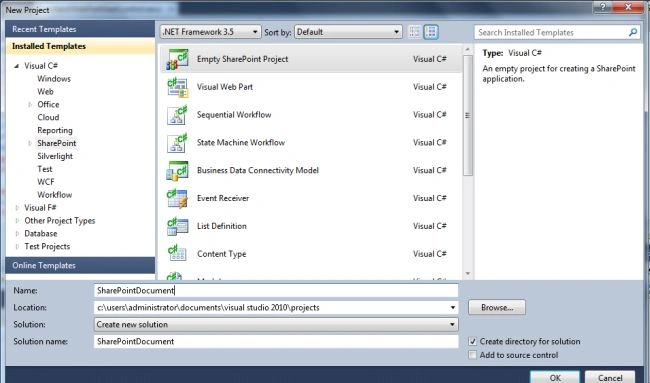
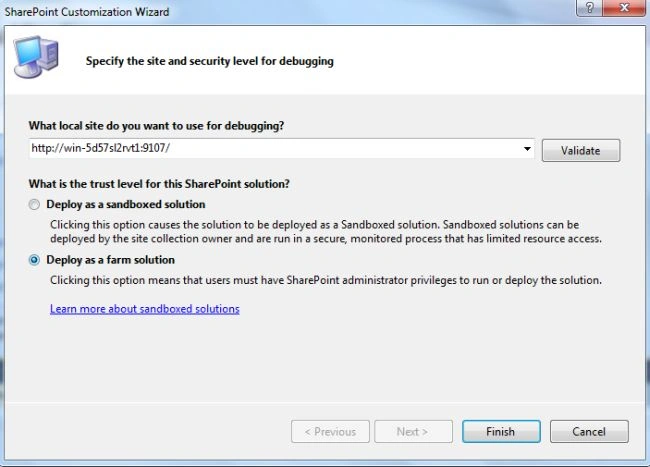
Step 4: Select "Deploy as a farm solution" and click on the "Finish" button. Now an empty project will be created.
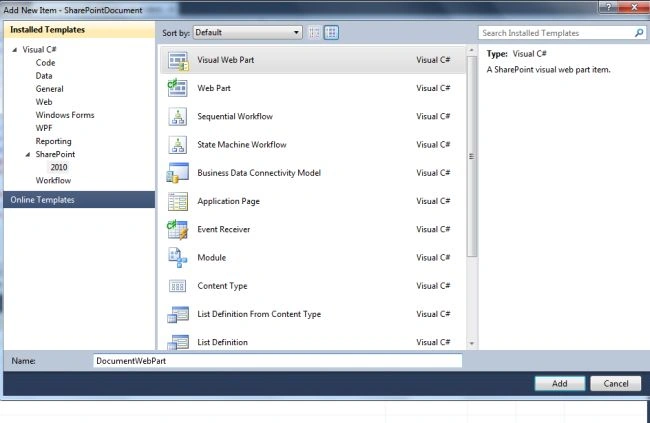
Step 5: Add a new visual webpart for that project.
Step 6: The complete code of visualwebpart1usercontrol.ascx looks like this:
<%@ Assembly Name="$SharePoint.Project.AssemblyFullName$" %>
<%@ Assembly Name="Microsoft.Web.CommandUI, Version=14.0.0.0, Culture=neutral, PublicKeyToken=71e9bce111e9429c" %>
<%@ Register TagPrefix="SharePoint" Namespace="Microsoft.SharePoint.WebControls"
Assembly="Microsoft.SharePoint, Version=14.0.0.0, Culture=neutral, PublicKeyToken=71e9bce111e9429c" %>
<%@ Register TagPrefix="Utilities" Namespace="Microsoft.SharePoint.Utilities" Assembly="Microsoft.SharePoint, Version=14.0.0.0, Culture=neutral, PublicKeyToken=71e9bce111e9429c" %>
<%@ Register TagPrefix="asp" Namespace="System.Web.UI" Assembly="System.Web.Extensions, Version=3.5.0.0, Culture=neutral, PublicKeyToken=31bf3856ad364e35" %>
<%@ Import Namespace="Microsoft.SharePoint" %>
<%@ Register TagPrefix="WebPartPages" Namespace="Microsoft.SharePoint.WebPartPages"
Assembly="Microsoft.SharePoint, Version=14.0.0.0, Culture=neutral, PublicKeyToken=71e9bce111e9429c" %>
<%@ Control Language="C#" AutoEventWireup="true" CodeBehind="ContactWebPartUserControl.ascx.cs"
Inherits="SharePointContact.ContactWebPart.ContactWebPartUserControl" %>
<div style="text-align: center;">
<table style="font-family: Verdana">
<tr>
<td colspan="2">
<asp:label id="Label1" runat="server" text="Contact List Creation - SharePoint 2010 via Visual Studio"
font-bold="true" forecolor="Maroon" font-size="Large"></asp:label>
</td>
</tr>
<tr>
<td>
<asp:label id="Label2" runat="server" text="Please Enter Contact List Name:"></asp:label>
</td>
<td>
<asp:textbox id="TextBox1" runat="server"></asp:textbox>
</td>
</tr>
<tr>
<td>
<asp:label id="Label3" runat="server" text="Please Enter Description:"></asp:label>
</td>
<td>
<asp:textbox id="TextBox2" runat="server"></asp:textbox>
</td>
</tr>
<tr>
<td colspan="2">
<asp:button id="Button1" runat="server" text="Create" forecolor="Orange" font-bold="true"
backcolor="Black" onclick="Button1_Click" width="116px" />
</td>
</tr>
<tr>
<td colspan="2">
<asp:label id="Label4" runat="server" font-bold="true"></asp:label>
</td>
</tr>
</table>
</div>
Step 7: The complete code of visualwebpart1usercontrol.ascx.cs looks like this:
using System;
using System.Web.UI;
using System.Web.UI.WebControls;
using System.Web.UI.WebControls.WebParts;
using Microsoft.SharePoint;
namespace SharePointContact.ContactWebPart
{
publicpartial classContactWebPartUserControl :UserControl
{
protected void Page_Load(object sender, EventArgs e)
{
TextBox1.Focus();
}
protected void Button1_Click(object sender, EventArgs e)
{
if (string.IsNullOrEmpty(TextBox1.Text) ||string.IsNullOrEmpty(TextBox2.Text))
{
Label4.Text ="Please Enter Name and Description to Create";
Label4.ForeColor = System.Drawing.Color.Red;
}
else
{
SPSite site = SPContext.Current.Site;
SPWeb web = site.OpenWeb()as SPWeb;
web.AllowUnsafeUpdates =true;
Guid id = web.Lists.Add(TextBox1.Text, TextBox2.Text, SPListTemplateType.Contacts);
SPList listdoc = web.Lists[id];
listdoc.OnQuickLaunch =true;
listdoc.Update();
web.AllowUnsafeUpdates =false; web.Dispose();
web.Dispose();
Label4.ForeColor = System.Drawing.Color.Green;
Label4.Text = TextBox1.Text + " Contact List is created successfully";
TextBox1.Text =string.Empty;
TextBox2.Text =string.Empty;
}
}
}
}
Step 8: Deploy the solution file and add the created webpart to a SharePoint site.
Step 9: The output of the application looks like this:
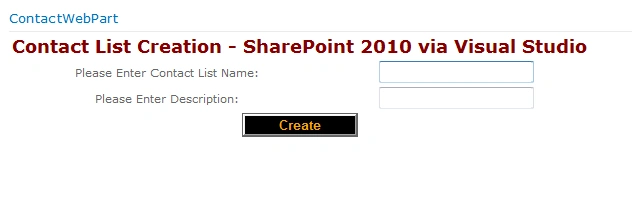
Step 10: Contact list entering output of the application looks like this:
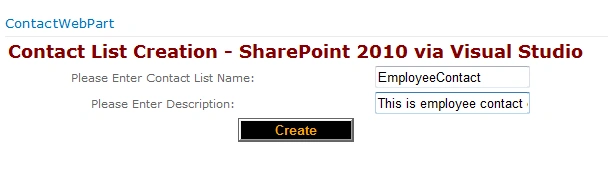
Step 11: Contact list adding output of the application looks like this:
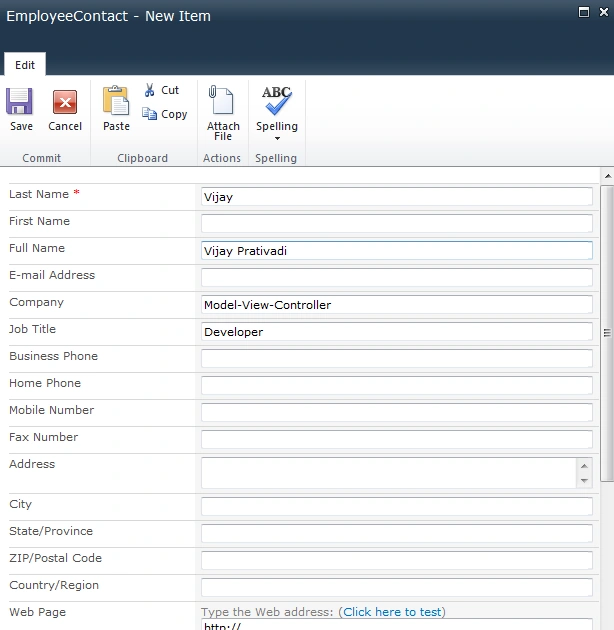
Step 12: Contact list added output of the application looks like this:

I hope this article is useful for you.

Join the conversation! Your thoughts help the community grow.