
Introduction
Handling JSON with C# is difficult some times. Most software developers work with Web APIs to exchange the data. JSON (JavaScript Object Notation) is one of the best way to exchange data over the HTTP protocol. JSON is simply a string, which contains the data or some important information about the receiving data. It’s a lightweight technology to pass the desired data. We simply request in the URL and API (other Sources) to pass the data in the form of JSON. Hence, in this article, I am showing how to map JSON with C# classes to access the data in the form of class and fields.
Example
I am working with a weather app. Therefore, I am taking this example; i.e., the website www.openweathermap.org/current, which provides the API, and gives the complete information about the weather.
- Go to Web and sign up
- Go to pricing and select the free package
- Generate the API key.
- We have a series of links of how to pass the information to API in the form of latitude or longitude of either zip or of either country
- Once the request is passed to the API, the weather information is passed in the form of JSON.
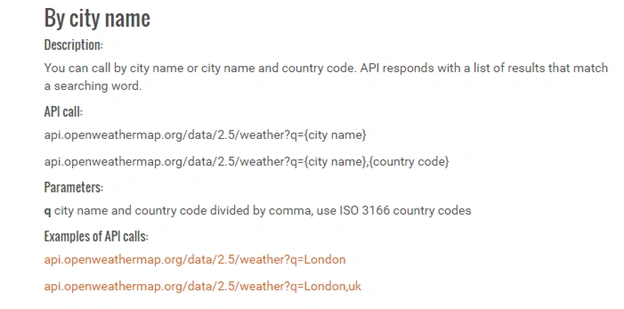
- I want to access the weather information of Pakistan, so the call is http://api.openweathermap.org/data/2.5/weather?q=Pakistan&appid={API Key}
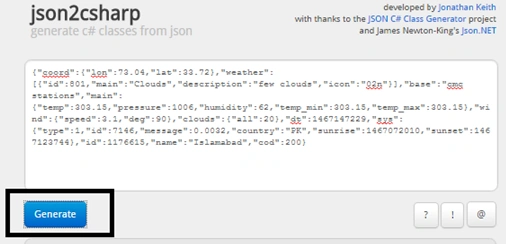
- Hence, it returns the data in the form of JSON, which is shown below:

- Our aim is to convert that JSON into the C# classes and fields
- Type www.Json2csharp.com,
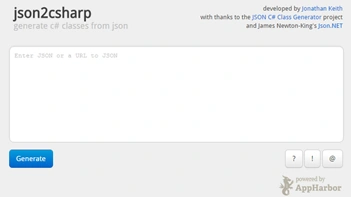
- Paste that JSON into the box and click Generate that web site followed by converting that JSON into C# classes and fields.
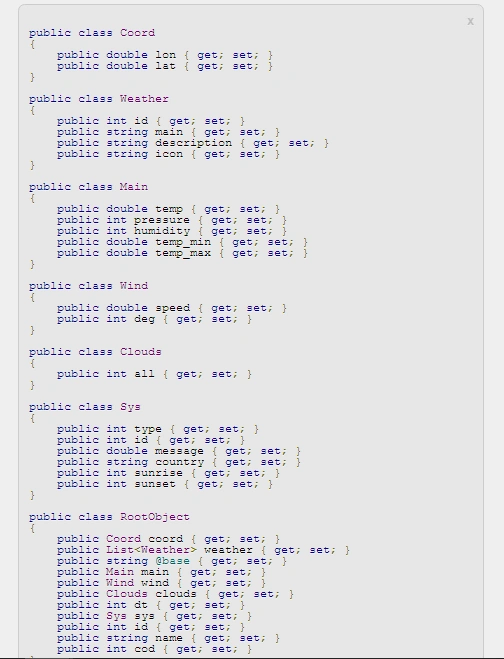
- When we click, the classes generate, which will look as follows:

- Click copy and then open the Visual Studio, and make the console project that you can use in every project like Windows form, WPF, UWP etc.
- Here, we verify it, using the console Application.
- As we see, Json2chsrp makes individual classes and the one class called Root Object contains the references of the sub classes
- RootObject class is most important, when we want to use data receiving in the form of JSON.
DataContract and DataMember Attribute
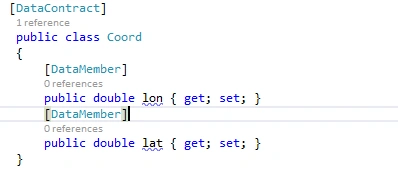
- Next step is to decorate each class with the DataContract attribute and each field of every class with the DataMemeber Attribute just like it is done in every class, as shown below:
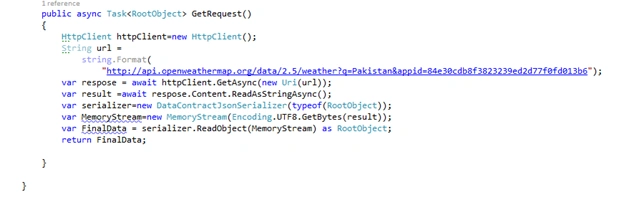
- Afterwards, we make a function, which requests the API to async and accept the request, as shown below:
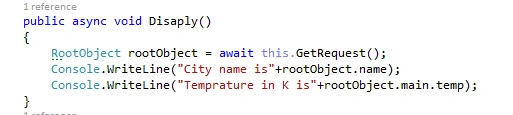
- Make a method which calls the GetRequest() Method, as shown below:
- Finally, the complete code will be:
- using System;
- using System.Collections.Generic;
- using System.IO;
- using System.Net.Http;
- using System.Runtime.Serialization;
- using System.Runtime.Serialization.Json;
- using System.Text;
- using System.Threading.Tasks;
- namespace ConsoleApplication1
- {
- class Program
- {
- static void Main(string[] args)
- {
- Program program = new Program();
- program.Disaply();
- Console.ReadKey();
- }
- public async void Disaply()
- {
- RootObject rootObject = await this.GetRequest();
- Console.WriteLine("City name is" + rootObject.name);
- Console.WriteLine("Temprature in K is" + rootObject.main.temp);
- }
- public async Task < RootObject > GetRequest()
- {
- HttpClient httpClient = new HttpClient();
- String url =
- string.Format(
- "http://api.openweathermap.org/data/2.5/weather?q=Pakistan&appid=84e30cdb8f3823239ed2d77f0fd013b6");
- var respose = await httpClient.GetAsync(new Uri(url));
- var result = await respose.Content.ReadAsStringAsync();
- var serializer = new DataContractJsonSerializer(typeof(RootObject));
- var MemoryStream = new MemoryStream(Encoding.UTF8.GetBytes(result));
- var FinalData = serializer.ReadObject(MemoryStream) as RootObject;
- return FinalData;
- }
- }
- [DataContract]
- public class Coord
- {
- [DataMember]
- public double lon
- {
- get;
- set;
- }
- [DataMember]
- public double lat
- {
- get;
- set;
- }
- }
- [DataContract]
- public class Weather
- {
- [DataMember]
- public int id
- {
- get;
- set;
- }
- [DataMember]
- public string main
- {
- get;
- set;
- }
- [DataMember]
- public string description
- {
- get;
- set;
- }
- [DataMember]
- public string icon
- {
- get;
- set;
- }
- }
- [DataContract]
- public class Main
- {
- [DataMember]
- public double temp
- {
- get;
- set;
- }
- [DataMember]
- public int pressure
- {
- get;
- set;
- }
- [DataMember]
- public int humidity
- {
- get;
- set;
- }
- [DataMember]
- public double temp_min
- {
- get;
- set;
- }
- [DataMember]
- public double temp_max
- {
- get;
- set;
- }
- }
- [DataContract]
- public class Wind
- {
- [DataMember]
- public double speed
- {
- get;
- set;
- }
- [DataMember]
- public int deg
- {
- get;
- set;
- }
- }
- [DataContract]
- public class Clouds
- {
- [DataMember]
- public int all
- {
- get;
- set;
- }
- }
- [DataContract]
- public class Sys
- {
- [DataMember]
- public int type
- {
- get;
- set;
- }
- [DataMember]
- public int id
- {
- get;
- set;
- }
- [DataMember]
- public double message
- {
- get;
- set;
- }
- [DataMember]
- public string country
- {
- get;
- set;
- }
- [DataMember]
- public int sunrise
- {
- get;
- set;
- }
- [DataMember]
- public int sunset
- {
- get;
- set;
- }
- }
- [DataContract]
- public class RootObject
- {
- [DataMember]
- public Coord coord
- {
- get;
- set;
- }
- [DataMember]
- public List < Weather > weather
- {
- get;
- set;
- }
- [DataMember]
- public string @base
- {
- get;
- set;
- }
- [DataMember]
- public Main main
- {
- get;
- set;
- }
- [DataMember]
- public Wind wind
- {
- get;
- set;
- }
- [DataMember]
- public Clouds clouds
- {
- get;
- set;
- }
- [DataMember]
- public int dt
- {
- get;
- set;
- }
- [DataMember]
- public Sys sys
- {
- get;
- set;
- }
- [DataMember]
- public int id
- {
- get;
- set;
- }
- [DataMember]
- public string name
- {
- get;
- set;
- }
- [DataMember]
- public int cod
- {
- get;
- set;
- }
- }
- }
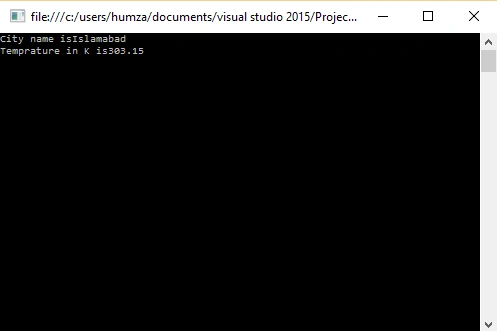
- Verify the output, as shown below:
Conclusion
There is a simple mechanism, which is used to develop the strongly typed classes and fields with JSON; using this method, it becomes easy to parse and use JSON across the whole project.


Shobana JPosted Jul 1, 2016, 3:41 AM EDT
Nice one
Vignesh ManiTOP 100Posted Jun 30, 2016, 1:43 PM EDT
Nice
Michael GriffithsPosted Jun 30, 2016, 6:02 AM EDT
Nice dude :)
Debasis SahaTOP 100Posted Jun 30, 2016, 3:22 AM EDT
Nice one..
W (WizX20)Posted Jun 30, 2016, 12:08 AM EDT
Check http://blog.codeinside.eu/2014/09/08/Visual-Studio-2013-Paste-Special-JSON-And-Xml/
kalu singh raoPosted Jun 29, 2016, 9:30 PM EDT
Nice...
RajaPosted Jun 29, 2016, 9:12 PM EDT
Good One...