
As you all know AngularJS is a JavaScript framework for developing applications. So basically AngularJS expects the response in the form of JSON. Hence it is recommended to return the data in JSON format before you start to work on the data. Here in this post we will load a local XML file using AngularJS $http service, and we will convert the same XML file to JSON. If you are new to AngularJS, please read here: Angular JS. I hope you will like this article.
Background
I have already posted an article related to $http service in Angular JS, you can see here.
Source Code
Please download the source code here: XML to JSON Source Code
Using the code
Create an html page first,
- <!DOCTYPE html>
- <html>
- <head>
- <title>Convert XML to JSON In Angular JS - SibeeshPassion </title>
- </head>
- <body>
- </body>
- </html>
- <script src="jquery-2.1.3.min.js"></script>
- <script src="angular.min.js"></script>
- <script src="xml2json.js"></script>
Now create a controller and app directive as follows::
- <div ng-app="httpApp" ng-controller="httpController">
- </div>
- <script>
- var app = angular.module('httpApp', []);
- app.controller('httpController', function($scope, $http)
- {
- $http.get("Sitemap.xml",
- {
- transformResponse: function(cnv)
- {
- var x2js = new X2JS();
- var aftCnv = x2js.xml_str2json(cnv);
- return aftCnv;
- }
- }).success(function(response)
- {
- console.log(response);
- });
- });
- </script>
Transforming Request and Response
In AngularJS, requests can be transformed using a function called transformRequest and if it is a response we can transform by function transformResponse. These functions returns the transformed values.
Here in our example we are using the transformResponse function as follows:
- transformResponse: function(cnv)
- {
- var x2js = new X2JS();
- var aftCnv = x2js.xml_str2json(cnv);
- return aftCnv;
- }
Output
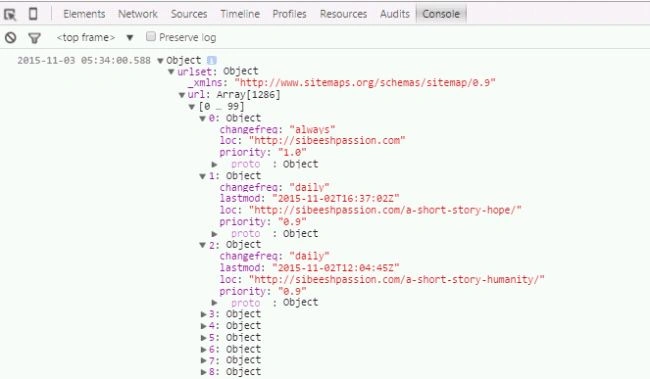
That’s all we have done everything.
Conclusion
Did I miss anything that you may think which is needed? Could you find this post as useful? I hope you liked this article. Please share me your valuable suggestions and feedback.
Your turn. What do you think?
If you have any questions, then please mention in the comments section.


Naveen BishtPosted Jul 6, 2016, 11:39 PM EDT
If i am using some complex JSON, in that case is it useful, i think it would impact the performance....kindly suggest.
Sibeesh VenuTOP 100Posted Jul 6, 2016, 3:42 AM EDT
Debasis Saha Thanks
Debasis SahaTOP 100Posted Jul 6, 2016, 3:15 AM EDT
Good One..
Sibeesh VenuTOP 100Posted Jul 6, 2016, 2:29 AM EDT
kalu singh rao Thanks
Sibeesh VenuTOP 100Posted Jul 6, 2016, 2:29 AM EDT
Sr Karthiga Thanks
Sibeesh VenuTOP 100Posted Jul 6, 2016, 2:29 AM EDT
Mohamed Gani Mn Thanks
kalu singh raoPosted Jul 6, 2016, 2:21 AM EDT
Nice...
Sr KarthigaPosted Feb 23, 2016, 2:52 PM EST
Nice explanation
Sr KarthigaPosted Feb 11, 2016, 4:51 AM EST
Good one
Mohamed Gani MnPosted Nov 14, 2015, 12:50 AM EST
good formation
Sibeesh VenuTOP 100Posted Nov 7, 2015, 6:15 PM EST
Srinivasan K K Thanks a lot
Srinivasan K KPosted Nov 7, 2015, 4:25 AM EST
Sibeesh Venu Great and very useful article you presented:)
Sibeesh VenuTOP 100Posted Nov 7, 2015, 4:09 AM EST
Manoj Kulkarni Thank you so much
Manoj KulkarniPosted Nov 7, 2015, 2:40 AM EST
Nice article. Thank you for sharing Sibeesh.
Sibeesh VenuTOP 100Posted Nov 5, 2015, 7:05 PM EST
Rajeesh Menoth Thanks buddy
Rajeesh MenothPosted Nov 5, 2015, 6:57 PM EST
Good One
Sibeesh VenuTOP 100Posted Nov 5, 2015, 6:56 PM EST
Rupali Shinde Thank you
Sibeesh VenuTOP 100Posted Nov 5, 2015, 6:56 PM EST
Harshad Pansuriya Thank you
Rupali ShindePosted Nov 5, 2015, 6:38 PM EST
good article
Harshad PansuriyaPosted Nov 5, 2015, 6:33 PM EST
Nice one Sibeesh
Sibeesh VenuTOP 100Posted Nov 5, 2015, 1:57 AM EST
Humayun Kabir Mamun Thank you
Humayun Kabir MamunPosted Nov 5, 2015, 1:54 AM EST
Nice...